AliSQL supports DDL throttling, which allows you to set upper limits on BPS and IOPS for DDL operations. This control over I/O resource consumption helps ensure the stability of your online services.
Overview
Background: MySQL Community Edition does not throttle DDL operations, which can cause high I/O consumption. This issue is more pronounced in MySQL 8.0, where parallel DDL can further increase I/O usage and potentially impact your online services.
Introduction: AliSQL implements DDL throttling by extending the DDL execution logic of MySQL Community Edition. This feature lets you set BPS and IOPS limits for individual DDL operations. Limiting I/O resource consumption this way prevents I/O spikes and helps maintain the stability of your online services.
Prerequisites
To use DDL throttling, your instance must meet one of the following version requirements:
MySQL 8.4
MySQL 8.0 with a minor engine version of 20251031 or later
If your instance does not meet these requirements, you can upgrade the minor engine version or the major engine version.
Parameters
Parameter details
You can use the loose_innodb_ddl_io_limit_enabled parameter to enable or disable the DDL throttling feature. After the feature is enabled, you can use the innodb_ddl_bps_limit parameter to set the BPS limit and the innodb_ddl_iops_limit parameter to set the IOPS limit.
|
Parameter |
Description |
|
|
|
|
|
|
|
|
|
Modify parameters
Go to the Instances page. In the top navigation bar, select the region in which the RDS instance resides. Then, find the RDS instance and click the ID of the instance.
-
In the left-side navigation pane, click Parameter Settings.
-
On the Editable Parameters tab, find the target parameter and set its value.
-
Click OK and then Submit Parameters. In the dialog box that appears, specify when the changes take effect.
Procedure
-
Enable the DDL throttling feature
Follow the instructions in the "Modify parameters" section to set the
loose_innodb_ddl_io_limit_enabledparameter toONin the RDS console and submit the change. -
Set BPS and IOPS limits
After enabling DDL throttling, set the BPS and IOPS limits within a session before executing a DDL statement. You can apply a limit to BPS, IOPS, or both.
# Limit the BPS for DDL operations to 100 MB.
SET SESSION innodb_ddl_bps_limit = 100 * 1024 * 1024;

# Limit the IOPS for DDL operations to 5,000.
SET SESSION innodb_ddl_iops_limit = 5000;
Example
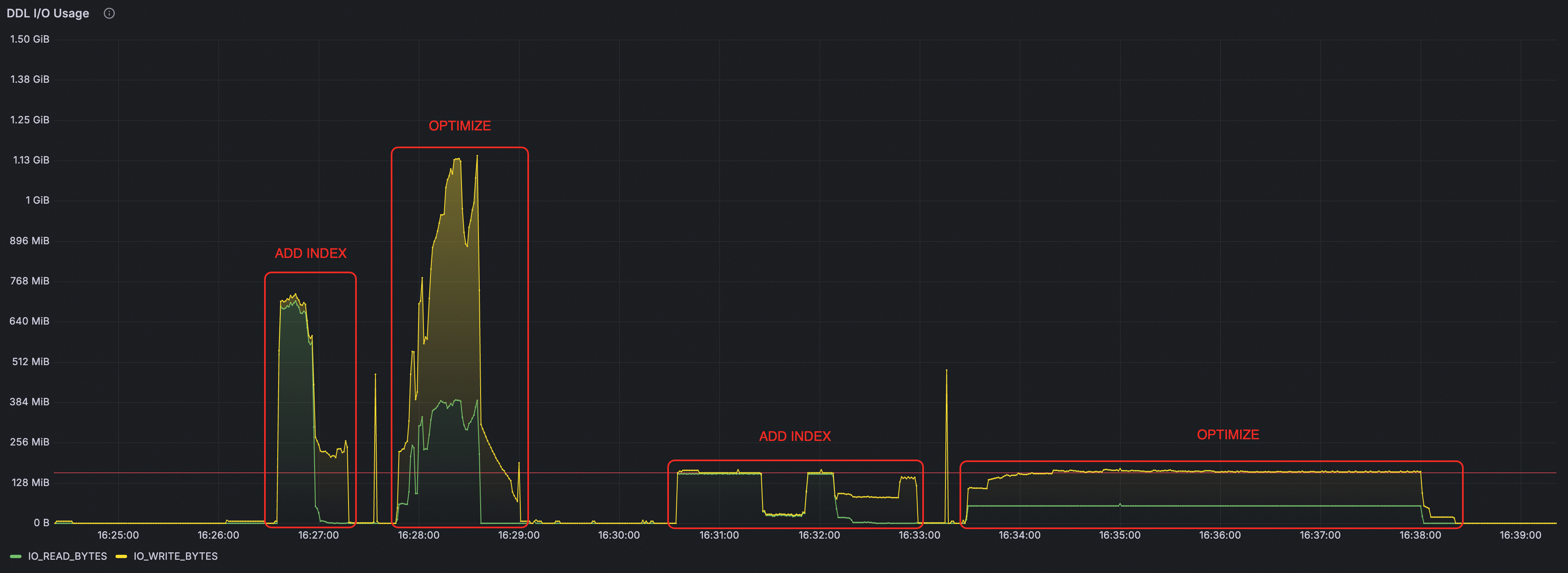
This example compares the I/O consumption of an instance when a DDL statement is run directly versus when it is run with throttling enabled.
# 1. Run the DDL statement directly.
ALTER TABLE t1 ADD INDEX idx_1(c1);
ALTER TABLE t1 DROP INDEX idx_1;
OPTIMIZE TABLE t1;


# 2. Set the BPS limit to 160 MB.
SET SESSION innodb_ddl_bps_limit = 160 * 1024 * 1024;
ALTER TABLE t1 ADD INDEX idx_1(c1);
ALTER TABLE t1 DROP INDEX idx_1;
OPTIMIZE TABLE t1;