This guide walks you through the five steps required to provision and connect to an ApsaraDB RDS for MariaDB instance. By the end, you will have a running instance with a database, an account, and a verified client connection.
Before you begin, review the limits of ApsaraDB RDS for MariaDB to confirm the service meets your requirements.
Setup steps
The following diagram shows the five-step provisioning sequence:
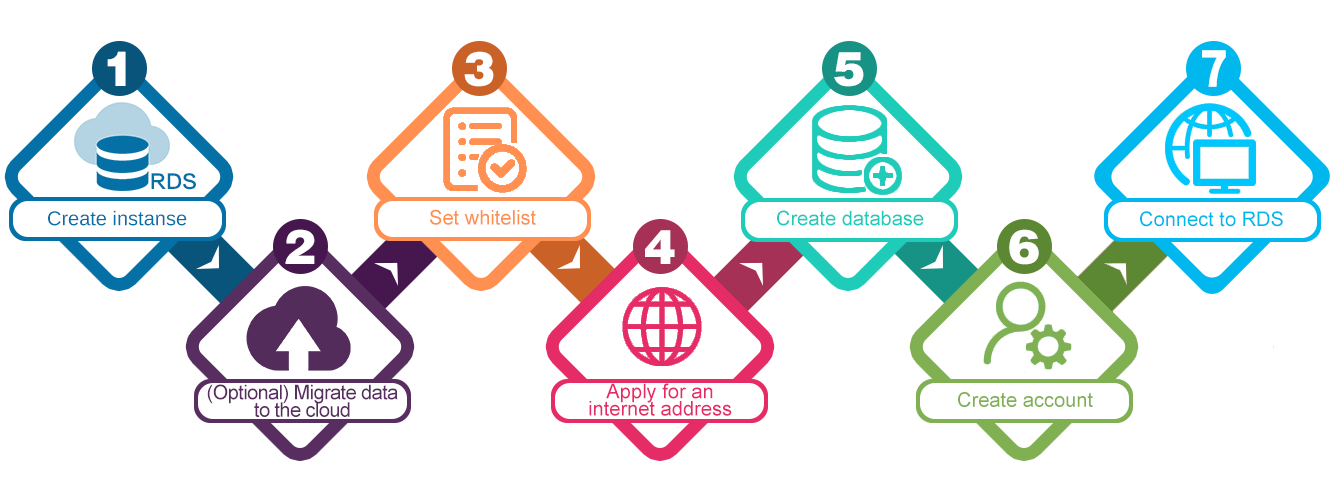
| Step | Task | What you get |
|---|---|---|
| 1 | Create an instance | A running RDS instance |
| 2 | Configure the IP address whitelist | Controlled network access to the instance |
| 3 | Apply for or release a public endpoint (optional) | Access from outside Alibaba Cloud's internal network |
| 4 | Create a database and account | Credentials for your application or client tool |
| 5 | Connect to the instance | A verified connection ready for use |
Step 1: Create an instance
Create an ApsaraDB RDS for MariaDB instance by selecting a region, instance type, storage, and network configuration.
Step 2: Configure the IP address whitelist
Configure an IP address whitelist to control which IP addresses can connect to the instance.
Step 3: Apply for or release a public endpoint (optional)
If your client is outside Alibaba Cloud's internal network, apply for or release a public endpoint.
Step 4: Create a database and account
Create a database and an account on the instance. The account credentials are what your application or client tool uses to authenticate.
Step 5: Connect to the instance
Connect to the instance using a client tool or your application. If the connection fails, verify that:
-
The IP address whitelist includes your client IP.
-
The endpoint type (internal or public) matches your network environment.