This topic describes how your web application can use the OAuth 2.0 authorization code flow to access Alibaba Cloud APIs on behalf of a user.
Prerequisites
-
Before your web application can access Alibaba Cloud APIs on behalf of a user, you must create an application. Provide key information such as a name, OAuth scopes, and redirect URIs. For more information, see Create an application. After you create the application, you can find its client ID. On the Enterprise Applications page, find the client ID of your application in the application list.
NoteAfter you create an application, it can act on behalf of users within your Alibaba Cloud account. To act on behalf of users from other Alibaba Cloud accounts, you must obtain authorization from those accounts.
-
Create a client secret. For more information, see Create a client secret. The client secret (
client_secret) is displayed only upon creation and cannot be retrieved later. Store it securely.
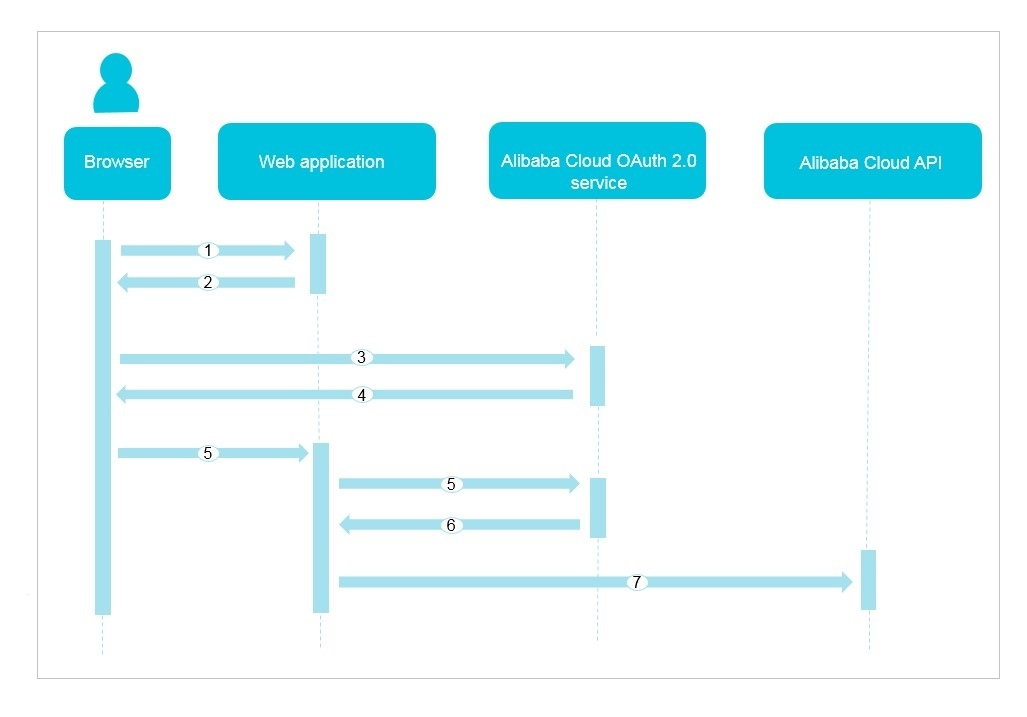
Authorization flow overview
-
A user signs in to the web application in a browser.
-
The web application redirects the user to the Alibaba Cloud OAuth 2.0 authorization endpoint.
NoteIf the user is not signed in to Alibaba Cloud, they are redirected to the Alibaba Cloud sign-in page first.
-
The user signs in and authorizes the application on the consent screen.
-
The Alibaba Cloud OAuth 2.0 service redirects the user back to the web application with an authorization code.
-
The web application exchanges the authorization code for an access token.
-
To obtain an access token, see Get an access token.
-
To refresh an access token, see Refresh an access token.
-
To revoke a refresh token, see Revoke a refresh token.
-
-
The Alibaba Cloud OAuth 2.0 service returns an access token (
access_token) to the web application. -
The web application uses the access token to call Alibaba Cloud APIs on behalf of the user.
NoteBecause the access token represents the user, the application can access the user's resources.
Get an access token
Step 1: Request an authorization code
Authorization endpoint: https://signin.alibabacloud.com/oauth2/v1/auth.
Request parameters:
|
Parameter |
Required |
Description |
|
client_id |
Yes |
The client ID of your application. |
|
redirect_uri |
Yes |
One of the redirect URIs that you specified during application creation. |
|
response_type |
Yes |
The response type. According to the OAuth 2.0 protocol, this value must be |
|
scope |
No |
A space-separated list of OAuth scopes. If this parameter is omitted, the request defaults to all scopes configured for the application. |
|
access_type |
No |
The requested access type. Valid values:
Default value: online. |
|
state |
No |
An application can use the state parameter for multiple purposes, such as preserving state or acting as a nonce to mitigate CSRF risks. If you set the state parameter to any string, the Alibaba Cloud OAuth 2.0 service includes the state parameter and its value in the response. |
|
prompt |
No |
Specifies whether the server must prompt the user for authorization. Including this parameter forces the user to re-authorize the application, even if they have granted authorization previously. If omitted, the user is prompted for authorization only on first use. Valid value: |
Request example:
https://signin.alibabacloud.com/oauth2/v1/auth?
client_id=123****&
redirect_uri=https://example.com/authcallback/&
response_type=code&
scope=openid /acs/ccc&
access_type=offline&
state=123456****
Response parameters:
|
Parameter |
Description |
|
code |
The authorization code. |
|
state |
The value of the state parameter in the request. |
Response example:
GET HTTP/1.1 302 Found
Location: https://example.com/authcallback/?code=ABAFDGDFXYZW888&state=123456****
Step 2: Exchange the code for an access token
Token endpoint: https://oauth.alibabacloud.com/v1/token.
Request parameters:
|
Parameter |
Required |
Description |
|
code |
Yes |
The authorization code. The authorization code that you received in Step 1. |
|
client_id |
Yes |
The client ID of your application. |
|
redirect_uri |
Yes |
The redirect URI. This URI must match the value specified in the Step 1 authorization request. |
|
grant_type |
Yes |
According to the OAuth 2.0 protocol, the value must be authorization_code. |
|
client_secret |
Yes |
The client secret for your application. |
Request example:
POST /v1/token HTTP/1.1
Host: oauth.alibabacloud.com
Content-Type: application/x-www-form-urlencoded
code=ABAFDGDFXYZW888&
client_id=123****&
client_secret=`your_client_secret`&
redirect_uri=https://example.com/authcallback/&
grant_type=authorization_code
Response parameters:
|
Parameter |
Description |
|
access_token |
A token that grants access to Alibaba Cloud APIs on behalf of the user. Your application should not parse this token; pass it as-is in your API calls. An access token represents a user's identity, and applications use this token to access Alibaba Cloud APIs. Applications do not need to understand the meaning of the token and can use it directly. |
|
expires_in |
The lifetime of the access token, in seconds. |
|
token_type |
The type of the access token. The value is always Bearer. |
|
id_token |
The ID token. A JWT (JSON Web Token) that contains user identity information. This token is returned only if the |
|
refresh_token |
The refresh token. This token is returned only if the |
|
scope |
The space-separated list of scopes that have been granted for the access token. If the application requires an authorization scope other than If your application has not been granted the specified scope, you must request authorization again. To do this, request an authorization code as described in Step 1 from |
Response example:
{
  "access_token": "eyJraWQiOiJrMTIzNCIsImVu****",
  "token_type": "Bearer",
  "expires_in": "3600",
  "refresh_token": "Ccx63VVeTn2dxV7ovXXfLtAqLLERA****",
  "id_token": "eyJhbGciOiJIUzI1****",
  "scope": "openid /acs/ccc"
}
Refresh an access token
Token endpoint: https://oauth.alibabacloud.com/v1/token.
Request parameters:
|
Parameter |
Required |
Description |
|
refresh_token |
Yes |
The refresh token that you received in the initial token exchange. |
|
client_id |
Yes |
The client ID of your application. |
|
grant_type |
Yes |
According to the OAuth 2.0 protocol, the value must be refresh_token. |
|
client_secret |
No |
The client secret for your application. |
Request example:
POST /v1/token HTTP/1.1
Host: oauth.alibabacloud.com
Content-Type: application/x-www-form-urlencoded
refresh_token=Ccx63VVeTn2dxV7ovXXfLtAqLLERAH1Bc&
client_id=123****&
client_secret=`your_client_secret`&
grant_type=refresh_token
Response parameters:
|
Parameter |
Description |
|
access_token |
A new access token. |
|
expires_in |
The lifetime of the access token, in seconds. |
|
token_type |
The type of the access token. The value is Bearer. |
Response example:
{
  "access_token": "eyJraWQiOiJrMTIzNCIsImVu****",
  "token_type": "Bearer",
  "expires_in": "3600"
}
Revoke a refresh token
After your web application obtains a refresh token, you should revoke the token when the user signs out or disconnects their account from your application.
Revocation endpoint: https://oauth.alibabacloud.com/v1/revoke.
Request parameters:
|
Parameter |
Required |
Description |
|
token |
Yes |
The refresh token to revoke. |
|
client_id |
Yes |
The client ID of your application. |
|
client_secret |
No |
The client secret for your application. |