Integrate and initialize the QuickTracking A/B testing SDK for Android to run programmatic experiments.
SDK information
|
File name |
Version |
MD5 |
File size |
|
QuickTracking A/B testing SDK |
1.1.0 Changelog: Android SDK Changelog |
118558e221e439f429c05d61200037ed |
61 KB |
1. Prerequisites
The Quick Tracking A/B testing SDK does not collect personal information directly. It relies on behavioral data from the Quick Tracking Analytics SDK. Before you begin, integrate the Quick Tracking Analytics Android SDK v1.6.4 or later and initialize it. For more information, see Import and Configure the SDK.
2. Programmatic experiments
2.1 Integrate and initialize the SDK
Initialize the Quick Tracking Analytics SDK synchronously first, then initialize the QuickTracking A/B testing SDK. During initialization, pass the traffic splitting experiment endpoint. Contact your operations team to obtain this endpoint.
2.1.1 Add the dependency
In your main module's build.gradle file, add the QuickTracking A/B testing SDK dependency:
Online package:
dependencies {
    implementation fileTree(include:['*.jar'], dir:'libs')

    // Quick Tracking Analytics SDK
    implementation 'com.lydaas.qtsdk:qt-px-common:1.8.9.PX'
    // QuickTracking A/B testing SDK
    implementation 'com.lydaas.qtsdk:qt-ab-test:1.1.0'

}
Local package:
dependencies {
    implementation fileTree(include:['*.jar'], dir:'libs')
    // Quick Tracking Analytics SDK
    implementation files('libs/qt-px-common-1.8.9.PX.aar')
    // QuickTracking A/B testing SDK
    implementation files('libs/QTABTest-release.aar')

}
2.1.2 Initialize the SDK
SDK initialization requires an ApplicationContext. Pass the parameters at the appropriate point in your app's lifecycle:
import com.quicktracking.sdk.android.abtest.QTABTest;
import com.quicktracking.sdk.android.abtest.QTABTestConfigOptions;

try {
    // Initialize the QuickTracking A/B testing SDK. This mode relies on data from the Analytics SDK.
   QTABTestConfigOptions config = new QTABTestConfigOptions("YOUR_DATA_COLLECTION_URL/abtest_results?appkey=xxxxx");
   // Initialize the QuickTracking A/B testing SDK for A/B testing only. This mode does not rely on data from the Analytics SDK.
   QTABTestConfigOptions config = new QTABTestConfigOptions("YOUR_DATA_COLLECTION_URL/abtest_results?appkey=xxxxx",10 * 60 * 1000,"your_custom_device_id", new IQTABTestPropertyChanged() {
        @Override
        public void onPropertyChanged(JSONArray abParams) {
            Log.d("ABTest", "onPropertyChanged: " + abParams.toString());
        }
    });

    // The initialization requires a Context.
   QTABTest.startWithConfigOptions(this.getApplicationContext(), config);
} catch (Exception e) {
    e.printStackTrace();
}
Configuration methods:
public QTABTestConfigOptions(String url,int timeInterval)
public QTABTestConfigOptions(String url)
public QTABTestConfigOptions(String url,int timeInterval, String customDeviceId, IQTABTestPropertyChanged iQTABTestPropertyChanged)|
Parameter |
Type |
Default |
Description |
Remarks |
|
url |
String |
undefined |
The experiment endpoint. |
Required. Must be a non-empty string. |
|
timeInterval |
int |
600000 (10 * 60 * 1000) |
Cache update interval in milliseconds. Maximum: 1800000 (30 * 60 * 1000) Minimum: 10000 (10 * 1000) |
Optional. |
|
customDeviceId |
String |
undefined |
A custom device ID. Use this when integrating only the A/B testing SDK, without the Analytics SDK. |
Optional. |
|
iQTABTestPropertyChanged |
IQTABTestPropertyChanged |
undefined |
A callback for A/B testing parameter changes. |
Optional. |
import com.quicktracking.sdk.android.abtest;

/**
 * Defines an interface, IQTABTestPropertyChanged, used to listen for property change events.
 *
 * <p>This interface includes a method {@link #onPropertyChanged(JSONArray)} that is invoked when properties change.
 *
 * @see JSONArray
 */

public interface IQTABTestPropertyChanged {

    /**
     * Callback triggered when properties change.
     *
     * @param abParams A JSON array that contains information about the property changes.
     *                 This parameter is typically used to pass detailed change data or context.
     */
    void onPropertyChanged(JSONArray abParams);
}
2.1.3 Obfuscation configuration
If your app uses code shrinking, add the following ProGuard rules to prevent the QuickTracking and A/B testing SDKs from being obfuscated.
-keep class com.umeng.** {*;}
-keep class org.repackage.** {*;}

-keep class com.quick.qt.** {*;}
-keep class rpk.quick.qt.** {*;}

# for AB
-keep class com.quicktracking.sdk.android.abtest.** {*;}

-keepclassmembers class * {
   public <init> (org.json.JSONObject);
}
-keepclassmembers enum * {
    public static **[] values();
    public static ** valueOf(java.lang.String);
}
2.2 Get experiment variables
After initializing the QuickTracking A/B testing SDK, use the following APIs to retrieve experiment variables. Three fetch strategies are available:
-
fetchABTestFromCache: Reads from the local cache and returns the default value if the variable is not found.
-
fetchABTestFromServer: Fetches the variable directly from the server, ignoring the local cache.
-
fetchABTestFromCacheThenServer: Tries to read from the local cache first. If the variable is not found, it fetches it from the server.
2.2.1 Use cases
|
API |
Scenario |
|
fetchABTestFromCache |
Best for fast lookups. The fetchABTestFromCache API reads variable values from the local cache. The trade-off is that results may not reflect the latest experiment configuration. |
|
fetchABTestFromServer |
Best for time-sliced rotation experiments that require data freshness. The fetchABTestFromServer API fetches variables directly from the server, bypassing the local cache. The trade-off is potential network latency. |
|
fetchABTestFromCacheThenServer |
Recommended. Balances performance and freshness by returning a cached value when available and falling back to the server otherwise. |
2.3 API reference
Return parameters (New in v1.1.0)
API calls return a QTABResult object that contains the experiment data:
import com.quicktracking.sdk.android.abtest.QTABResult
/**
 * The structure for A/B testing results.
 */
public class QTABResult<T> {
    public T value; // The experiment variable's value.
    public String expid = ""; // The experiment ID (expid).
    public String gid = ""; // The group ID (gid).
}
Parameters
|
Parameter |
Type |
Default |
Description |
Remarks |
|
value |
String | Boolean | Integer | JSONObject |
undefined |
The value of the experiment variable. |
The type of the returned value must match the experiment variable's type; otherwise, the SDK considers it an abnormal result. Ensure your business logic correctly handles this value. |
|
expid |
String |
"" |
The experiment ID. |
|
|
gid |
String |
"" |
The group ID. |
fetchABTestFromCache
/**
 * Gets the experiment result from the cache.
 *
 * @param paramName The name of the variable.
 * @param defaultValue The default value to return if the variable is not found.
 * @param <T> The type of the default value.
 * @return A QTABResult object containing the value.
 */

<T> QTABResult<T> fetchABTestFromCache(String paramName, T defaultValue);
Request parameters
|
Parameter |
Type |
Default |
Description |
Remarks |
|
paramName |
String |
undefined |
The name of the experiment variable. |
Required. Must be a non-empty string. |
|
defaultValue |
String | Boolean | Integer | JSONObject |
undefined |
The default value for the experiment variable. |
Required. The type must match the experiment variable's type. For example, if the experiment variable is a number, |
Note: Ensure that your business logic correctly handles the default value used in the A/B testing API calls.
Return result
|
Parameter |
Type |
Default |
Description |
Remarks |
|
QTABResult<T> |
QTABResult |
undefined |
The result of the experiment variable. For details, see Parameter description. |
The returned value's type must match the experiment variable's type. Otherwise, the SDK treats it as an exception. Ensure your business logic handles the result correctly. |
Example
import com.quicktracking.sdk.android.abtest.QTABTest;

// Request a String variable
QTABResult<String> result = QTABTest.shareInstance().fetchABTestFromCache(getTextValue(), "test");

// Request a Boolean variable
QTABResult<Boolean> result = QTABTest.shareInstance().fetchABTestFromCache(getTextValue(), false);

// Request a Number variable
QTABResult<Integer> result = QTABTest.shareInstance().fetchABTestFromCache(getTextValue(), 1);

// Request a JSONObject variable
try{
  QTABResult<JSONObject> result = QTABTest.shareInstance().fetchABTestFromCache(getTextValue(), null);
}catch (Exception e){
}
fetchABTestFromServer
 /**
   * Fetches the experiment result from the server.
   *
   * @param <T>            The type of the default value.
   * @param paramName      The name of the variable.
   * @param timeoutMillSeconds The timeout in milliseconds.
   * @param defaultValue   The default value.
   * @param callback       The callback interface.
   */

void fetchABTestFromServer(String paramName, int timeoutMillSeconds, T defaultValue, OnABTestResultCallBack<T> callback);
Request parameters
|
Parameter |
Type |
Default |
Description |
Remarks |
|
paramName |
String |
undefined |
The name of the experiment variable. |
Required. Must be a non-empty string. |
|
timeoutMillSeconds |
int |
3000 |
The request timeout for the traffic splitting experiment server, in milliseconds. |
Optional. |
|
defaultValue |
String | Boolean | Integer | JSONObject |
undefined |
The default value for the experiment variable. |
Required. The type must match the experiment variable's type. For example, if the experiment variable is a number, |
|
callback |
OnABTestResultCallBack |
None |
The callback function for the experiment result. |
Required. |
Callback description:
import com.quicktracking.sdk.android.abtest.OnABTestResultCallBack;

public interface OnABTestResultCallBack<T> {
    /**
     * Request callback.
     *
     * @param result A QTABResult<T> object containing the result.
     */
    void onResult(QTABResult<T> result);
}
Callback parameters:
|
Parameter |
Type |
Default |
Description |
Remarks |
|
result |
QTABResult<T> |
undefined |
The result of the experiment variable. For details, see Parameter description. |
The returned value's type must match the experiment variable's type. Otherwise, the SDK treats it as an exception. Ensure your business logic handles the result correctly. |
Note: Ensure that your business logic correctly handles the default value used in the A/B testing API calls.
Example
import com.quicktracking.sdk.android.abtest.OnABTestResultCallBack;
import com.quicktracking.sdk.android.abtest.QTABTest;

QTABTest.shareInstance().fetchABTestFromServer("", 10 * 1000, null, new OnABTestResultCallBack<JSONObject>() {
    @Override
    public void onResult(QTABResult<JSONObject> result) {
        refreshLogView(result.toString());
    }
});
fetchABTestFromCacheThenServer
/**
   * This method returns the cached value if available locally.
   * Otherwise, it requests the latest data from the server. You can specify a custom timeout.
   *
   * @param <T>          The type of the default value.
   * @param paramName    The name of the variable.
   * @param timeout      The timeout in milliseconds.
   * @param defaultValue The default value.
   * @param callback     The callback interface.
   */
void fetchABTestFromCacheThenServer(String paramName, int timeout, T defaultValue, OnABTestResultCallBack<T> callback);
Request parameters
|
Parameter |
Type |
Default |
Description |
Remarks |
|
paramName |
String |
undefined |
The name of the experiment variable. |
Required. Must be a non-empty string. |
|
timeout |
int |
3000 |
The request timeout for the traffic splitting experiment server, in milliseconds. |
Optional. |
|
defaultValue |
String | Boolean | Integer | JSONObject |
undefined |
The default value for the experiment variable. |
Required. The type must match the experiment variable's type. For example, if the experiment variable is a number, |
|
callback |
OnABTestResultCallBack |
None |
The callback function for the experiment result. |
Required. |
Callback description:
import com.quicktracking.sdk.android.abtest.OnABTestResultCallBack;

public interface OnABTestResultCallBack<T> {
    /**
     * Request callback.
     *
     * @param result A QTABResult<T> object containing the result.
     */
    void onResult(QTABResult<T> result);
}
Callback parameters:
|
Parameter |
Type |
Default |
Description |
Remarks |
|
result |
QTABResult<T> |
undefined |
The result of the experiment variable. For details, see Parameter description. |
The returned value's type must match the experiment variable's type. Otherwise, the SDK treats it as an exception. Ensure your business logic handles the result correctly. |
Note: Ensure that your business logic correctly handles the default value used in the A/B testing API calls.
Example
import com.quicktracking.sdk.android.abtest.OnABTestResultCallBack;
import com.quicktracking.sdk.android.abtest.QTABTest;

QTABTest.shareInstance().fetchABTestFromCacheThenServer("param_json", 10 * 1000, null, new OnABTestResultCallBack<JSONObject>() {
    @Override
    public void onResult(QTABResult<JSONObject> result) {
    }
});
3. Debugging experiments
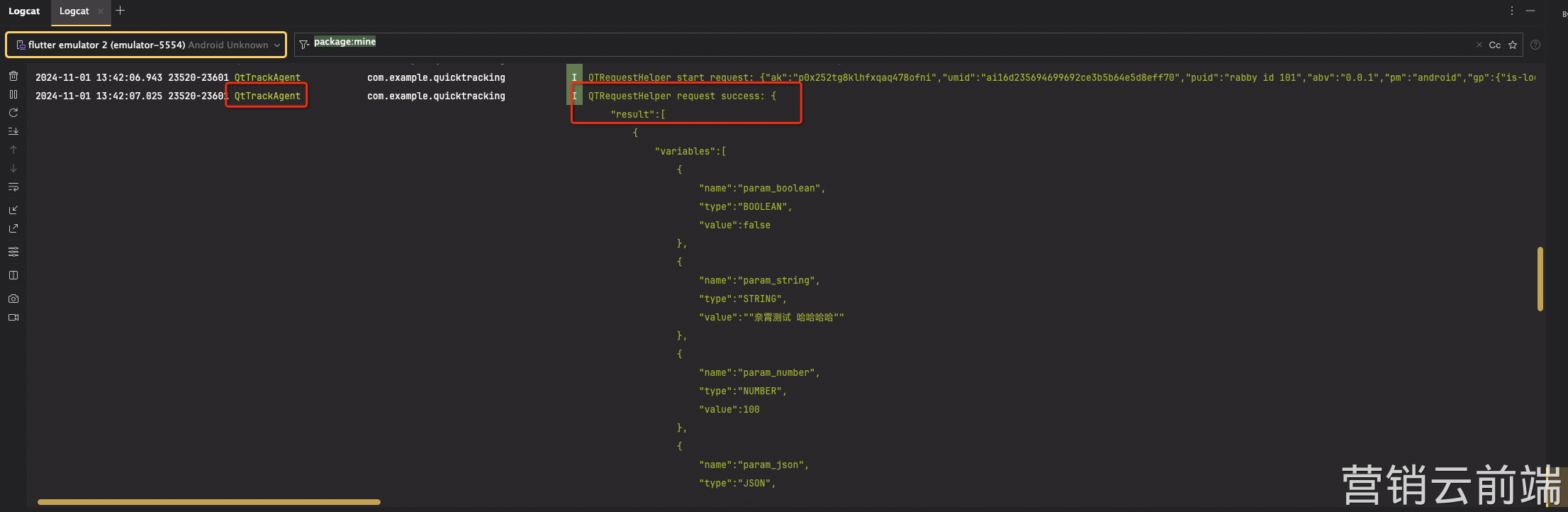
After you start the experiment:

When logging is enabled, the SDK prints the experiment list.