Quick Tracking uses three analysis subjects — device ID, account ID, and entity ID — to identify and track users across platforms.
Overview
Quick Tracking supports three analysis subjects: device ID, account ID, and entity ID.
-
Device ID: An app-level unique ID that QuickTracking generates for each device.
-
Account ID: A user account ID passed in through the SDK to uniquely identify a user.
-
Entity ID: A user identifier generated by Quick Tracking through ID-Mapping, which associates device IDs with account IDs.
Select an analysis subject
-
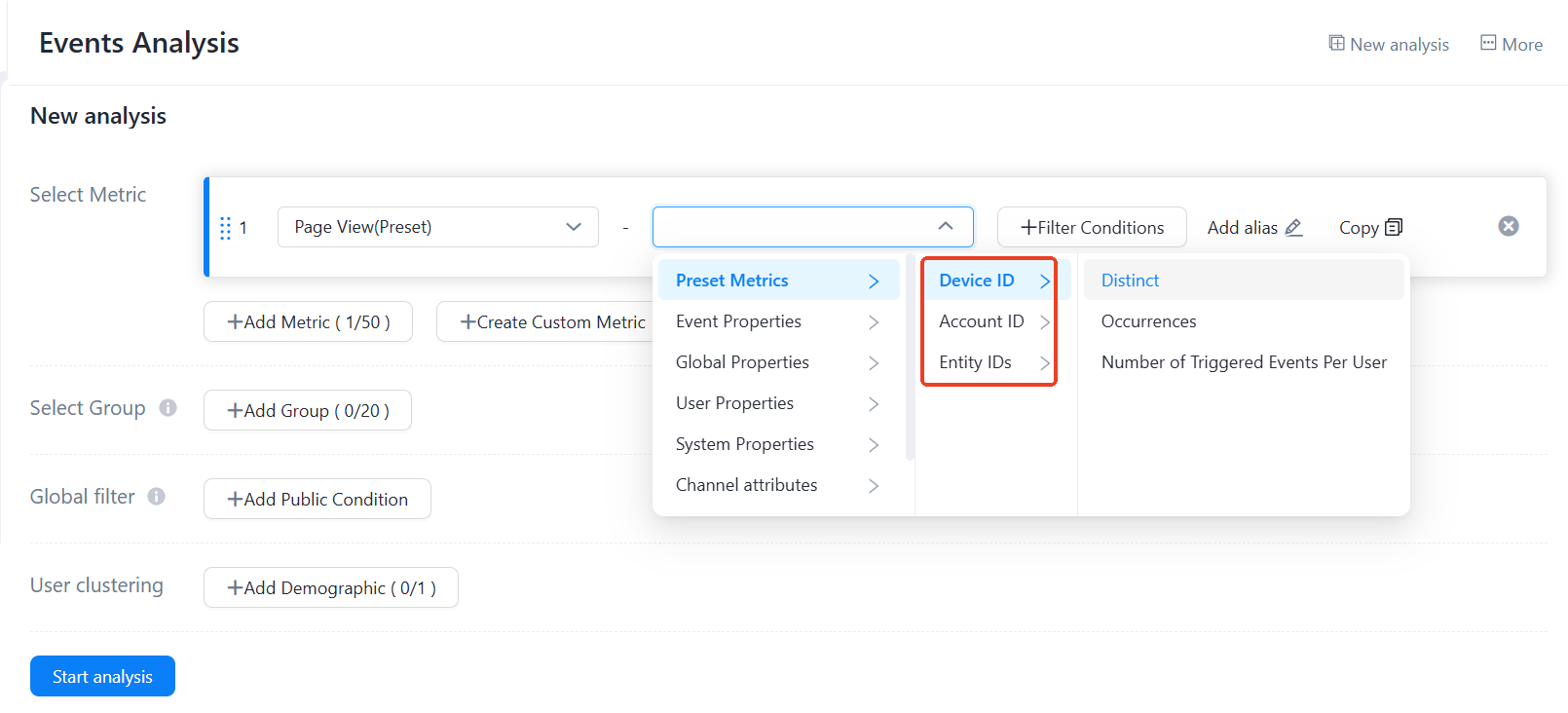
In event analysis, select the analysis subject under "Preset Metrics":
-
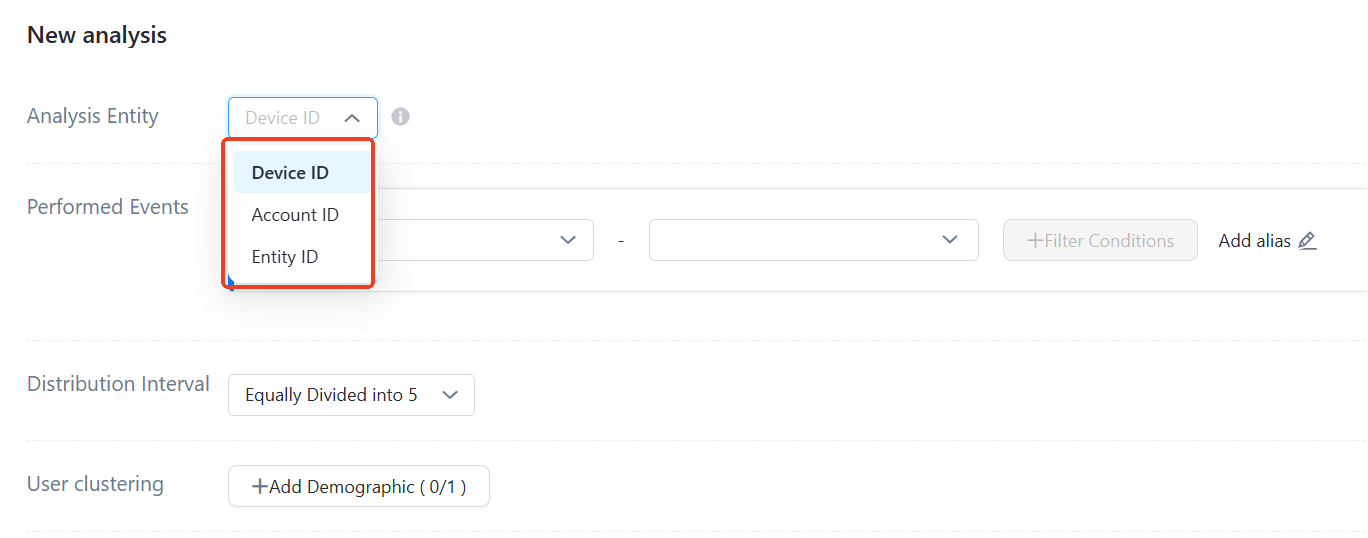
In funnel, retention, distribution, and interval analysis, select the analysis subject under "Analysis Subject":
-
Session, path, and attribution analysis use only the device ID.
-
Audience management uses only the entity ID when creating a crowd.
System attributes vs. user attributes
|
Attribute category |
Analysis subject |
Description |
|
System attributes |
Device ID |
Device ID values in the event table |
|
Account ID |
Account ID values in the event table |
|
|
Entity ID |
Entity ID values in the event table |
|
|
User attributes |
User account (account ID) |
Account ID values in the user table |
FAQ
-
What is an event table?
The event table stores tracking logs, including actual reported values and the entity ID generated from the account ID or device ID. A log contains an account ID only if one was reported.
-
What is a user table?
-
If tracking logs contain an account ID, the account ID and entity ID are stored in the user table.
-
If an event code is $$_ user_profile, its event attributes are stored as user attributes in the user table.
-
-
What is the difference between the account ID in system attributes and the user account in user attributes?
-
The account ID in system attributes is queried from the event table.
-
The user account in user attributes is queried from the user table, associated through the entity ID in the event table.
-
Device ID
App Device ID
Default Android and iOS device IDs are app-level unique IDs automatically generated by QuickTracking:
-
Android 9 and earlier: The SDK tracks imei, wifimac, androidid, and SN to generate device IDs. Generated IDs are stored locally and regenerated only after the app is deleted.
-
Android 10 and later: The SDK tracks oaid, gaid, androidid, and serial number to generate device IDs. Generated IDs are stored locally and regenerated only after the app is deleted.
-
iOS: The SDK tracks openudid to generate a device ID. The generated ID is stored in the keychain and regenerated only after a factory reset.
-
The QT SDK tracks IDFA and OAID only if end users consent. Only the app SDK can track OAID, GAID, IMEI, WiFiMAC, AndroidID, SN, IDFA, and IDFV.
|
iOS: Enable the following configuration to allow the SDK to track IDFA. |
|
|
Android: Enable the following configuration to allow the SDK to track OAID. |
|
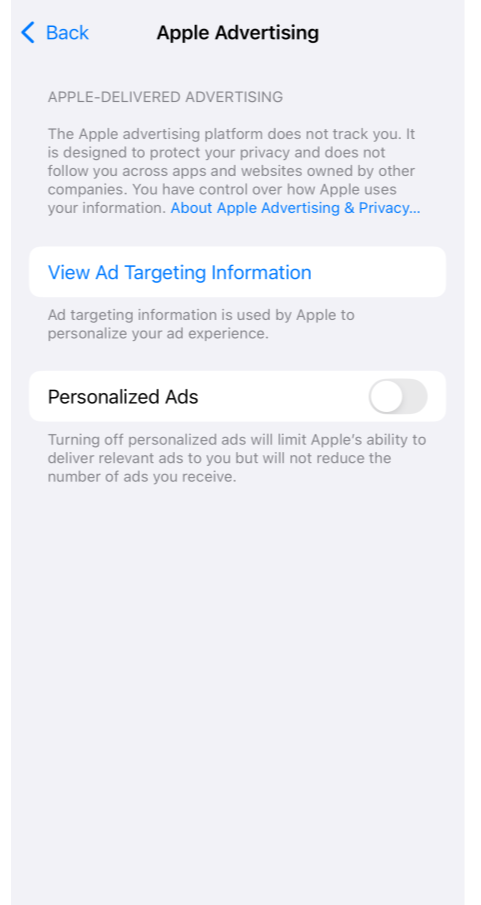
Android SDK Integration Document and iOS SDK Integration Document.
Mini program device ID
Developers obtain and upload the mini program device ID:
-
The device ID is a unique ID generated by the mini program, such as the WeChat OpenID.
-
Assign the value to "_anony_id":
// If the user ID is tracked asynchronously, you must prevent the SDK from being reported and set the BLOCK tracking point.
aplus.aplus_queue.push({
 action: 'aplus.setMetaInfo',
  arguments: ['_hold', 'BLOCK']
});

// Set_anony_id
aplus.aplus_queue.push({
 action: "aplus.setMetaInfo",
  arguments: ["_anony_id", "The openid you obtained"]
});

 // Because the tracking of user IDs is asynchronous, you need to set BLOCK first, and then set START.
 // After_hold=START is set, logs that are previously blocked will be sent one by one with user information.
aplus.aplus_queue.push({
 action: 'aplus.setMetaInfo',
  arguments: ['_hold', 'START']
});
Mini program Integration SDK Document.
Web/H5 Device ID
H5 device IDs can be generated in two ways: automatic generation by QuickTracking or manual upload by developers:
-
Automatic generation: By default, the QuickTracking SDK generates device IDs from browser cookie parameters. If the browser changes or the user clears cookies and cache, the device ID is regenerated. If the browser and IP address remain unchanged, the regenerated device ID stays the same.
-
Manual upload: Assign the value to "_dev_id"
// If the user ID is tracked asynchronously, you must prevent the SDK from being reported and set the BLOCK tracking point.
aplus.aplus_queue.push({
 action: 'aplus.setMetaInfo',
  arguments: ['_hold', 'BLOCK']
});

// Set the_dev_id parameter.
aplus.aplus_queue.push({
 action: "aplus.setMetaInfo",
  arguments: ["_dev_id", "Custom device ID"]
});

 // Because the tracking of user IDs is asynchronous, you need to set BLOCK first, and then set START.
 // After_hold=START is set, logs that are previously blocked will be sent one by one with user information.
aplus.aplus_queue.push({
 action: 'aplus.setMetaInfo',
  arguments: ['_hold', 'START']
});
Web/H5 SDK Integration Document.
Account ID
App Account ID
Apps upload user accounts by calling a fixed API.
-
Android:
// Log on to the API.
public static void onProfileSignIn(String ID);
// Log out of the API.
public static void onProfileSignOff();

// Sample code
MobclickAgent.onProfileSignIn("userID");
MobclickAgent.onProfileSignOff();-
iOS:
// Log on to the API.
+ (void)profileSignInWithPUID:(NSString *)puid;
// Log out of the API.
+ (void)profileSignOff;

// Sample code
[MobClick profileSignInWithPUID:@"UserID"];
[MobClick profileSignOff];
Android SDK Integration Documentation and iOS SDK Integration Documentation.
Mini program account ID
Upload a mini program user account:
Upload the account when the user logs on and enters the logged-in state.
aplus_queue.push({
 action: "aplus.setMetaInfo",
 arguments: ["_user_id", "The ID of the user member you obtained"]
});
Mini program SDK Integration Documentation.
Web/H5 Account ID
Upload a web user account:
Upload the account when the user logs on and enters the logged-in state.
aplus_queue.push({
 action: "aplus.setMetaInfo",
 arguments: ["_user_id", "The ID of the user member you obtained"]
});
Web/H5 SDK Integration Documentation.
Entity ID
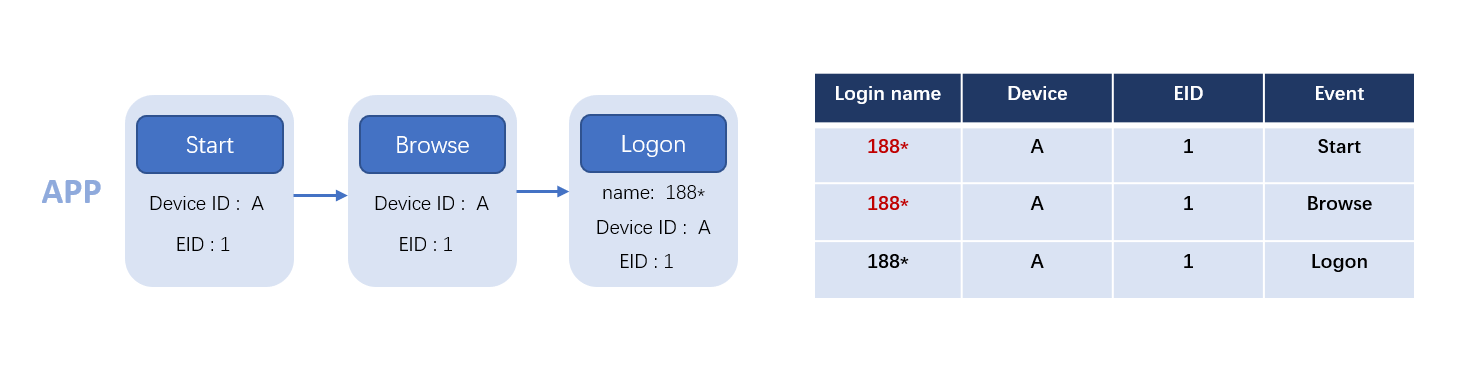
An entity ID (EID) is a unique ID that associates an account ID with a device ID. You can use an EID to associate mini programs, H5 apps, and apps with unique users. The following example illustrates this.
-
When App Device A sends its first log, a unique EID_1 is generated for it. Subsequent events from this device also carry this EID.
-
App Device A triggered a login event and uploaded user account "188*". QT bound Device A, account 188*, and EID_1, so the first log and browsing event can be associated with account 188*.
-
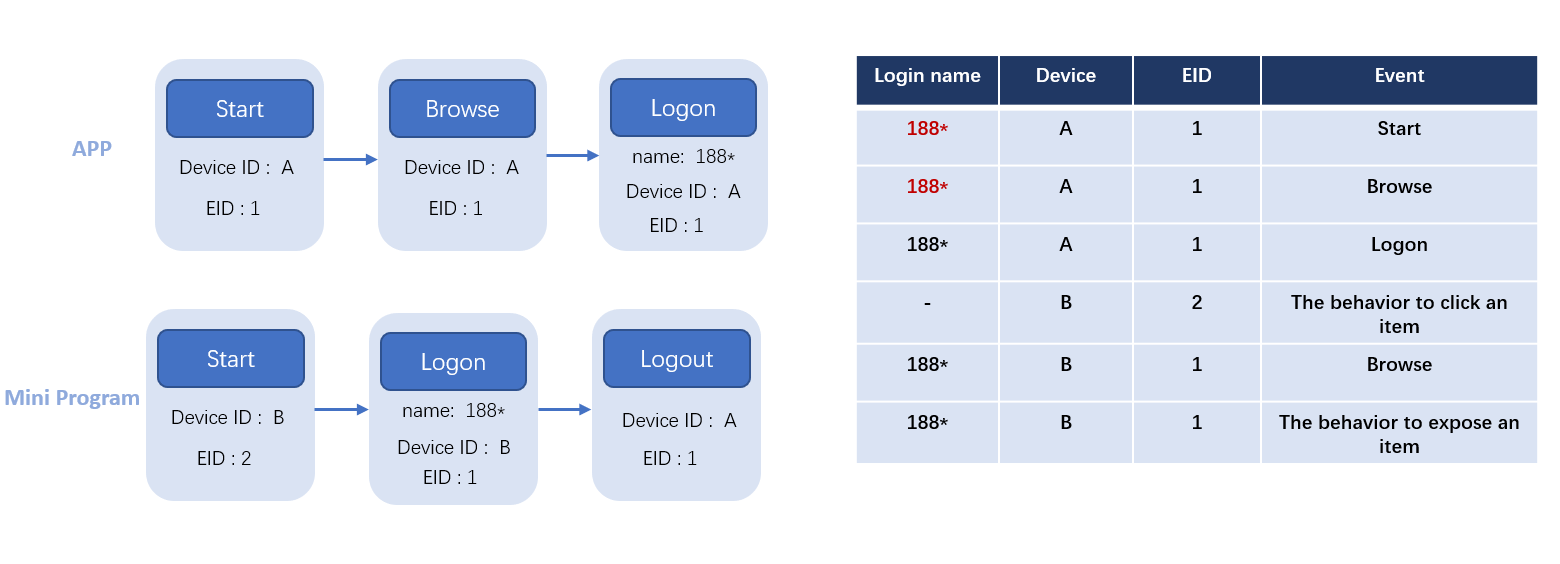
When Mini Program Device B sends its first log, a unique EID_2 is generated. After the user logs in with account "188*", because "188*" is already bound to EID_1, Device B's EID_2 is merged into EID_1. Device B, account 188*, and EID_1 are then bound together.
Field forwarding
|
Code sample fields |
SDK reporting log field |
ods layer field |
dwd field |
|
|
App-Device ID |
N/A |
umid |
utdid |
utdid |
|
Mini program-device ID |
_anony_id |
umid |
utdid |
utdid |
|
web-Device ID |
None or_dev_id |
umid |
utdid |
utdid |
|
App-User Accounts |
puid |
active_user:{puid:""} |
active_user:{puid:""} |
ll_userid |
|
Mini program-user account |
_user_id |
active_user:{puid:""} |
active_user:{puid:""} |
ll_userid |
|
web-user account |
_user_id |
active_user:{puid:""} |
active_user:{puid:""} |
ll_userid |