1. How do I view a tracking solution?
Before embedding points, it is necessary to determine where to bury points and which points to bury, that is, it is necessary to sort out the clear requirements for embedding points. In the QuickTracking platform, the explicit requirements of the tracking point are called the tracking point scheme, and a specification template is designed for the tracking point scheme. as follows:
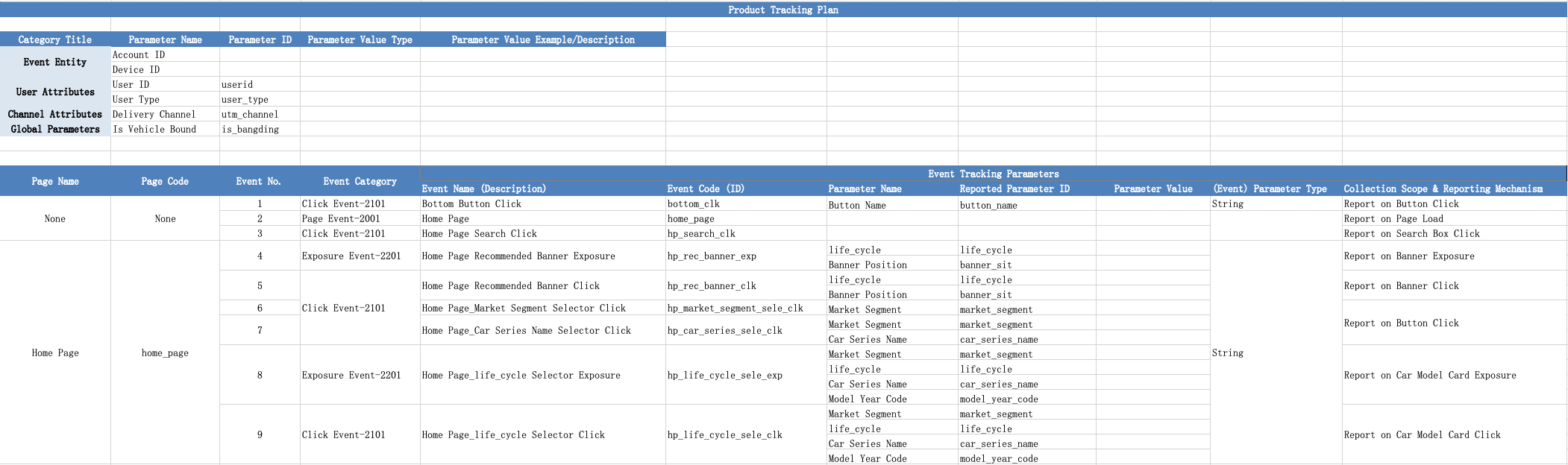
In the burial point scheme, the required burial points are as follows:
1. Event subject: the "who" triggered the event. The event can be divided into device ID and account ID. The event must have one of them.
Device ID: Default device IDs of Android and iOS devices are app-level unique device IDs, which are automatically generated by Quicktracking.
For Android 9 and the following devices: The SDK automatically collects imei, wifimac, androidid, and SN to generate device IDs. After the device IDs are generated, the device IDs are stored locally. The device IDs are generated again only after the application is uninstalled or the application data is deleted.
Devices above the Android level 10 level: The SDK automatically collects the oaid, gaid, androidid, and serial number to generate device IDs. After the device IDs are generated, the device IDs are stored locally. The device IDs are generated again only after the application is uninstalled or the application data is deleted.
iOS devices: The SDK automatically collects openudid to generate a device ID. After the device ID is generated, it is placed in the keychain. The device ID is generated again only after factory settings are restored or application data is deleted.
The Quick Tracking SDK collects IDFAs and OAIDs only if the C- terminal users of the application agree to collect IDFAs and OAIDs. Only QuickTracking app SDK can collect OAID, GAID, IMEI, WiFIMAC, AndroIID, SN, IDFV.
Account ID: the account ID of the client user after logging in. When a user logs in from different devices, the device ID changes, but the account ID does not change. For example, a user uses a mobile phone and a pad to log in separately.
2. User attribute: for the attribute of account ID, for example, the user with account ID of "testdemo@111", "birthday" of "1999-02-13", "member level" of "platinum", etc. The "birthday" and "membership" ratings are user attributes.
3. Channel attributes: attributes of advertisement delivery, such as delivery channel, delivery method, and delivery content.
4. Global attribute: the attribute carried by each event after global setting once
5. Page browsing events: events reported during page loading (events with equal page code and event code in the tracking scheme are also events marked in blue)
6. Click, exposure, and custom events: events reported when the client user interacts with the client.
2. Set the device ID and account ID
2.1 Device ID Settings
The SDK implements the default device identifier collection tool class DefaultDeviceInfo in the com.quick.qt.commonsdk package path. This default implementation class collects the following identifiers by default.
Device ID or device information | Collection Method | Remarks |
AndroidID | String getAndroidID(Context context) | Android ID |
Serial | String getSerial() | Android phone device serial number |
IMEI | String getImei(Context context) | IMEI |
IMSI | String getImsi(Context context) | IMSI |
WiFi-Mac | String getWifiMac(Context context) | WiFi-Mac |
OAID | String getOaid(Context context) | Advertising ID (Domestic) |
GAID | String getGaid(Context context) | Google Ads ID |
MCCMNC | String getMCCMNC(Context context) | MCC: Mobile country code MNC: mobile network number Return value: the result of concatenating MCC and MNC values. MCC is a 3-bit integer and MNC is a 2-bit integer. Example: 46011 |
If the developer wants to control the collection of certain device identifiers in the preceding table, for example, the IMEI field and the Serial field are not collected, and the OAID collection method is implemented by the developer. You can implement a subclass of the DefaultDeviceInfo class and overload the three collection methods getImi, getSerial, and getOaid, as shown in the following example:
import com.quick.qt.commonsdk.DefaultDeviceInfo;

public class CustomDeviceInfo extends DefaultDeviceInfo {

	@Override
	public String getImei(Context context) {
		return null;
	}

	@Override
	public String getSerial() {
		return null;
	}

	@Override
	public String getOaid(Context context) {
		String oaid = "";
        // oaid = getOaidMethod(); // Your own oaid fetch method
        return oaid;
	}

}
Note: If you do not reload the device identifier, the device identifier is collected by the Quick Tracking SDK by default. Exercise caution when you implement the corresponding method. If you choose to implement the method, you are in charge of collecting the device identifier. The SDK does not attempt to collect the device identifier. The fewer device identifiers that can be collected by the SDK, the greater the negative impact on the accuracy and stability of statistical data.
Custom tool class registration:
import com.quick.qt.commonsdk.QtConfigure;

// Before you set the collection domain name and call the SDK pre-initialization function, call the collection tool class registration function.
// If you do not need to control the device identity collection behavior, you do not need to implement a custom utility class and register it.
QtConfigure.setDeviceInfo(new CustomDeviceInfo());
QtConfigure.setCustomDomain("Your collection service domain name", null);
The SDK supports custom device IDs. If you want to use custom device IDs, you must set the setCustomDeviceId interface to a valid value (not empty) before initialization (that is, before init).
public static void setCustomDeviceId(Context var0, String var1)Usage example:
import com.quick.qt.commonsdk.QtConfigure;

QtConfigure.setCustomDeviceId(this, "xxxxxx");
Note: Therefore, the function takes effect when the device ID is not obtained. If the device ID already exists locally, the setting is invalid. If the device ID is obtained locally, you can uninstall and reinstall the device.
2.2 Device ID Acquisition
You can use the following methods to obtain:
import com.quick.qt.commonsdk.QtConfigure;

QtConfigure.getUMIDString(this)
2.3 Account ID Settings
1. When counting users, the device is used as the standard. If you need to count the account of the application itself, please use the following interface:
public static void onProfileSignIn(String ID);Parameters | Meaning |
ID | The ID of the user account. The value must be less than 64 bytes in length. |
Note: After the account ID is set, it will be stored in the local storage. The account ID will become invalid only when the app is uninstalled, the application data is cleared, or the following logon interface is called. Otherwise, each event will carry the account ID.
2. You must call this operation when you log off the account. After you call this operation, no account-related content is sent.
public static void onProfileSignOff();Example:
import com.quick.qt.analytics.QtTrackAgent;

// When a user logs on with his or her own account, the following statistics can be collected:
QtTrackAgent.onProfileSignIn("userID");

// Log out.
QtTrackAgent.onProfileSignOff();
3. Set user properties
Reports user attributes through the preset event encoding $$_user_profile.
Before you report user attributes, you must set _user_id to report user accounts. Otherwise, Quick Tracking does not perform correlation calculation on user attributes. After you confirm the account ID of the reporting user, an example of reporting user attributes is as follows:
import com.quick.qt.analytics.QtTrackAgent;
import java.util.HashMap;
import java.util.Map;

Map<String, Object> user = new HashMap<String, Object>();
user.put("sex", "girl");// The gender.
user.put("age", "8"); // The age.
QtTrackAgent.onEventObject(mContext, "$$_user_profile", user);
4 Channel attributes
4.1 H5 Link Evokes App
Channel attributes do not need to be tracked, but the URL of the mini program or app must contain these channel attributes, and the attribute key must start with "utm_" because the keyword recognized by the SDK is "utm_". For example:
<URL scheme>?utm_channel=gzh
PS: If you have cooperated with a channel delivery company on the market and cannot start with utm_, you can use the Global Attributes API to report the channel attributes. The attribute key must start with utm_.
4.2 The H5 link arouses the application market to download and launch the application
In this scenario, if only the utm_parameter is included in the H5 URL, the utm_parameter cannot be included in the startup event after the app is downloaded. Therefore, it is necessary to perform fuzzy matching between "H5 arousal event" and "application activation event" on "IP address and browser UserAgent ".
When a user clicks the "Call /Download App" button in H5, an "app call event ($$_app_link)" is reported. In the event, the appkey and channel attribute of the call app must be included.
// Example
aplus_queue.push({
  action:'aplus.recordAppLink',
  arguments:[{
    targetAppKey: 'Application appKey', // Required. The appKey of the application to be evoked.
    custom1: 'custom1', // Optional. The custom parameter.
    ...
  }]
})
The app activation event ($$_app_install) is automatically collected and reported by the QT App SDK.
The QuickTracking system performs fuzzy matching between an application evocation event ($$_app_link) and an application activation event ($$_app_install) with respect to the IP address and browser UserAgent. When you use it, you can directly analyze the channel properties of "application activation (preset)" in the app application.
4.3 Active Data Statistics of App Market
QtConfigure.preInit(this, "your appkey","Channel-Huawei"); QtConfigure.init(this, "your appkey","Channel-Huawei");
5 Global attributes
After global attributes are registered, these attributes are automatically included in all subsequent events. These attributes and their values are saved in the memory and cleared after the app exits. When analyzing data, you can view and filter based on this property.
5.1 Register a Global Property
public static void registerGlobalProperties(Context var0, Map<String, Object> var1);Parameters | Meaning |
var0 | The ApplicationContext context of the current host process. |
propertyName | The name of the property. |
propertyValue | The property value. |
numeric description:
Data types | Example | Data types recognized by the system after import | Limits related to this type in the system |
Number | 12 or 12.0 | <Numeric Integer,Long,Float,Short,Double> | None |
Bool | true or false | <Boolean Bool> | None |
String | "This is test Text" | <String String> | The maximum length after using UTF-8 encoding is 1024 bytes, the system will discard the current field after exceeding |
List | ["ABC","123"] | <Collection List> | The default value is an array of string elements (the passed-in string is not deduplication). The maximum number of elements is 100, and the maximum length of each element is 255 bytes after using UTF-8 encoding. |
String |
| <Datetime> | We recommend that you use the first one, where SSS is in milliseconds
|
Note:
Property names and property values of the String type. Only uppercase and lowercase letters, digits, and underscores are supported!
The property value can be one of the following Java types: String, Long, Integer, Float, Double, Short.
If the key of an existing global attribute is the same as the key of an existing global attribute, the existing value is updated. If the key of an existing global attribute is different from the key of an existing global attribute, a new global attribute is inserted.
Example:
import com.quick.qt.analytics.QtTrackAgent;
import java.util.HashMap;
import java.util.Map;

Map firstMap = new HashMap<String, Object>();
firstMap.put("a", "1");
firstMap.put("b", "2");
QtTrackAgent.registerGlobalProperties(mContext, firstMap);// The current globalproperty is a:1 and b:2

Map secondMap = new HashMap<String, Object>();
secondMap.put("b", "3");
secondMap.put("c", "4");
QtTrackAgent.registerGlobalProperties(mContext, secondMap);// The current globalproperty is a:1, b:3, and c:4
5.2 delete a global attribute
public static void unregisterGlobalProperty(Context context, String propertyName);Parameters | Meaning |
context | The ApplicationContext context of the current host process. |
propertyName | The name of the property. Only letters, digits, and underscores are supported. |
Example:
Deletes a specific global property. After the property is deleted, all subsequent events that are triggered no longer carry the property.
import com.quick.qt.analytics.QtTrackAgent;

QtTrackAgent.unregisterGlobalProperty(mContext, "lnch_Source");
5.3 to obtain a single global attribute based on a key
public static Object getGlobalProperty(Context context, String propertyName);Parameters | Meaning |
context | The ApplicationContext context of the current host process. |
propertyName | The name of the property. Only letters, digits, and underscores are supported. |
Object (return value) | The type of the returned global property value can be one of several Java types: String, Long, Integer, Float, Double, and Short. Must be the same parameter type as passed in when registering this global property. |
Example:
import com.quick.qt.analytics.QtTrackAgent;

String userId = QtTrackAgent.getGlobalProperty(mContext, "lnch_Source");
5.4 Get All Global Properties
public static String getGlobalProperties(Context context);Parameters | Meaning |
context | The ApplicationContext context of the current host process. |
String (Return Value) | The returned string contains all global properties and the corresponding property values, which are represented as K-V key-value pairs. Separate multiple key-value pairs with commas (,). The outer layer of the data is braces. For example:{"id":"SA1375","userName":"Mike","account_type":"vip", "MemberLevel":"Level1"} |
Example:
import com.quick.qt.analytics.QtTrackAgent;

String allSuperProp = QtTrackAgent.getGlobalProperties(mContext);
5.5 Clear All Global Attributes
public static void clearGlobalProperties(Context context);Parameters | Meaning |
context | The ApplicationContext context of the current host process. |
Example:
import com.quick.qt.analytics.QtTrackAgent;

QtTrackAgent.clearGlobalProperties(mContext);
6 Page Browsing Event API
6.1 page manual collection
Developers who want to collect statistics on the page path and page stay duration of Activity, Fragment, CustomView, and other custom pages. You can call the QtTrackAgent.onPageStart or QtTrackAgent.onPageEnd operation to manually track the data.
public static void onPageStart(String viewName);
public static void onPageEnd(String viewName);
Parameters | Meaning |
viewName | The name of the custom page. |
Example code for manually counting the paths of Fragemnt pages:
import com.quick.qt.analytics.QtTrackAgent;

// A pair of onPageStart -> onPageEnd calls, corresponding to a non-activity page (such as a fragment) lifecycle statistics.

// The onResume function on the Fragment page is overloaded.
public void onResume() {
    super.onResume();
    QtTrackAgent.onPageStart("MainScreen"); // Statistics page ("MainScreen" is the page encoding, which can be customized)
}

// The onResume function on the Fragment page is overloaded.
public void onPause() {
    super.onPause();
    QtTrackAgent.onPageEnd("MainScreen");
}
Note:
onPageStart is used by the SDK to record page entry information. onPageStart does not report events. PageView events are reported only when onPageEnd is called.
You must call the onPageStart and onPageEnd methods in pairs. The page_name of the onPageStart and onPageEnd methods must be the same. If onPageEnd is not specified or the page_name of the onPageEnd and onPageStart methods is inconsistent, the information recorded in the onPageStart method does not take effect.
6.1.1 Upload page properties
QtTrackAgent.setPageProperty(), which supports attaching custom properties to the current page.
Interface: QtTrackAgent.setPageProperty
Parameters:
Parameters | Meaning |
context | The context of the current Application. |
pageName | The name of the target page, which must be the same as the name of the current page. If not, the function execution is invalid. |
pageProperty | k-v key-value pair parameter to associate with the page. Valid values: String,Integer,Long,Float,Short, and Double. |
Example:
Example of setting the properties of the current page when the Activity page starts to be displayed:
import com.quick.qt.analytics.QtTrackAgent;

private static final String PAGE_NAME = "page_home"; // The name of the page.

 @Override
 public void onResume() {
    super.onResume();

    QtTrackAgent.onPageStart(PAGE_NAME); // The start point of the page.
    Map<String, Object> params = new HashMap<>();
    params.put("home_param_1", "value11"); // Set the properties of the current page.
    QtTrackAgent.setPageProperty(mContext, PAGE_NAME, params);
 }
Note: You can configure only manual tracking for a page.
6.1.2 Pass through page properties
In addition, the QuickTracking SDK provides the SpmAgent.updateNextPageProperties interface, which allows you to attach custom properties to the next page.
Interface: SpmAgent.updateNextPageProperties
Parameters:
Parameters | Meaning |
params | The map of k-v key-value pairs to be passed through. Valid values: String,Integer,Long,Float,Short, and Double. |
Supported types:
Data types | Example | Data types recognized by the system after import | Limits related to this type in the system |
Number | 12 or 12.0 | <Numeric Integer,Long,Float,Short,Double> | None |
Bool | true or false | <Boolean Bool> | None |
String | "This is test Text" | <String String> | The maximum length after using UTF-8 encoding is 1024 bytes, the system will discard the current field after exceeding |
List | ["ABC","123"] | <Collection List> | The default value is an array of string elements (the passed-in string is not deduplication). The maximum number of elements is 100, and the maximum length of each element is 255 bytes after using UTF-8 encoding. |
String |
| <Datetime> | We recommend that you use the first one, where SSS is in milliseconds
|
/**
*
This function is called when you jump to the next tab.
*/
public static void updateNextPageProperties(Map<String, Object> params)
Example of passing a value:
import com.quick.qt.analytics.QtTrackAgent;
import com.quick.qt.spm.SpmAgent;

public class MainActivity extends AppCompatActivity {
    private static final String PAGE_NAME = "page_home"; // The name of the page.
    private Button mGoNewsWithHole;

    @Override
    public void onCreate(Bundle savedInstanceState) {
        super.onCreate(savedInstanceState);

        setTitle("QuickTracking Statistics Home Page");
        setContentView(R.layout.activity_u4a_home);

        binding.btnGoToDetail.setOnClickListener(v -> {
            // Add custom properties to the next page.
            Map<String, Object> params = new HashMap<>();
            params.put("my_transfer_arg1", "MainActivity with passthrough property values");
            SpmAgent.updateNextPageProperties(params); //
            startActivity(new Intent(this, DetailActivity.class));
        });
    }
 }
Example values:
import com.quick.qt.spm.SpmAgent;

String transferValue = SpmAgent.getPageProperty(PAGE_NAME, "my_transfer_arg1", SpmAgent.transProperties);
Note: You can only manually tag page attributes.
6.2 Activity page automatic collection (full tracking point)
By default, automatic page collection is enabled on the Activity page. You do not need to integrate the gradle plug-in. When the SDK collects session data, the SDK collects and reports the path and page access duration data of each activity page by default. If the developer calls the page path manual collection API QtTrackAgent.onPageStart/onPageEnd at the same time, the page data will be repeatedly reported, resulting in redundant page path data. You can call the QtConfigure.preInit pre-initialization function immediately after calling the QtTrackAgent.disableActivityPageCollection() function to prevent the SDK from automatically collecting the activity page path data.
public static void disableActivityPageCollection();If you only want to disable the automatic collection and reporting interface of an activity page, you need to call this function in the onCreate function of the activity:
import com.quick.qt.analytics.QtTrackAgent;

QtTrackAgent.skipMe(this, null);
Parameters | Type | Remarks |
this | Activity Object | WebView host activity object, this parameter controls whether the automatic page data of the current page is reported. If this parameter is passed, this parameter indicates that the automatic page data is not reported. |
viewName | String | The custom page code of the manual tracking point. This parameter controls whether the manual tracking page data of the current page is reported. If the parameter is empty, the data is reported. If the custom page code is not reported, the data is not reported. |
6.3 Automatic collection on the Fragment page (full tracking)
By default, the Fragment page does not automatically collect data. You need to integrate the full-tracking plug-in and turn on Automatic Collection. Specific operations can be viewed
8.1 the full tracking point gradle plug-in to introduce and enable the full tracking point of PV data for Fragment.
7 Event Burial Point
Custom events can be used to track user behavior and record the specific details of behavior occurrence.
7.1 event tracking point
Use the onEventObject interface to collect statistics on events. The parameter value can be one of the following types: String, Long, Integer, Float, Double, and Short.
Interface:
public static void onEventObject(Context context, String eventID, Map<String, Object> map)

public static void onEventObject(Context context, String eventID, Map<String, Object> map, String pageName)
Parameters | Meaning |
context | The ApplicationContext context of the current host process. |
eventId | is the ID of the event for the current statistics. |
map | The parameter description of the current event is defined as a HashMap "<key-value> pair" of "parameter name: parameter value". |
pageName | Page encoding at the time of the event |
The maximum number of events to upload.
Maximum length of custom property key string: 1024
Maximum length of the custom attribute value string: 1024*4
Custom attribute map length (number of parameters):100 key-value pairs
When the custom property value is an array element, the maximum array length of the property value is 100.
numeric description:
Data types | Example | Data types recognized by the system after import | Limits related to this type in the system |
Number | 12 or 12.0 | <Numeric Integer,Long,Float,Short,Double> | None |
Bool | true or false | <Boolean Bool> | None |
String | "This is test Text" | <String String> | The maximum length after using UTF-8 encoding is 1024 bytes, the system will discard the current field after exceeding |
List | ["ABC","123"] | <Collection List> | The default value is an array of string elements (the passed-in string is not deduplication). The maximum number of elements is 100, and the maximum length of each element is 255 bytes after using UTF-8 encoding. |
String |
| <Datetime> | We recommend that you use the first one, where SSS is in milliseconds
|
Example:
import com.quick.qt.analytics.QtTrackAgent;

Map<String, Object> music = new HashMap<String, Object>();
music.put("music_type", "popular");// Custom parameter: Music type. Value: Popular
music.put("singer", "JJ"); // Singer: (Junjie Lin) JJ
music.put("song_name","A_Thousand_Years_Later"); // Song title: one thousand years later
music.put("song_price",100); // Price: CNY 100
QtTrackAgent.onEventObject(this, "play_music", music, "home_page");
Remarks:
The current pull event sample rate configuration depends on the automatic collection switch. To use the SDK, you need to call the setAutoEventEnabled() method.
Example:
public class MyApplication extends Application {

    @Override
    public void onCreate() {
        super.onCreate();
	QtConfigure.setCustomDomain("Your collection service domain name", null);
        // Open the debugging log.
        QtConfigure.setLogEnabled(true);
        // sample rate pull depends on the full tracking point switch setting. If you need the event sample rate control function, call this API as needed.
        QtTrackAgent.setAutoEventEnabled(false);
        //...
    }
    //...
}
Multi-parameter type events can meet the original analysis scenarios of computing events /counting events;
Different parameter type of computational events correspond to different computing methods, which can be divided into two categories, numeric and character.
Digital type: supports the calculation of accumulated value, maximum value, minimum value, average value, and deduplication.
Character type: supports deduplication calculation.
7.2 sub-process tracking
The SDK only supports custom event tracking for child processes. Other types of collection, such as page collection, are not supported. For child process tracking, you must call the QtConfigure.setProcessEvent function after the SDK is initialized.
Example:
public class MyApplication extends Application{
    @Override
    public void onCreate(){
        super.onCreate();
        // Initialize the SDK.
        QtConfigure.preInit(this, "Your appkey", "Application Marketplace");

        // Supports counting custom events in child processes.
        QtConfigure.setProcessEvent(true);
        // ...
Note:
If you want to collect statistics on custom events in a child process, you must initialize the SDK in the child process.
8 Full embedding point (automatic embedding point)
8.1 full-tracking gradle plug-in introduction
Low Gradle Version
Add the android-gradle-plugin plug-in dependencies to the build.gradle file at the project level:
Note:
Android Plugin needs to Android Gradle Plugin 3.2.0 +, otherwise the element click event and the page view event of Fragment cannot be triggered.
buildscript {
    repositories {
        maven { url 'https://repo1.maven.org/maven2/' } // QuickTracking repository
        jcenter()
            google()
        }

    dependencies {
        classpath 'com.android.tools.build:gradle:3.5.4'

            // Add the QuickTracking plug-android-gradle-plugin dependency.
            // Adapt to Gradle 7.1.2 or later.
            //classpath 'com.umeng.umsdk:android-gradle-plugin:1.0.0'
            // Adapt to Gradle 7.1.2 to 7.5.
            classpath 'com.lydaas.qtsdk:quick-gradle-plugin2:1.0.2'
            // Adapt to Gradle 7.5 to 8 or later.
            // classpath 'com.lydaas.qtsdk:quick-gradle-plugin2:2.0.0'
            // Adapt to Gradle 9 +.
            // classpath 'com.lydaas.qtsdk:quick-gradle-plugin2:2.0.1'
        }
}

allprojects {
    repositories {
        maven { url 'https://repo1.maven.org/maven2/' } // QuickTracking repository
        jcenter()
            google()
        }
}
AGP7 and above
Add the code repository address to the settings.gradle file in the project:
pluginManagement {
    repositories {
        google {
            content {
                includeGroupByRegex("com\\.android.*")
                includeGroupByRegex("com\\.google.*")
                includeGroupByRegex("androidx.*")
            }
        }
        mavenCentral()
        gradlePluginPortal()
        maven { url 'https://repo1.maven.org/maven2/' }// QuickTracking repository
    }

}
dependencyResolutionManagement {
    repositoriesMode.set(RepositoriesMode.FAIL_ON_PROJECT_REPOS)
    repositories {
        google()
        mavenCentral()
        maven { url 'https://repo1.maven.org/maven2/' }// QuickTracking repository
    }
}
Add the android-gradle-plugin plug-in dependencies to the build.gradle file of the main module:
buildscript {
    dependencies {
        classpath 'com.lydaas.qtsdk:quick-gradle-plugin2:2.0.1'
    }
}Note:
Append the-noverify parameter to the value of org.gradle.jvmargs parameter in the gradle.properties file in the root directory of the app.
If the gradle.properties file does not exist in the root project directory of the app, create the file. If the parameter has not been previously org.gradle.jvmargs in this file, the developer must add this parameter and specify /or append the-noverify parameter value to the parameter value.

8.2 dependencies and compile plug-ins using gradle
Apply the full tracking plug-in to the build.gradle configuration of the main module:
apply plugin: 'com.android.application'
// apply plugin: 'Plugin' // com.qt.analytics.plugin the plug-in of version P (full-tracking scenario)
apply plugin: 'com.quick.analytics.plugin' // PX version plug-in (full-tracking scenario)

dependencies {
   // Add the Quick Tracking statistics SDK. The SDK version must match the preceding Gradle version.
   // implementation 'com.umeng.umsdk:qt-common:1.4.4.P' //P. The SDK version is x.x.x.P.
   implementation 'com.lydaas.qtsdk:qt-px-common:1.8.6.PX' // PX version (the SDK version is x.x.x.PX)
}
8.3 Full Embedding API
8.3.1 Fully buried switch
Enable full fragment tracking for PV data
You can use the enableFragmentPageCollection() method to enable automatic collection of all fragment page browsing events.
/**
* The automatic data collection switch on the Fragment page is disabled by default.
* @param enable true-enabled; false-disabled
*/
public static void enableFragmentPageCollection(boolean enable);
Example:
import com.quick.qt.commonsdk.QtConfigure;
import com.quick.qt.analytics.QtTrackAgent;

public class MyApplication extends Application {

    @Override
    public void onCreate() {
        super.onCreate();
	QtConfigure.setCustomDomain("Your collection service domain name", null);
        // Open the debugging log.
        QtConfigure.setLogEnabled(true);
        // Enable automatic collection of all fragment page browsing events.
        QtTrackAgent.enableFragmentPageCollection(true);
        //...
    }
    //...
}
Enable Activity PV
By default, automatic collection on activity pages is enabled. When the SDK collects session data, the SDK collects and reports the path and page access duration data of each activity page. If the developer calls the page path to manually collect API QtTrackAgent.onPageStart/onPageEnd at the same time, the derivative page data will be repeatedly reported to generate redundant page path data. You can call the QtTrackAgent.disableActivityPageCollection() function immediately after calling the QtConfigure.preInit pre-initialization function to prevent the SDK from automatically collecting Activity page path data.
public static void disableActivityPageCollection();If you only want to disable the automatic collection and reporting interface of an activity page, you need to call this function in the onCreate function of the activity:
import com.quick.qt.analytics.QtTrackAgent;

QtTrackAgent.skipMe(this, null);
Disable automatic collection for a page
If you only want to disable the automatic collection and reporting interface of an activity page, you need to call this function in the onCreate function of the activity:
import com.quick.qt.analytics.QtTrackAgent;

QtTrackAgent.skipMe(this, null);
Parameters | Type | Remarks |
this | Activity Object | WebView host activity object, this parameter controls whether the automatic page data of the current page is reported. If this parameter is passed, this parameter indicates that the automatic page data is not reported. |
viewName | String | The custom page code of the manual tracking point. This parameter controls whether the manual tracking page data of the current page is reported. If the parameter is empty, the data is reported. If the custom page code is not reported, the data is not reported. |
Open the control and click the data tracking point
/**
 * Pull the event sample rate configuration.
 * Specify whether to automatically collect control click events. By default, the SDK does not automatically collect control click events.
 * @param enable true-automatic collection; false-no automatic collection
 */
public static void setAutoEventEnabled(boolean enable);
Example:
import com.quick.qt.analytics.QtTrackAgent;
import com.quick.qt.commonsdk.QtConfigure;

public class MyApplication extends Application {

    @Override
    public void onCreate() {
        super.onCreate();
	QtConfigure.setCustomDomain("Your collection service domain name", null);
        // Open the debugging log.
        QtConfigure.setLogEnabled(true);
        QtTrackAgent.enableFragmentPageCollection(true);
        // Enable automatic collection of control click events.
        QtTrackAgent.setAutoEventEnabled(true);
        //...
    }
    //...

}
List of control types that support automatic monitoring:
Control Name | Remarks |
CheckBox | For onCheckedChanged methods, automatic piling |
RadioButton | For onCheckedChanged methods, automatic piling |
ToggleButton | |
Switch | |
Button | |
ImageButton | |
CheckedTextView | |
TextView | |
ImageView | |
RatingBar | For onRatingChanged methods, automatic piling |
SeekBar | For onStopTrackingTouch methods, automatic piling and pointing |
Spinner | |
ListView | |
ExpandableListView | |
RecyclerView | Automatic collection of events of child controls within RecyclerView Items is supported. |
TabHost | |
TabLayout | |
MenuItem | |
Dialog | |
GridView | |
Layout | The layout object that implements the click event response function and its subclasses generate objects. |
8.3.2 Automatic Activity/Fragment PV Setting Custom Properties
By implementing interface com.umeng.analytics.autotrack.PageAutoTracker for a specific activity /fragment, you can customize the properties, page name, or source page name of the activity /fragment page that is automatically collected.
public interface PageAutoTracker {
    /**
     * Return the name of the current page.
     * @return If you do not need a custom page name, null or an empty string is returned.
     */
    String getPageName();

    /**
     * Return the source page name.
     * @return If you do not need a custom source page name, null or an empty string is returned.
     */
    String getRefPageName();

    /**
     * Return the key-value pair of the custom property. Both the key and value must be of the string type. If no custom property exists, return null.
     *
     * @return If no custom attribute exists, null is returned.
     */
    Map<String, String> getTrackProperties();
}
Example:
import com.quick.qt.analytics.QtTrackAgent;

/**
 * Specify a custom page name and properties for the FragmentContacts.
 */
public static class FragmentContacts extends Fragment implements PageAutoTracker {
        private final String mPageName = "FragmentContacts";

        static FragmentSimple newInstance(int num) {
            FragmentSimple f = new FragmentSimple();

            // Supply num input as an argument.
            Bundle args = new Bundle();
            args.putInt("num", num);
            f.setArguments(args);

            return f;
        }

        /**
         * The Fragment's UI is just background simple text view showing its instance
         * number.
         */
        @Override
        public View onCreateView(LayoutInflater inflater, ViewGroup container, Bundle savedInstanceState) {

            FrameLayout fl = new FrameLayout(getActivity());
            fl.setLayoutParams(new FrameLayout.LayoutParams(FrameLayout.LayoutParams.MATCH_PARENT,
                    FrameLayout.LayoutParams.MATCH_PARENT));
            fl.setBackgroundColor(Color.LTGRAY);
            TextView tv = new TextView(getActivity());
            tv.setText("Fragment Contacts");
            tv.setTextColor(Color.BLACK);
            tv.setOnClickListener(new View.OnClickListener() {
                @Override
                public void onClick(View v) {
                    QtTrackAgent.ignoreView(v); // Disable the automatic collection and reporting of data by the TextView control.
                    Toast.makeText(getActivity(), "The text box was clicked", Toast.LENGTH_LONG).show();
                }
            });
            fl.addView(tv);
            return fl;
        }

        // Customize the name of the FragmentContacts page.
        @Override
        public String getPageName() {
            return "FragmentContacts";
        }

    	// You do not need to customize the source page name of the FragmentContacts, so null is directly returned.
        @Override
        public String getRefPageName() {
            return null;
        }

    	// Customize the properties of the FragmentContacts page.
        @Override
        public Map<String, String> getTrackProperties() {
            Map<String, String> properties = new HashMap<>();
            properties.put("fragment_arg1", "fragment_value111");
            properties.put("fragment_arg2", "fragment_value222");
            return properties;
        }
    }
8.3.3 Setting Custom Properties for Control Click Events
By setViewProperties() method, you can set custom properties for specific controls, custom properties can set multiple K-V key-value pairs, key and value need to be string type. The custom properties and values are included in this control's full-click event data.
/**
* Set the custom attribute of the control. The custom attribute can set multiple K-V key-value pairs. Both the key and value must be of the string type.
* @param view control object
* @param properties Custom properties
*/
public static void setViewProperties(View view, JSONObject properties);
Example:
import com.quick.qt.analytics.QtTrackAgent;

@QtDataTrackViewOnClick
public void onClick(View v) {
    int id = v.getId();
    Intent in = null;
    if (id == R.id.normal) {
        // Set a custom event ID ekv_normal for the Button control whose Resource ID is normal.
        // After you set this parameter, the event ID in the SDK reporting data is "ekv_normal".
        QtTrackAgent.setViewEventID(v, "ekv_normal");
        // Set custom property values for the ekv_normal event that is called the normal Button control.
        // The attributes and attribute values in customArgs are reported together in the ekv_normal event data.
        JSONObject customArgs = new JSONObject();
        try {
            customArgs.put("customArg1", "value1111");
            customArgs.put("customArg2", "value2222");
        } catch (JSONException e) {

        }
        QtTrackAgent.setViewProperties(v, customArgs);
      }
   }
8.3.4 Setting Custom Event Codes for Control Click Events
You can use the setViewEventID() method to set a custom event code for the click event of a specific control.
/**
* Set a custom event code for the control click event that is automatically collected.
* @param view control object
* @param eventID The custom event code.
*/
public void setViewEventID(View view, String eventcode);
Example:
import com.quick.qt.analytics.QtTrackAgent;

@QtDataTrackViewOnClick
public void onButtonClick(View v) {
    int id = v.getId();
    Intent in = null;
    if (id == R.id.normal) {
       // Set the custom event encoding ekv_normal for the Button control whose Resource ID is normal.
       // After setting, click this control is the event code in the SDK report data to "ekv_normal".
       QtTrackAgent.setViewEventID(v, "ekv_normal");
       //...
    }
}
8.3.5 Handle click events set via onClick attribute
The control click event cannot be automatically triggered when the click callback method configured by the android:onClick attribute in the layout file is executed. At this time, the method corresponding to the android:onClick attribute can be annotated with @ QtDataTrackViewOnClick, so that when the method is executed, the SDK can automatically trigger the control click event. For example:
Layout file:
<Button
    android:id="@+id/normal"
    android:layout_width="wrap_content"
    android:layout_height="wrap_content"
    android:layout_marginTop="24dp"
    android:onClick="onButtonClick"
    android:text="@string/ana_name"/>
Custom handler function for onClick event:
import com.quick.qt.analytics.autotrack.QtDataTrackViewOnClick;

@QtDataTrackViewOnClick
public void onButtonClick(View v) {
    //...
}
8.3.6 Ignore automatic collection of click events for specific types of controls
Automatic collection of click events for controls of a specific type is ignored by using the ignoreViewType() method.
/**
* Ignore the automatic collection of click events of viewType controls.
* This method supports multiple calls and ignores the set result collection.
* @param viewType
*/
public static void ignoreViewType(Class viewType);
Example:
import com.quick.qt.analytics.QtTrackAgent;

// Ignore Button type control click event
QtTrackAgent.ignoreViewType(Button.class);
8.3.7 Ignore automatic collection of specific control click events
The automatic collection of click events for a specific control is ignored by the ignoreView() method.
/**
* Ignore the automatic collection of click events of a View object.
*
* @param view The object.
*/
public static void ignoreView(View view);
Example:
import com.quick.qt.analytics.QtTrackAgent;

Button myButton = (Button)findViewById(R.id.testButton);
// Ignore the myButton control click event.
QtTrackAgent.ignoreView(myButton);
8.4 exposure buried point
This feature is supported in SDK version 1.8.0 and later. For more information, see SDK update logs for Android.
When using the automatic exposure tracking function, the user needs to manually turn on the automatic exposure function in the configuration items
import com.quick.qt.analytics.QtTrackAgent;

// Enable exposure statistics.
QtTrackAgent.enableExposureCollection();
Of course, you can also turn off the automatic exposure function when needed.
// Disable exposure statistics.
QtTrackAgent.disableExposureCollection();
8.4.1 Exposure configuration items
import com.quick.qt.analytics.exposure.QTExposureConfig;
import com.quick.qt.analytics.QtTrackAgent;

// General exposure settings
QTExposureConfig config = new QTExposureConfig.Builder()
                . setMinDuration(300) // The minimum exposure display time (milliseconds)
                . setMinVisibleRatio(0.5f) /// Minimum display percentage
                . setRepeated(true) // Specifies whether to repeat the exposure.
                . setCallback(new QTExposureConfig.ExposureCallback() { // Exposure callback
                    @Override
                    public void onExposure(View view) {
                        Toast.makeText(mContext, "Exposure succeeded", Toast.LENGTH_SHORT).show();
                    }
                })
                .build();

QtTrackAgent.setExposureConfig(config);
The following table describes the parameters that are QTExposureConfig to configure properties for exposure:
Parameters | Type | Description |
minVisibleRatio | float | The minimum exposure ratio. The default value is 0.5f. The exposure range is 0~1f.
|
minDuration | long | The effective exposure duration (in milliseconds). The default value is 300, which indicates that the exposure behavior is triggered only after the specified time is exceeded. |
repeated | boolean | Indicates whether the exposure is repeated. Default value: true.
|
callback | QTExposureConfig.ExposureCallback | Exposure callback |
8.4.2 Configure global exposure
You can use the QtTrackAgent.setExposureConfig(config) method to set the global exposure attribute. We recommend that you call the
import com.quick.qt.analytics.exposure.QTExposureConfig;
import com.quick.qt.analytics.QtTrackAgent;

// General exposure settings
QTExposureConfig config = new QTExposureConfig.Builder()
                . setMinDuration(300) // The minimum exposure display time (milliseconds)
                . setMinVisibleRatio(0.5f) /// Minimum display percentage
                . setRepeated(true) // Specifies whether to repeat the exposure.
                . setCallback(new QTExposureConfig.ExposureCallback() { // Exposure callback
                    @Override
                    public void onExposure(View view) {
                        Toast.makeText(mContext, "Exposure succeeded", Toast.LENGTH_SHORT).show();
                    }
                })
                .build();

QtTrackAgent.setExposureConfig(config);
8.4.3 Marking Exposure Elements
To use the exposure function, you need to manually bind the exposure element, you can call the QtTrackAgent.addExposureView() method to achieve the binding of the exposure element.
import com.quick.qt.analytics.QtTrackAgent;

  /**
   * Mark exposure elements
   *
   * @param view The object of the view to be exposed.
   * @param The object that contains the exposure data parameter.
   * @return No return value is returned.
   */
public static void addExposureView(View view, QTExposureData data) {
    QtTrackAgent.addExposureView(view, data);
}
Parameter description:
Parameters | Type | Remarks |
view | View | View object whose exposure needs statistics |
data | QTExposureData | The following table describes the exposure data in detail. |
QTExposureData API:
// The name of the imported package.
import com.quick.qt.analytics.exposure.QTExposureData;

/**
 * Initialize exposure data with the specified event name.
 *
 * @param event The name of the event.
 */
public QTExposureData(String event)

/**
 * Use the specified event name and custom attributes to initialize the exposure data.
 *
 * @param event The name of the event.
 * @param properties The custom properties of the event.
 */
public QTExposureData(String event, Map<String, Object> properties)

/**
 * Initializes exposure data with the specified event name, custom attributes, and exposure configuration.
 *
 * @param event The name of the event.
 * @param properties The custom properties of the event.
 * @param exposureConfig The exposure configuration.
 */
public QTExposureData(String event,  Map<String, Object>  properties, QTExposureConfig exposureConfig)
Parameter description:
Parameters | Type | Description |
event | String | Event Name (Required) |
properties | Map<String,Object> | Exposure event attributes (optional) |
config | QTExposureConfig | Exposure configuration (optional. Global configuration is used by default) |
Note:
Property names and property values of the String type. Only uppercase and lowercase letters, digits, and underscores are supported!
The property value can be one of the following Java types: String, Long, Integer, Float, Double, Short.
If the key of an existing global attribute is the same as the key of an existing global attribute, the existing value is updated. If the key of an existing global attribute is different from the key of an existing global attribute, a new global attribute is inserted.
Example:
import com.quick.qt.analytics.exposure.QTExposureData;

Map<String, Object> properties = new HashMap<>();
properties.put("param1", item.text); // Custom parameter 1
properties.put("param2", position); // Custom parameter 2

QTExposureData exposureData=new QTExposureData("Event encoding", properties))
General element tag
Sample code:
import com.quick.qt.analytics.exposure.QTExposureData;
import com.quick.qt.analytics.QtTrackAgent;

// Construct exposure data.
QTExposureData exposureData = new QTExposureData("exposure_view_click");
QtTrackAgent.addExposureView(imageView, exposureData);
List Class Element Tag
Mark all elements
import com.quick.qt.analytics.exposure.QTExposureConfig;
import com.quick.qt.analytics.exposure.QTExposureData;
import com.quick.qt.analytics.QtTrackAgent;

// Construct exposure data.
public void onBindViewHolder(@NonNull ViewHolder holder, final int position) {
    View view = holder.xxxx;
    Map<String, Object> properties = new HashMap<>();
    properties.put("param1", item.text); // Custom parameter 1
    properties.put("param2", position); // Custom parameter 2
    QtTrackAgent.addExposureView(convertView, new QTExposureData(item.text, properties));
}
Mark a single element:
A single element in the list is often reused and the element position is changed (refreshed, deleted, added, etc.). It is recommended that customers add $$item_reused_id fields to the exposure data and ensure the uniqueness of the id.
import com.quick.qt.analytics.exposure.QTExposureConfig;
import com.quick.qt.analytics.exposure.QTExposureData;
import com.quick.qt.analytics.QtTrackAgent;

// Construct exposure data.
public void onBindViewHolder(@NonNull ViewHolder holder, final int position) {
     View view = holder.xxxx;
     if(item.text.contains("New")){
          Map<String, Object> properties = new HashMap<>();
          properties.put("$$item_reused_id","custom id"); // A single element needs to mark the custom id of the current element to avoid duplicate
          properties.put("text", item.text); // Custom parameter 1
          properties.put("position", position); // Custom parameter 1
          QtTrackAgent.addExposureView(convertView, new QTExposureData(item.text, properties));
     }
}
8.4.4 Remove Exposure Elements
If the element itself is removed, the corresponding tracking point monitoring will be removed (such as deleting a list)
Of course, you can use QtTrackAgent.removeExposureView() to remove elements that do not require exposure collection
import com.quick.qt.analytics.QtTrackAgent;

/**
 * Use the specified event name and custom attributes to initialize the exposure data.
 *
 * @param view The elements that are labeled.
 * @param item_reused_id custom id (if a custom element id is passed in)
 */
QtTrackAgent.removeExposureView(view,"custom id");
9 share fission
Sharing fission is a key concept of the growth hacking strategy. It relies on the social connection between users to realize the mutual transmission of information, so as to promote the acquisition of new users.
After completing the integration of the SDK function of sharing fission, you will be able to use the QuickTracking platform to share trend models and measure the pull-up benefits of marketing activities by sharing return-related indicators.
Supports viewing the reflow effect metrics of the top sharing users and different sharing reflow levels.
Supports flexible combination and configuration of backflow indicators, views top users with the most fission pull-up capability and sharing backflow conversion capability, tracks the relationship between users sharing fission links and sharing backflow, and quickly locates key opinion consumers.
9.1 obtain source sharing parameters
import com.quick.qt.analytics.QtTrackAgent;
/**
 * Source sharing parameter acquisition API
 * @param context The ApplicationContext object of the host app. You must specify the
 * */
public static Map<String, String> getRefShareParams(Context context);
Version
Android SDK v1.6.0.PX version and above
Features
API used to obtain the source share id and source share url before request sharing parameters
request parameters
Parameters | Type | Default Value | Meaning | Remarks |
context | Context | null | The ApplicationContext context of the hosting app | Must be passed in, cannot be null |
Return parameters
Parameters | Type | Default Value | Meaning | Remarks |
$$_ref_share_url | String | null | Source share url that does not contain the share id | None |
"$$_ref_share_id | String | null | source sharing id | None |
Call example
import com.quick.qt.analytics.QtTrackAgent;
import com.quick.qt.analytics.share.ShareResultHandler;

public class DemoActivity {
    ...
    public void onShare() {
        Context context = DemoActivity.this;
        Map<String, String> refShareParams = QtTrackAgent.getRefShareParams(context);
        String $$_ref_share_id = refShareParams.get("$$_ref_share_id");

        Map<String, String> shareParams = new HashMap<String, String>();
        shareParams.put("shareId", $$_ref_share_id);
        shareParams.put("title", "Share activity A");
        shareParams.put("campaign", "Share activity A");
        QtTrackAgent.requestShareParams(context, "https://www.taobao.com/productId", shareParams, 0, new ShareResultHandler() {
            @Override
            public void onShareResultSuccess(final JSONObject result) {
                try {
                    Log.i("Test", "shareParams = " + result.toString());
                    String $sid = result.getString("shareId");
                    Map<String, Object> properties = new HashMap<String, Object>();
                    properties.put("$$_share_id", $sid);
                    properties.put("$$_share_url", "https://www.taobao.com/productId");
                    properties.put("$$_share_title","Share activity A");
                    properties.put("$$_share_campaign_id", "This is a custom sharing activity");
                      //
                    properties.put("$$_share_type", "Target platform for user-defined sharing");
                    QtTrackAgent.onEventObject(this, "$$_share", properties);
                    // Assume this is some operation in a background thread
                    new Thread(new Runnable() {
                        @Override
                        public void run() {
                            // Perform some background tasks...

                            // Update the UI and switch back to the main thread.
                            runOnUiThread(new Runnable() {
                                @Override
                                public void run() {
                                    // Display the dialog on the main thread
                                    AlertDialog.Builder builder = new AlertDialog.Builder(context);
                                    builder.setTitle("Share parameters");
                                    builder.setMessage(result.toString());
                                    builder.show();
                                }
                            });
                        }
                    }).start();
                } catch (Exception e) {
                    e.printStackTrace();
                }
            }

            @Override
            public void onShareResultFail(Throwable t) {
                Log.i("Test", "fail = " + t.getMessage());
            }
        });
    }
    ...
}
9.2 request sharing parameters
import com.quick.qt.analytics.QtTrackAgent;
import com.quick.qt.analytics.share.ShareResultHandler;

/**
 * Share the URL to obtain the API.
 * @param context The ApplicationContext object of the host app. You must specify the
 * @param url The URL of the page. You must specify this parameter.
 * @param params The possible sharing parameters. This parameter can be null.
 *    {
 * title: the title of the share. The value can be null. The maximum length is 4*1024.
 * campaign: sharing activity, can be null, maximum length 4*1024
 * shareId: the ID of the source share. This parameter can be null.
 * ... to be expanded
 *  }
 * @params timeout The timeout period of the request. Unit: seconds. Valid values: 0 to 10. If you specify 0 and 10, the SDK uses the default value 3.
 * @param callback The callback result object, which must be specified and cannot be null.
 * */
public static void requestShareParams(Context context, String url, Map<String, String> params, int timeout,final ShareResultHandler callback)
Version
Android SDK v1.6.0.PX version and above
Features
request is used to build the share ID required for the sharing chain
request parameters
Parameters | Type | Default Value | Meaning | Remarks |
context | Context | null | The ApplicationContext context of the hosting app | Must be passed in, cannot be null |
url | String | null | url of the shared page | Must be passed in, cannot be null |
params | Map<String,String> | null | Share parameters to obtain API request parameters |
campaign: the identity of the shared campaign. String type, the default value is "", the maximum length is 4*1024 characters title: Share the title. String type, the default value is "", the maximum length is 4*1024 length shareId: the ID of the source share. String type, default value is "" |
timeout | int | 0 | Interface Timeout Period | Valid values: 1 to 10. Unit: seconds. The default timeout period of the SDK is 3 seconds. |
callback | ShareResultHandler | null | Result callback object | Must be passed in, cannot be null Note: The callback context is the SDK internal network request background worker thread. If you need to operate UI controls in the callback method, use the UI thread handler to perform relevant operations. |
The callback interface ShareResultHandler is defined as follows:
public interface ShareResultHandler {
    // This method returns a callback when the shared parameter is successfully returned.
    void onShareResultSuccess(JSONObject result);
    // This method returns a callback when the shared parameter fails to be shared. You can use t.getMessage to obtain the cause of the failure.
    void onShareResultFail(Throwable t);
}
Return parameters
Parameters | Type | Default Value | Meaning | Remarks |
data | JSONObject | null | Share Parameter API Request Results | Contains one property shareId, String type, share ID |
Call example
import com.quick.qt.analytics.QtTrackAgent;
import com.quick.qt.analytics.share.ShareResultHandler;

public class DemoActivity {
    ...
    public void onShare() {
        Context context = DemoActivity.this;
        Map<String, String> shareParams = new HashMap<String, String>();
        shareParams.put("shareId", "");
        shareParams.put("title", "Share activity A");
        shareParams.put("campaign", "Share activity A");
        QtTrackAgent.requestShareParams(context, "https://www.taobao.com/productId", shareParams, 0, new ShareResultHandler() {
            @Override
            public void onShareResultSuccess(final JSONObject result) {
                try {
                    Log.i("Test", "shareParams = " + result.toString());
                    String $sid = result.getString("shareId");

                    Map<String, Object> properties = new HashMap<String, Object>();
                    properties.put("$$_share_id", $sid);
                    properties.put("$$_share_url", "https://www.taobao.com/productId");
                    properties.put("$$_share_title","Share activity A");
                    properties.put("$$_share_campaign_id", "This is a custom sharing activity");
                    properties.put("$$_share_type", "User-defined sharing platform");
                    QtTrackAgent.onEventObject(this, "$$_share", properties);

                    // Assume this is some operation in a background thread
                    new Thread(new Runnable() {
                        @Override
                        public void run() {
                            // Perform some background tasks...

                            // Update the UI and switch back to the main thread.
                            runOnUiThread(new Runnable() {
                                @Override
                                public void run() {
                                    // Display the dialog on the main thread
                                    AlertDialog.Builder builder = new AlertDialog.Builder(context);
                                    builder.setTitle("Share parameters");
                                    builder.setMessage(result.toString());
                                    builder.show();
                                }
                            });
                        }
                    }).start();
                } catch (Exception e) {
                    e.printStackTrace();
                }
            }

            @Override
            public void onShareResultFail(Throwable t) {
                Log.i("Test", "fail = " + t.getMessage());
            }
        });
    }
}
9.3 reporting and sharing events
Report sharing events by using preset event code $$_ share
Example
import com.quick.qt.analytics.QtTrackAgent;

Map<String, Object> properties = new HashMap<String, Object>();
properties.put("$$_share_id", "Share ID obtained through the request sharing parameter API");
properties.put("$$_share_url", "https://www.taobao.com/productId");
properties.put("$$_share_title","Share activity A");
properties.put("$$_share_campaign_id", "This is a custom sharing activity");
properties.put("$$_share_type", "User-defined sharing platform");
QtTrackAgent.onEventObject(this, "$$_share", properties);
Please note that the evoked link needs to carry the key "$sid" and the value is the sharing Id parameter, such as https://example.aliyun.com/path/to/content?$sid=123456"