Using VPC (Virtual Private Cloud) network to connect to data sources in Quick BI is a secure way to access databases located in enterprise internal networks or cloud private networks. It establishes a reliable communication bridge between the database and Quick BI, preventing sensitive data from being exposed to the public network.
When using Alibaba Cloud VPC network to connect to a database, you need to ensure that the RAM account corresponding to the entered AccessKey ID and AccessKey secret has the required permission policies to successfully access the database. This topic describes how to configure RAM account permission policies.
Procedure
When using a VPC network, the system obtains database information through the instance details retrieval interface and whitelist addition interface provided by Alibaba Cloud. Therefore, you need to ensure that your current account has permissions for these interfaces.
For example, if you need to access a SQL Server data source through a VPC network, you need to configure the following RAM account permission policies.
Log on to the Alibaba Cloud website, hover your mouse over your profile picture in the upper-right corner, and click Permissions & Security > Resource Access Management in the dropdown card.
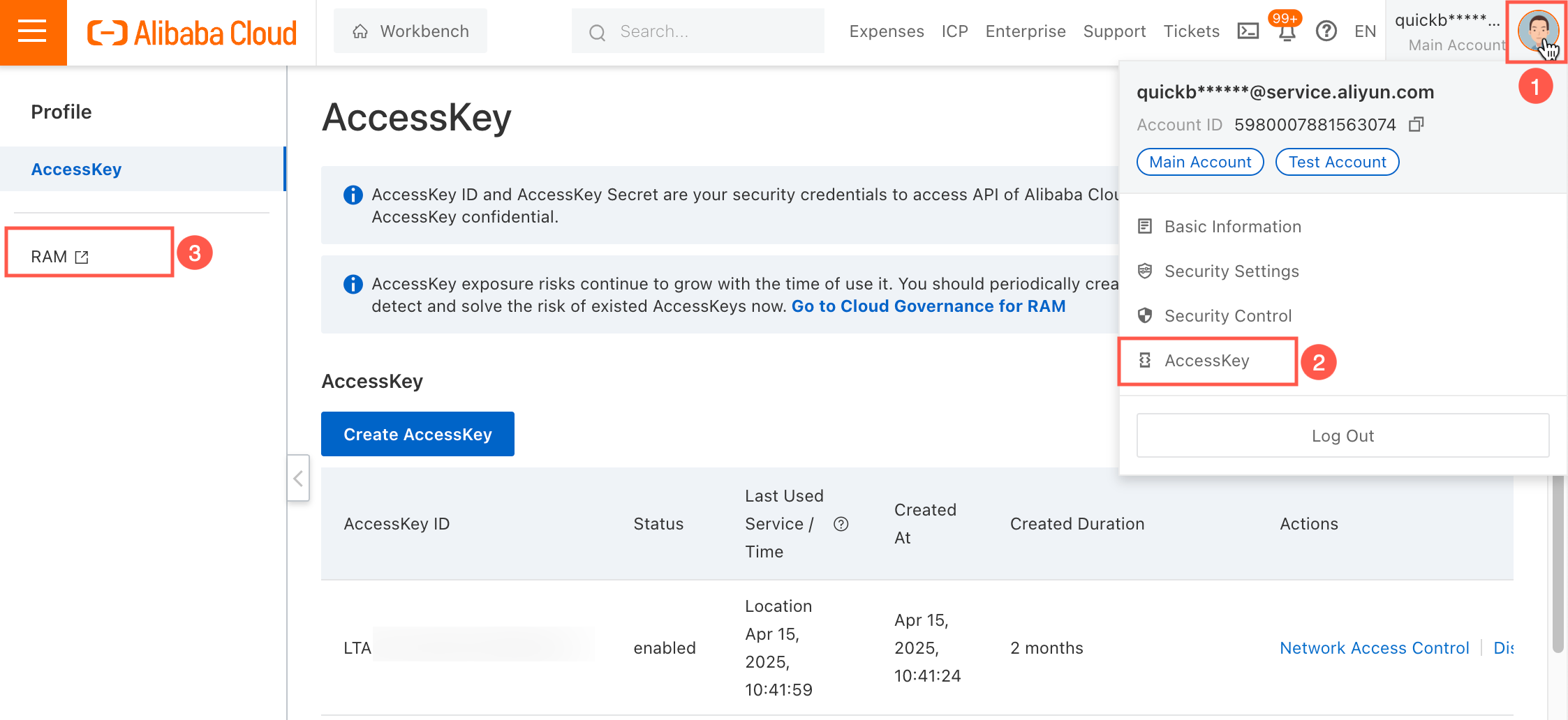
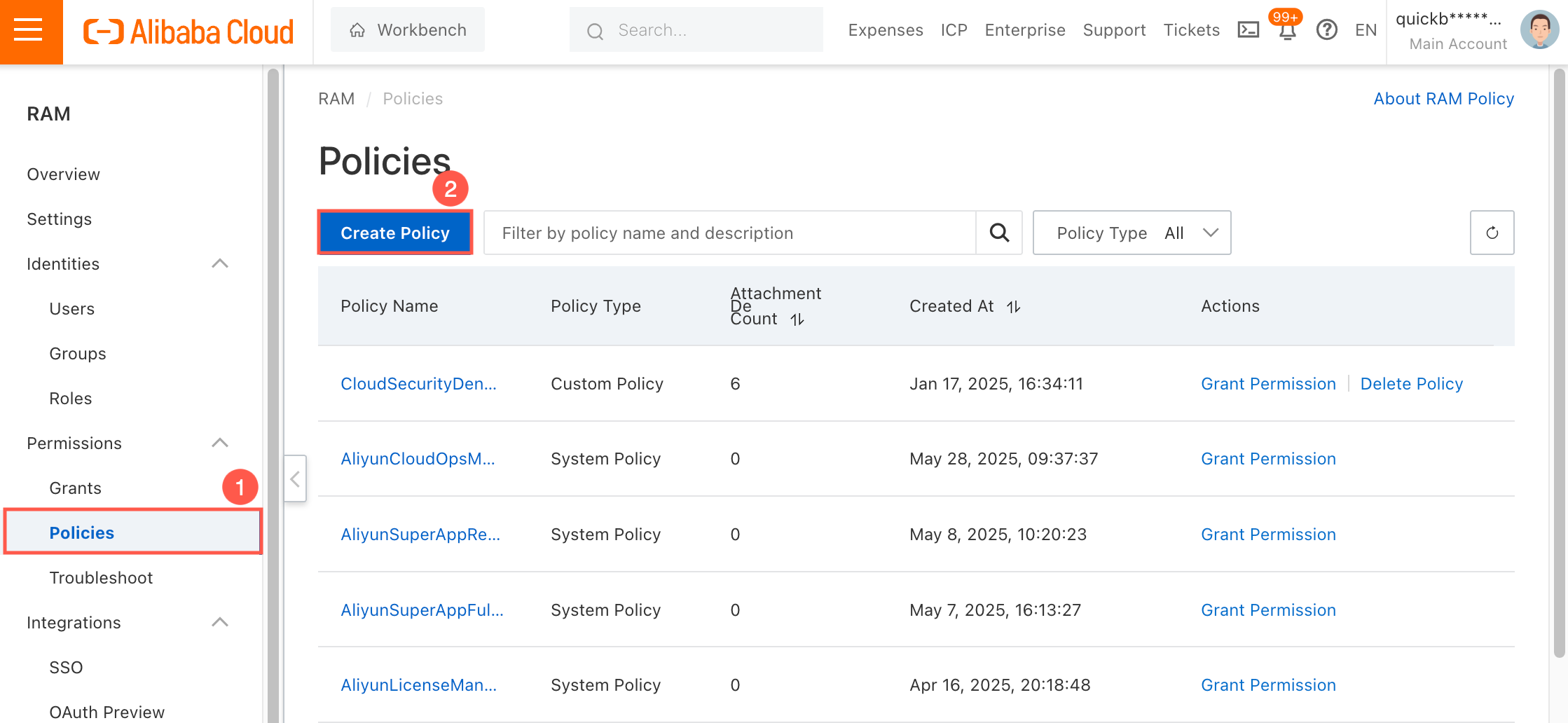
On the RAM Access Control page, choose Permission Management > Policies from the left-side navigation pane, and click Create Policy on the right side of the page.
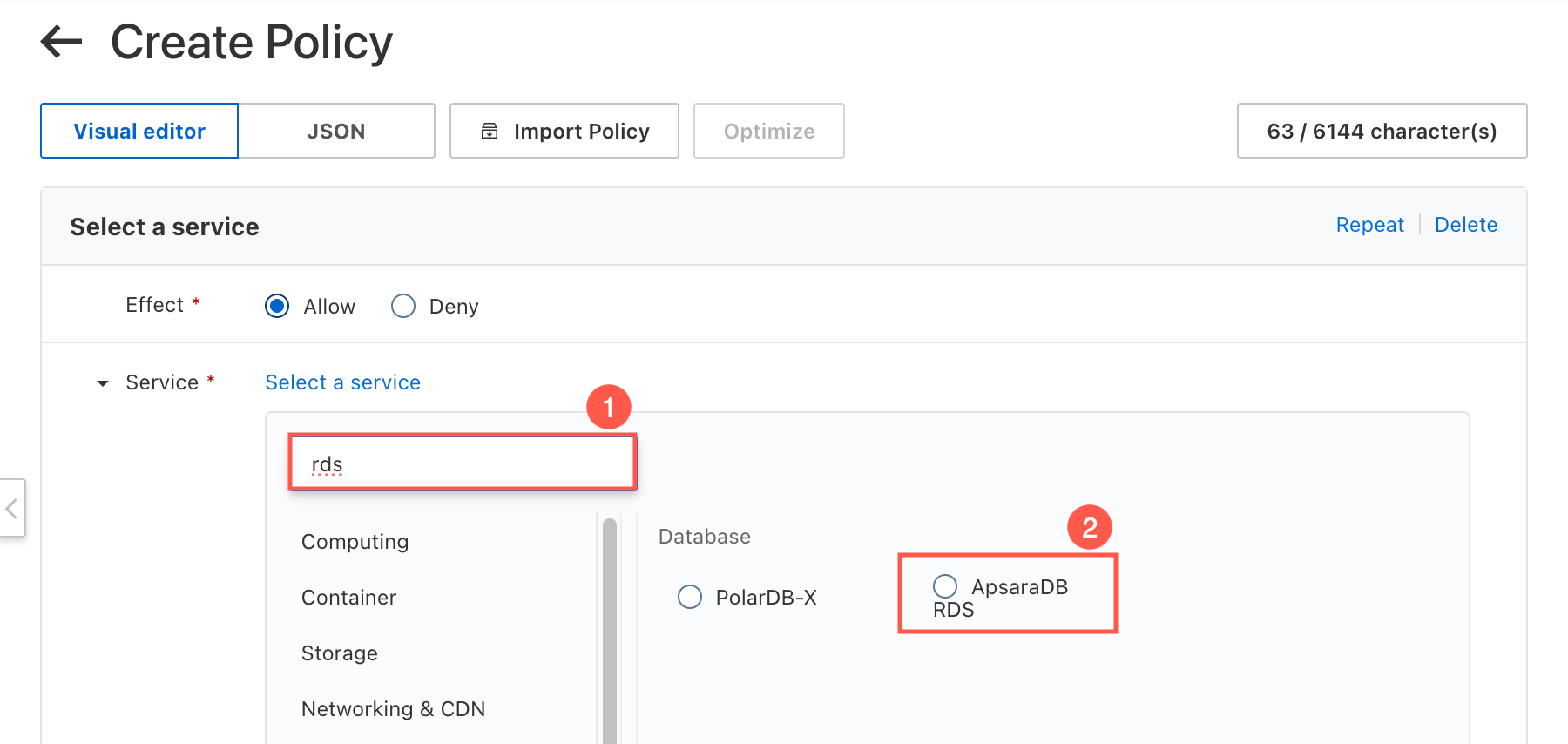
On the Create Policy page, configure the relevant interface permissions according to the VPC service type. The service type for SQL Server database is ApsaraDB RDS, so you need to search for rds in the Service module and select ApsaraDB RDS.
For information about the VPC service types and required interface permissions for different databases, see Permission requirements for VPC data sources in this topic.
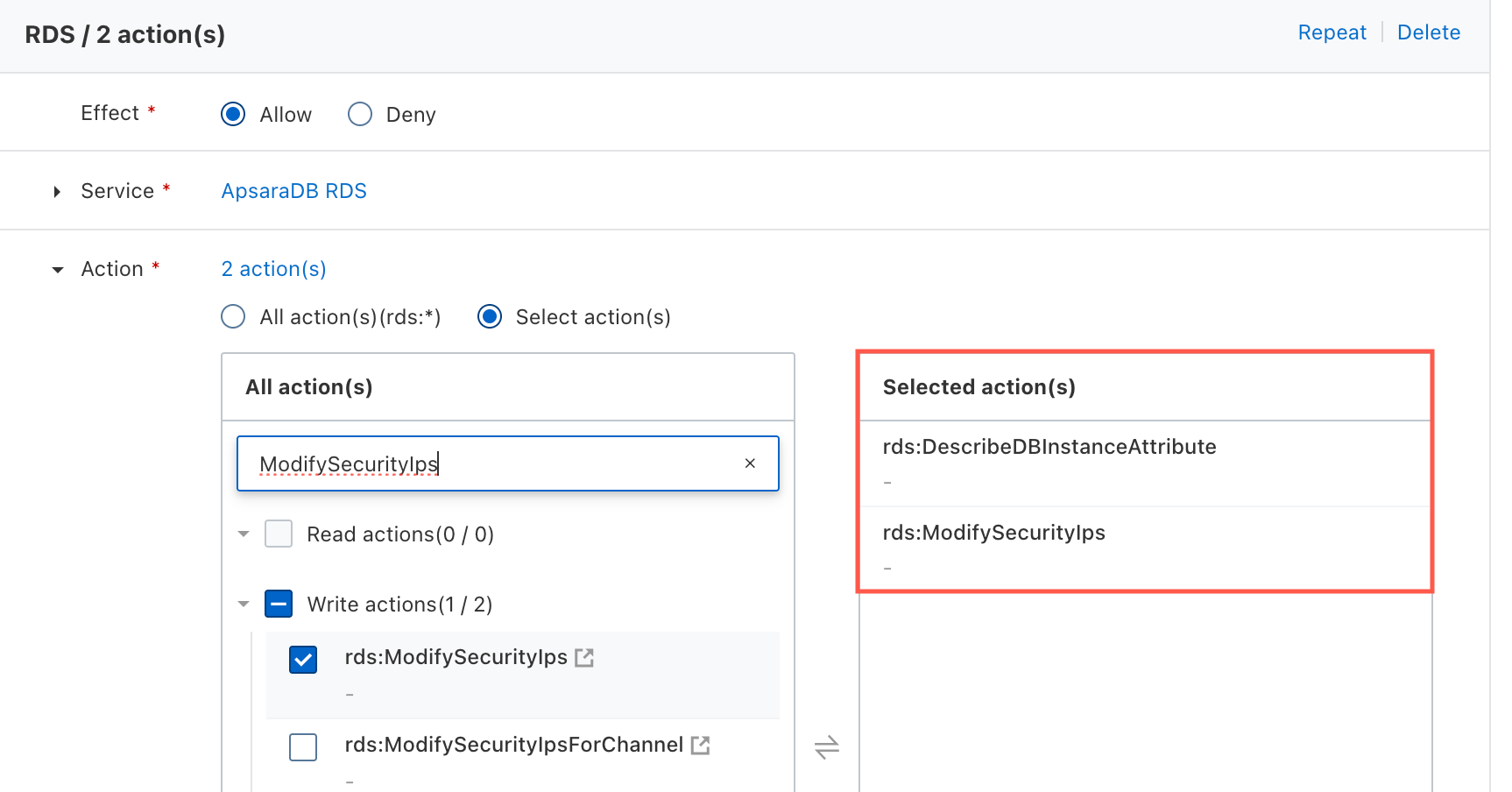
In the Operation module, continue to configure the interface permissions required for connecting to the database: SQL Server database requires permissions for the Query instance details (DescribeDBInstanceAttribute) interface and the Modify RDS instance IP whitelist (ModifySecurityIps) interface.
As needed, select the resource scope (all resources or specific resources) for which the current permission policy should take effect in the Resource module, and maintain conditions, statements, and other configurations. Click OK to save the policy. For more information about permission policies, see Basic operations.
Related Information
The following provides additional information about configuring RAM account permission policies to help you better understand the configuration process.
Permission requirements for VPC data sources
Service | Corresponding database | Instance details retrieval interface | Whitelist addition interface |
ApsaraDB RDS | RDS MySQL, RDS PostgreSQL, RDS SQL Server, PolarDB for PostgreSQL (Compatible with Oracle) | ||
Cloud Native Data Warehouse AnalyticDB for MySQL | AnalyticDB MySQL 3.0 | ||
Cloud Native Data Warehouse AnalyticDB for MySQL | AnalyticDB MySQL 3.0 (Spark engine) | ||
Elastic Computing Service/ECS | Self-built data sources deployed on Alibaba Cloud ECS | ||
Server Load Balancer/SLB | Self-built data sources accessed through Classic Load Balancer (CLB) | None, not blocked by default | |
Cloud Native Data Warehouse AnalyticDB for PostgreSQL | AnalyticDB PostgreSQL | ||
Cloud Native Database PolarDB | PolarDB for MySQL, PolarDB for PostgreSQL, PolarDB for PostgreSQL (Compatible with Oracle) | ||
ApsaraDB for ClickHouse | ClickHouse Community Edition | ||
ApsaraDB for ClickHouse | ApsaraDB for ClickHouse Enterprise Edition | ||
Cloud Native Distributed Database PolarDB-X | PolarDB Distributed Edition 1.0 | ||
polardb-x | PolarDB Distributed Edition 2.0 | ||
ApsaraDB for OceanBase | OceanBase |
| |
Real-time Data Warehouse Hologres | Hologres | None, not blocked by default | |
Open Source Big Data Platform E-MapReduce/StarRocks | E-MapReduce Serverless StarRocks Edition |
|
Verify whether the interface has permissions
After completing the permission policy configuration, you can log on to the Alibaba Cloud Management Console's OpenAPI debug interface with the corresponding account, select the corresponding interface to initiate a request, and verify whether the current account has permissions.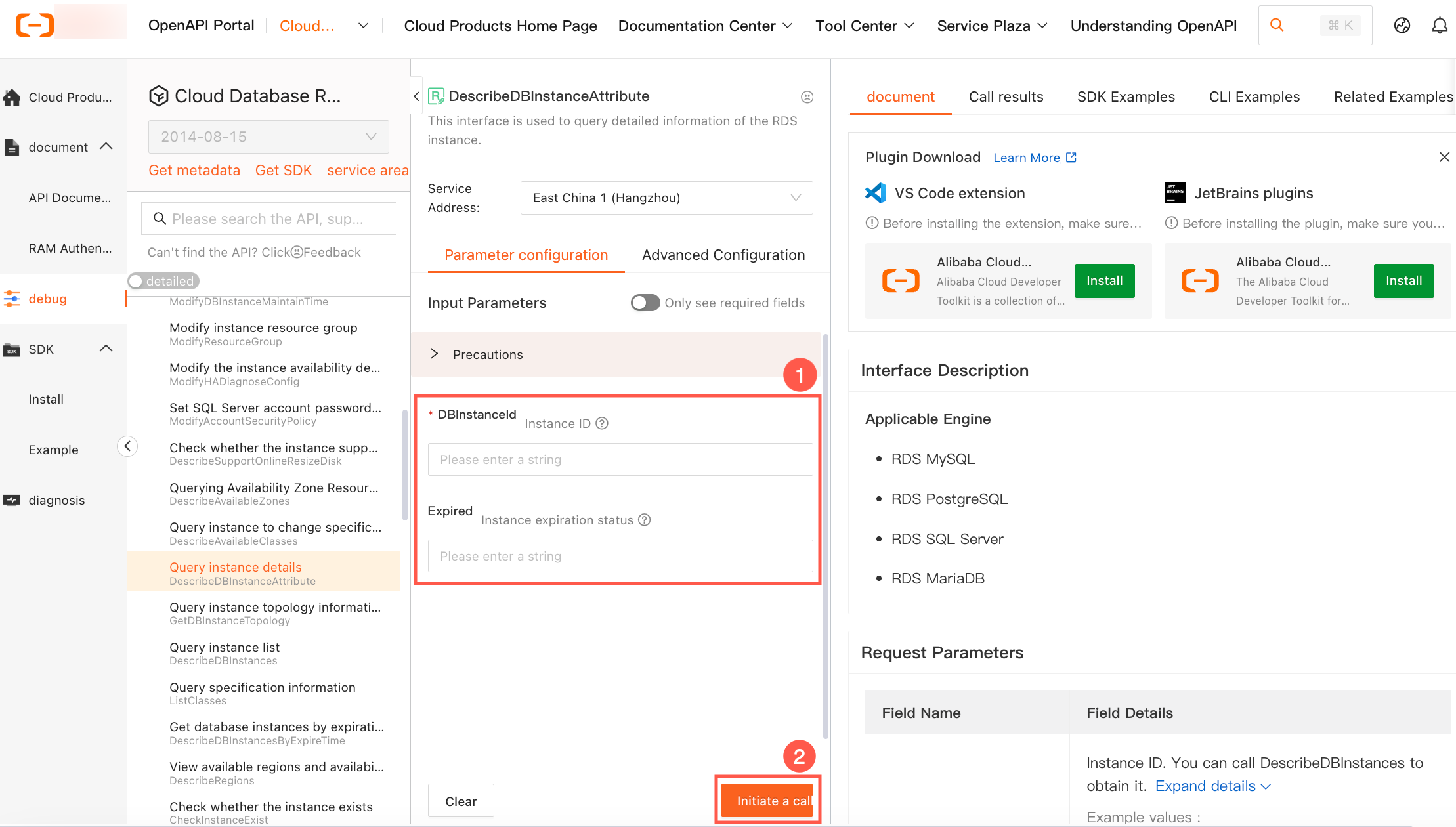
Interface error query
When an interface returns an error, you can diagnose the error message through the OpenAPI Troubleshooting platform.
You need to log on to this platform with the account corresponding to the AccessKey ID and AccessKey secret used for connecting to the VPC.