Column-store snapshots let you capture a consistent point-in-time view of your columnar data and use it for historical queries or data validation. This topic explains how to generate snapshot points manually, schedule them automatically, and query existing snapshot points. It also describes how generation frequency affects data synchronization latency between the read-only columnar instance and the primary instance.
Supported versions
The following versions support the snapshot point feature.
| Three-digit version | Compute node version | Recommended version | Data node engine |
|---|---|---|---|
| 5.4.20 | All versions | 5.4.20-20250328 or later (column-store snapshot optimized) | MySQL 5.7 or MySQL 8.0 |
| 5.4.19 | 5.4.19-20250305 or later | — | MySQL 5.7 or MySQL 8.0 |
For version naming rules, see Release notes. To check your instance version, see View and update the version of an instance.
Generate snapshot points manually
Use CALL polardbx.columnar_flush() to generate snapshot points on demand.
Instance-level snapshot
CALL polardbx.columnar_flush();The function returns an unsigned long value representing the snapshot point version — a timezone-independent timestamp.
CCI-level snapshot
CALL polardbx.columnar_flush(schema_name, table_name, index_name);

-- You can include or omit the random suffix in index_name.
-- To view the suffix, run SHOW COLUMNAR STATUS.
CALL polardbx.columnar_flush('db1', 'tb1', 'cci');
CALL polardbx.columnar_flush('db1', 'tb1', 'cci_$09a9');
A CCI-level snapshot covers the entire instance, not just the specified table — it is equivalent to an instance-level snapshot point. Theindex_nameparameter is the name of the Clustered Columnar Index (CCI). To getindex_name, see SHOW COLUMNAR STATUS.
Schedule snapshot points automatically
Interval-based scheduling
Set a fixed interval (in minutes) for a specific CCI:
-- Generate a snapshot every 10 minutes.
CALL polardbx.columnar_config(cci_id, 'auto_gen_columnar_snapshot_interval', 10);
CRON-based scheduling
Schedule instance-level snapshots using a CRON expression. Requires version 5.4.20-20250328 or later (for 5.4.20) or 5.4.19-20250305 or later (for 5.4.19).
-- Schedule a snapshot every hour.
CALL polardbx.columnar_auto_snapshot_config('ENABLE', '0 0 * * * ?', '+08:00');

-- View the current schedule.
CALL polardbx.columnar_auto_snapshot_config('SHOW');

-- Disable scheduled snapshots.
CALL polardbx.columnar_auto_snapshot_config('DISABLE');
Query snapshot points
Query the INFORMATION_SCHEMA.COLUMNAR_SNAPSHOTS view to list all available snapshot points, including both manually and automatically generated ones:
SELECT * FROM INFORMATION_SCHEMA.COLUMNAR_SNAPSHOTS;Sample output:
+------------------------+------------+------------+---------------------+
| SCHEMA_NAME            | TABLE_NAME | INDEX_NAME | TSO                 |
+------------------------+------------+------------+---------------------+
| test_columnar_snapshot | tb1        | cci_$09a9  | 7249374192586457152 |
| polardbx               | __global__ | __global__ | 7249332223843762240 |
| polardbx               | __global__ | __global__ | 7249374271451955264 |
+------------------------+------------+------------+---------------------+
Column descriptions:
| Column | Description |
|---|---|
SCHEMA_NAME | Schema name. polardbx indicates an instance-level snapshot point. Any other value indicates a CCI-level snapshot point. |
TABLE_NAME | Name of the logical table associated with the CCI. |
INDEX_NAME | Physical name of the CCI, which includes a random suffix (for example, _$09a9) appended to the logical name. |
TSO | Snapshot version as a Timestamp Oracle (TSO) value — a timezone-independent timestamp that identifies the snapshot point. |
You can also use SHOW COLUMNAR STATUS to retrieveSCHEMA_NAME,TABLE_NAME,INDEX_NAME, andTSOvalues. If the view returns a large number of rows, filter by one or more of these columns to avoid degrading instance performance.
Filter by time range using TSO
Convert a timestamp to a TSO value with this formula:
SELECT ((UNIX_TIMESTAMP(@your_timestamp) * 1000) << 22)The * 1000 and << 22 operations are fixed parts of the timestamp-to-TSO conversion algorithm.
Example — query snapshot points for a specific CCI between 14:00 and 18:00 on July 1, 2024:
SELECT * FROM INFORMATION_SCHEMA.COLUMNAR_SNAPSHOTS
WHERE SCHEMA_NAME = '<schema>'
AND TABLE_NAME = '<table>'
AND INDEX_NAME = '<snapshot_cci_name>'
AND TSO >= ((UNIX_TIMESTAMP('2024-07-01 14:00:00') * 1000) << 22)
AND TSO <= ((UNIX_TIMESTAMP('2024-07-01 18:00:00') * 1000) << 22);
Sample output:
+-------------+------------+------------------------+---------------------+
| SCHEMA_NAME | TABLE_NAME | INDEX_NAME             | TSO                 |
+-------------+------------+------------------------+---------------------+
| polardbx    | __global__ | __global__             | 7213421061734400000 |
| your_schema | your_table | your_snapshot_cci_name | 7213481459712000000 |
+-------------+------------+------------------------+---------------------+
Performance considerations
Calling CALL polardbx.columnar_flush() does not affect read or write operations on the row store. However, calling it at high frequency can increase data synchronization latency between the read-only columnar instance and the primary instance.
Test environment
Test data
Based on 1,000 warehouses:
bmsql_order_line: 300 million rowsbmsql_stock: 100 million rowsbmsql_customer,bmsql_history,bmsql_oorder: 30 million rows each
Instance specifications
| Node | Specification | Count |
|---|---|---|
| Compute node | 4 cores, 16 GB memory | 2 |
| Data node | 4 cores, 16 GB memory | 4 |
| Columnar engine | 4 cores, 32 GB memory | 2 |
ECS client: ecs.hfg6.4xlarge (16 cores, 64 GB memory). For purchasing details, see Create an instance on the Custom Launch tab in the ECS console and manage the instance.
Test procedure
Set up a TPC-C test environment. For details, see TPC-C tests.
Create column-store snapshots for the
bmsql_stock,bmsql_customer, andbmsql_order_linetables:CREATE CLUSTERED COLUMNAR INDEX cci ON `bmsql_stock`(s_i_id) PARTITION BY KEY(s_w_id) COLUMNAR_OPTIONS='{ "type":"snapshot", "snapshot_retention_days":"30", "auto_gen_columnar_snapshot_interval":"-1" }'; CREATE CLUSTERED COLUMNAR INDEX cci ON `bmsql_customer`(c_id) PARTITION BY KEY(c_w_id) COLUMNAR_OPTIONS='{ "type":"snapshot", "snapshot_retention_days":"7", "auto_gen_columnar_snapshot_interval":"-1" }'; CREATE CLUSTERED COLUMNAR INDEX cci ON `bmsql_order_line`(ol_i_id) PARTITION BY KEY(ol_w_id) COLUMNAR_OPTIONS='{ "type":"snapshot", "snapshot_retention_days":"365", "auto_gen_columnar_snapshot_interval":"-1" }';When CPU utilization on compute and data nodes is near 50%, call
CALL polardbx.columnar_flush()at different frequencies and observe synchronization latency.
Test results
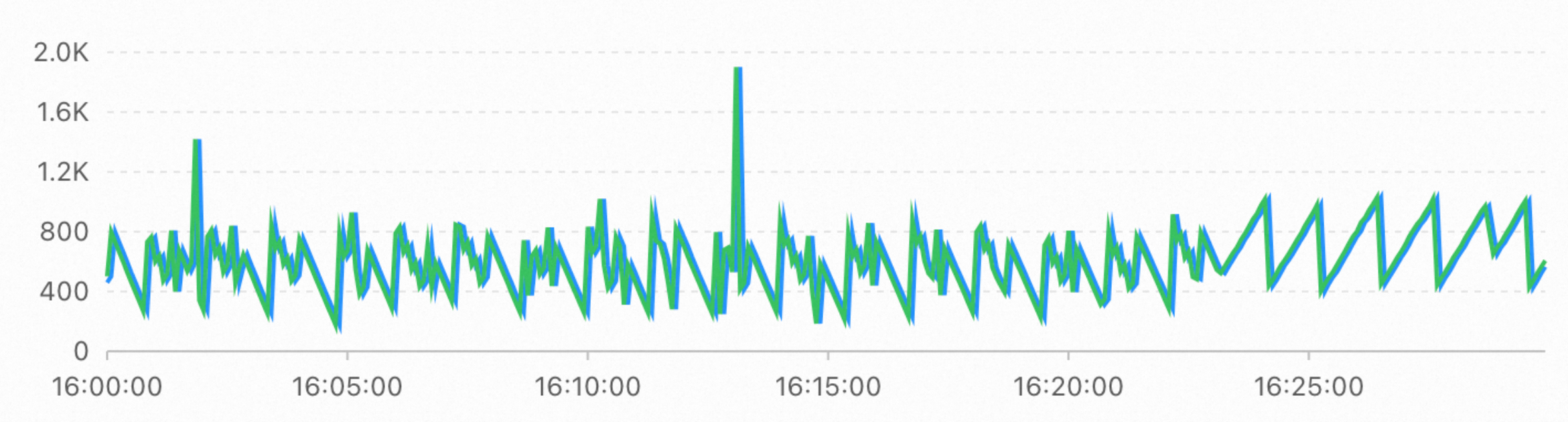
60 calls per minute
480 calls per minute
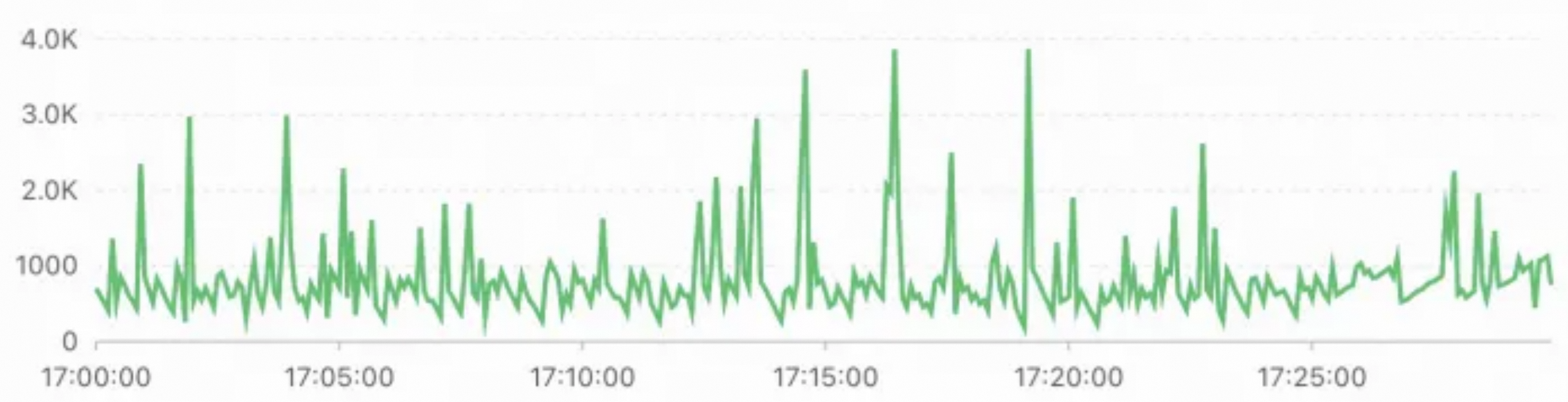
Synchronization latency stays around 1 second, with a peak of about 4 seconds.
960 calls per minute
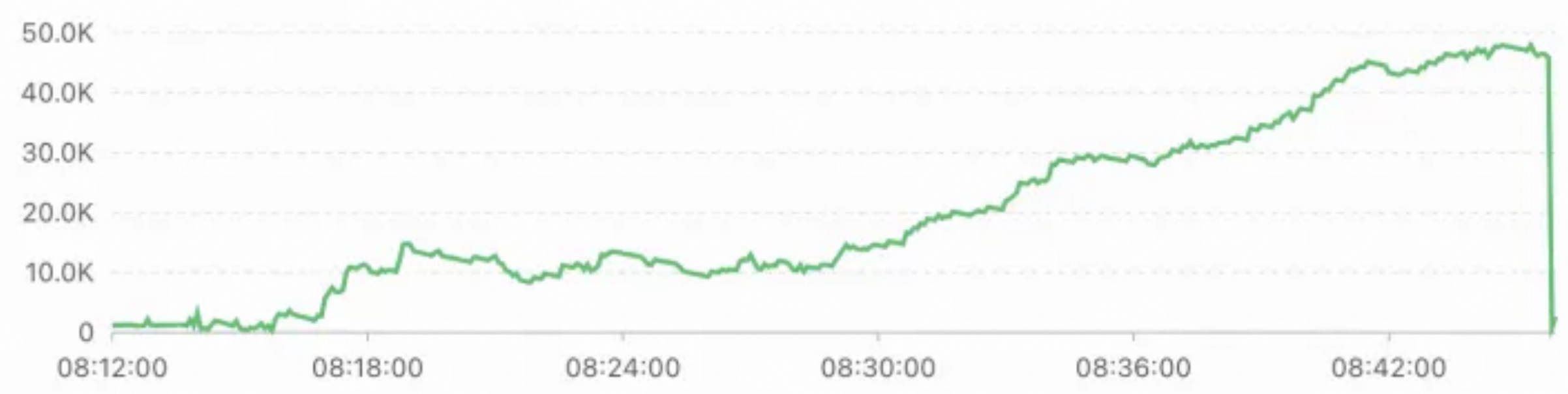
At this frequency, synchronization latency increases significantly, with a peak of about 50 seconds.
Conclusions
Below 500 calls per minute, synchronization latency does not increase significantly. At around 1,000 calls per minute, latency increases significantly.
In practice, the impact depends on actual traffic volume and the number of column-store snapshots. Keep the call frequency at no more than once per second. If your workload requires a higher frequency, run sufficient tests.