PolarDB for AI lets you query external databases using natural language — no data migration required. Define the schema of your external data source (PostgreSQL, Hive, Elasticsearch, and others) in a metadata table, and PolarDB for AI builds a knowledge base that a large language model (LLM) uses to convert questions like "find the customer with the most orders" into executable SQL or DSL queries.
This document covers two roles:
DBA (privileged account): installs the extension, configures the node token, and manages permissions (steps 1–3 and step 6).
Data developer: prepares metadata and runs queries (steps 4–5 and the query section).
This feature is in canary release. If you want to use this feature, submit a ticket to have it enabled.
How it works
Upload metadata (table schemas, column comments, and sample values) to the schema_info table. An internal model vectorizes this metadata and stores it in a searchable index table named schema_info_index.
When you run a natural language query, the NL2SQL (natural language to SQL) pipeline does the following:
Converts your question into a vector.
Runs a similarity search in
schema_info_indexto identify relevant tables and columns.Generates an executable SQL or DSL query using the retrieved metadata.
Prerequisites
Before you begin, make sure you have:
Engine: PostgreSQL 16, minor version 2.0.16.10.11.0 or later
AI node: An AI node added to the cluster with a database connection account configured. For setup instructions, see Add and manage AI nodes.
The database connection account must have read and write permissions.
If you added an AI node when purchasing the cluster, configure the database connection account directly.
Endpoint: Connect to the cluster using the cluster endpoint.
Set up the Data Agent
Step 1: Log in with a privileged account
Connect to the cluster using a privileged account.
Step 2: Get the node token
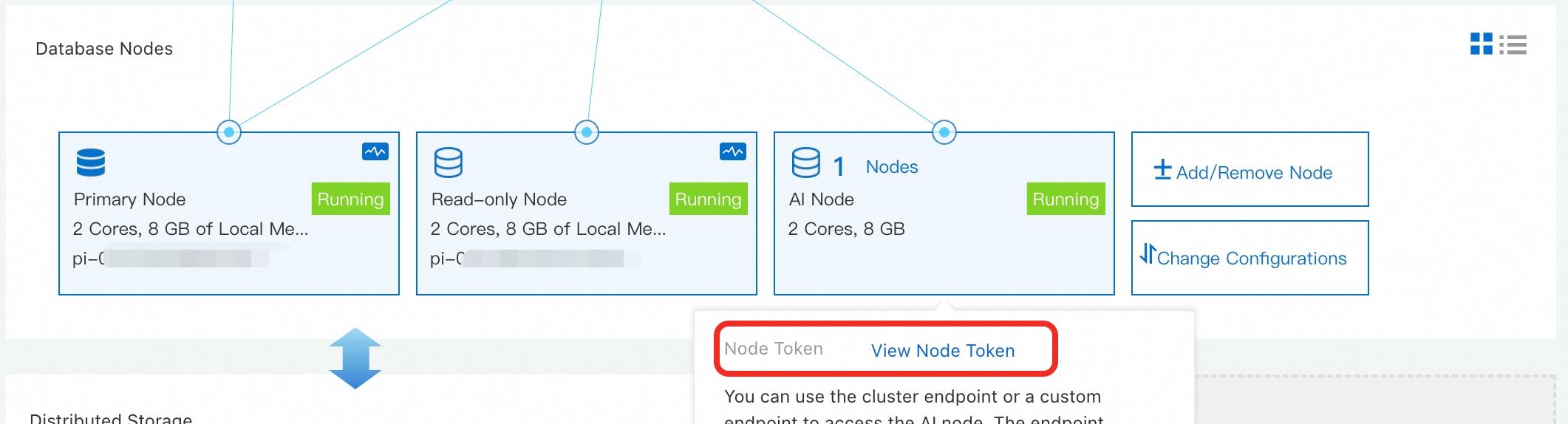
In the PolarDB console, go to the target cluster's product page. In the Database Nodes section, find the AI node, click View, and record the Node Token.
Step 3: Install the extension and configure the node token
Make sure the database connection account for the AI node is configured before running these commands.
-- Install the extension
CREATE EXTENSION polar_ai;

-- Set the node token
SELECT polar_ai._ai_nl2sql_alter_token('sk-xxx');
Step 4: Create the metadata table
The schema_info table stores information about your external data sources: table names, column names, data types, comments, and sample values.
CREATE TABLE IF NOT EXISTS public.schema_info (
    id SERIAL PRIMARY KEY,
    table_name VARCHAR(255) NOT NULL,
    table_comment TEXT,
    column_name VARCHAR(255) NOT NULL,
    column_comment TEXT,
    data_type VARCHAR(255) NOT NULL,
    sample_values TEXT,
    is_primary BOOLEAN DEFAULT FALSE,
    is_foreign BOOLEAN DEFAULT FALSE,
    ext TEXT,
    db_type VARCHAR(128)
);

COMMENT ON TABLE schema_info IS 'Database metadata information table';
COMMENT ON COLUMN schema_info.id IS 'Auto-increment primary key';
COMMENT ON COLUMN schema_info.table_name IS 'Table name';
COMMENT ON COLUMN schema_info.table_comment IS 'Table comment. Crucial for NL2SQL accuracy.';
COMMENT ON COLUMN schema_info.column_name IS 'Column name';
COMMENT ON COLUMN schema_info.column_comment IS 'Column comment. Crucial for NL2SQL accuracy.';
COMMENT ON COLUMN schema_info.data_type IS 'Column data type';
COMMENT ON COLUMN schema_info.sample_values IS 'Sample values, separated by commas.';
COMMENT ON COLUMN schema_info.is_primary IS 'Indicates whether the column is a primary key (true/false).';
COMMENT ON COLUMN schema_info.is_foreign IS 'Indicates whether the column is a foreign key (true/false).';
COMMENT ON COLUMN schema_info.ext IS 'Foreign key association information. Format: database_name.table_name.column_name';
COMMENT ON COLUMN schema_info.db_type IS 'The language type of the relational database (such as MySQL, PostgreSQL, StarRocks, or Oracle).';
Step 5: Insert metadata
Each row in schema_info describes one column of an external table. The fields fall into three categories:
Identity and structure
| Field | Required | Description |
|---|---|---|
table_name | Yes | Name of the table this column belongs to |
column_name | Yes | Name of the column |
data_type | Yes | Column data type (for example, INT, VARCHAR(100), DATE) |
is_primary | No | Set to true if this column is a primary key |
Semantic context — these fields have the greatest impact on NL2SQL accuracy
| Field | Description | Guidance |
|---|---|---|
table_comment | Business purpose of the table | Describe what the table represents and the domain it covers. Include business aliases and common names users associate with this table. |
column_comment | Business meaning of the column | Describe what the column represents in business terms. Include business aliases and synonyms — for example: "customer ID, also referred to as client ID or account number." The more specific you are, the more accurately the LLM can match natural language to the right column. |
sample_values | Representative values, comma-separated | Keep the total field length under 100 characters. |
Relationships
| Field | Description |
|---|---|
is_foreign | Set to 1 if this column is a foreign key |
ext | Required when is_foreign = 1. Format: <database_name>.<table_name>.<column_name> |
db_type | Type of the source database (for example, MySQL or PostgreSQL). All tables in the same logical database must share the same db_type. |
Example: inserting metadata for `customers` and `orders` tables
-- Insert metadata for the customers table
INSERT INTO schema_info (table_name, table_comment, column_name, column_comment, data_type, sample_values, is_primary, is_foreign, ext, db_type) VALUES
('customers', 'Customer information table', 'id', 'Unique customer identifier', 'INT', '1,2,3', true, false, NULL, 'MySQL'),
('customers', 'Customer information table', 'name', 'Customer name', 'VARCHAR(100)', 'John Doe,Jane Smith,Peter Jones', false, false, NULL, 'MySQL'),
('customers', 'Customer information table', 'email', 'Customer email', 'VARCHAR(100) UNIQUE', 'johndoe@example.com,janesmith@example.com', false, false, NULL, 'MySQL');

-- Insert metadata for the orders table
INSERT INTO schema_info (table_name, table_comment, column_name, column_comment, data_type, sample_values, is_primary, is_foreign, ext, db_type) VALUES
('orders', 'Order information table', 'order_id', 'Unique order identifier', 'INT', '1001,1005,1003', true, false, NULL, 'MySQL'),
('orders', 'Order information table', 'order_date', 'Order date', 'DATE', '2023-01-01,2023-05-06', false, false, NULL, 'MySQL'),
('orders', 'Order information table', 'customer_id', 'Associated customer ID', 'INT', '1,2,3', false, true, 'dbname.customers.id', 'MySQL'),
('orders', 'Order information table', 'total_amount', 'Total order amount', 'DECIMAL(10,2)', '99.99,101.81,250.00', false, false, NULL, 'MySQL');
Step 6: Grant permissions to the AI node account
Grant the AI node's database account access to the schema_info table. In this example, the account is polarai_user.
GRANT ALL PRIVILEGES ON TABLE public."schema_info" TO polarai_user;In production, make sure the AI node account also has permissions on your actual business tables.
Build a retrieval index
Create a vector index over the metadata in schema_info. This index is what the LLM uses to find relevant tables and columns when answering natural language questions.
Syntax
text ai_BuildSchemaIndex(text name, jsonb text2vecOption default '{"mode": "async", "resource": "schema"}')| Parameter | Description |
|---|---|
name | Index name used in subsequent queries |
text2vecOption | JSON object with the following fields: |
mode | Data writing mode. Default: async (asynchronous) |
resource | Resource type. Set to schema_info |
to_sample | Whether to sample column values. 0 (default): no sampling. 1: sampling enabled — improves SQL quality for tables with fewer than 15 columns, but increases build time |
Example
SELECT polar_ai.ai_BuildSchemaIndex('schema_info_index', '{"mode":"async", "resource":"schema_info", "to_sample":1}');The function returns a task ID, for example: bce632ea-97e9-11ee-bdd2-492f4dfe0918.
Check the indexing status by running:
SELECT polar_ai.ai_ShowTask('<your_task_id>');A status of finish means the index is ready.
Query data using the Data Agent
After the index is built, pass a natural language question and the index name to ai_nl2sql:
-- Find the top 10 customers by order count
SELECT polar_ai.ai_nl2sql('top 10 customers with the most orders', 'schema_info_index');
The function returns an AI-generated SQL statement. For this example:
SELECT customer_id, COUNT(*) AS order_count FROM orders GROUP BY customer_id ORDER BY order_count DESC LIMIT 10;FAQ
`ai_ShowTask` returns `fail`. What do I do?
Task failures are almost always caused by metadata errors or missing permissions. Check the following:
Verify that the
extfield uses the correct format (database_name.table_name.column_name) and thatdb_typeis consistent across all rows for the same logical database.Confirm that the user running
ai_BuildSchemaIndexhas read permissions onschema_infoand write permissions onschema_info_index.
NL2SQL results are inaccurate. How do I improve them?
Think of the LLM as a new analyst who has never seen your database. Its accuracy depends entirely on the context you provide in schema_info. Work through these steps in priority order — each one gives the model more signal:
Improve comments first (highest impact). Add meaningful
table_commentandcolumn_commentvalues that describe the business purpose, not just the technical name. Include business aliases and synonyms — for example: "customer ID, also referred to as client ID or account number." This is the most effective change you can make.Add sample values. Populate
sample_valueswith representative data so the model understands the format and range of each column. Keep the total under 100 characters.Clarify relationships. Verify that
is_foreignandextare correctly set for all foreign key columns. Accurate relationship information is essential for multi-table join queries.
What's next
LLM-based NL2SQL — learn how PolarDB for AI converts natural language to SQL
Add and manage AI nodes — configure and manage AI nodes for your cluster