LLM-based NL2SQL is a built-in model in PolarDB for AI that converts natural language questions into executable SQL statements using a large language model (LLM). Ask questions like "Which outlet in Shanghai has the highest revenue?" and the model generates the corresponding SQL to run against your database — no SQL knowledge required.
This feature is in canary release. If you want to use this feature, submit a ticket to have it enabled.
How it works
The model follows three steps when you ask a question:
Build a schema index — Vectorize your database's table schema, column names, comments, and sample data into a searchable "database map" that gives the LLM context about your data structure.
Convert to SQL — Send the question plus the schema index to the LLM, which generates a corresponding SQL statement.
Fine-tune (optional) — For industry-specific terms or query patterns the general-purpose model misses, configure question templates, a configuration table, or custom comments to improve accuracy.
Prerequisites
Before you begin, make sure you have:
An AI node added to the cluster, with a database connection account configured. For details, see Add and manage AI nodes. The account must have read and write permissions on the target database.
A connection to the PolarDB cluster using the cluster endpoint.
Usage notes
Structure your questions for accuracy
State conditions first, then the entities for the column values you want to retrieve, then possible column names. Example:
SELECT 'What are the property names for "houses" or "apartments" with more than 1 room?'In this question, "with more than 1 room" is the condition, "houses" and "apartments" are entities corresponding to column values, and "property names" is a possible column name.
Factors that affect query accuracy
| Factor | Effect |
|---|---|
| Richness of table and column comments | Detailed comments give the LLM more context. Add comments to every table and column. |
| Match between your question and column comments | The closer your question's keywords are to the column comments, the better the results. |
| Number of columns in the generated SQL | Queries involving fewer columns produce more accurate results. |
| SQL logical complexity | Simpler SQL syntax produces more accurate results. |
Get started
This section walks through a complete NL2SQL setup using a fictional "Alixiang" restaurant management system as the example. The workflow has three phases:
Phase 1 — Quick setup: Create the extension, prepare data, build the schema index, and run your first query.
Phase 2 — Fine-tune: Improve accuracy for domain-specific terms and query patterns.
Phase 3 — Production: Apply the same workflow to your own tables and business data.
Step 1: Set up the extension
Log on to the cluster using a privileged account.
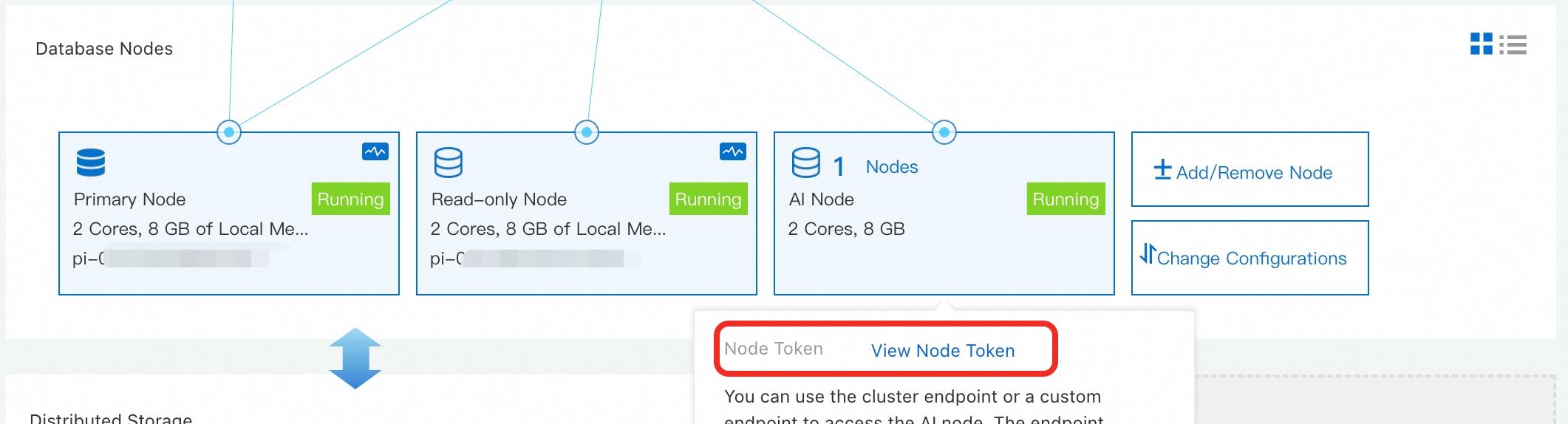
Get the node token. Go to the PolarDB console. On the cluster's product page, find the AI node in the Database Nodes section. Click View and record the Node Token.
Create the
polar_aiextension and set the node token. Run the following commands to create the extension and configure the key for accessing the LLM service.ImportantMake sure you have set a database connection account for the AI node before proceeding.
-- Create the extension
CREATE EXTENSION polar_ai;

-- Set your key
SELECT polar_ai._ai_nl2sql_alter_token('sk-xxx');
Step 2: Prepare data and add comments
Before building the schema index, add comments to your tables and columns. Good comments are the single most effective way to improve NL2SQL accuracy.
Table comments — Summarize the table's main content in 10 words or fewer, for example: "Orders table" or "Inventory table". Avoid lengthy explanations.
Column comments — Use common nouns or short phrases that accurately describe the column. For columns with a fixed set of values, include the value mapping. For example, for a column named isValid: Is valid. 0: No. 1: Yes.
Create sample tables. Run the following SQL to create three tables for the "Alixiang" restaurant system: an outlet table, a menu table, and a bill table. <details><summary>Click to expand the SQL</summary>
-- Outlet table
CREATE TABLE restaurant_info (
  id INT PRIMARY KEY,
  position VARCHAR(128)
);
COMMENT ON TABLE restaurant_info IS 'Outlet table';
COMMENT ON COLUMN restaurant_info.id IS 'Outlet ID';
COMMENT ON COLUMN restaurant_info.position IS 'Outlet location';

-- Menu table
CREATE TABLE menu_info (
  id INT PRIMARY KEY,
  name VARCHAR(64),
  type INT,
  unit_price float8
);
COMMENT ON TABLE menu_info IS 'Menu table';
COMMENT ON COLUMN menu_info.id IS 'Dish ID';
COMMENT ON COLUMN menu_info.name IS 'Dish name';
COMMENT ON COLUMN menu_info.type IS 'Dish type';
COMMENT ON COLUMN menu_info.unit_price IS 'Dish unit price';

-- Bill table
CREATE TABLE bill_info (
  id INT PRIMARY KEY,
  items VARCHAR(512),
  actual_amount INT,
  restaurant_id INT,
  waiter VARCHAR(16),
  diner_count INT,
  pay_time DATE
);
COMMENT ON TABLE bill_info IS 'Bill table';
COMMENT ON COLUMN bill_info.id IS 'Bill ID';
COMMENT ON COLUMN bill_info.items IS 'Ordered dishes';
COMMENT ON COLUMN bill_info.actual_amount IS 'Actual amount paid';
COMMENT ON COLUMN bill_info.restaurant_id IS 'Dining outlet';
COMMENT ON COLUMN bill_info.waiter IS 'Waiter';
COMMENT ON COLUMN bill_info.diner_count IS 'Number of diners';
COMMENT ON COLUMN bill_info.pay_time IS 'Order time';

INSERT INTO restaurant_info (id, position) VALUES
(1, 'South Area, Taikoo Li Sanlitun, Chaoyang District, Beijing'),
(2, 'Nanjing Road Pedestrian Street, Huangpu District, Shanghai'),
(3, 'Block B, TeeMall, Tianhe District, Guangzhou'),
(4, 'Kexing Science Park, Science and Technology Park, Nanshan District, Shenzhen'),
(5, 'Huanglong Times Square, Wensan Road, Xihu District, Hangzhou'),
(6, 'IFS International Finance Centre, Chunxi Road, Jinjiang District, Chengdu'),
(7, 'Jiefangbei Pedestrian Street, Yuzhong District, Chongqing'),
(8, 'South Square of Giant Wild Goose Pagoda, Yanta District, Xi''an'),
(9, 'Deji Plaza, Xinjiekou, Xuanwu District, Nanjing'),
(10, 'Wushang Plaza, Hankou, Jianghan District, Wuhan'),
(11, 'Binjiang Avenue Commercial Street, Heping District, Tianjin'),
(12, 'BBG Plaza, Meixi Lake, Yuelu District, Changsha'),
(13, 'The Mixc, May Fourth Square, Shinan District, Qingdao'),
(14, 'Parkson, Friendship Square, Zhongshan District, Dalian'),
(15, 'Zhongshan Road Pedestrian Street, Siming District, Xiamen'),
(16, 'Times Square, Jinji Lake, Suzhou Industrial Park, Suzhou'),
(17, 'Tianyi Square, Yinzhou District, Ningbo'),
(18, 'Nanchang Street, Nanshan Temple, Liangxi District, Wuxi'),
(19, 'The Mixc, Shushan District, Hefei'),
(20, 'Wanda Plaza, Honggu Middle Avenue, Honggutan District, Nanchang');

INSERT INTO menu_info (id, name, type, unit_price) VALUES
(1, 'Kung Pao Chicken', 1, 38.0),
(2, 'Braised Pork', 1, 48.0),
(3, 'Mapo Tofu', 1, 22.0),
(4, 'Steamed Sea Bass', 1, 68.0),
(5, 'Yuxiang Shredded Pork', 1, 32.0),
(6, 'Hot and Sour Shredded Potatoes', 2, 16.0),
(7, 'Hand-torn Cabbage', 2, 18.0),
(8, 'Stir-fried Water Spinach with Garlic', 2, 15.0),
(9, 'Scrambled Eggs with Tomatoes', 2, 18.0),
(10, 'Griddle Cooked Cauliflower', 2, 26.0),
(11, 'Sichuan Boiled Beef', 1, 58.0),
(12, 'Twice-cooked Pork', 1, 36.0),
(13, 'Stir-fried Yellow Beef', 1, 42.0),
(14, 'Spicy Diced Chicken', 1, 46.0),
(15, 'Dongpo Pork', 1, 52.0),
(16, 'Iced Plum Soup', 3, 12.0),
(17, 'Sago in Coconut Milk', 3, 14.0),
(18, 'Red Bean Paste Soup', 3, 10.0),
(19, 'Lemon Honey Water', 3, 16.0),
(20, 'White Fungus and Lotus Seed Soup', 3, 18.0);

INSERT INTO bill_info (id, items, actual_amount, restaurant_id, waiter, diner_count, pay_time) VALUES
(1, 'Kung Pao Chicken*1,Mapo Tofu*1,Hot and Sour Shredded Potatoes*1', 92, 1, 'Zhang Li', 4, '2025-03-01'),
(2, 'Steamed Sea Bass*1,Braised Pork*1,Hand-torn Cabbage*1', 132, 2, 'Wang Qiang', 5, '2025-03-02'),
(3, 'Yuxiang Shredded Pork*2,Scrambled Eggs with Tomatoes*1', 82, 3, 'Li Na', 3, '2025-03-03'),
(4, 'Sichuan Boiled Beef*1,Griddle Cooked Cauliflower*1,Iced Plum Soup*2', 92, 4, 'Liu Yang', 6, '2025-03-04'),
(5, 'Twice-cooked Pork*1,Stir-fried Water Spinach with Garlic*1,Sago in Coconut Milk*1', 76, 5, 'Chen Fang', 2, '2025-03-05'),
(6, 'Stir-fried Yellow Beef*1,Spicy Diced Chicken*1,Hand-torn Cabbage*1', 104, 6, 'Zhao Min', 4, '2025-03-06'),
(7, 'Dongpo Pork*1,Scrambled Eggs with Tomatoes*1,White Fungus and Lotus Seed Soup*1', 88, 7, 'Zhou Jie', 3, '2025-03-07'),
(8, 'Kung Pao Chicken*1,Steamed Sea Bass*1', 106, 8, 'Wu Ting', 2, '2025-03-08'),
(9, 'Mapo Tofu*2,Hot and Sour Shredded Potatoes*1,Lemon Honey Water*1', 70, 9, 'Xu Hao', 4, '2025-03-09'),
(10, 'Braised Pork*1,Sichuan Boiled Beef*1,Hand-torn Cabbage*1', 122, 10, 'Sun Li', 5, '2025-03-10'),
(11, 'Yuxiang Shredded Pork*1,Griddle Cooked Cauliflower*1,Red Bean Paste Soup*1', 68, 11, 'Gao Xiang', 3, '2025-03-11'),
(12, 'Spicy Diced Chicken*1,Stir-fried Water Spinach with Garlic*1,Iced Plum Soup*1', 74, 12, 'Lin Xue', 4, '2025-03-12'),
(13, 'Twice-cooked Pork*1,Scrambled Eggs with Tomatoes*1,Sago in Coconut Milk*1', 68, 13, 'Zheng Kai', 2, '2025-03-13'),
(14, 'Stir-fried Yellow Beef*1,Hot and Sour Shredded Potatoes*1', 58, 14, 'He Jing', 2, '2025-03-14'),
(15, 'Dongpo Pork*1,Mapo Tofu*1,White Fungus and Lotus Seed Soup*1', 90, 15, 'Feng Lei', 3, '2025-03-15'),
(16, 'Kung Pao Chicken*1,Steamed Sea Bass*1,Hand-torn Cabbage*1', 124, 16, 'Deng Chao', 6, '2025-03-16'),
(17, 'Sichuan Boiled Beef*1,Scrambled Eggs with Tomatoes*1,Lemon Honey Water*1', 94, 17, 'Han Mei', 4, '2025-03-17'),
(18, 'Braised Pork*2,Stir-fried Water Spinach with Garlic*1', 112, 18, 'Tang Jun', 5, '2025-03-18'),
(19, 'Yuxiang Shredded Pork*1,Griddle Cooked Cauliflower*1,Plum Soup*1', 66, 19, 'Xu Wei', 3, '2025-03-19'),
(20, 'Kung Pao Chicken*1,Twice-cooked Pork*1,Sago in Coconut Milk*1', 92, 20, 'Qiao Feng', 4, '2025-03-20');
</details>
Grant the AI node's database account permissions on the business tables. For example, if the database connection account for the AI node is
polarai_user:Note In a production environment, make sure the AI node's database account has permissions on all relevant business tables.-- Grant permissions GRANT ALL PRIVILEGES ON TABLE public."restaurant_info" TO polarai_user; GRANT ALL PRIVILEGES ON TABLE public."menu_info" TO polarai_user; GRANT ALL PRIVILEGES ON TABLE public."bill_info" TO polarai_user;
Step 3: Build the schema index
Run the following command to create a schema index named schema_index for all tables in the current database. This collects and vectorizes table structures, comments, and other information to give the LLM context about your data.
SELECT polar_ai.ai_BuildSchemaIndex('schema_index');The command returns a task ID, for example: bce632ea-97e9-11ee-bdd2-492f4dfe0918. Check the task status with:
SELECT polar_ai.ai_ShowTask('<your_task_id>');The index is ready when the status shows finish.
Step 4: Run NL2SQL queries
Use ai_nl2sql to convert a natural language question into SQL.
Simple query
SELECT polar_ai.ai_nl2sql('What is the total revenue for this week?', 'schema_index');Expected SQL generated:
SELECT SUM(actual_amount) AS total_income FROM bill_info WHERE pay_time BETWEEN '2025-08-25' AND '2025-08-31';Complex queries
The model handles multi-table queries with joins, grouping, sorting, and calculations.
| Question | SQL generated |
|---|---|
| Sort the revenue of each outlet. | SELECT restaurant_id, SUM(actual_amount) AS total_income FROM bill_info GROUP BY restaurant_id ORDER BY total_income DESC; |
| Which outlet in Shanghai has the highest revenue? | SELECT b.restaurant_id FROM restaurant_info r JOIN bill_info b ON r.id = b.restaurant_id WHERE r.position LIKE '%Shanghai%' GROUP BY r.position ORDER BY SUM(b.actual_amount) DESC LIMIT 1; |
| What is the average spending per person in Shanghai? | SELECT AVG(bill_info.actual_amount / bill_info.diner_count) AS average_consumption_per_person FROM bill_info WHERE bill_info.restaurant_id IN (SELECT id FROM restaurant_info WHERE position = 'Shanghai'); |
| What are the top 10 most ordered dishes this month? | SELECT mi.name, SUM(bi.items) as total_orders FROM bill_info bi JOIN menu_info mi ON bi.items = mi.id WHERE bi.pay_time >= '2024-10-01' AND bi.pay_time < '2024-11-01' GROUP BY mi.name ORDER BY total_orders DESC LIMIT 10; |
| What is the month-over-month revenue growth percentage? | SELECT (SUM(CASE WHEN MONTH(pay_time) = 10 AND YEAR(pay_time) = 2024 THEN actual_amount ELSE 0 END) - SUM(CASE WHEN MONTH(pay_time) = 9 AND YEAR(pay_time) = 2024 THEN actual_amount ELSE 0 END)) / SUM(CASE WHEN MONTH(pay_time) = 9 AND YEAR(pay_time) = 2024 THEN actual_amount ELSE 0 END) * 100 AS growth_percentage FROM bill_info; |
| Which outlet in Shanghai has the highest customer traffic? | SELECT r.position, COUNT(b.id) AS customer_flow FROM restaurant_info r JOIN bill_info b ON r.id = b.restaurant_id WHERE r.position LIKE '%Shanghai%' GROUP BY r.id ORDER BY customer_flow DESC LIMIT 1; |
When results don't match expectations
The model captures the core query logic but may miss implicit expectations about output format. For example, for "Which outlet in Shanghai has the highest revenue?", the model returns the outlet ID (restaurant_id) rather than the address. You can either adjust your question explicitly — for instance, "Which outlet in Shanghai has the highest revenue? Return the outlet address" — or use the fine-tuning methods below to solve this systematically.
Fine-tune for accuracy
When the basic model doesn't meet your needs, choose the method that matches your problem:
| Problem | Method |
|---|---|
| The model doesn't understand a domain-specific term (like "customer traffic") or a specific query pattern | Configure question templates |
| You need to pre-process questions (replace names, add formulas) or post-process generated SQL (fix value mappings) | Build a configuration table |
| You cannot modify the original table or column comments | Customize table and column comments |
Configure question templates
A question template pairs a parameterized question with an expected SQL. When a user asks a question that matches the template, the model uses the pre-defined SQL instead of generating from scratch, giving you full control over the output.
Set up a question template
The polar_ai extension automatically creates the question template table (public.polar4ai_nl2sql_pattern). Its schema is:
CREATE TABLE public.polar4ai_nl2sql_pattern (
  id serial NOT NULL COMMENT 'Primary key' primary key,
  pattern_question text COMMENT 'Template question',
  pattern_description text COMMENT 'Template description',
  pattern_sql text COMMENT 'Template SQL',
  pattern_params text COMMENT 'Template parameters'
);
Column descriptions
| Column | Description |
|---|---|
pattern_question | A parameterized question. Write parameters in #{XXX} format. |
pattern_description | A refined version of the template question where entities (dates, organizations, etc.) are replaced with parameters in [XXX] format. Parameter order must match pattern_question. |
pattern_sql | The expected SQL for the template question. Parameters from the template question appear as variables. The parameters in pattern_question and pattern_sql do not have to be identical, but they must be related — for example, the same prefix with a one-to-one value mapping (see the examples below). |
pattern_params | A JSON string with three fields: table_name, param_info, and explanation. See details below. |
`pattern_params` fields
`table_name` *(string)*: The name of the table in the template SQL.
`param_info` *(array)*: Descriptions of the parameters in the template SQL.
`param_name` *(string)*: The parameter name.
`value` *(array)*: Sample values.
If the parameter maps to a finite set of values, list all possible values.
If the values are illustrative, list two to four.
For parameters that map to each other (like
#{category}and#{categoryCode}), align them by array index.
`explanation` *(string)*: Additional context, such as which columns to output or how certain fields map to values.
Set pattern_params to NULL, an empty string, or [] if you have no parameters to define.
Examples
| Template question | Template description | Template SQL | Template parameters |
|---|---|---|---|
| Query for courses with course name #{courseName} and teaching status #{status} | What are the courses with [Course Name] and [Teaching Status]? | SELECT course_name, course_time, course_location FROM courses WHERE course_name=#{courseName} AND status=#{statusCode} | [{"table_name":"courses","param_info":[{"param_name":"#{courseName}","value":["Mathematics","Physics","Chemistry","English","History","Geography","Biology","Computer Science","Art","Music","Physical Education","Programming","Literature","Psychology","Philosophy","Economics","Sociology","Physics Lab","Chemistry Lab","Biology Lab"]},{"param_name": "#{status}", "value": ["Not started","In progress"]},{"param_name": "#{statusCode}","value": [0,1]}], "explanation": "Output course name (course_name), course time (course_time), and course location (course_location). Note: status is a constant mapping type. The variable mapping field is statusCode."}] |
| Query for national standards planned for release in the year #{issueDate} with project status #{projectStat} | What are the national standards planned for release with [Year] and [Project Status]? | SELECT DISTINCT planNum, projectCnName, projectStat FROM sy_cd_me_buss_std_gjbzjh WHERE planNum IS NOT NULL AND dataStatus != 3 AND isValid = 1 AND projectStat=#{projectStat} AND DATE_FORMAT(issueDate, '%Y')=#{issueDate} | [{"table_name":"sy_cd_me_buss_std_gjbzjh","param_info":[{"param_name":"#{issueDate}","value":[2009,2010,2011,2012]},{"param_name":"#{projectStat}","value":["Seeking comments","Published","Under review"]}],"explanation":"Output standard name (projectCnName), plan number, and project status."}] |
| Query for trademarks with trademark type #{category} and international classification #{intCls} | What are the trademarks with [Trademark Type] and [International Classification]? | SELECT DISTINCT tmName, regNo, status FROM sy_cd_me_buss_ip_tdmk_new WHERE dataStatus!=3 AND isValid = 1 AND category=#{categoryCode} AND intCls=#{intClsCode} | [{"table_name":"sy_cd_me_buss_ip_tdmk_new","param_info":[{"param_name":"#{intCls}","value":["Chemical raw materials","Pigments and paints","Daily chemicals","Fuels and oils","Pharmaceuticals"]},{"param_name":"#{category}","value":["Ordinary trademark","Special trademark","Collective trademark"]},{"param_name":"#{intClsCode}","value":[1,2,3,4,5]},{"param_name":"#{categoryCode}","value":[0,1,2]}],"explanation":"Output trademark name (tmName), application/registration number (regNo), and trademark status (status). Note: category is a constant mapping type. The variable mapping field is categoryCode. intCls is a constant mapping type. The variable mapping field is intClsCode."}] |
Apply to the Alixiang example
To make the question "Which outlet has the highest revenue in [location]" reliably return the outlet address rather than the ID, insert the following template:
INSERT INTO public.polar4ai_nl2sql_pattern (pattern_question, pattern_description, pattern_sql, pattern_params) VALUES (
  'Which outlet has the highest revenue in #{position}',
  'Which outlet has the highest revenue in [location]',
  'SELECT r.position FROM bill_info b JOIN restaurant_info r ON b.restaurant_id = r.id WHERE r.position LIKE ''%#{position}%'' ORDER BY b.actual_amount DESC LIMIT 1;',
  '[{"table_name":"bill_info","param_info":[{"param_name":"#{position}","value":["Shanghai"]}], "explanation": "Consumption location"}]'
);
#{position} matches any location. pattern_sql is the exact SQL you want generated.
Build the question template index
After inserting at least one template, build the index:
SELECT polar_ai.ai_BuildSchemaIndex('pattern_index', '{"mode": "async", "resource": "pattern"}');| Parameter | Required | Description |
|---|---|---|
mode | Yes | Set to async for asynchronous execution. |
resource | Yes | Set to pattern to vectorize question template information. |
Check the task status with SELECT polar_ai.ai_ShowTask('<your_task_id>');. The index is ready when taskStatus is finish.
pattern_index whenever the data in public.polar4ai_nl2sql_pattern changes.Use the question template
Pass the pattern_index_name option when running a query:
SELECT polar_ai.ai_nl2sql('Which outlet in Shanghai has the highest revenue', 'schema_index', '{"pattern_index_name":"pattern_index"}');schema_index— the schema index for the current databasepattern_index_name— the question template index to use
Additional options
| Parameter | Description | Default |
|---|---|---|
pattern_index_top | Number of most-similar templates to retrieve. Range: [1, 10]. | 2 |
pattern_index_threshold | Minimum vector match score for a template to be selected. Range: (0, 1]. | 0.85 |
Build a configuration table
A configuration table pre-processes questions before calling the LLM or post-processes the generated SQL. Use it when you need deterministic text replacements or formula injections.
When to use it
Replace deterministic terms: For all questions mentioning
Zhang San, substituteZhang SanwithZS001before the LLM sees the question.Inject business formulas: For questions containing "total sales", add the formula
Total Sales = SUM(Sales)so the LLM calculates correctly.Fix SQL value mappings: For any generated SQL touching the
student_coursestable, replacestatus = 'Leave'withstatus = 0as a fallback value mapping.
Schema
The polar_ai extension automatically creates the configuration table:
CREATE TABLE polar_ai.polar4ai_nl2sql_llm_config (
  id SERIAL NOT NULL COMMENT 'Primary key' Primary Key,
  is_functional tinyint NOT NULL DEFAULT 't' COMMENT 'Is active',
  text_condition text COMMENT 'Text condition',
  query_function text COMMENT 'Query processing',
  formula_function text COMMENT 'Formula information',
  sql_condition text COMMENT 'SQL condition',
  sql_function text COMMENT 'SQL processing'
);polar4ai_nl2sql_llm_config take effect immediately — no index rebuild required.Parameters
| Column | Description | Value range | Example |
|---|---|---|---|
is_functional | Whether this row is active. Set to 0 to disable a row without deleting it. | 1 (active, default), 0 (inactive) | is_functional = 1 activates the row. |
text_condition | Pre-processing: matches against the question text. If matched, query_function and formula_function apply. An empty value matches all questions. | Operators: && (AND), || (OR), !! (NOT) | Zhang San||Li Si&&!!Wang Wu matches questions containing "Zhang San", or containing "Li Si" without "Wang Wu". |
query_function | Pre-processing: transforms the question when text_condition matches. Format: JSON string. | Methods: append, delete, replace | {"append":["one","two"],"delete":["?"],"replace":{"Zhang San":"a","Li Si":"b"}} |
formula_function | Pre-processing: injects a formula or definition into the question when text_condition matches. | — | Total sales: SUM(Sales) |
sql_condition | Post-processing: matches against the generated SQL. If matched, sql_function applies. An empty value matches all SQL. | Operators: &&, ||, !! | students||student_courses&&!!courses |
sql_function | Post-processing: transforms the generated SQL when sql_condition matches. Format: JSON string. | Method: replace only | {"replace":{"status = 'Leave'":"status = 0","status = 'Present'":"status = 1"}} |
Example: Explain a business term
The LLM doesn't know what "customer traffic" means in the context of your restaurant data. Add a formula to teach it:
INSERT INTO public.polar4ai_nl2sql_llm_config (id, is_functional, text_condition, query_function, formula_function, sql_condition, sql_function) VALUES (
  1,
  1,
  'customer traffic||foot traffic',
  '',
  'Customer traffic or foot traffic is calculated as the sum of the number of diners',
  '',
  ''
);
No index rebuild is needed. Run the query again:
SELECT polar_ai.ai_nl2sql('Which outlet in Shanghai has the highest customer traffic', 'schema_index', '{"pattern_index_name":"pattern_index"}');Expected SQL:
SELECT r.position, SUM(b.diner_count) AS total_customer_flow FROM restaurant_info r JOIN bill_info b ON r.id = b.restaurant_id WHERE r.position LIKE '%Shanghai%' GROUP BY r.id ORDER BY total_customer_flow DESC LIMIT 1;The model now maps "customer traffic" to diner_count correctly.
Example: Improve query method hints
By default, the model may use an exact match (=) for place names, which causes queries to fail when the position column stores full addresses. Use a global formula to tell the model that outlet location searches require a fuzzy match:
INSERT INTO public.polar4ai_nl2sql_llm_config (id, is_functional, text_condition, query_function, formula_function, sql_condition, sql_function) VALUES (
  2,
  1,
  '',   -- Empty text_condition applies globally
  '',
  'Matching for the outlet location ''position'' requires a fuzzy search',
  '',
  ''
);
Run the query again:
SELECT polar_ai.ai_nl2sql('What is the average spending per person in Shanghai?', 'schema_index');Expected SQL:
SELECT AVG(b.actual_amount / b.diner_count) FROM bill_info b JOIN restaurant_info r ON b.restaurant_id = r.id WHERE r.position LIKE '%Shanghai%';The model now uses LIKE for location matching. Apply the same pattern to inject month-over-month and year-over-year formulas for revenue calculations.
Customize table and column comments
If you cannot modify the original comments on a table or column, add overrides in the polar4ai_nl2sql_table_extra_info table. Comments in this table take precedence over the original table and column comments when running NL2SQL.
Schema
CREATE TABLE polar_ai.polar4ai_nl2sql_table_extra_info (
  id SERIAL NOT NULL PRIMARY KEY COMMENT 'Primary key',
  table_name text COMMENT 'Table name',
  table_comment text COMMENT 'Table comment',
  column_name text COMMENT 'Column name',
  column_comment text COMMENT 'Column comment'
);polar4ai_nl2sql_table_extra_info, rebuild the schema index for the changes to take effect.Example
Add a detailed comment to the type column in menu_info, mapping integer values to dish categories:
Insert the custom comment:
INSERT INTO public.polar4ai_nl2sql_table_extra_info (table_name, table_comment, column_name, column_comment) VALUES ('menu_info','Menu table','type','Dish type 1-Meat, 2-Vegetable, 3-Dessert');Rebuild the schema index:
SELECT polar_ai.ai_BuildSchemaIndex('schema_index_new');Check the task status with
SELECT polar_ai.ai_ShowTask('<your_task_id>');. The index is ready whentaskStatusisfinish.Run a query using the new index:
SELECT polar_ai.ai_nl2sql('Which outlet sells the most vegetable dishes?', 'schema_index_new');Expected SQL:
SELECT r.position FROM bill_info b, menu_info m, restaurant_info r WHERE b.restaurant_id = r.id AND b.items::jsonb ? m.id::text AND m.type = 2 GROUP BY r.position ORDER BY COUNT(*) DESC LIMIT 1;The model maps "vegetable" to
type = 2based on the custom comment.
API reference
_ai_nl2sql_alter_token
Configures the node token required to access the LLM service. Run this once during initialization before using NL2SQL.
Syntax
text _ai_nl2sql_alter_token(text token);Parameters
| Parameter | Description | Example |
|---|---|---|
token | The key to access the model service. | sk-xxxxxx |
Example
SELECT polar_ai._ai_nl2sql_alter_token('sk-xxxxxx');ai_BuildSchemaIndex
Creates a vectorized index for a database schema or question templates. This is an asynchronous operation.
Syntax
text ai_BuildSchemaIndex(text name, jsonb text2vecOption default '{"mode": "async", "resource": "schema"}');Parameters
| Parameter | Description | Example |
|---|---|---|
name | The name of the index to create. Must follow database object naming conventions. | my_schema_index |
text2vecOption | (Optional) A JSON object to configure the vectorization process. | {"mode": "async", "resource": "schema", "tables_included": "tbl1,tbl2"} |
`text2vecOption` fields
| Field | Required | Description |
|---|---|---|
mode | No | Data writing mode. Default: async (asynchronous). |
resource | No | Resource type to vectorize. schema (default): vectorizes table schema. pattern: vectorizes question templates. |
tables_included | No | Comma-separated list of tables to vectorize. Default: empty string (all tables). |
to_sample | No | Whether to sample column values. Sampling improves SQL quality for tables with fewer than 15 columns, but increases index build time. 0 (default): no sampling. 1: sample. |
columns_excluded | No | Columns to exclude from NL2SQL. Format: 'table1.col1,table1.col2,table2.col1'. Default: empty (all columns included). |
pattern_table_name | No | When resource is pattern, the name of the question template table. Default: polar4ai_nl2sql_pattern. |
Return value
A unique asynchronous task ID (job_id) to track task status.
Examples
-- Create an index for all tables
SELECT polar_ai.ai_BuildSchemaIndex('my_schema_index');

-- Create an index for specific tables
SELECT polar_ai.ai_BuildSchemaIndex('my_schema_index_2', '{"mode": "async", "resource": "schema", "tables_included": "my_table1, my_table2"}');
ai_ShowTask
Queries the status of an asynchronous task created by ai_BuildSchemaIndex.
Syntax
text ai_ShowTask(text job_id);Parameters
| Parameter | Description | Example |
|---|---|---|
job_id | The unique task ID returned by ai_BuildSchemaIndex. | bce632ea-97e9-11ee-bdd2-492f4dfe0918 |
Return value
| Status | Meaning |
|---|---|
init | The task is initializing. |
Working | The task is in progress. |
Finish | The task completed successfully. |
Example
SELECT polar_ai.ai_ShowTask('bce632ea-97e9-11ee-bdd2-492f4dfe0918');ai_nl2sql
Converts a natural language question into an executable SQL statement.
Syntax
text ai_nl2sql(text nl, text basic_index_name, jsonb options default '{}');Parameters
| Parameter | Description | Example |
|---|---|---|
nl | The natural language question. | What is the total revenue for this week? |
basic_index_name | The schema index to use. Pre-create it with ai_BuildSchemaIndex. | my_schema_index |
options | (Optional) A JSON object for advanced options. | {"to_optimize": 1, "basic_index_top": 5} |
`options` fields
| Field | Required | Description |
|---|---|---|
to_optimize | No | Whether to optimize the generated SQL. 0 (default): no optimization. 1: optimize. |
basic_index_top | No | Number of most-relevant tables to retrieve. Range: [1, 10]. Default: 3. Increase for queries spanning many tables. |
basic_index_threshold | No | Relevance threshold for table retrieval. Range: (0, 1]. Default: 0.1. Only tables above this score are included. |
pattern_index_name | No | Name of the question template index to use. |
pattern_index_top | No | (Requires pattern_index_name) Number of most-relevant templates to retrieve. Range: [1, 10]. Default: 2. |
pattern_index_threshold | No | (Requires pattern_index_name) Relevance threshold for template retrieval. Range: (0, 1]. Default: 0.85. |
Return value
The generated executable SQL string.
Example
SELECT polar_ai.ai_nl2sql('What is the total revenue for this week?', 'schema_index');

-- Result
SELECT SUM(actual_amount) AS total_income FROM bill_info WHERE pay_time BETWEEN '2025-08-25' AND '2025-08-31';
ai_nl2chart
Runs an SQL query and returns a publicly accessible URL to a chart generated from the results.
Syntax
text ai_nl2chart(text sql, text usr_query);Parameters
| Parameter | Description | Example |
|---|---|---|
sql | The SQL query to run. | SELECT r.id, SUM(b.actual_amount) AS total_income FROM restaurant_info r JOIN bill_info b ON r.id = b.restaurant_id GROUP BY r.id |
usr_query | A natural language description of the chart. | Show outlet revenue |
Return value
A publicly accessible image URL.
Example
SELECT polar_ai.ai_nl2chart(
    $$SELECT r.id, SUM(b.actual_amount) AS total_income FROM restaurant_info r JOIN bill_info b ON r.id = b.restaurant_id GROUP BY r.id$$,
    'Show outlet revenue'
);

-- Result
-- http://db4ai-aiengine-cn-hangzhou-dataset-pre.oss-cn-hangzhou.aliyuncs.com/pc-xxx/xxx.png?security-token=...
ai_nl2summary
Runs an SQL query and returns both the raw results and a natural language summary.
Syntax
text ai_nl2summary(sql text, usr_query text);Parameters
| Parameter | Description | Example |
|---|---|---|
sql | The SQL query to run. | SELECT r.id, SUM(b.actual_amount) AS total_income FROM restaurant_info r JOIN bill_info b ON r.id = b.restaurant_id GROUP BY r.id |
usr_query | A natural language request describing the summary. | Summarize the revenue of all outlets |
Return value
Two fields:
sql_result text— The raw SQL query result.summary_result text— A natural language summary of the result.
Example
SELECT polar_ai.ai_nl2summary(
    $$SELECT r.id, SUM(b.actual_amount) AS total_income FROM restaurant_info r JOIN bill_info b ON r.id = b.restaurant_id GROUP BY r.id$$,
    'Summarize the revenue of all outlets'
);

-- Result
-- ("[{""total_income"": 68, ""id"": 11}, {""total_income"": 70, ""id"": 9}, ...]",)