PolarDB can directly query CSV-formatted data in OSS using external tables, reducing your storage costs. This topic describes how to access data in OSS using external tables.
Prerequisites
Your PolarDB cluster must meet one of the following requirements:
The engine version is MySQL 8.0.1 with revision 8.0.1.1.25.4 or later.
The engine version is MySQL 8.0.2 with revision 8.0.2.2.1 or later.
To check the engine version, see Query the engine version.
How it works
An OSS foreign table lets you store infrequently queried, CSV-formatted data (known as cold data) in OSS and query and analyze it.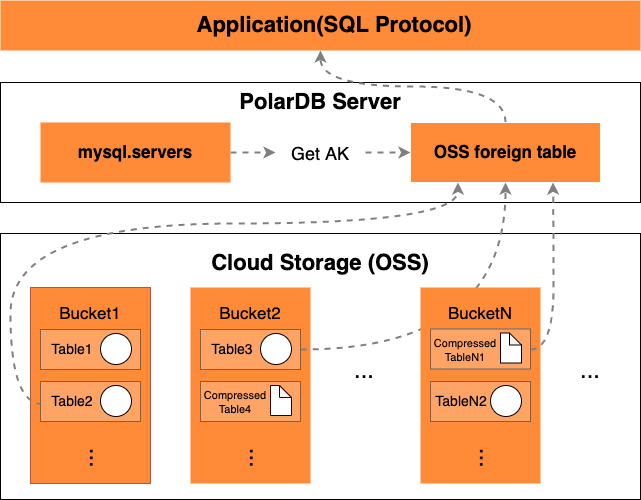
Limitations
OSS foreign tables can query data from CSV files only.
OSS foreign tables support only the CREATE, SELECT, and DROP statements.
NoteThe DROP operation removes only the table metadata in PolarDB, not the data files in OSS.
OSS foreign tables do not support indexes, partitioning, or transactions.
The supported data types for data in CSV format include numeric types, date and time types, string types, and NULL values.
NoteGeospatial data types are not supported.
You cannot query compressed CSV files.
NULL values are supported only if one of the following conditions is met:
The kernel version is MySQL 8.0.1 and the revision is 8.0.1.1.28 or later.
The kernel version is MySQL 8.0.2 and the revision is 8.0.2.2.5 or later.
Numeric types
Type
Size
Signed range
Unsigned range
Description
TINYINT
1 byte
-128 to 127
0 to 255
A very small integer.
SMALLINT
2 bytes
-32768 to 32767
0 to 65535
A small integer.
MEDIUMINT
3 bytes
-8388608 to 8388607
0 to 16777215
A medium-sized integer.
INT or INTEGER
4 bytes
-2147483648 to 2147483647
0 to 4294967295
A standard integer.
BIGINT
8 bytes
-9,223,372,036,854,775,808 to 9,223,372,036,854,775,807
0 to 18,446,744,073,709,551,615
A large integer.
FLOAT
4 bytes
-3.402823466E+38 to -1.175494351E-38; 0; 1.175494351E-38 to 3.402823466E+38
0; 1.175494351E-38 to 3.402823466E+38
A single-precision floating-point number.
DOUBLE
8 bytes
-1.7976931348623157E+308 to -2.2250738585072014E-308; 0; 2.2250738585072014E-308 to 1.7976931348623157E+308
0; 2.2250738585072014E-308 to 1.7976931348623157E+308
A double-precision floating-point number.
DECIMAL
For DECIMAL(M,D), the size is M+2 bytes if M > D, or D+2 bytes otherwise.
Depends on the values of M and D.
Depends on the values of M and D.
A decimal number.
Date and time types
Type
Size
Range
Format
Description
DATE
3 bytes
1000-01-01 to 9999-12-31
YYYY-MM-DD
A date value.
TIME
3 bytes
-838:59:59 to 838:59:59
HH:MM:SS
A time value or duration.
YEAR
1 byte
1901 to 2155
YYYY
A year value.
DATETIME
8 bytes
1000-01-01 00:00:00 to 9999-12-31 23:59:59
YYYY-MM-DD HH:MM:SS
A combined date and time value.
NoteFor this data type, the month and day must be two-digit numbers. For example, specify
2020-01-01instead of2020-1-1. Otherwise, the query fails when pushed down to OSS.TIMESTAMP
4 bytes
1970-01-01 00:00:00 to 2038-01-19 03:14:07
YYYY-MM-DD HH:MM:SS
A timestamp, which is a combined date and time value.
NoteFor this data type, the month and day must be two-digit numbers. For example, specify
2020-01-01instead of2020-1-1. Otherwise, the query fails when pushed down to OSS.String types
Type
Size
Description
CHAR
0 to 255 bytes
A fixed-length string.
VARCHAR
0 to 65,535 bytes
A variable-length string.
TINYBLOB
0 to 255 bytes
A binary string with a maximum length of 255 characters.
TINYTEXT
0 to 255 bytes
A short text string.
BLOB
0 to 65,535 bytes
Long text data in binary format.
TEXT
0 to 65,535 bytes
Long text data.
MEDIUMBLOB
0 to 16,777,215 bytes
Medium-length text data in binary format.
MEDIUMTEXT
0 to 16,777,215 bytes
Medium-length text data.
LONGBLOB
0 to 4,294,967,295 bytes
Extra-large text data in binary format.
LONGTEXT
0 to 4,294,967,295 bytes
Extra-large text data.
NULL values
Insertion
Insert a NULL value into an OSS foreign table.
To insert a NULL value into an OSS foreign table, specify the corresponding NULL value marker,
NULL_MARKER, when you create the table. TheNULL_MARKERfor an OSS foreign table defaults to NULL. You can run theSHOW CREATE TABLEstatement to view the NULL value marker:SHOW CREATE TABLE t1;The following result is returned:
+-------+-----------------------------------------------------------------------------------------------------------------------------------------------------------------------------------+
| Table | Create Table                                                                                                                                                                      |
+-------+-----------------------------------------------------------------------------------------------------------------------------------------------------------------------------------+
| t1    | CREATE TABLE `t1` (
  `id` int(11) DEFAULT NULL
) ENGINE=CSV DEFAULT CHARSET=utf8mb4 COLLATE=utf8mb4_0900_ai_ci /*!99990 800020204 NULL_MARKER='NULL' */ CONNECTION='server_name' |
+-------+-----------------------------------------------------------------------------------------------------------------------------------------------------------------------------------+
1 row in set (0.00 sec)
Insert a NULL value into a CSV file.
If you insert
NULL_MARKERinto a field in a CSV file, andNULL_MARKERis not enclosed in double quotation marks, PolarDB will recognize the value as NULL.NoteIf you add double quotes around
NULL_MARKER, PolarDB recognizes it as a string. As a result, you cannot use theis_nullstatement to find NULL values, and an error is reported if the parameter that is assigned the NULL value in the CSV file does not match the data type of the corresponding parameter in the OSS foreign table.The
NULL_MARKERcannot be a numeric value, an empty string, or contain any of the following characters:",\n,\r, and,
Example
Use the following statement to create an OSS foreign table:
CREATE TABLE `t1` (
  `id` int(11) DEFAULT NULL,
  `name` varchar(20) DEFAULT NULL,
  `time` timestamp NULL DEFAULT NULL
) ENGINE=CSV NULL_MARKER='NULL' CONNECTION='server_name';
Assume that the data file contains the following content:
1,"xiaohong","2022-01-01 00:00:00"
NULL,"xiaoming","2022-02-01 00:00:00"
3,NULL,"2022-03-01 00:00:00"
4,"xiaowang",NULL
Querying the OSS foreign table returns the following data:
SELECT * FROM t1;
+------+----------+---------------------+
| id   | name     | time                |
+------+----------+---------------------+
|    1 | xiaohong | 2022-01-01 00:00:00 |
| NULL | xiaoming | 2022-02-01 00:00:00 |
|    3 | NULL     | 2022-03-01 00:00:00 |
|    4 | xiaowang | NULL                |
+------+----------+---------------------+
Reading
When data is read from a CSV file, if a value in the CSV file is NULL and the corresponding column in the OSS foreign table can be NULL, the column is set to NULL.
If a NULL value is read from a CSV file for a column defined as NOT NULL, a conflict occurs. The result depends on the SQL mode.
If the
sql_modeis set toSTRICT_TRANS_TABLES, an error is reported.If the
sql_modeis set to a mode other thanSTRICT_TRANS_TABLES, the column is set to its defined default value. If no default value is defined, it is set to the MySQL default for its data type. For more information, see Data Type Default Values. A warning is also returned. Use theSHOW WARNINGS;command to view the warning details.
NoteUse the
SHOW VARIABLES LIKE "sql_mode";command to view the current SQL mode. You can also go to the PolarDB console and modify thesql_modeparameter on the page. For more information, see Modify parameters.Example
Create an OSS foreign table named
twhere theidcolumn is set to NOT NULL and has no default value.CREATE TABLE `t` ( `id` int(11) NOT NULL ) ENGINE=CSV CONNECTION="server_name";Assume that the CSV file
t.CSVcontains the following content:NULL 2The following two scenarios may occur when you read data from the CSV file by using the OSS foreign table:
If
sql_modeis set toSTRICT_TRANS_TABLES, run the following command to query data from the CSV file:SELECT * FROM t;The following error message is reported:
ERROR 1364 (HY000): Field 'id' doesn't have a default valueIf
sql_modeis set to a mode other thanSTRICT_TRANS_TABLES, run the following command to query data from the CSV file:SELECT * FROM t;The following result is returned:
+----+
| id |
+----+
|  0 |
|  2 |
+----+
2 rows in set, 1 warning (0.00 sec)
In the result, 0 is the MySQL default value. Run the following command to view the warning message:
SHOW WARNINGS;The following result is returned:
+---------+------+-----------------------------------------+
| Level   | Code | Message                                 |
+---------+------+-----------------------------------------+
| Warning | 1364 | Field 'id' doesn't have a default value |
+---------+------+-----------------------------------------+
1 row in set (0.00 sec)
Parameters
You can view or modify the following parameters on the page in the PolarDB console:
Parameter | Scope | Description |
loose_csv_oss_buff_size | Session | Sets the amount of memory in bytes that a single OSS thread can use. The default value is 134217728. Valid values: 4096 to 134217728 |
loose_csv_max_oss_threads | Global | Sets the maximum number of concurrent OSS threads. The default value is 1. Valid values: 1 to 100 |
The maximum total memory for the OSS feature is calculated as: loose_csv_max_oss_threads * loose_csv_oss_buff_size.
To prevent out-of-memory issues, the total memory for the OSS feature should not exceed 5% of the current node's memory.
Procedure
Create an OSS server
Create an OSS server to add connection information and connect to OSS.
For security reasons, creating an OSS server is the only supported method to connect to OSS.
Newer versions
If your database cluster meets one of the following conditions, use the following syntax:
The kernel version is MySQL 8.0.1, and the revision is 8.0.1.1.28 or later.
The kernel version is MySQL 8.0.2, and the revision is 8.0.2.2.5 or later.
CREATE SERVER <server_name>
FOREIGN DATA WRAPPER oss OPTIONS
(
  [DATABASE '<my_database_name>',]
  EXTRA_SERVER_INFO '{"oss_endpoint": "<my_oss_endpoint>","oss_bucket": "<my_oss_bucket>","oss_access_key_id": "<my_oss_access_key_id>","oss_access_key_secret": "<my_oss_access_key_secret>","oss_prefix":"<my_oss_prefix>","oss_sts_token":"<my_oss_sts_token>"}'
);The optional
DATABASEparameter is equivalent tooss_prefix. We recommend usingoss_prefix.To use the
oss_sts_tokenparameter, one of the following conditions must be met:The kernel version is MySQL 8.0.1, and the revision is 8.0.1.1.29 or later.
The kernel version is MySQL 8.0.2, and the revision is 8.0.2.2.6 or later.
The following table describes the parameters.
Parameter | Type | Required | Description |
server_name | String | Yes | The name of the OSS server. Note This parameter is global and must be unique. The name is case-insensitive and has a maximum length of 64 characters. Names longer than 64 characters are automatically truncated. You can specify the OSS server name as a quoted string. |
my_database_name | String | No | The directory in OSS that contains the CSV data files. Note If both the |
my_oss_endpoint | String | Yes | The endpoint for the corresponding OSS region. Note If you access the database from an Alibaba Cloud host, use an internal endpoint, which contains "internal" in its name, to avoid public network traffic. For example, the internal endpoint for the China (Hangzhou) region is |
my_oss_bucket | String | Yes | The OSS bucket where the data files are stored. You must create this bucket in OSS in advance. Note For best performance, place the OSS bucket and the PolarDB database cluster in the same availability zone to reduce network latency. |
my_oss_access_key_id | String | Yes | The AccessKey ID of a RAM user or an Alibaba Cloud account. |
my_oss_access_key_secret | String | Yes | The AccessKey Secret of a RAM user or an Alibaba Cloud account. |
my_oss_prefix | String | No | The directory in OSS that contains the CSV data files. |
my_oss_sts_token | String | No | The STS temporary access credential. Note
|
Older versions
If your database cluster meets one of the following conditions, use the following syntax:
The kernel version is MySQL 8.0.1, and the revision is from 8.0.1.1.25.4 to 8.0.1.1.27.
The kernel version is MySQL 8.0.2, and the revision is from 8.0.2.2.1 to 8.0.2.2.4.
CREATE SERVER <server_name>
FOREIGN DATA WRAPPER oss OPTIONS
(
  [DATABASE '<my_database_name>',]
  EXTRA_SERVER_INFO '{"oss_endpoint": "<my_oss_endpoint>","oss_bucket": "<my_oss_bucket>","oss_access_key_id":"<my_oss_access_key_id>","oss_access_key_secret":"<my_oss_access_key_secret>"}'
); In this version, the syntax does not support the oss_prefix and oss_sts_token parameters.
The following table describes the parameters.
Parameter | Type | Required | Description |
server_name | String | Yes | The name of the OSS server. Note This parameter is global and must be unique. The name is case-insensitive and has a maximum length of 64 characters. Names longer than 64 characters are automatically truncated. You can specify the OSS server name as a quoted string. |
my_database_name | String | No | The name of the directory in OSS that contains the CSV data files. |
my_oss_endpoint | String | Yes | The endpoint for the corresponding OSS region. Note If you access the database from an Alibaba Cloud host, use an internal endpoint, which contains "internal" in its name, to avoid public network traffic. Example: |
my_oss_bucket | String | Yes | The OSS bucket where the data files are stored. You must create the bucket in OSS beforehand. |
my_oss_access_key_id | String | Yes | The AccessKey ID of a RAM user or an Alibaba Cloud account. |
my_oss_access_key_secret | String | Yes | The AccessKey Secret of a RAM user or an Alibaba Cloud account. |
Creating an OSS server requires the SERVERS_ADMIN permission. You can run the SHOW GRANTS FOR <username>; command to check whether the current user has the SERVERS_ADMIN permission. Currently, high-privilege accounts have this permission by default and can grant it to low-privilege accounts.
If you do not have the
SERVERS_ADMINprivilege, the following error is returned:Access denied; you need (at least one of) the SERVERS_ADMIN OR SUPER privilege(s) for this operation.If you use a standard account that does not have the
SERVERS_ADMINprivilege, a high-privilege account can grant the privilege by running:GRANT SERVERS_ADMIN ON *.* TO `users`@`%` WITH GRANT OPTION.If you have a high-privilege account but do not have the
SERVERS_ADMINpermission, go to the page in the PolarDB console and reset the permissions. Wait for a period of time and then check the high-privilege account again. The account will then be granted theSERVERS_ADMINpermission. If the high-privilege account still does not have theSERVERS_ADMINpermission after you try these steps, please submit a ticket to contact us, or contact us by searching for our group number on DingTalk.A high-privilege account can view the OSS server information by running
SELECT Server_name, Extra_server_info FROM mysql.servers;. For security, theoss_access_key_idandoss_access_key_secretparameter values are encrypted and cannot be viewed.
Upload data
You can use the ossutil command-line tool to upload local CSV files to Object Storage Service (OSS).
The OSS directory where you upload the CSV file must match the directory specified in the
DATABASEoross_prefixparameter of the OSS server.The name of the uploaded CSV file must be in the format
<foreign_table_name>.CSV, with the.CSVextension in uppercase. For example, if the OSS foreign table is namedt1, the CSV file must be namedt1.CSV.The data fields in the CSV file must match the columns of the OSS foreign table. For example, if the OSS foreign table
t1has a single columnidof typeINT, the uploaded CSV file must also contain only oneINTfield.We recommend that you directly upload data files from your local MySQL database and create the corresponding OSS foreign table based on the table definition.
Create an OSS foreign table
After you define the OSS server, create an OSS foreign table in PolarDB to map to a CSV file in OSS. Example:
CREATE TABLE <table_name> (create_definition,...) engine=csv connection="<connection_string>";The connection_string consists of the following parts, joined with a slash (/):
The OSS server name.
(Optional) The path to the data file in OSS.
NoteThe data file path is supported only if one of the following conditions is met.
The kernel version is MySQL 8.0.1, and the revision is 8.0.1.1.28 or later.
The kernel version is MySQL 8.0.2, and the revision is 8.0.2.2.5 or later.
(Optional) The name of the data file.
NoteDo not include the
.CSVsuffix in the data file name.If you do not specify a data file name, the OSS file corresponding to the current table is
<current_table_name>.CSV. If you specify a data file name, the corresponding OSS file is<specified_data_file_name>.CSV.If you specify the path to the data file in OSS, you must also specify the data file name. Otherwise, the system treats the last segment of the path as the file name.
View OSS foreign table
After the OSS foreign table is created, you can view its definition by running SHOW CREATE TABLE <table_name>;. Check that the table's engine is CSV (that is, ENGINE=CSV). If not, your PolarDB database cluster version may be too old to support the OSS engine. For more information, see Prerequisites.
Example
CREATE TABLE t1 (id int) engine=csv connection="server_name/a/b/c/d/t1";This example shows the composition of the connection_string:
OSS server name:
server_name.Path to the data file in OSS:
oss_prefix/a/b/c/d/.Data file:
t1. The actual file ist1.CSV, but the.CSVsuffix is omitted as required.
You can specify the data file for the OSS foreign table by name only. For example, in the following statement, PolarDB searches for the t2.CSV file in the oss_prefix path in OSS.
CREATE TABLE t1 (id int) engine=csv connection="server_name/t2";Query data
The following examples query the t1 table created in the previous steps.
-- Count rows in the t1 table.
SELECT count(*) FROM t1;

-- Range query.
SELECT id FROM t1 WHERE id < 10 AND id > 1;

-- Point query.
SELECT id FROM t1 where id = 3;

-- Multi-table join.
SELECT id FROM t1 left join t2 on t1.id = t2.id WHERE t2.name like "%er%";
The following table describes common errors that may occur during data queries and their solutions.
If a query returns a warning instead of an error, run SHOW WARNINGS; to view the warning details.
Error message | Cause | Solution |
OSS error: No corresponding data file on the OSS engine. | The corresponding data file was not found in OSS. | Check whether the data file exists at the expected path in OSS.
|
There is not enough memory space for OSS transmission. Currently requested memory %d. | Insufficient memory for the OSS query. | To resolve this error:
|
ERROR 8054 (HY000): OSS error: error message : Couldn't connect to server.Failed connect to aliyun-mysql-oss.oss-cn-hangzhou-internal.aliyuncs.com:80; | The database cluster cannot connect to the OSS server. | Check whether the database instance and the OSS bucket are in the same availability zone.
|
Query optimization
The OSS engine improves query performance by pushing down eligible conditions to the remote OSS engine. This optimization is called engine condition pushdown. The following limitations apply to condition pushdown:
Only UTF-8-encoded CSV text files are supported.
In SQL statements, only the following types of operators and arithmetic expressions are supported:
Comparison operators:
>,<,>=,<=,==Logical operators:
LIKE,IN,AND,ORArithmetic expressions:
+,-,*,/
Only single-file queries are supported. Queries that use
JOIN,ORDER BY,GROUP BY, orHAVINGclauses are not supported.The WHERE clause cannot contain aggregation operations. For example,
where max(age) > 100is not allowed.The maximum number of columns is 1,000, and the maximum length of a column name in an SQL statement is 1,024 bytes.
In a LIKE clause, up to five
%wildcards are supported.In an IN clause, up to 1,024 constants are supported.
For CSV files, the maximum size is 256 KB per row and 256 KB per column.
The maximum length of an SQL statement is 16 KB. The WHERE clause can contain up to 20 expressions, and a query can contain up to 100 aggregation operations.
This feature is disabled by default. To enable it, run the SET SESSION optimizer_switch='engine_condition_pushdown=on'; command.
Queries that meet these conditions are pushed down to the OSS engine. Check the execution plan of an OSS foreign table to see which conditions are pushed down.
Use
EXPLAINto view the execution plan of an OSS foreign table. Example:EXPLAIN SELECT count(*) FROM `t1` WHERE `id` > 5 AND `id` < 100 AND `name` LIKE "%1%%%%%" GROUP BY `id` ORDER BY `id` DESC; +----+-------------+-------+------------+------+---------------+------+---------+------+-------+----------+----------------------------------------------------------------------------------------------------------------------------------+ | id | select_type | table | partitions | type | possible_keys | key | key_len | ref | rows | filtered | Extra | +----+-------------+-------+------------+------+---------------+------+---------+------+-------+----------+----------------------------------------------------------------------------------------------------------------------------------+ | 1 | SIMPLE | t1 | NULL | ALL | NULL | NULL | NULL | NULL | 15000 | 1.23 | Using where; With pushed engine condition ((`test`.`t1`.`id` > 5) and (`test`.`t1`.`id` < 100)); Using temporary; Using filesort | +----+-------------+-------+------------+------+---------------+------+---------+------+-------+----------+----------------------------------------------------------------------------------------------------------------------------------+ 1 row in set, 1 warning (0.00 sec)The conditions following
With pushed engine conditionare pushed down to the remote OSS engine. The remaining conditions,`name` LIKE "%1%%%%%"andGROUP BY `id` ORDER BY `id` DESC, are not pushed down and are executed only on the local OSS server.Use the
treeformat to view the execution plan of an OSS foreign table. Example:EXPLAIN FORMAT=tree SELECT SELECT count(*) FROM `t1` WHERE `id` > 5 AND `id` < 100 AND `name` LIKE "%1%%%%%" GROUP BY `id` ORDER BY `id` DESC; +-------------------------------------------------------------------------------------------------------------------------------------------------------------------------------------------------------------------------------------------------------------------------------------------------------------------+ | EXPLAIN | +-------------------------------------------------------------------------------------------------------------------------------------------------------------------------------------------------------------------------------------------------------------------------------------------------------------------+ | -> Sort: <temporary>.id DESC -> Table scan on <temporary> -> Aggregate using temporary table -> Filter: (t1.`name` like '%1%%%%%') (cost=1690.00 rows=185) -> Table scan on t1, extra ( engine conditions: ((t1.id > 5) and (t1.id < 100)) ) (cost=1690.00 rows=15000) | +-------------------------------------------------------------------------------------------------------------------------------------------------------------------------------------------------------------------------------------------------------------------------------------------------------------------+ 1 row in set (0.00 sec)The conditions following
engine conditions:are pushed down to the remote OSS engine. The remaining conditions,`name` LIKE "%1%%%%%"andGROUP BY `id` ORDER BY `id` DESC, are not pushed down and are executed only on the local OSS server.NoteYour cluster must be running PolarDB for MySQL 8.0.2 or later. You can confirm the cluster version by following the instructions in Query the version number.
Use the
JSONformat to view the execution plan of an OSS foreign table. Example:EXPLAIN FORMAT=json SELECT count(*) FROM `t1` WHERE `id` > 5 AND `id` < 100 AND `name` LIKE "%1%%%%%" GROUP BY `id` ORDER BY `id` DESC; +-------------------------------------------------------------------------------------------------------------------------------------------------------------------------------------------------------------------------------------------------------------------------------------------------------------------------------------------------------------------------------------------------------------------------------------------------------------------------------------------------------------------------------------------------------------------------------------------------------------------------------------------------------------------------------------------------------------------------------------------------------------------------------------------------------------------------------------------------------------------------------------------------------------------------------------------------------------------------------------------+ | EXPLAIN | +-------------------------------------------------------------------------------------------------------------------------------------------------------------------------------------------------------------------------------------------------------------------------------------------------------------------------------------------------------------------------------------------------------------------------------------------------------------------------------------------------------------------------------------------------------------------------------------------------------------------------------------------------------------------------------------------------------------------------------------------------------------------------------------------------------------------------------------------------------------------------------------------------------------------------------------------------------------------------------------------+ | { "query_block": { "select_id": 1, "cost_info": { "query_cost": "1875.13" }, "ordering_operation": { "using_filesort": false, "grouping_operation": { "using_temporary_table": true, "using_filesort": true, "cost_info": { "sort_cost": "185.13" }, "table": { "table_name": "t1", "access_type": "ALL", "rows_examined_per_scan": 15000, "rows_produced_per_join": 185, "filtered": "1.23", "engine_condition": "((`test`.`t1`.`id` > 5) and (`test`.`t1`.`id` < 100))", "cost_info": { "read_cost": "1671.49", "eval_cost": "18.51", "prefix_cost": "1690.00", "data_read_per_join": "146K" }, "used_columns": [ "id", "name" ], "attached_condition": "(`test`.`t1`.`name` like '%1%%%%%')" } } } } } | +-------------------------------------------------------------------------------------------------------------------------------------------------------------------------------------------------------------------------------------------------------------------------------------------------------------------------------------------------------------------------------------------------------------------------------------------------------------------------------------------------------------------------------------------------------------------------------------------------------------------------------------------------------------------------------------------------------------------------------------------------------------------------------------------------------------------------------------------------------------------------------------------------------------------------------------------------------------------------------------------+ 1 row in set, 1 warning (0.00 sec)Similarly, the conditions in the
engine_conditionfield are pushed down to the remote OSS engine. The remaining conditions,`name` LIKE "%1%%%%%"andGROUP BY `id` ORDER BY `id` DESC, are not pushed down and are executed only on the local OSS server.
If you receive the following error, it indicates that some characters in the OSS data file are incompatible with engine condition pushdown.
OSS error: The current query does not support engine condition pushdown. You need to use NO_ECP() hint or set optimizer_switch = 'engine_condition_pushdown=OFF' to turn off the condition push down function.You can manually disable engine condition pushdown by using a hint or optimizer_switch.
Hints
Use a hint to disable engine condition pushdown for a specific query. For example, to disable engine condition pushdown for the
t1table:SELECT /*+ NO_ECP(t1) */ `j` FROM `t1` WHERE `j` LIKE "%c%" LIMIT 10;optimizer_switch
Use
optimizer_switchto disable engine condition pushdown for all queries in the current session.SET SESSION optimizer_switch='engine_condition_pushdown=off'; # Disable engine condition pushdown for the current session.To check the status of engine condition pushdown for the current session, run the following command:
select @@optimizer_switch;
Synchronize OSS server information
The primary node and read-only nodes in a PolarDB cluster share a single OSS server, enabling data access from all nodes. This lock-free synchronization ensures that operations on each node remain independent.
When you modify the OSS server information, the changes are synchronized to the read-only nodes without locks. If a thread on a read-only node holds a lock on the OSS server, this synchronization may be delayed. In this case, run /*force_node='pi-bpxxxxxxxx'*/ flush privileges; or /*force_node='pi-bpxxxxxxxx'*/flush table oss_foreign_table; to manually update the read-only node's OSS server information.