The archive database feature is available in two editions: Archive Database Standalone Edition and Archive Database Cluster Edition (now known as X-Engine Edition). This topic describes how to upgrade a cluster from Archive Database Standalone Edition to Archive Database Cluster Edition.
Background
You can no longer purchase new Archive Database Standalone Edition clusters. However, existing clusters of this edition can still be used. You can upgrade your existing Archive Database Standalone Edition clusters to the dedicated specifications of Archive Database Cluster Edition. For more information about Archive Database Cluster Edition, see X-Engine Edition.
Precautions
-
Upgrading an Archive Database Standalone Edition cluster to an Archive Database Cluster Edition cluster automatically restarts the node. The restart process typically takes 3 to 5 minutes, but the exact duration depends on the volume of redo logs accumulated before the upgrade. In extreme cases, the restart may take up to 30 minutes. Your services will be unavailable during this process. We recommend performing this upgrade during off-peak hours.
-
After the upgrade is complete, all nodes in the cluster continue to use the primary endpoint. If you need to use a cluster endpoint, you must configure it manually.
-
After upgrading to Archive Database Cluster Edition, you cannot revert to Archive Database Standalone Edition. If needed, you can add more nodes. Adding nodes at this stage does not cause a node restart. The procedure for adding or removing nodes is the same as for the cluster edition. For more information, see Add or remove nodes.
Procedure
- Log on to the PolarDB console.
-
In the upper-left corner, select the region where the cluster is deployed.
-
There are two ways to open the Change Configurations dialog box:
-
Method 1:
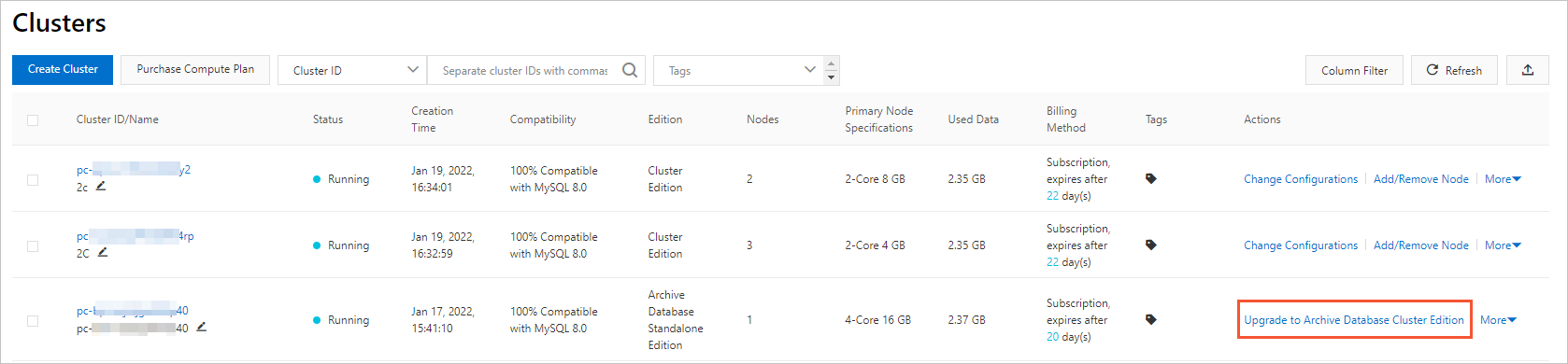
On the Clusters page, find the target cluster, and in the Actions column, click Upgrade to Archive Database Cluster Edition.
-
Method 2:
-
On the Clusters page, click the ID of the target cluster.
-
On the Basic Information page, in the Database Nodes section, click Upgrade to Archive Database Cluster Edition.

-
-
-
Click + Add a read-only node, select a Switching Time, select the terms of service checkbox, and then click Go to pay.
Note-
To add multiple nodes at once to your PolarDB for MySQL cluster, click + Add a read-only node for each desired node.
-
You can set Switching Time to Switch Now or Switch At. If you select Switch At, you can specify a time within the next 24 hours. The nodes will be added within 30 minutes of the specified time. You can view task details or cancel the task on the Scheduled Tasks page. For more information, see Scheduled Tasks.
-
-
On the Pay page, confirm the order details and click Pay.