The default specifications of PolarProxy Enterprise Edition meet most application scenarios. During stress testing or high business throughput, the latest version of PolarProxy automatically scales up in real time based on proxy load to prevent PolarProxy from becoming a bottleneck. For earlier versions of PolarProxy, you can also manually upgrade its specifications. This topic describes how to upgrade PolarProxy Enterprise Edition specifications.
Background information
The specifications of PolarProxy Enterprise Edition automatically scale based on the number and specifications of database nodes. No manual configuration is required. The rules are as follows:
Standard Enterprise Edition: The default specification is 1/6 of the total cores of database nodes in the cluster, rounded up to the nearest multiple of 2 vCPU. Minimum: 2 vCPU. Maximum: 64 vCPU.
Dedicated Enterprise Edition: The default specification is 1/4 of the total cores of database nodes in the cluster, rounded up to the nearest multiple of 2 vCPU. Minimum: 2 vCPU. Maximum: 128 vCPU.
For example, if the PolarProxy uses the Dedicated Enterprise Edition specification and the cluster has two 4-core database nodes, PolarProxy uses 2 cores.
The default specifications of PolarProxy Enterprise Edition meet most application scenarios. During stress testing or high business throughput, the latest version of PolarProxy automatically scales up in real time based on proxy load to prevent PolarProxy from becoming a bottleneck. For earlier versions of PolarProxy, you can also manually upgrade its specifications.
Version requirements
PolarProxy must be version 2.8.0 or earlier. For more information about how to check the PolarProxy version, see View version information.
Precautions
PolarDB for MySQL supports three types of proxies: proxies for Serverless clusters, proxies for standard clusters, and proxies for the Serverless feature of fixed-specification clusters.
Proxies for Serverless clusters support automatic upgrades. No version requirements.
Proxies with earlier versions (version < 2.8.1) are proxies for standard clusters. You can change the proxy specifications in the console.
Proxies with later versions (version ≥ 2.8.1) are proxies for the Serverless feature of fixed-specification clusters. CPU resources automatically scale in real time based on proxy load. No manual operation is required.
Specification changes for proxies of the Serverless feature of fixed-specification clusters prioritize local scaling, which is transparent to your business. Cross-machine scaling is used only when local resources are insufficient.
During cross-machine scaling, new sessions are connected to the new-specification PolarProxy. Sessions that remain connected to the original-specification PolarProxy after 48 hours may experience transient interruptions. We recommend that you perform the upgrade during off-peak hours and ensure that your application has a reconnection mechanism.
The database proxy does not consume the CPU core resources of the cluster. Therefore, upgrading its specifications does not reduce the number of available CPU cores in the cluster.
PolarProxy Enterprise Edition is free of charge. No fees are charged for quota increases.
Change the specifications of a standard cluster proxy
You can change the specifications of a standard cluster proxy in the console. This topic uses PolarProxy Enterprise Dedicated Edition as an example.
Log on to the PolarDB console.
-
In the upper-left corner, select the region where the cluster is deployed.
On the Clusters page, click the ID of the target cluster.
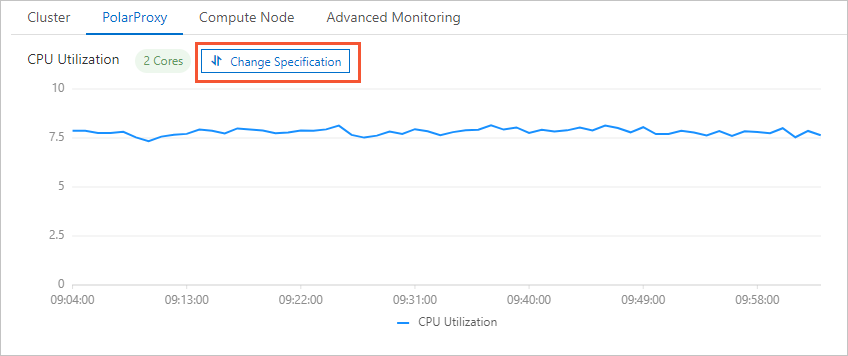
On the page, click the Database Proxy tab, and then click Change Specifications.
In the Change Specifications dialog box, select an upgrade plan for PolarProxy Enterprise Edition.
Upgrade plans:
Standard: Standard Enterprise Edition uses 1/6 of the total cores, and Dedicated Enterprise Edition uses 1/4 of the total cores, rounded up.
Standard x2: The number of vCPUs is twice that of the standard plan.
Standard x4: The number of vCPUs is four times that of the standard plan.
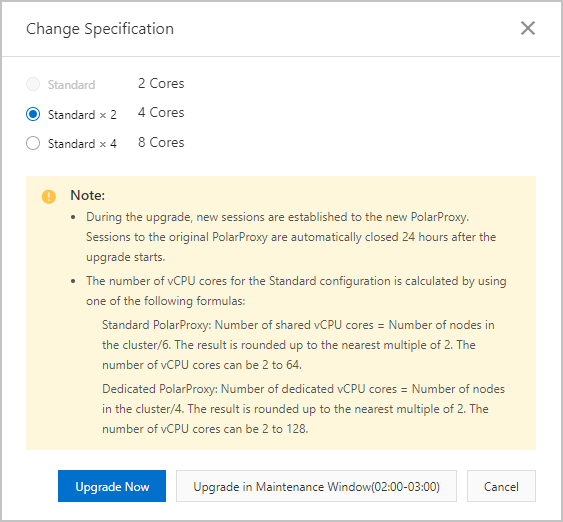
Click Upgrade Now or Upgrade in Maintenance Window.
If you select Upgrade in Maintenance Window, you can also view the task details or cancel the task on the Scheduled Tasks page. For more information, see Scheduled tasks.
In the dialog box that appears, click OK.