As the business volume of customers using the Multi-master Cluster (Limitless) Edition product series grows, more and more read/write nodes are required. In this case, customers need a global read-only node to read the data on all read/write nodes, which facilitates the processing of aggregation requests. This topic describes the architecture and core advantages of the global read-only node of Multi-master Cluster (Limitless) Edition.
Technical architecture
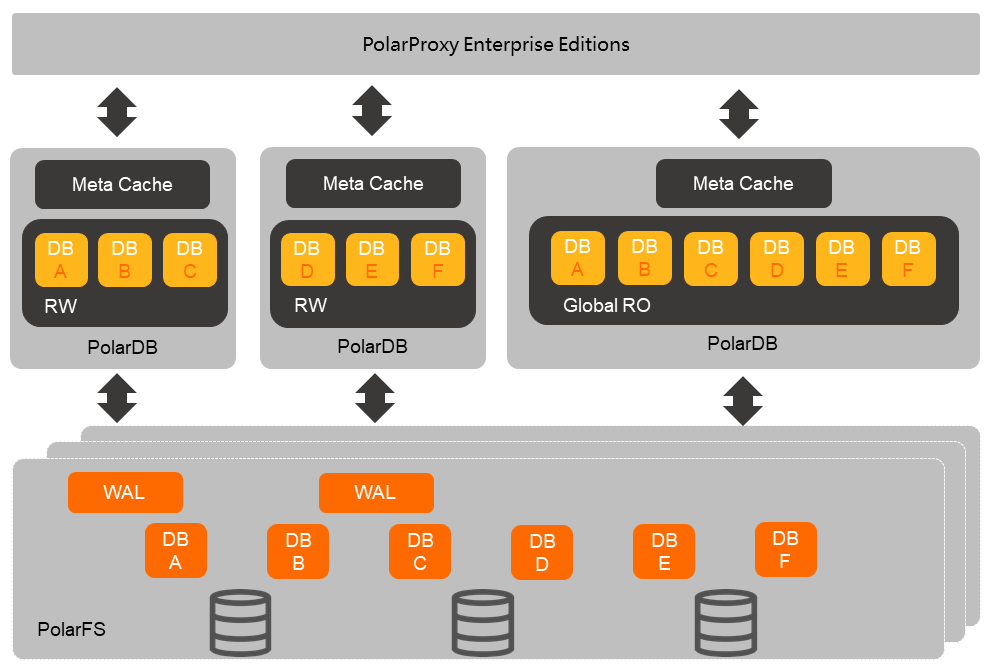
The data files of all read/write nodes in the cluster are stored in the shared storage (PolarStore). The global read-only node shares the data files of the existing read/write nodes in the underlying storage (PolarStore) through the distributed file system (PolarFileSystem). You can connect to the global read-only node through the global read-only endpoint, and use the read/write splitting feature of the database proxy to automatically identify SQL statements that require cross-node access, so as to read the data on the read/write nodes in the cluster.
Core advantages
-
Cost reduction.
Before the global read-only node was provided, to build a global read-only node, customers had to additionally purchase a PolarDB for MySQL cluster to process aggregation requests, and use this cluster to store the data on all RW nodes. In addition, customers had to purchase multiple DTS synchronization links to continuously synchronize the data on multiple RW nodes to the newly purchased cluster.
After using the global read-only feature of Multi-master Cluster (Limitless) Edition, customers only need to purchase one global read-only node to process aggregation requests. With the shared storage capability of PolarDB, the global read-only node and the RW nodes of Multi-master Cluster (Limitless) Edition can share the same data, and there is no need to additionally purchase a cluster to store the data on all RW nodes. In addition, the global read-only node can directly synchronize the data of all RW nodes under Multi-master Cluster (Limitless) Edition, and there is no need to additionally purchase multiple DTS synchronization links.
-
Low latency.
The latency of DTS data synchronization is generally at the second level, while the latency of global read-only data synchronization is tens of milliseconds, which greatly improves the timeliness of aggregation data.
Kernel version
Currently, only the 8.0 kernel version of PolarDB for MySQL supports Multi-master Cluster (Limitless).
Billing
Global read-only nodes are charged only for the compute nodes. For billing details, see Compute nodes.
Usage instructions
Add a global read-only node
You can add a global read-only node by Add a node. The added read-only node can be used as a global read-only node in the multi-master cluster.
Run cross-database queries
The global read-only node of Multi-master Cluster (Limitless) Edition has the capability of directly accessing the data on all RW nodes across databases. You can directly run cross-database queries on the global read-only node, for example: select * from db1.tbl1 t1, db2.tbl2 t2 where t1.id=t2.id;. You can also flexibly change the node configuration through Manual specification change based on the business volume.
Remove a global read-only node
After you finish using it, you can remove the read-only node to release resources and save costs.
After the global read-only node is removed, the global read-only endpoint is also removed, and you will be unable to perform cross-node queries through the cluster endpoint. To ensure the normal operation of your business, after removing the read-only node, use the cluster endpoint to connect to the read/write nodes to read data.
Add a global read-only column store node
You can modify the configuration parameter loose_polar_enable_imci_with_mm to ON, and then add a global read-only column store node.