Columnstore index data is physically written in primary key order and, for updated rows, in append order — which means data is generally unsorted. Without a deliberate ordering, the In-Memory Column Index (IMCI) pruner must read more column data blocks than necessary to satisfy a query. Sort keys let you control how column data blocks are physically ordered so the pruner can skip irrelevant blocks and reduce I/O.
How it works
Columnstore index data is organized into row groups of 64,000 rows each. Within each row group, columns are packaged into column data blocks. Each block stores the minimum and maximum values of its data as metadata (a rough index). When a query runs, the IMCI pruner classifies all column data blocks into three categories based on the query predicate and this metadata:
Relevant — must be read
Possibly relevant — read as a candidate
Irrelevant — skipped entirely
The physical order of column data blocks determines how effective this pruning is. For a query like SELECT * FROM t WHERE c >= 8, an unsorted set of blocks requires loading all of them. A sorted set lets the pruner skip any block whose maximum value is less than 8.
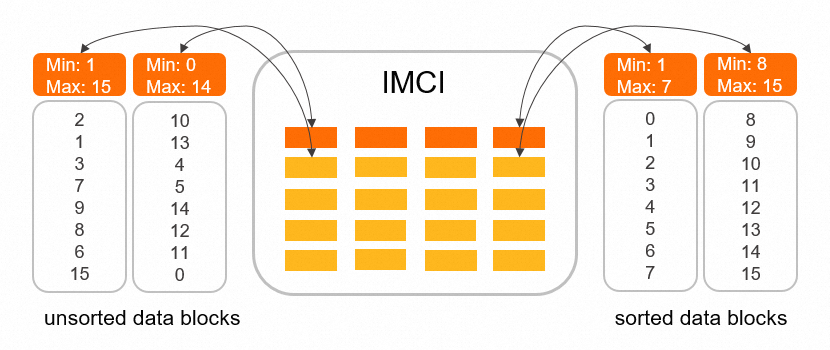
When to use sort keys
Sort keys are most effective when:
Your table is large (hundreds of gigabytes or more).
Queries are selective — they filter on a small subset of rows rather than scanning the full table.
A large percentage of your queries use the same filter columns.
Sort keys are less useful when:
Queries scan most of the table without selective filters.
Write throughput is more important than read performance — incremental sorting slows down when write workload is high to free resources for write operations.
Build time is constrained — sorting increases index build time significantly (see Performance reference).
Prerequisites
Before you begin, ensure that you have:
An Enterprise Edition PolarDB for MySQL cluster at one of the following versions:
Data sorting when creating a new columnstore index:
Version Minimum revision PolarDB for MySQL 8.0.1 8.0.1.1.32 PolarDB for MySQL 8.0.2 8.0.2.2.12 Incremental sorting:
Version Minimum revision PolarDB for MySQL 8.0.1 8.0.1.1.39.1 PolarDB for MySQL 8.0.2 8.0.2.2.20.1
To check your cluster version, see Query the version number.
Limitations
BLOB, JSON, and GEOMETRY columns cannot be used as sort keys.
Incremental sorting does not support unsigned integer or Decimal columns as sort keys.
Incremental sorting maintains order based only on the first column of the sort key. Additional sort key columns are not maintained incrementally.
When write workload is high, incremental sorting slows down to free resources for write operations.
Choose sort key columns
Choosing the right columns determines how much pruning benefit you get. Follow these guidelines:
Prioritize columns used in range or equality filters. These benefit most from min-max pruning. For date-range queries (for example,
WHERE order_date BETWEEN ... AND ...), the date column is a strong candidate.Favor lower-cardinality columns as the leading key. The pruner skips blocks most effectively when the leading sort key column has relatively low cardinality. A column with very high cardinality (for example, a unique user ID) produces blocks with wide min-max ranges, reducing skip effectiveness.
Add join predicate columns as secondary keys if you have remaining capacity.
Limit the number of sort key columns. Additional columns increase build time with diminishing pruning benefit.
Configure sort keys
Step 1: Enable data sorting
Set the imci_enable_pack_order_key parameter to ON.
This parameter is ON by default. If you have not changed it, sorting is already active for newly created columnstore indexes.For parameter naming differences between the PolarDB console and a database session, see Parameters.
Step 2: Add sort keys to the table
Run the following statement to specify sort key columns:
ALTER TABLE table_name COMMENT 'columnar=1 order_key=column_name[,column_name]';| Parameter | Description |
|---|---|
table_name | The name of the table. |
column_name | The column to use as a sort key. Separate multiple columns with commas. |
Example — sort the lineitem table by receipt date and shipping mode:
ALTER TABLE lineitem COMMENT='columnar=1 order_key=l_receiptdate,l_shipmode';Step 3: Monitor build progress
Query INFORMATION_SCHEMA.IMCI_ASYNC_DDL_STATS to track build progress:
SELECT * FROM INFORMATION_SCHEMA.IMCI_ASYNC_DDL_STATS;For column descriptions, see View DDL execution speed and build progress for IMCIs.
Parameters
To enable or disable sorting and configure parallelism, set the following parameters in your cluster.
Parameter names differ between the PolarDB console and a database session.
PolarDB console: Use parameter names with theloose_prefix (for example,loose_imci_enable_pack_order_key). The console adds this prefix for MySQL configuration file compatibility.
Database session (SQL client or command line): Remove theloose_prefix and use the base parameter name (for example,imci_enable_pack_order_key).
| Parameter | Description | Default |
|---|---|---|
loose_imci_enable_pack_order_key | Controls whether to sort data when creating a new columnstore index. Set to ON to enable, OFF to disable. | ON |
loose_imci_enable_pack_order_key_changed_rebuild | Controls whether to rebuild the table when the sort order changes. Set to ON to require a rebuild, OFF to skip it. | OFF |
loose_imci_parallel_build_threads_per_table | Number of threads used to build the columnstore index for a single table. Valid values: 1–128. | 8 |
How sorting is implemented
Sorting when creating a new columnstore index
The sort process mirrors the Data Definition Language (DDL) sorting algorithm for secondary indexes. Both single-threaded and multi-threaded modes are supported:
Single-threaded: Standard two-way merge sort.
Multi-threaded: k-way external merge sort with a loser tree, with optional sampling sort.
The process runs in four passes:
Traverse data in primary key order, write complete rows to data files, and add sort key columns to the sort buffer. Each thread writes to its own data file.
When the sort buffer is full, sort its contents by the sort key combination and flush to merge files.
Merge-sort the merge files in pairs, write sorted output to temporary files, then replace the merge files with the temporary files.
Repeat pass 3 until all merge files are sorted. Then read each record from the merge files, retrieve the full row from the data files using the offset, and append it to the columnstore index.
Incremental sorting
Incremental sorting is progressive — it improves the order of data blocks over time but does not guarantee complete ordering. The process:
Group all data blocks in pairs, selecting groups with high overlap in their timestamp ranges.
Merge-sort each pair to produce two new sorted data blocks.
Repeat until all data blocks are sorted.
Incremental sorting maintains order based only on the first column of the sort key.
Performance reference
Build time vs. query time (100 GB TPC-H, lineitem table, 16 threads)
Sorting increases build time but significantly reduces query time.
| Dataset | Build time | Query time (TPC-H Q12) |
|---|---|---|
| Unordered | 6 minutes | 7.47 s |
| Sorted | 35 minutes | 1.25 s |
Test conditions: LRU cache = 10 GB, executor memory = 10 GB. TPC-H Q12 query:
SELECT
    l_shipmode,
    SUM(CASE
        WHEN o_orderpriority = '1-URGENT' OR o_orderpriority = '2-HIGH'
        THEN 1
        ELSE 0
        END) AS high_line_count,
    SUM(CASE
        WHEN o_orderpriority <> '1-URGENT' AND o_orderpriority <> '2-HIGH'
        THEN 1
        ELSE 0
        END) AS low_line_count
    FROM
        orders,
        lineitem
    WHERE
        o_orderkey = l_orderkey
        AND l_shipmode in ('MAIL', 'SHIP')
        AND l_commitdate < l_receiptdate
        AND l_shipdate < l_commitdate
        AND l_receiptdate >= date '1994-01-01'
        AND l_receiptdate < date '1994-01-01' + interval '1' year
    GROUP BY
        l_shipmode
    ORDER BY
        l_shipmode;
Sort keys combined with partitioning (1 TB TPC-H, 32 cores, 256 GB memory)
The following results compare unordered columnstore indexes against columnstore indexes with partitions and sort keys. Table definitions used:
CREATE TABLE region ( r_regionkey  BIGINT NOT NULL,
                      r_name       CHAR(25) NOT NULL,
                      r_comment    VARCHAR(152)) COMMENT 'COLUMNAR=1';

CREATE TABLE nation ( n_nationkey  BIGINT NOT NULL,
                      n_name       CHAR(25) NOT NULL,
                      n_regionkey  BIGINT NOT NULL,
                      n_comment    VARCHAR(152)) COMMENT 'COLUMNAR=1';

CREATE TABLE part ( p_partkey     BIGINT NOT NULL,
                    p_name        VARCHAR(55) NOT NULL,
                    p_mfgr        CHAR(25) NOT NULL,
                    p_brand       CHAR(10) NOT NULL,
                    p_type        VARCHAR(25) NOT NULL,
                    p_size        BIGINT NOT NULL,
                    p_container   CHAR(10) NOT NULL,
                    p_retailprice DECIMAL(15,2) NOT NULL,
                    p_comment     VARCHAR(23) NOT NULL) COMMENT 'COLUMNAR=1';

CREATE TABLE supplier ( s_suppkey     BIGINT NOT NULL,
                        s_name        CHAR(25) NOT NULL,
                        s_address     VARCHAR(40) NOT NULL,
                        s_nationkey   BIGINT NOT NULL,
                        s_phone       CHAR(15) NOT NULL,
                        s_acctbal     DECIMAL(15,2) NOT NULL,
                        s_comment     VARCHAR(101) NOT NULL) COMMENT 'COLUMNAR=1';

CREATE TABLE partsupp ( ps_partkey     BIGINT NOT NULL,
                        ps_suppkey     BIGINT NOT NULL,
                        ps_availqty    BIGINT NOT NULL,
                        ps_supplycost  DECIMAL(15,2)  NOT NULL,
                        ps_comment     VARCHAR(199) NOT NULL) COMMENT 'COLUMNAR=1';

CREATE TABLE customer ( c_custkey     BIGINT NOT NULL,
                        c_name        VARCHAR(25) NOT NULL,
                        c_address     VARCHAR(40) NOT NULL,
                        c_nationkey   BIGINT NOT NULL,
                        c_phone       CHAR(15) NOT NULL,
                        c_acctbal     DECIMAL(15,2)   NOT NULL,
                        c_mktsegment  CHAR(10) NOT NULL,
                        c_comment     VARCHAR(117) NOT NULL) COMMENT 'COLUMNAR=1';

CREATE TABLE orders ( o_orderkey       BIGINT NOT NULL,
                      o_custkey        BIGINT NOT NULL,
                      o_orderstatus    CHAR(1) NOT NULL,
                      o_totalprice     DECIMAL(15,2) NOT NULL,
                      o_orderdate      DATE NOT NULL,
                      o_orderpriority  CHAR(15) NOT NULL,
                      o_clerk          CHAR(15) NOT NULL,
                      o_shippriority   BIGINT NOT NULL,
                      o_comment        VARCHAR(79) NOT NULL) COMMENT 'COLUMNAR=1'
                      PARTITION BY RANGE (year(`o_orderdate`))
                      (PARTITION p0 VALUES LESS THAN (1992) ENGINE = InnoDB,
                       PARTITION p1 VALUES LESS THAN (1993) ENGINE = InnoDB,
                       PARTITION p2 VALUES LESS THAN (1994) ENGINE = InnoDB,
                       PARTITION p3 VALUES LESS THAN (1995) ENGINE = InnoDB,
                       PARTITION p4 VALUES LESS THAN (1996) ENGINE = InnoDB,
                       PARTITION p5 VALUES LESS THAN (1997) ENGINE = InnoDB,
                       PARTITION p6 VALUES LESS THAN (1998) ENGINE = InnoDB,
                       PARTITION p7 VALUES LESS THAN (1999) ENGINE = InnoDB);

CREATE TABLE lineitem ( l_orderkey       BIGINT NOT NULL,
                        l_partkey        BIGINT NOT NULL,
                        l_suppkey        BIGINT NOT NULL,
                        l_linenumber     BIGINT NOT NULL,
                        l_quantity       DECIMAL(15,2) NOT NULL,
                        l_extendedprice  DECIMAL(15,2) NOT NULL,
                        l_discount       DECIMAL(15,2) NOT NULL,
                        l_tax            DECIMAL(15,2) NOT NULL,
                        l_returnflag     CHAR(1) NOT NULL,
                        l_linestatus     CHAR(1) NOT NULL,
                        l_shipdate       DATE NOT NULL,
                        l_commitdate     DATE NOT NULL,
                        l_receiptdate    DATE NOT NULL,
                        l_shipinstruct   CHAR(25) NOT NULL,
                        l_shipmode       CHAR(10) NOT NULL,
                        l_comment        VARCHAR(44) NOT NULL) COMMENT 'COLUMNAR=1'
                        PARTITION BY RANGE (year(`l_shipdate`))
                        (PARTITION p0 VALUES LESS THAN (1992) ENGINE = InnoDB,
                         PARTITION p1 VALUES LESS THAN (1993) ENGINE = InnoDB,
                         PARTITION p2 VALUES LESS THAN (1994) ENGINE = InnoDB,
                         PARTITION p3 VALUES LESS THAN (1995) ENGINE = InnoDB,
                         PARTITION p4 VALUES LESS THAN (1996) ENGINE = InnoDB,
                         PARTITION p5 VALUES LESS THAN (1997) ENGINE = InnoDB,
                         PARTITION p6 VALUES LESS THAN (1998) ENGINE = InnoDB,
                         PARTITION p7 VALUES LESS THAN (1999) ENGINE = InnoDB);
After importing data, apply sort keys using the ALTER TABLE syntax above:
ALTER TABLE customer COMMENT='COLUMNAR=1 order_key=c_mktsegment';
ALTER TABLE nation COMMENT='COLUMNAR=1 order_key=n_name';
ALTER TABLE part COMMENT='COLUMNAR=1 order_key=p_brand,p_container,p_type';
ALTER TABLE region COMMENT='COLUMNAR=1 order_key=r_name';
ALTER TABLE orders COMMENT='COLUMNAR=1 order_key=o_orderkey,o_custkey,o_orderdate';
ALTER TABLE lineitem COMMENT='COLUMNAR=1 order_key=l_orderkey,l_linenumber,l_receiptdate,l_shipdate,l_partkey';
Query time results (seconds):
| Query | Unordered | Sorted with partitions and sort keys |
|---|---|---|
| Q3 | 71.951 | 36.566 |
| Q4 | 46.679 | 32.015 |
| Q6 | 34.652 | 4.4 |
| Q7 | 74.749 | 34.166 |
| Q12 | 86.742 | 28.586 |
| Q14 | 50.248 | 12.56 |
| Q15 | 79.22 | 21.113 |
| Q20 | 51.746 | 10.178 |
| Q21 | 216.942 | 148.459 |
Differences from secondary index DDL sorting
Columnstore index sorting differs from secondary index DDL sorting in two ways:
Sort key flexibility: Secondary index DDL uses index columns as sort keys. Columnstore index sorting lets you specify any combination of columns as sort keys, independent of the index definition.
Data scope: After columnstore index sorting, the complete row data must be read. Secondary index DDL only stores the index portion (for example, only the prefix of a VARCHAR column).