Standard indexes on partitioned tables are local — they only cover data within a single partition. This means queries that don't filter on the partition key must scan every partition, results aren't globally sorted, and unique constraints must include all partition keys. Global secondary indexes (GSIs) remove these restrictions by spanning all partitions, so you can query any column efficiently and enforce uniqueness without including partition keys.
To use this feature, go to Quota Center. Find the quota by its Quota ID polardb_mysql_gsi, then click Apply in the Actions column.
Why local indexes fall short
A local index is partitioned the same way as its table. Each index partition covers only the corresponding table partition, so data is sorted within each partition but not across them. This creates three problems when queries don't include the partition key:
-
Full partition scans: Every partition is scanned, causing read amplification that grows with partition count.
-
No guaranteed global order: Results from sorted partitions are not globally sorted, which may trigger an additional sorting step.
-
Unique index restriction: A local unique index must include all partition keys to enforce uniqueness across partitions.
A GSI is not partitioned. It is built from data across all partitions and is globally sorted. A globally unique index on a GSI does not need to include all partition keys.
When to use a GSI
|
Scenario |
Recommended index type |
Reason |
|
Queries that frequently filter on non-partition-key columns |
GSI |
Avoids full partition scans |
|
Global uniqueness constraints on non-partition-key columns |
GSI |
Local unique indexes require all partition keys |
|
Infrequent partition archiving (for example, monthly partitions retained for years) |
GSI |
Better query performance, less partition churn |
|
Queries mostly limited to a single partition |
Local index |
Lower write overhead |
Supported versions
This feature requires a PolarDB for MySQL cluster running version 8.0.2, revision 8.0.2.2.7 or later. For information about how to check the version of your cluster, see Query the version number.
Limitations
-
GSIs are supported only on InnoDB partitioned tables. Hybrid partitioned tables are not supported.
-
A GSI cannot be a full-text index or a spatial index.
-
GSIs are not supported on compressed tables, temporary tables, or encrypted tables. Tables using the REDUNDANT or COMPRESSED row format are also not supported.
-
Tables with GSIs do not support generated columns.
-
Partition-level DDL operations — except adding, dropping RANGE or LIST partitions, and truncating partitions — invalidate existing GSIs. You must delete and rebuild all GSIs on the table, or use the
UPDATE GLOBAL INDEXsyntax to rebuild them in the same statement.NoteDropping RANGE or LIST partitions and truncating partitions without invalidating GSIs is a gated feature. You must apply for access before you can use it. For more information, see Feature enhancements.
Feature enhancements
-
Create GSIs faster using parallel DDL.
-
Use instant add column on partitioned tables that have GSIs.
-
For RANGE or LIST partitioned tables with GSIs, partition-level metadata locks (MDLs) are supported when adding new partitions.
-
Convert a table with GSIs to an INTERVAL RANGE partitioned table, or create GSIs directly on an INTERVAL RANGE partitioned table.
-
When you perform partition-level DDL operations on a partitioned table that has GSIs, use the
UPDATE GLOBAL INDEXsyntax to rebuild the GSIs in the same statement. -
You can drop RANGE or LIST partitions, or truncate partitions of any type, without invalidating existing GSIs. This is a gated feature. To enable it, go to the Quota Center and search for Quota ID
polardb_mysql_gsi_drop_partitionorpolardb_mysql_gsi_truncate_part. In the Actions column, click Apply to activate the feature.NoteThis feature is supported only on PolarDB for MySQL 8.0.2, revision 8.0.2.2.31 or later.
-
When you drop or truncate partitions on a table with GSIs, stale data may remain in the GSI if you do not rebuild it. You can enable the asynchronous purge feature to have a background thread clean up the stale data automatically. This is a gated feature. To enable it, go to the Quota Center and search for Quota ID
polardb_mysql_gsi_async_purge. In the Actions column, click Apply to activate the feature.NoteThis feature is supported only on PolarDB for MySQL 8.0.2, revision 8.0.2.2.35 or later.
Syntax
Add the GLOBAL or LOCAL keyword after the index name when creating an index.
If you omit the keyword, a local index is created by default.
-- Create a global index
INDEX index_name(column) GLOBAL

-- Create a local index
INDEX index_name(column) LOCAL
Create a GSI
Create a GSI inline with the table
Add the GLOBAL keyword when defining the index in CREATE TABLE:
CREATE TABLE t1(
  a INT PRIMARY KEY,
  b INT,
  INDEX k1(b) GLOBAL
) PARTITION BY HASH(a) PARTITIONS 3;
Add a GSI to an existing table
Use ALTER TABLE to add a global index, or CREATE UNIQUE INDEX to add a globally unique index:
-- Create the table
CREATE TABLE t1(
  a INT PRIMARY KEY,
  b INT
) PARTITION BY HASH(a) PARTITIONS 3;

-- Add a global index on column b
ALTER TABLE t1 ADD INDEX k1(b) GLOBAL;

-- Add a globally unique index on column b
CREATE UNIQUE INDEX k2 ON t1(b) GLOBAL;
Rebuild a GSI during partition DDL
Use UPDATE GLOBAL INDEX to rebuild GSIs in the same statement as a partition-level DDL operation. This avoids leaving GSIs in an invalid state.
The following example creates a RANGE-partitioned table with a GSI, then drops a partition and rebuilds the GSI in one statement:
-- Step 1: Create a range-partitioned table with a global index
CREATE TABLE t1(
  a INT PRIMARY KEY,
  b INT,
  INDEX k1(b) GLOBAL
) PARTITION BY RANGE (`a`)
(PARTITION p0 VALUES LESS THAN (5) ENGINE = InnoDB,
 PARTITION p1 VALUES LESS THAN (10) ENGINE = InnoDB);

-- Step 2: Drop the p1 partition and rebuild the GSI
ALTER TABLE t1 DROP PARTITION p1 UPDATE GLOBAL INDEX;
Performance
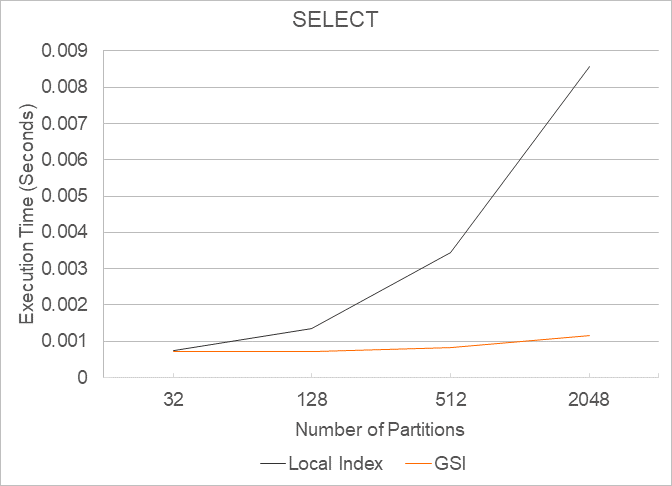
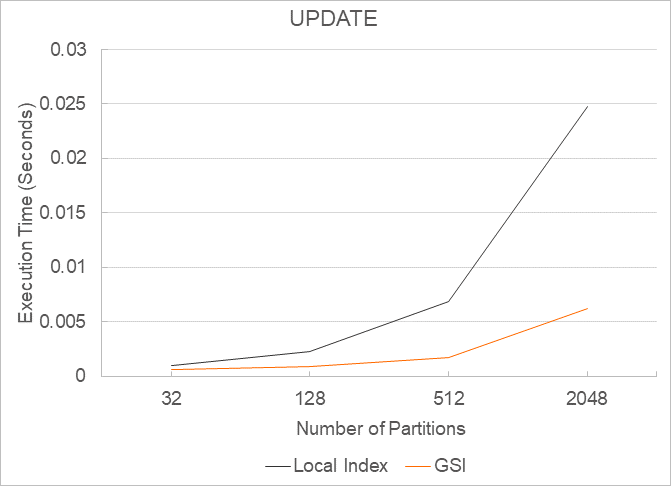
GSIs outperform local indexes for SELECT, UPDATE, and DELETE queries that don't include the partition key. The advantage grows as partition count and data volume increase.
Test setup: Two HASH-partitioned tables with 32 partitions and 1,000,000 rows each — one with a local index, one with a GSI.
-- Table with local index
CREATE TABLE mytest1.big_table_1(
  a INT PRIMARY KEY,
  b INT,
  c INT,
  INDEX k1(b) LOCAL
) PARTITION BY HASH(a) PARTITIONS 32;

-- Table with GSI
CREATE TABLE mytest2.big_table_1(
  a INT PRIMARY KEY,
  b INT,
  c INT,
  INDEX k1(b) GLOBAL
) PARTITION BY HASH(a) PARTITIONS 32;
SELECT — execution time, query condition does not include the partition key:
UPDATE — execution time, query condition does not include the partition key:
DELETE — execution time, query condition does not include the partition key:
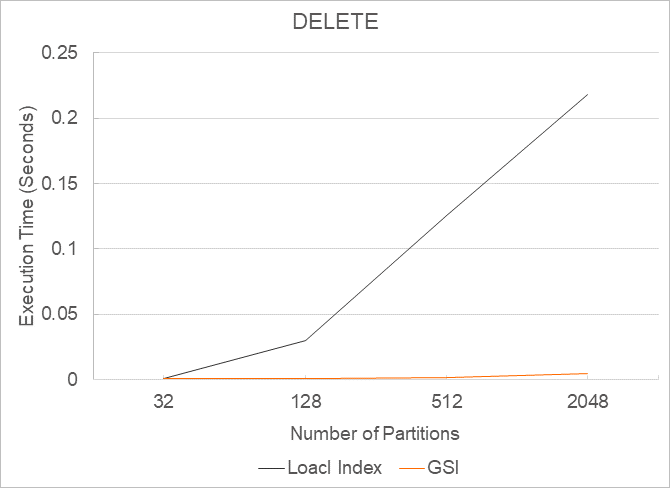
The performance advantage of GSIs is more pronounced as data volume and partition count increase.
What's next
-
Parallel DDL — speed up GSI creation on large tables
-
Instant add column — add columns to partitioned tables with GSIs without a full table rebuild
-
INTERVAL RANGE partitioned tables — automatic partition management compatible with GSIs