A global database network (GDN) consists of multiple PolarDB clusters deployed across different regions. This topic explains how to view the cluster endpoints of a GDN and connect to it.
Read/write splitting and request routing
The routing of read and write requests to clusters (primary and secondary clusters) in a GDN is determined by the database proxy configuration of each cluster. You do not need to modify your application code. Simply connect to the address of the respective cluster, and read and write requests are automatically routed based on the following logic:
The database proxy automatically forwards write requests, such as
INSERT,UPDATE, andDELETEstatements, other broadcast syntax such asSETstatements, and all requests within transactions to the primary node of the primary cluster for processing.By default, the database proxy routes read requests to the read-only nodes of the local secondary cluster for local access. If session consistency is enabled, some read requests may also be routed to the primary node of the primary cluster to ensure data consistency.
When an application connects to the cluster endpoint of a secondary cluster, the same routing rules apply. After a client establishes a connection with the database proxy, the proxy creates and maintains backend connections from the secondary cluster to the primary node of the primary cluster. Whether these connections are pre-established depends on the database proxy configuration. The link from a secondary cluster to the primary node is often a cross-region connection. For applications with short-lived connections, the frequent creation of these cross-region connections can degrade performance due to network fluctuations. In this scenario, we recommend that you enable On-demand Connections for the database proxy of the secondary cluster. For more information, see Configure a database proxy.
In addition, GDN provides a global domain name, which not only enables nearby access but also remains unchanged after a primary cluster switchover.
-
The GDN read/write splitting service is supported only for cluster endpoints or custom endpoints for which the Read-write mode is set to Read/Write (Automatic Read/Write Splitting).
-
The Primary address and custom endpoints for which the Read-write mode is set to Read-Only do not support the GDN read/write splitting service.
-
To reduce the potential business impact of replication lag between the primary and secondary clusters, we recommend setting Primary Node Accepts Read Requests to No and the Consistency Level to Eventual Consistency (Weak) when you configure a custom cluster endpoint on a secondary cluster.
-
If your application cannot tolerate replication lag from a secondary cluster, we recommend connecting directly to the cluster endpoint of the primary cluster.
View cluster endpoints
-
Log on to the PolarDB console. In the left-side navigation pane, click Global Database Network (GDN).
-
On the Global Database Network (GDN) page, find the target GDN and click its GDN ID/Name to open the GDN details page.
-
In the Clusters section, find the target secondary cluster and click Cluster Endpoint in the View column to view the cluster endpoint details.
Note-
You can view the endpoint information of the default cluster only, including the Private and Public endpoints.
-
For more detailed endpoint information, click Visit the Overview page of the cluster. You are redirected to the details page of the target cluster, where you can view more endpoints in the Database Connections section.
-
Connect to a GDN cluster
Applications in different regions connect to the GDN by using the nearest cluster endpoint, enabling automatic read/write splitting. This topic provides examples of several common connection methods.
Use DMS to connect to the cluster
DMS is a graphical data management service from Alibaba Cloud. You can manage your PolarDB cluster directly in DMS without installing additional tools.
Go to the PolarDB console. In the Cluster List, click the ID of the target cluster to go to the cluster details page. In the upper-right corner of the page, click Log on to Database.

Enter your database account and database password for the PolarDB for MySQL cluster, then click Log on.

After you log on, find the PolarDB for MySQL cluster in the Logged-in Instances list in the left navigation pane.

Use a client to connect to the cluster
You can use any MySQL-compatible client to connect to a PolarDB cluster. The following example uses MySQL Workbench 8.0.29.
Download and install MySQL Workbench.
Open MySQL Workbench and choose .
Enter the connection information and click OK.
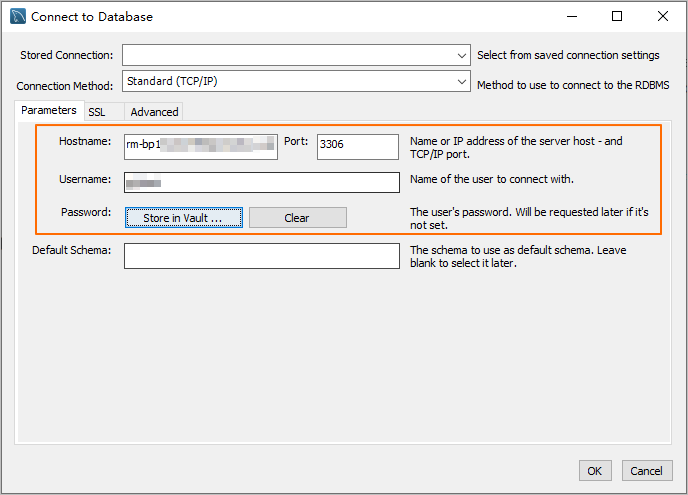
Parameter
Description
Example
Hostname
The database endpoint.
pc-2***.rwlb.rds.aliyuncs.com
Port
The port number of the database endpoint.
NoteThe default port is 3306.
3306
Username
The database account.
polardb_mysql_user
Password
The password of the database account.
Pass***233
Use the command line to connect to the cluster
If a MySQL client is installed on your server, run the following command to connect to the PolarDB for MySQL cluster.
Syntax:
mysql -h<endpoint> -P<port> -u<database_username> -p<database_user_password>Example:
mysql -h pc-2***.rwlb.rds.aliyuncs.com -P3306 -upolardb_mysql_user -pPass***233Parameter | Description | Example |
-h | The database endpoint. | pc-2***.rwlb.rds.aliyuncs.com |
-P | The port number of the database endpoint. Note
| 3306 |
-u | The database account. | polardb_mysql_user |
-p | The password of the database account. Note This parameter is required.
| Pass***233 |
Use an application to connect to the cluster
Connecting to a PolarDB for MySQL cluster is the same as connecting to any MySQL database. Replace the endpoint, port, account, and password with your PolarDB cluster values. Examples by language:
Java
Use the MySQL JDBC driver in a Maven project to connect to a PolarDB for MySQL cluster.
Add the MySQL JDBC driver dependency to your pom.xml file:
<dependency>
    <groupId>mysql</groupId>
    <artifactId>mysql-connector-java</artifactId>
    <version>8.0.27</version>
</dependency>
Connect to the cluster. Replace
<HOST>,<USER>,<PASSWORD>,<DATABASE>,<YOUR_TABLE_NAME>, and<YOUR_TABLE_COLUMN_NAME>with your actual values.import java.sql.Connection; import java.sql.DriverManager; import java.sql.ResultSet; import java.sql.Statement; public class DatabaseConnection { public DatabaseConnection() { } public static void main(String[] args) { // The endpoint, port, and name of the database to connect to. String url = "jdbc:mysql://<HOST>:3306/<DATABASE>?useSSL=false&serverTimezone=UTC"; // The database account. String user = "<USER>"; // The password of the database account. String password = "<PASSWORD>"; try { Class.forName("com.mysql.cj.jdbc.Driver"); Connection conn = DriverManager.getConnection(url, user, password); Statement stmt = conn.createStatement(); // The name of the data table to retrieve. ResultSet rs = stmt.executeQuery("SELECT * FROM `<YOUR_TABLE_NAME>`"); while(rs.next()) { // The name of the column in the data table to retrieve. System.out.println(rs.getString("<YOUR_TABLE_COLUMN_NAME>")); } rs.close(); stmt.close(); conn.close(); } catch (Exception var7) { var7.printStackTrace(); } } }
Python
Use the PyMySQL library with Python 3 to connect to a PolarDB for MySQL cluster.
Install the PyMySQL library:
pip3 install PyMySQLConnect to the cluster. Replace
<HOST>,<USER>,<PASSWORD>,<DATABASE>, and<YOUR_TABLE_NAME>with your actual values.import pymysql # Database connection parameters host = '<HOST>' # The endpoint of the PolarDB cluster port = 3306 # The default port is 3306 user = '<USER>' # The database account password = '<PASSWORD>' # The password of the database account database = '<DATABASE>' # The name of the database to connect to try: # Create a database connection connection = pymysql.connect( host=host, port=port, user=user, passwd=password, db=database ) # Get the cursor with connection.cursor() as cursor: # Execute an SQL query sql = "SELECT * FROM `<YOUR_TABLE_NAME>`" # The name of the data table to retrieve cursor.execute(sql) # Get the query results results = cursor.fetchall() for row in results: print(row) finally: # Close the database connection if 'connection' in locals() and connection.open: connection.close()
Go
Use the database/sql package and go-sql-driver/mysql driver (Go 1.23.0) to connect to a PolarDB for MySQL cluster.
Install the
go-sql-driver/mysqldriver:go get -u github.com/go-sql-driver/mysqlConnect to the cluster. Replace
<HOST>,<USER>,<PASSWORD>,<DATABASE>, and<YOUR_TABLE_NAME>with your actual values.package main import ( "database/sql" "fmt" "log" _ "github.com/go-sql-driver/mysql" ) func main() { // Database connection parameters dbHost := "<HOST>" // The endpoint of the PolarDB cluster dbPort := "3306" // The default port is 3306 dbUser := "<USER>" // The database account dbPass := "<PASSWORD>" // The password of the database account dbName := "<DATABASE>" // The name of the database to connect to // Build the Data Source Name (DSN) dsn := fmt.Sprintf("%s:%s@tcp(%s:%s)/%s?charset=utf8mb4&parseTime=True&loc=Local", dbUser, dbPass, dbHost, dbPort, dbName) // Open a database connection db, err := sql.Open("mysql", dsn) if err != nil { log.Fatalf("Failed to connect to database: %v", err) } defer db.Close() // Test the connection err = db.Ping() if err != nil { log.Fatalf("Failed to ping database: %v", err) } // Create a cursor var result string err = db.QueryRow("SELECT VERSION()").Scan(&result) if err != nil { log.Fatalf("Failed to execute query: %v", err) } // Print the database version fmt.Printf("Connected to database, version: %s\n", result) // Execute an SQL query rows, err := db.Query("SELECT * FROM `<YOUR_TABLE_NAME>`") // The name of the data table to retrieve if err != nil { log.Fatalf("Failed to execute query: %v", err) } defer rows.Close() }
Related documentation
-
Global Database Network (GDN): Learn about the GDN architecture and use cases.
-
Create a global domain name: Learn how to create a global domain name for nearest-cluster access and switchover resilience.
API reference
|
API |
Description |
|
Queries the information about the cluster endpoints of a PolarDB cluster. |
|
|
Modifies the attributes of a PolarDB cluster endpoint. The attributes include the read/write mode, automatic new node addition, consistency level, transaction splitting, Primary Node Accepts Read Requests, and connection pool. |