When your business data volume continues to grow, storage costs can become a major burden for historical data, such as logs, transaction records, and historical orders, that is accessed less frequently but must be retained for analysis. You can use this feature to archive cold data from PolarDB for MySQL to the lower-cost Alibaba Cloud Object Storage Service (OSS) and, in combination with Columnar Index (IMCI), run high-performance analytical queries on this archived data to reduce costs and improve efficiency.
Prerequisites
Before you use this feature, ensure that your environment meets the following requirements:
Product version: Enterprise Edition of the Cluster Edition.
Kernel version: 8.0.2.2.30 or later.
Archive format: This feature applies only to data archived in ORC format.
IMCI node: You must first add an IMCI read-only node to your cluster.
Configure archiving and IMCI queries
This section uses a standard table to demonstrate the entire process: enabling IMCI, archiving data, and running accelerated queries.
Process overview
Enable IMCI for the table and archive the data: Add a columnar index to the target table to enable IMCI-based acceleration. Then, migrate the table data to OSS and store it in ORC format.
Query the archived data: Direct analytical queries to the IMCI read-only node for execution by either using the cluster endpoint for automatic routing or by connecting directly to the IMCI read-only node.
Step 1: Enable IMCI and archive data
A columnar index is required to accelerate queries with IMCI. You can add the index either before or during data archiving.
Before data archiving
Create a columnar index: Add
comment='columnar=1'to the end of theCREATE TABLEstatement.CREATE TABLE t1( a1 INT PRIMARY KEY, a2 INT, a3 INT, a4 INT ) ENGINE=InnoDB COMMENT='columnar=1';Archive the cold data:
ALTER TABLE t1 ENGINE = ORC STORAGE OSS;
During data archiving
Create a table:
CREATE TABLE t2(
  a1 INT PRIMARY KEY,
  a2 INT,
  a3 INT,
  a4 INT
) ENGINE=InnoDB;
Archive the cold data and add a columnar index:
ALTER TABLE t2 ENGINE = ORC STORAGE OSS comment='columnar=1';
Step 2: Query archived data
Route analytical query requests to the IMCI read-only node to accelerate the analysis of data archived in OSS.
For ORC-archived tables with IMCI enabled and for hybrid partitioned tables containing ORC-archived partitions, queries made through the cluster endpoint are automatically forwarded to the IMCI read-only node. You do not need to add hints to your SQL statements.
Method 1: (Recommended) Use the cluster endpoint
Automatic routing requires an IMCI read-only node to be added to the cluster.
This automatic routing does not rely on a cost-based decision by the optimizer. It uses short-circuit logic: if a query targets an ORC-archived table with IMCI enabled, it is routed directly to the IMCI read-only node, bypassing any cost comparison between row and columnar storage.
You can connect to the database by using the cluster endpoint and run your query directly.
SELECT COUNT(*) FROM t1;Method 2: Connect to an IMCI node
You can also add a custom cluster endpoint in the console and select only IMCI read-only nodes. Queries on this connection use the columnar index by default.
This method is ideal for scenarios where you want to consistently send analytical queries on archived data to the IMCI read-only node.
Handling hybrid queries for partitioned tables
For partitioned tables, you can archive some historical partitions to separate hot and cold data. When you run a query, the In-Memory Columnar Index (IMCI) can intelligently perform a hybrid query on unarchived InnoDB partitions and archived OSS partitions.
Add a columnar index to a partitioned table: You can add a columnar index only to an entire table, not to an individual partition.
CREATE TABLE t_partition(
  a1 INT PRIMARY KEY,
  a2 INT,
  a3 INT,
  a4 INT
) COMMENT='columnar=1'
PARTITION BY RANGE(a1) (
  PARTITION p1 VALUES LESS THAN (20),
  PARTITION p2 VALUES LESS THAN (40),
  PARTITION p3 VALUES LESS THAN (60),
  PARTITION p4 VALUES LESS THAN MAXVALUE
);
Archive specific partitions: Archive one or more partitions.
ALTER TABLE t_partition CHANGE PARTITION p1 ENGINE = ORC FORCE STORAGE OSS;Run a hybrid query.
If a query needs to access both archived OSS partitions and unarchived InnoDB partitions, first enable hybrid queries for the session.
-- Enable support for hybrid queries
SET hybrid_partition_query_mix_engine_enabled = ON;

-- Run the query
SELECT COUNT(*) FROM t_partition;
Routing rules for partitioned tables
For a hybrid partitioned table that contains ORC archived partitions, the system determines the execution path for the entire table. If the table has a columnar index and contains ORC archived partitions, queries sent to the cluster endpoint are automatically routed to an IMCI read-only node. This rule applies even if the query uses partition pruning or accesses only unarchived InnoDB partitions with the PARTITION clause.
SELECT COUNT(*) FROM t_partition;To run queries in the current session without using the columnar index, disable use_imci_engine. After you disable this parameter, queries are not automatically routed to the columnar index. The system processes them using the row storage execution path.
SET use_imci_engine = OFF;

SELECT COUNT(*) FROM t_partition;
To use the columnar index again, enable the parameter.
SET use_imci_engine = ON;Performance reference
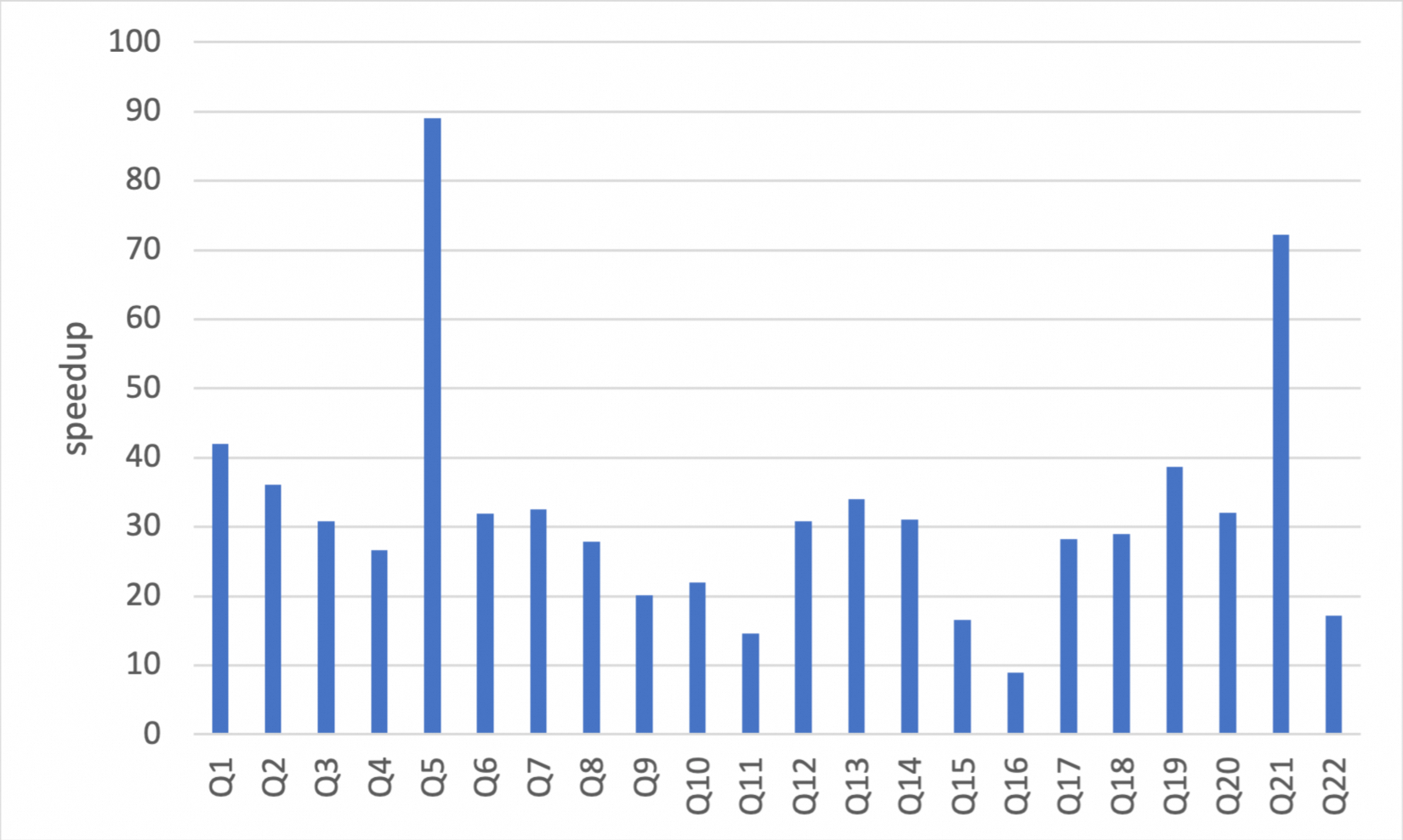
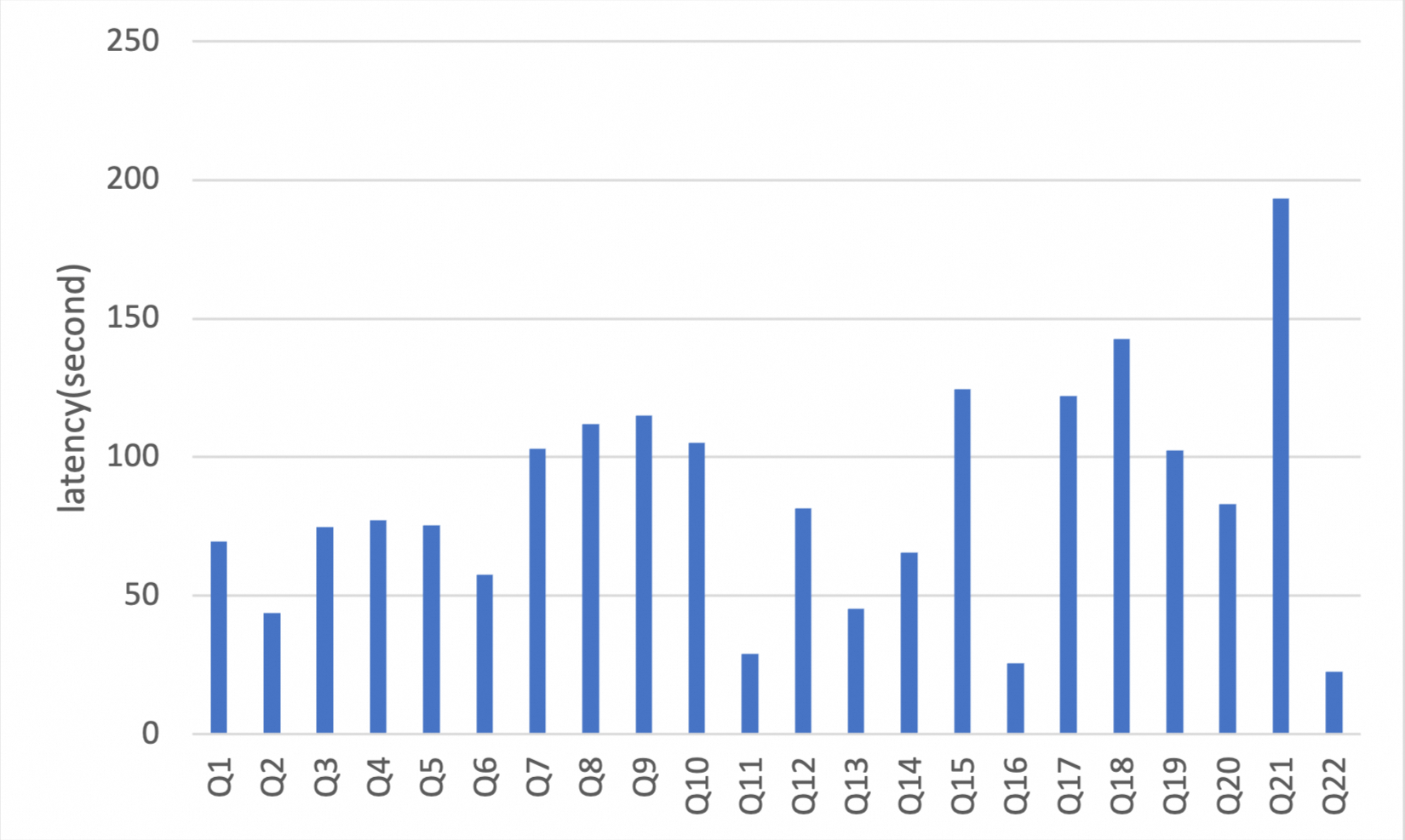
The following data is from benchmarks run on a 32-core, 256 GB PolarDB for MySQL cluster using the TPC-H 100 GB standard test set. The results show that after data is archived to OSS, running analytical queries with IMCI provides an overall speedup ratio of about 35 times compared to querying data directly from InnoDB row storage. The speedup is especially significant for typical analytical processing (AP) queries, such as full table aggregations and wide table scans.
The TPC-H implementation described here is based on the TPC-H benchmark. These results are not comparable to officially published TPC-H benchmark results because the tests do not fully comply with all TPC-H requirements.
Columnar storage query execution time (seconds)
Speedup ratio of columnar storage compared to row storage