PolarDB offers two storage classes, PSL4 and PSL5, designed for different business scenarios. They differ in price, data durability, and performance. This topic explains these differences to help you choose the right storage class for your workload.
Introduction
|
Storage type |
Features |
Use cases |
|
PSL5 (PolarStore Level 5) |
This storage class was used in earlier versions of PolarDB and is the default for clusters purchased before June 7, 2022. It offers higher performance, reliability, and availability. |
Business-critical workloads that require high performance and reliability, such as finance, e-commerce, government services, and medium-to-large internet businesses. |
|
PSL4 (PolarStore Level 4) |
A new PolarDB storage class that uses Alibaba's proprietary smart-SSD technology. This technology compresses and decompresses data at the physical SSD layer, which reduces storage costs with a manageable performance impact. |
Cost-sensitive applications that prioritize high cost-effectiveness. |
-
Storage class conversion rules:
-
Some product series support upgrading the storage class from PSL4 to PSL5.
-
Downgrading the storage class is not supported. You cannot downgrade PSL5 storage to PSL4 storage.
-
-
To switch from PSL5 storage to PSL4 storage, purchase a new cluster and migrate the data using either a migration tool like Data Transmission Service (DTS) or a major version upgrade.
Pricing
Subscription
Storage type | Price (USD/GB/month) | ||
Chinese mainland | Hong Kong (China) and other regions | ||
PSL4 | Dual-AZ with storage hot-standby cluster | 0.2308 | 0.2569 |
Dual-AZ with storage and compute hot-standby clusters | |||
Three-AZ with storage hot-standby cluster and logger nodes | |||
Single-AZ without storage hot-standby cluster | 0.1154 | 0.1285 | |
PSL5 | Dual-AZ with storage hot-standby cluster | 0.3492 | 0.3892 |
Dual-AZ with storage and compute hot-standby clusters | |||
Three-AZ with storage hot-standby cluster and logger nodes | |||
Single-AZ without storage hot-standby cluster | 0.1746 | 0.1946 | |
Pay-as-you-go
Storage type | Price (USD/GB/hour) | ||
Chinese mainland | China (Hong Kong) and international | ||
PSL4 | Dual-AZ (storage hot-standby cluster enabled) | 0.000486 | 0.000542 |
Dual-AZ (storage hot-standby cluster and compute hot-standby cluster enabled) | |||
Triple-AZ (storage hot-standby cluster and logger node enabled) | |||
Single-AZ (storage hot-standby cluster disabled) | 0.000243 | 0.000271 | |
PSL5 | Dual-AZ (storage hot-standby cluster enabled) | 0.000748 | 0.000834 |
Dual-AZ (storage hot-standby cluster and compute hot-standby cluster enabled) | |||
Triple-AZ (storage hot-standby cluster and logger node enabled) | |||
Single-AZ (storage hot-standby cluster disabled) | 0.000374 | 0.000417 | |
Serverless
Storage type | Price (USD/GB/hour) | ||
Regions in the Chinese mainland | China (Hong Kong) and regions outside China | ||
PSL4 | Dual-zone (hot standby storage cluster enabled) | 0.000486 | 0.000542 |
Dual-zone (hot standby storage cluster and compute cluster enabled) | |||
Three-zone (hot standby storage cluster and logger node enabled) | |||
Single-zone (hot standby storage cluster disabled) | 0.000243 | 0.000271 | |
PSL5 | Dual-zone (hot standby storage cluster enabled) | 0.000748 | 0.000834 |
Dual-zone (hot standby storage cluster and compute cluster enabled) | |||
Three-zone (hot standby storage cluster and logger node enabled) | |||
Single-zone (hot standby storage cluster disabled) | 0.000374 | 0.000417 | |
For PSL4 storage, a 4-core CPU is allocated for data compression for each terabyte (TB) of data. This CPU cost is included in the storage fee at no extra charge.
Data durability
|
Storage type |
Data durability |
|
PSL5 |
99.99999999% |
|
PSL4 |
99.9999999% |
Upgrade storage class
If PSL4 storage no longer meets your business requirements, you can manually upgrade it to PSL5 storage in the PolarDB console.
Prerequisites
Your PolarDB for MySQL cluster must meet the following requirements:
-
Billing method: subscription or pay-as-you-go
NoteServerless clusters do not support storage class upgrades.
-
Product version: Enterprise Edition
-
Product series: Cluster Edition
-
Storage class: PSL4
Procedure
-
After you upgrade the storage class, the system calculates the related fees based on the billing method for the cluster's storage. For more information, see Billing of configuration changes.
-
The storage class cannot be downgraded from PSL5 to PSL4. Evaluate your requirements carefully before upgrading.
-
Log in to the PolarDB console. In the left-side navigation pane, click Clusters. Select the target cluster's region and click its ID to open the details page.
-
On the cluster details page, in the Distributed Storage section, click Storage Upgrade.
Performance metrics
For the same compute node specifications, PSL4 and PSL5 have the same maximum storage capacity and I/O bandwidth limit. However, their IOPS limits differ. For more information, see Enterprise Edition compute node specifications and Standard Edition compute node specifications.
Performance comparison
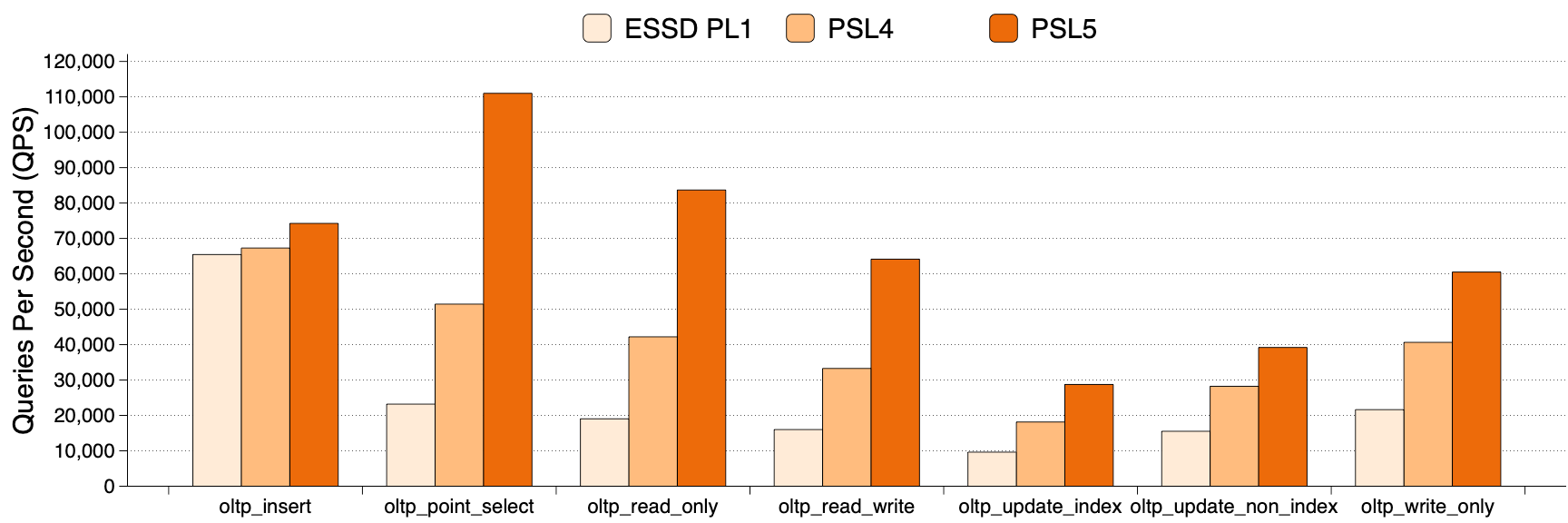
Tests on a dedicated cluster with 8 cores and 64 GB of memory measured the maximum queries per second (QPS) for several scenarios in an I/O-bound workload pattern to compare three backend storage options: Enterprise Edition PSL5, Enterprise Edition PSL4, and Standard Edition PL1 cloud disk. The data volume was approximately 800 GB to 1 TB. The following figure shows the test results.