Photo and Drive Service (PDS) supports two access paths: OAuth 2.0-based user systems (mobile numbers, email addresses, DingTalk, RAM users, and LDAP accounts) and custom user systems that use a private key to generate access tokens directly.
All PDS API access requires an access token for identity verification. Tokens are generated in two ways: through the OAuth 2.0 service after authentication (for OAuth user systems), or by calculating a token using a trusted private key (for custom user systems).
Choosing an access method
Use the following table to determine which method fits your application.
|
PDS OAuth user systems |
Custom user systems |
|
|
Users log on through PDS? |
Yes |
No |
|
Supports an external identity system (LDAP, AD)? |
Yes (LDAP/AD) |
Yes (any) |
|
Users need a PDS account? |
Yes |
No |
|
Recommended for |
Consumer apps, enterprise SSO |
Server-to-server, bring-your-own identity |
|
Access token source |
PDS OAuth 2.0 service |
Private key calculation (JWT or AccessKey) |
PDS OAuth supported user systems
Use PDS OAuth user systems when your application relies on PDS to manage user identity. PDS handles registration, authentication, and logon; your application receives an access token after users authenticate through the PDS OAuth 2.0 flow.
Step 1: Configure an OAuth user system for a domain
PDS supports the following OAuth user systems:
Mobile numbers: a native PDS user system that lets users register and log on using their mobile numbers.
Email addresses: a native PDS user system that lets users register and log on using their email addresses.
DingTalk: users log on by scanning a DingTalk QR code or entering their DingTalk account credentials.
RAM users: users access applications as Alibaba Cloud RAM users.
LDAP accounts: users access applications using LDAP accounts based on Active Directory (AD).
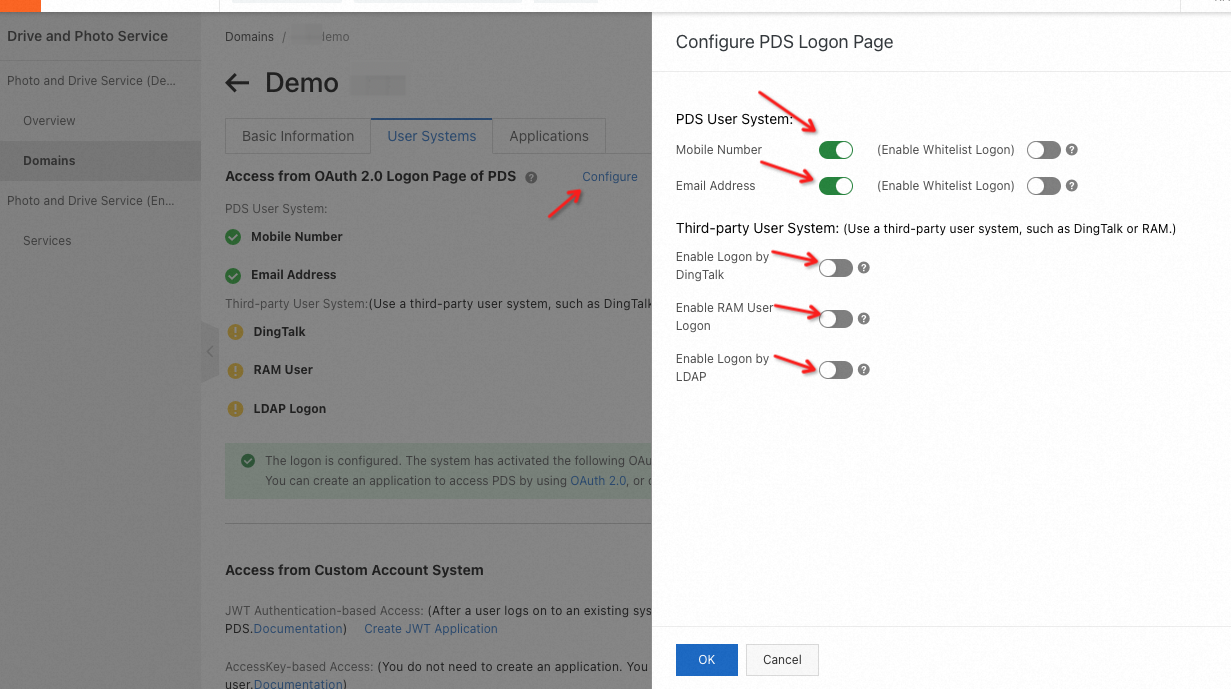
For configuration instructions, see:
Step 2: Review the OAuth logon page
After the user systems are configured for a domain, the corresponding logon options appear on the OAuth logon page.
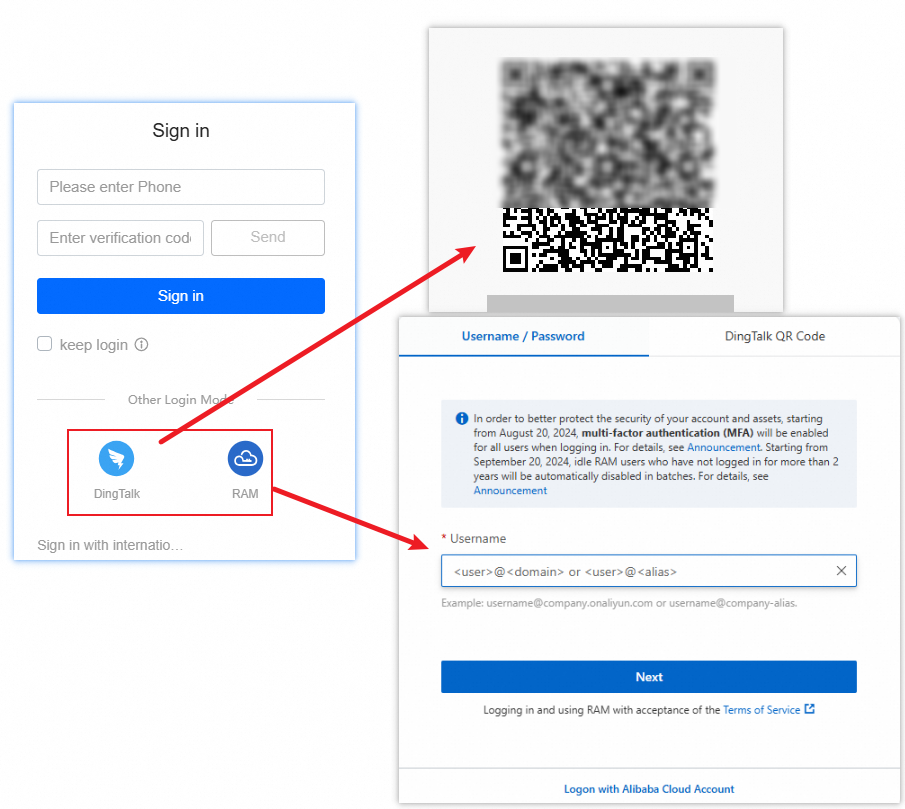
Step 3: Enable OAuth logon for an application
BasicUI supports OAuth logon. On the Applications tab of the domain details page, locate BasicUI, click Allow Access in the Actions column, and confirm. Log on to BasicUI as the super administrator to sync data.
To enable OAuth logon for self-managed applications, see:
Custom user systems
Use a custom user system when your application manages its own user identity. Users don't need PDS accounts, and PDS doesn't handle authentication. Your application calculates an access token using a trusted private key and passes it directly to the PDS API.
Two methods are available:
JSON Web Token (JWT) — recommended
Generate an access token using a standard JSON Web Token (JWT) signed with your private key. For implementation details, see JWT application access.
AccessKey-based API access
Retrieve an access token by calling AccessKey-based API operations. For implementation details, see AccessKey-based API access.