DataJuicer is a large-scale multi-modal data processing tool that supports the cleaning, filtering, and enhancement of text, image, audio, and video data. DLC supports one-click submission of DataJuicer jobs.
Background
The performance of a Large Language Model (LLM) depends heavily on the quality of its training data. High-quality data pre-processing accelerates training, reduces computing overhead, and is the foundation of model performance. However, cleaning, enhancing, and synthesizing large-scale multi-modal data remains a core challenge.
DataJuicer is an open-source tool dedicated to processing large-scale multi-modal data such as text, images, audio, and video. It helps researchers and developers efficiently clean, filter, transform, and enhance large scale datasets, and provides higher-quality, richer, and more digestible data for LLMs.
PAI introduces the DataJuicer on DLC job type, which provides out-of-the-box, high-performance data processing.
Features
DataJuicer on DLC is jointly launched by PAI and Tongyi Lab. It supports one-click submission of DataJuicer jobs, so you can efficiently clean, filter, transform, and enhance large-scale data.
-
Rich operators: Provides over 100 core operators, including aggregators, duplicators, filters, formatters, groupers, mappers, and selectors. These cover the entire data processing lifecycle, from loading and normalization to editing, transformation, filtering, deduplication, and high-quality sample selection. You can flexibly compose operator chains to meet your business needs.
-
Excellent performance: Delivers excellent linear scalability and processing speed. For multimodal data at the scale of tens of millions of samples, it reduces processing time by 24.8% compared to native nodes.
-
Resource estimation: Intelligently balances resource limits against runtime efficiency and automatically tunes operator (OP) parallelism, which significantly reduces the job failure rate caused by out-of-memory (OOM) errors. Resource estimation analyzes dataset, operator, and quota information to automatically estimate the optimal resource configuration. This lowers the barrier to entry and keeps your jobs efficient and stable.
-
Large-scale processing: Built on PAI DLC's distributed computing framework with deep hardware acceleration (CUDA/operator fusion), it efficiently handles workloads that range from experiments with thousands of samples to production data with tens of billions of samples.
-
Automatic fault tolerance: PAI DLC provides fault tolerance and self-healing at the node, job, and container levels. DataJuicer adds operator-level fault tolerance to handle interruptions from infrastructure failures such as server or network issues.
-
Ease of use: DLC provides an intuitive interface and API, requires no deployment and no O&M, and supports one-click submission of DataJuicer jobs.
Instructions
1. Select an image and framework
The runtime image must have the DataJuicer environment pre-installed, including the dj-process command. We recommend that you use the official data-juicer Alibaba Cloud Image, or build a custom image based on it.
In the Repo filter, select data-juicer, and then select data-juicer:1.4.2-pytorch2.6-cpu-py310-ubuntu22.04 (CPU, 14.30 GiB) from the image list.
Set Framework to DataJuicer.
In the Resource Information section, set Resource Type to general computing, set Source to Public Resources, and set Run Mode to Single node.
2. Configure run mode
When you create a DLC job, you can choose between single-node and distributed run modes. Ensure that your choice matches the executor_type in your configuration file.
-
Single-node mode:
-
DataJuicer configuration file: In the configuration file, set
executor_typetodefaultor omit this field. -
DLC configuration:
-
Run Mode: Select Single node.
-
Nodes: Set to 1.
-
-
-
Distributed mode:
-
DataJuicer configuration file: In the configuration file, you must set
executor_typetoray. -
DLC configuration:
-
Run Mode: Select Distributed.
-
Resource Estimation: This option is available only when you use a Resource Quota. When enabled, the system intelligently estimates the optimal resource configuration based on dataset, operator, and quota information, and then runs the task automatically to ensure efficient execution. You can also set a maximum resource limit for the task if needed.
-
Maximum Task Resource Limit: If you need to set an upper limit on the resources requested by the DataJuicer task, configure this option. The total resources requested by the task will not exceed the configured limit. If you leave this field blank, the system automatically requests resources based on the estimation result.
-
-
Task Resources: If you do not enable resource estimation, you must manually specify the task resources.
-
Nodes: The number of Head nodes must be 1, and the number of Worker nodes must be at least 1.
-
Instance Type: The Head node requires a resource specification with more than 8 GB of memory. Configure the Worker resource specification based on your needs.
-
-
Fault Tolerance and Diagnosis (Optional): You can configure head node fault tolerance by selecting a Redis instance within the same Virtual Private Cloud (VPC).
-
-
3. Enter the start command
DLC supports start commands in Shell and YAML formats, with Shell as the default. The Shell format works the same as for other DLC jobs. In YAML format, you can enter the DataJuicer configuration directly in the command input field.
You can configure DataJuicer by creating a configuration file. For details, see Build a Configuration File. For a complete configuration reference, see config_all.yaml. The following figure shows a sample configuration:
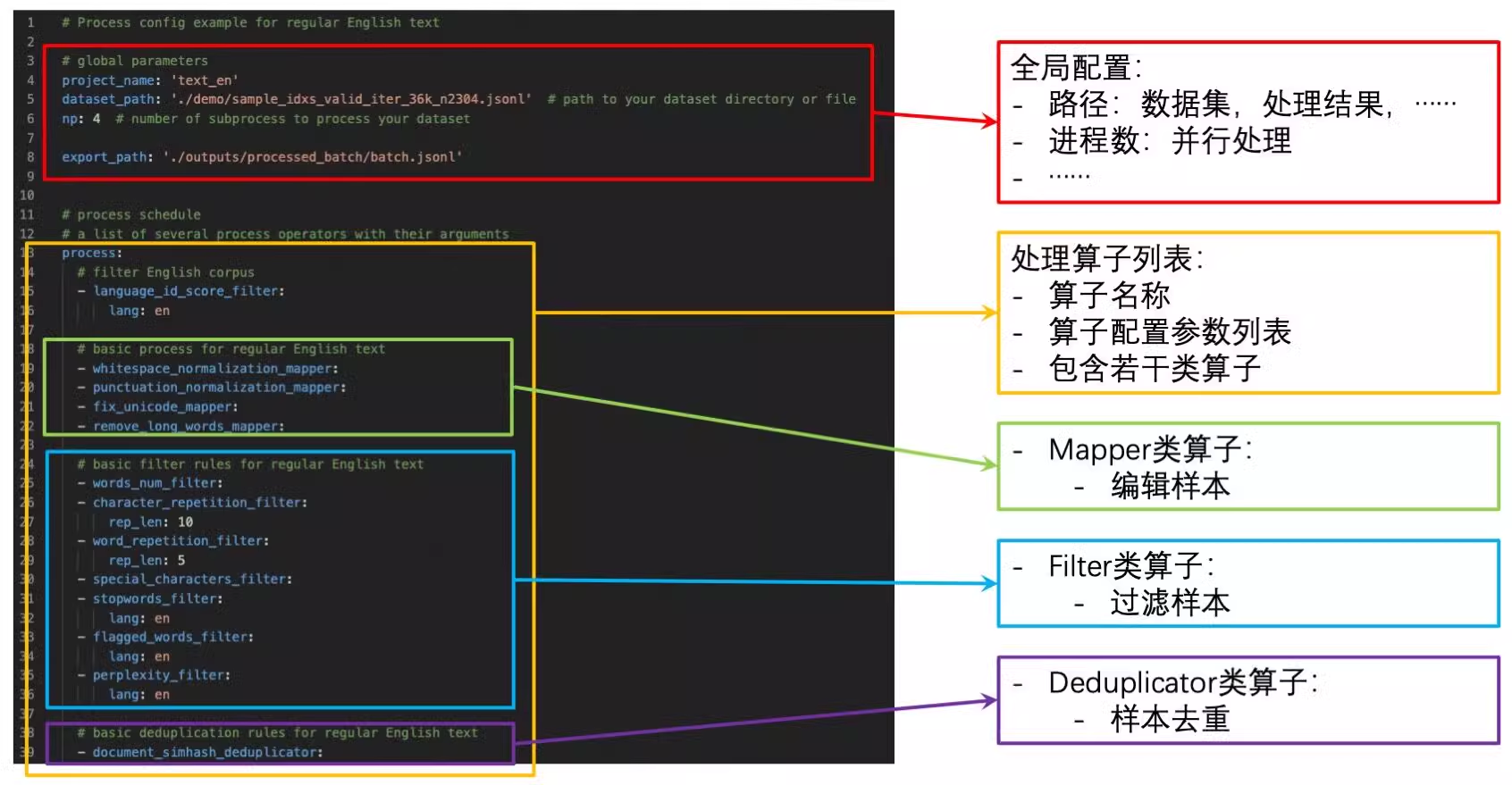
The key parameters are as follows:
-
dataset_path: The path to the input data. For a DLC job, set this path to where your data storage, such as Object Storage Service (OSS), is mounted inside the container. -
export_path: The output path for the processed results. For a distributed task, this path must be a directory, not a specific file. -
executor_type: The executor type.-
defaultindicates thatDefaultExecutorwill be used to run on a single node. -
rayindicates thatRayExecutorwill be used. RayExecutor supports distributed processing. For details, see Data-Juicer Distributed Data Processing.
-
The following are examples of how to configure the start command on DLC:
-
Shell format command example 1: Write the configuration to a temporary file and start the job by using the
dj-processcommand. -
Shell format command example 2: Save the configuration file to cloud storage, such as Object Storage Service (OSS), mount it to the DLC container, and run the job by directly specifying the mounted configuration file with
dj-process.dj-process --config /mnt/data/process_on_ray/config/demo.yaml -
YAML format command example: Enter the DataJuicer configuration directly in the command field.
Use case
Massive video data processing
With the breakthrough applications of multimodal large language models (MLLMs) in autonomous driving and embodied intelligence, fine-grained processing of massive video data has become a key competitive advantage. In autonomous driving, models must analyze complex road conditions, traffic signs, and pedestrian behavior in real time from continuous video streams. In embodied intelligence, systems rely on video data to build dynamic representations of the physical world for tasks such as robot motion planning and environmental interaction. However, traditional data processing solutions face three core challenges:
-
Modality separation: Video data contains heterogeneous information — visuals, audio, time series, and text descriptions. Cross-modal feature fusion requires specialized toolchains, as traditional pipeline-style tools struggle with global association analysis.
-
Quality bottlenecks: Data cleaning involves multiple stages — deduplication, annotation repair, keyframe extraction, and noise filtering. Traditional multi-stage processing easily leads to information loss and redundant computation.
-
Engineering inefficiency: Processing large-scale video data (at the terabyte or petabyte scale) demands sophisticated distributed computing power scheduling and heterogeneous hardware adaptation. Self-built systems often have long development cycles and low resource utilization.
The PAI-DLC DataJuicer framework provides an end-to-end solution to these challenges. Its technical advantages are as follows:
-
Multimodal collaborative processing engine: Built-in operators for text, images, video, and audio support joint cleaning and enhancement of visual, textual, and temporal data, avoiding the fragmented processing of traditional toolchains.
-
Cloud-native elastic architecture: Integrates PAI's distributed storage acceleration (hundreds of GB/s) and heterogeneous GPU/CPU resource pooling, supporting automatic scaling for tasks with thousands of nodes.
Procedure
This use case demonstrates a video processing workflow for autonomous driving and embodied intelligence, using DataJuicer to:
-
Filter out video clips from the raw data that are too short.
-
Filter out dirty data based on NSFW scores.
-
Extract frames from the videos and generate text captions.
Data Preparation
This example uses 2,000 video entries from the Youku-AliceMind dataset, which have been uploaded to Object Storage Service (OSS).
Create a DLC task
Create a DLC task and configure the following key parameters. Leave other parameters at their default values.
-
Image Configuration: Select Alibaba Cloud Image, then search for and select
data-juicer:1.4.3-pytorch2.6-gpu-py310-cu121-ubuntu22.04. -
Mount storage: Select OSS
-
Uri: Select the OSS directory where the dataset is located.
-
Mount Path: The default is
/mnt/data/.
-
-
Startup Command: Select YAML and enter the following command:
-
Source: Select Public Resources.
-
Framework: Select DataJuicer.
-
Running Mode: Select Distributed.
-
Job Resource: Configure the node count and specifications as follows:
-
Head node: Count 1, specification
ecs.g6.2xlarge(8 vCPU, 32 GiB) -
Worker node: Count 2, specification
ecs.gn7i-c8g1.2xlarge(8 vCPU, 30 GiB, GPU)
-
Click OK to create the task.