This topic introduces the Checkpoint (ckpt), Hypernetwork, and LoRA models, and how to use the Models page.
Prerequisites
You have activated and authorized ArtLab.
From the Models page
-
SD WebUI/ComfyUI/Kohya exclusive edition
-
Log on to the PAI ArtLab console, click Model in the left-side navigation pane. On the Models tab, click
 to add the target model to My Models.
-
After the transmission, you can view the model on the My Models tab.
-
-
SD WebUI shared edition
-
Log on to the PAI ArtLab console, click Model the left-side navigation pane. On the Models tab, click
 to add the target model to the SD shared edition.
-
After the transmission, refresh the model section to find the model.
-
Upload local model to ArtLab
-
Support custom model uploads or node installations: SD WebUI shared edition, SD WebUI/ComfyUI/Kohya exclusive edition
-
Do not support custom model uploads or node installations: ComfyUI shared edition
Model files smaller than 5 GB
-
Log on to the PAI ArtLab console, click Model in the left-side navigation pane. On the Models tab, click Upload. Complete the configurations, and click OK.

-
After the transmission, refresh the model section to find the model.
Model files larger than 5 GB
-
Log on to the PAI ArtLab console, and find the workspace ID, account ID, and storage path.

-
Upload the model file.
-
Enter OSS Browser. Search for the storage path and find the corresponding bucket.

-
Enter the bucket. Search for the workspace ID and find the file path.

-
Enter the file path. Search for the account ID and find the corresponding path. Upload your model or node files.
For ComfyUI exclusive edition, place node files in the custom_nodes folder. For StableDiffusion/Kohya/ComfyUI exclusive edition, place model files in the corresponding Stable Diffusion (checkpoint), lora, or other folders under the models directory.
-
-
Close the tool tab and restart the tool for the changes to take effect.
Appendix: Model types
A checkpoint model is a base model. Stable Diffusion provides checkpoint models of V1.5 and V2.1. Other characteristic models that are developed based on the official models can also be used to generate images. If you want to customize image styles, you can use other models for fine-tuning.
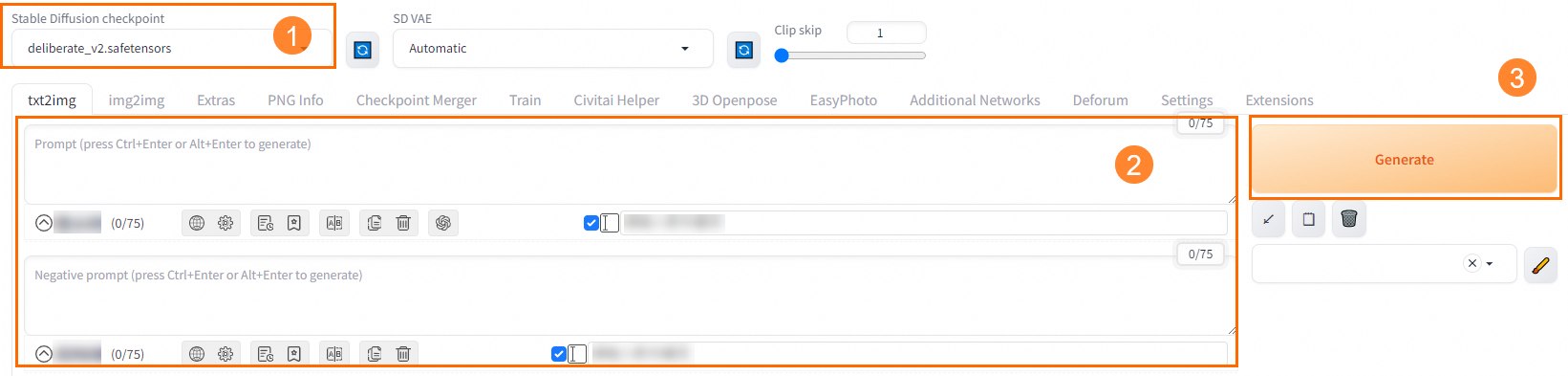
Performance showcase:
-
Positive prompt: best quality, masterpiece, highres, 1girl,blush,(seductive smile:0.8),star-shaped pupils,china hanfu,hair ornament,necklace, jewelry,Beautiful face,upon_body, tyndall effect,photorealistic, dark studio, rim lighting, two tone lighting,(high detailed skin:1.2), 8k uhd, dslr, soft lighting, high quality, volumetric lighting, candid, Photograph, high resolution, 4k, 8k, Bokeh
-
Negative prompt: (((simple background))),monochrome ,lowres, bad anatomy, bad hands, text, error, missing fingers, extra digit, fewer digits, cropped, worst quality, low quality, normal quality, jpeg artifacts, signature, watermark, username, blurry, lowres, bad anatomy, bad hands, text, error, extra digit, fewer digits, cropped, worst quality, low quality, normal quality, jpeg artifacts, signature, watermark, username, blurry, ugly,pregnant,vore,duplicate,morbid,mutilated,transsexual, hermaphrodite,long neck,mutated hands,poorly drawn hands,poorly drawn face,mutation,deformed,blurry,bad anatomy,bad proportions,malformed limbs,extra limbs,cloned face,disfigured,gross proportions, (((missing arms))),(((missing legs))), (((extra arms))),(((extra legs))),pubic hair, plump,bad legs,error legs,username,blurry,bad feet
-
Prompt source: civitai
-
Generation result:
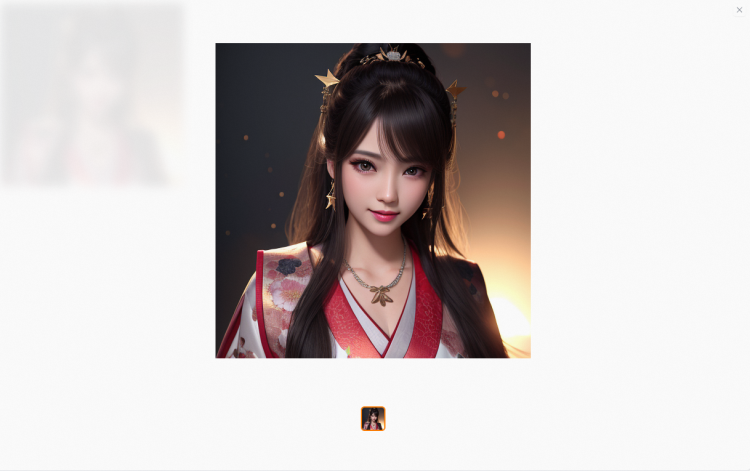
An embedding model (textual inversion model) works with a checkpoint to generate images with specified characteristics or styles. Although embedding models are small in size and require less storage space, this type of model delivers less information. This may affect the styles and visual effects of output images. Therefore, embedding models are not widely used.
How to use Embedding:
After you select an embedding model, a tag is automatically displayed in the positive prompts.
Performance showcase:
-
Positive prompt: best quality, masterpiece, highres, 1girl,blush,(seductive smile:0.8),star-shaped pupils,china hanfu,hair ornament,necklace, jewelry,Beautiful face,upon_body, tyndall effect,photorealistic, dark studio, rim lighting, two tone lighting,(high detailed skin:1.2), 8k uhd, dslr, soft lighting, high quality, volumetric lighting, candid, Photograph, high resolution, 4k, 8k, Bokeh
-
Negative prompt: (((simple background))),monochrome ,lowres, bad anatomy, bad hands, text, error, missing fingers, extra digit, fewer digits, cropped, worst quality, low quality, normal quality, jpeg artifacts, signature, watermark, username, blurry, lowres, bad anatomy, bad hands, text, error, extra digit, fewer digits, cropped, worst quality, low quality, normal quality, jpeg artifacts, signature, watermark, username, blurry, ugly,pregnant,vore,duplicate,morbid,mutilated,transsexual, hermaphrodite,long neck,mutated hands,poorly drawn hands,poorly drawn face,mutation,deformed,blurry,bad anatomy,bad proportions,malformed limbs,extra limbs,cloned face,disfigured,gross proportions, (((missing arms))),(((missing legs))), (((extra arms))),(((extra legs))),pubic hair, plump,bad legs,error legs,username,blurry,bad feet
-
Prompt source: civitai
-
Result comparison (left is the original image, right is the image after model processing):
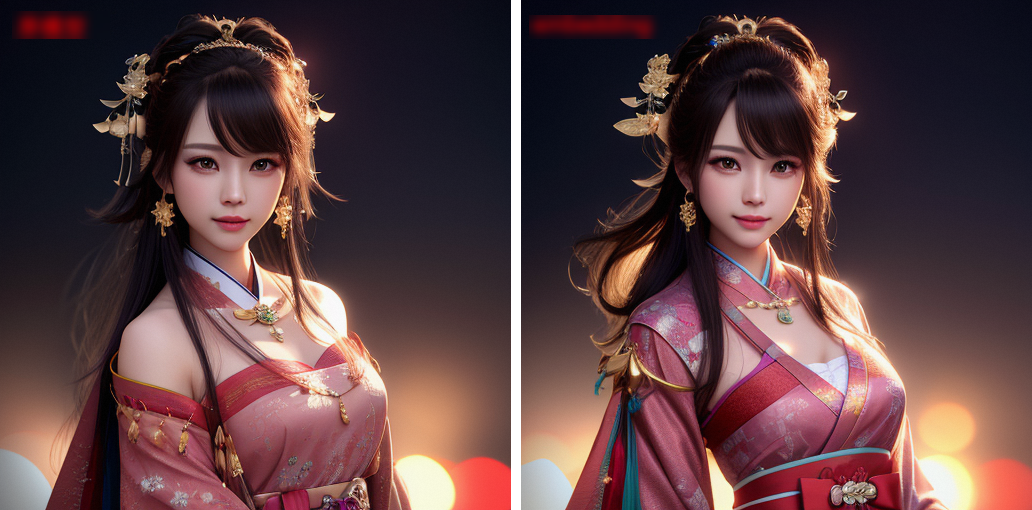
A LoRA model must be used together with a checkpoint to generate images. LoRA models are trained based on checkpoint models to provide better effects. When a creator shares a pre-trained LoRA model on Civitai, the version of the checkpoint model based on which the LoRA model is trained is specified. You can select the checkpoint model of the specified version to work with the LoRA model and improve the effects of generated images.
How to use LoRA models:
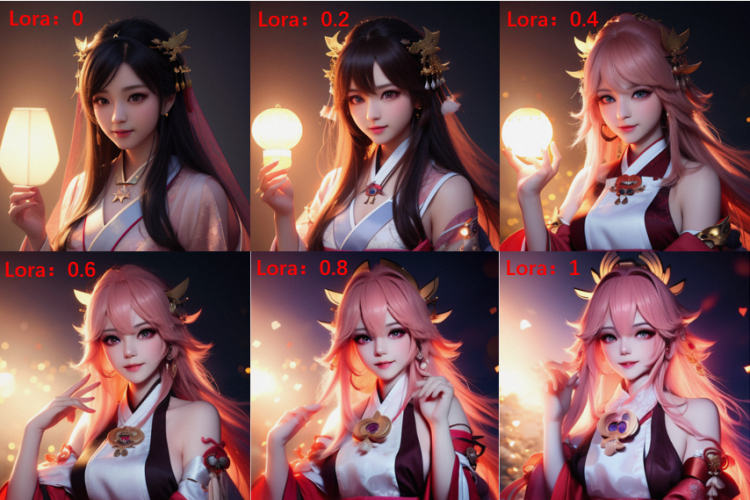
After you select a LoRA model, a tag is automatically displayed in the positive prompts, with the default weight of 1. You can modify the weight between 0 and 1. We recommend 0.8. A greater value specifies a closer similarity to the specified LoRA model.
Performance showcase:
-
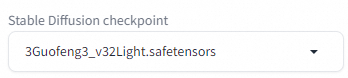
Base model
-
LoRA model
-
Positive prompt: best quality, masterpiece, highres, 1girl,blush,(seductive smile:0.8),star-shaped pupils,china hanfu,hair ornament,necklace, jewelry,Beautiful face,upon_body, tyndall effect,photorealistic, dark studio, rim lighting, two tone lighting,(high detailed skin:1.2), 8k uhd, dslr, soft lighting, high quality, volumetric lighting, candid, Photograph, high resolution, 4k, 8k, Bokeh
-
Negative prompt: (((simple background))),monochrome ,lowres, bad anatomy, bad hands, text, error, missing fingers, extra digit, fewer digits, cropped, worst quality, low quality, normal quality, jpeg artifacts, signature, watermark, username, blurry, lowres, bad anatomy, bad hands, text, error, extra digit, fewer digits, cropped, worst quality, low quality, normal quality, jpeg artifacts, signature, watermark, username, blurry, ugly,pregnant,vore,duplicate,morbid,mutilated,transsexual, hermaphrodite,long neck,mutated hands,poorly drawn hands,poorly drawn face,mutation,deformed,blurry,bad anatomy,bad proportions,malformed limbs,extra limbs,cloned face,disfigured,gross proportions, (((missing arms))),(((missing legs))), (((extra arms))),(((extra legs))),pubic hair, plump,bad legs,error legs,username,blurry,bad feet
-
Prompt source: civitai
-
Seed: set to 3, keep other parameters as default, adjust the LoRA weight:.
-
A VAE model works with a checkpoint to adjust the colors and filters of generated images. Generally, you do not need to download a VAE model because most of the checkpoint models have built-in VAE models.
Performance showcase:
-
Positive prompt: best quality, masterpiece, highres, 1girl,blush,(seductive smile:0.8),star-shaped pupils,china hanfu,hair ornament, jewelry,Beautiful face,tyndall effect,photorealistic, dark studio, rim lighting,high detailed skin:1.2), 8k uhd, dslr, soft lighting, high quality, volumetric lighting, candid, Photograph, high resolution, 4k, 8k, Bokeh
-
Negative prompt: (((simple background))),monochrome ,lowres, bad anatomy, bad hands, text, error, missing fingers, extra digit, fewer digits, cropped, worst quality, low quality, normal quality, jpeg artifacts, signature, watermark, username, blurry, lowres, bad anatomy, bad hands, text, error, extra digit, fewer digits, cropped, worst quality, low quality, normal quality, jpeg artifacts, signature, watermark, username, blurry, ugly,pregnant,vore,duplicate,morbid,mutilated,transsexual, hermaphrodite,long neck,mutated hands,poorly drawn hands,poorly drawn face,mutation,deformed,blurry,bad anatomy,bad proportions,malformed limbs,extra limbs,cloned face,disfigured,gross proportions, (((missing arms))),(((missing legs))), (((extra arms))),(((extra legs))),pubic hair, plump,bad legs,error legs,username,blurry,bad feet
-
Prompt source: civitai
-
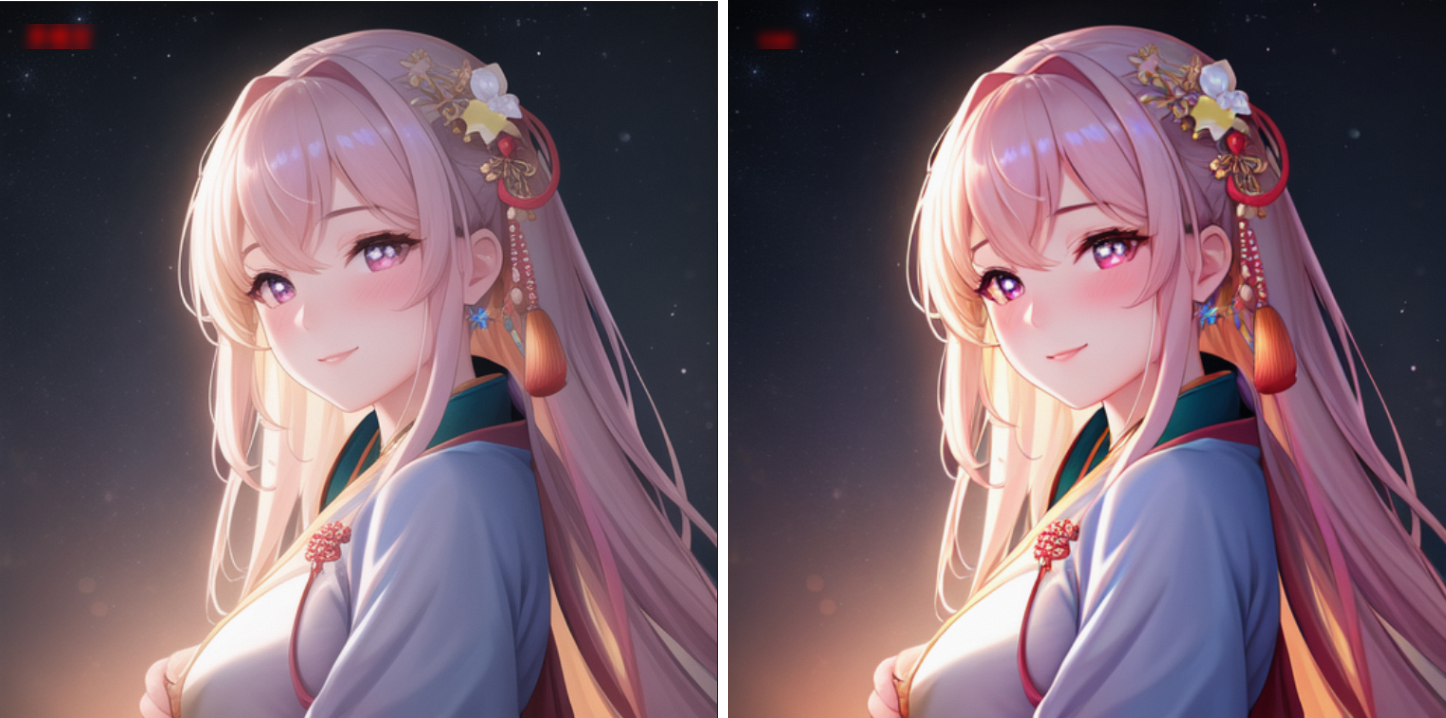
Seed: 55555, with other parameters kept as default.
-
Effect image (left is the original image, right is the image after model processing):
Models page instructions
Model sources
The models, images, and other resources displayed on the Models page are provided by third parties. You need to read the model details and agree to comply with all requirements proposed by the third party before you can start using them. PAI ArtLab does not assume any responsibility for adverse results or potential risks caused by them.
Currently, most high-quality and popular open-source models come from the Civitai open-source model community. Due to access restrictions, users in the Chinese mainland may find it inconvenient to access the community and download models. PAI ArtLab aims to provide users with a convenient way to access and download models. We sincerely invite high-quality models that are popular in the open-source community to join PAI ArtLab. After formal communication and obtaining authorization from model creators, these models will be listed on the Models page. This simplifies the download process for users, promotes the application and exchange of models, and also helps the designers understand and use high-quality models through the platform.
Billing
PAI ArtLab does not commercialize the models themselves and will not charge for the models or images generated using the models.
Rights and protections for model creators
-
PAI ArtLab's commitments to you:
-
Display the author attribution, model name, model source, and open-source license in the details of the models that join the platform.
-
Do not charge users any fees for your models and their generated content on PAI ArtLab.
-
-
Your commitments to PAI ArtLab:
-
You grant ArtLab a global, non-exclusive, revocable, free authorization to host, store, transmit, publicly display, exhibit, communicate, copy, modify, and create derivative works, support multi-level re-authorization, applicable to all media forms and channels.
-
You need to ensure the legality and compliance of the models, and ensure that the above usage behaviors on PAI ArtLab do not infringe on any third-party rights.
-
-
Cooperation opportunities:
-
Leverage the Alibaba Cloud platform to showcase model advantages to businesses, promoting cooperation between model creators and enterprises.
-
After the model is online, the platform will significantly increase the model's exposure and user awareness through promotional activities.
-
Plan to launch model ecosystem cooperation projects to explore more cooperation opportunities for creators.
-
-
Intellectual property respect statement:
PAI ArtLab fully respects the intellectual property rights of the original authors. The introduction of models aims to build a platform for learning and exchange. If you have objections to the displayed content as a copyright owner or rights holder, please contact us at PAI-ArtLab@alibabacloud.com.