Accelerate distributed training using eRDMA-enabled GPU instances with automatic network card mounting.
Limitations
-
Applies only to training jobs submitted using subscription-based general computing resources.
-
Requires NCCL version 2.19 or later.
-
Supported GPU instance types and their eRDMA network interface card counts:
GPU instance type
eRDMA network interface cards
ecs.ebmgn7v.32xlarge
2
ecs.ebmgn8v.48xlarge
2
ecs.ebmgn8is.32xlarge
2
ecs.ebmgn8i.32xlarge
4
ecs.gn8is.2xlarge
1
ecs.gn8is.4xlarge
1
ecs.gn8is-2x.8xlarge
1
ecs.gn8is-4x.16xlarge
1
ecs.gn8is-4x.16xlarge
1
Environment variables
PAI automatically enables eRDMA and sets default NCCL environment variables for supported instance types. Adjust these variables based on your training framework, communication framework, and model characteristics. For optimal performance, use the platform defaults.
Common variables
|
Environment variable |
Value |
|
PYTHONUNBUFFERED |
1 |
|
TZ |
Set based on the region where the job runs. Usually "Asia/Shanghai". |
eRDMA network variables
A hyphen (-) indicates the environment variable is not applicable.
|
Environment variable |
Value |
|
NCCL_DEBUG |
INFO |
|
NCCL_SOCKET_IFNAME |
eth0 |
|
NCCL_IB_TC |
- |
|
NCCL_IB_SL |
- |
|
NCCL_IB_GID_INDEX |
1 |
|
NCCL_IB_HCA |
erdma |
|
NCCL_IB_TIMEOUT |
- |
|
NCCL_IB_QPS_PER_CONNECTION |
8 |
|
NCCL_MIN_NCHANNELS |
16 |
|
NCCL_NET_PLUGIN |
none |
Custom image configuration
When submitting training jobs that use eRDMA-enabled general computing resources, build and use a custom image that meets the following requirements:
Prerequisites
-
CUDA 12.1 or later
-
NCCL 2.19 or later
-
Python 3
Install eRDMA library
The installation process varies based on the Linux distribution. The following example demonstrates Ubuntu 22.04 installation:
# Add the PGP signature.
wget -qO - http://mirrors.cloud.aliyuncs.com/erdma/GPGKEY | sudo gpg --dearmour -o /etc/apt/trusted.gpg.d/erdma.gpg

# Add the apt source.
mkdir -p /etc/apt/sources.list.d
echo "deb [ ] http://mirrors.cloud.aliyuncs.com/erdma/apt/ubuntu jammy/erdma main" | sudo tee /etc/apt/sources.list.d/erdma.list

# Update and install the eRDMA user-mode driver package.
sudo apt update
sudo apt install -y libibverbs1 ibverbs-providers ibverbs-utils librdmacm1
For installation on other distributions, see Use eRDMA in Docker containers.
Dockerfile example
# Replace ${user_docker_image_url} with your existing Docker image.
FROM ${user_docker_image_url}

# If the RDMA library is already installed in the image, uninstall it first.
RUN rm /etc/apt/sources.list.d/mellanox_mlnx_ofed.list && \
    apt remove -y libibverbs1 ibverbs-providers ibverbs-utils librdmacm1

RUN wget -qO - http://mirrors.aliyun.com/erdma/GPGKEY | gpg --dearmour -o /etc/apt/trusted.gpg.d/erdma.gpg && \
    echo "deb [ ] http://mirrors.aliyun.com/erdma/apt/ubuntu jammy/erdma main" | tee /etc/apt/sources.list.d/erdma.list && \
    apt update && apt install -y libibverbs1 ibverbs-providers ibverbs-utils librdmacm1
Run NCCL test using MPIJob
To submit an MPIJob training job, configure the following key parameters. For other parameters, see Submit an MPIJob training job.
|
Parameter |
Description |
|
|
Environment Information |
Node Image |
On the Image Address tab, enter the custom image. Alternatively, use the PAI-DLC NCCL test image with pre-installed eRDMA dependencies: Replace |
|
Startup Command |
|
|
|
Resource Information |
Resource Source |
Select Resource Quota. |
|
Resource Quota |
Select a created general computing resource quota (such as one with ecs.ebmgn8v.48xlarge instance type). For more about creating resource quotas, see General computing resource quotas. |
|
|
Framework |
Select MPIJob. |
|
|
Job Resource |
Configure the following parameters:
|
|
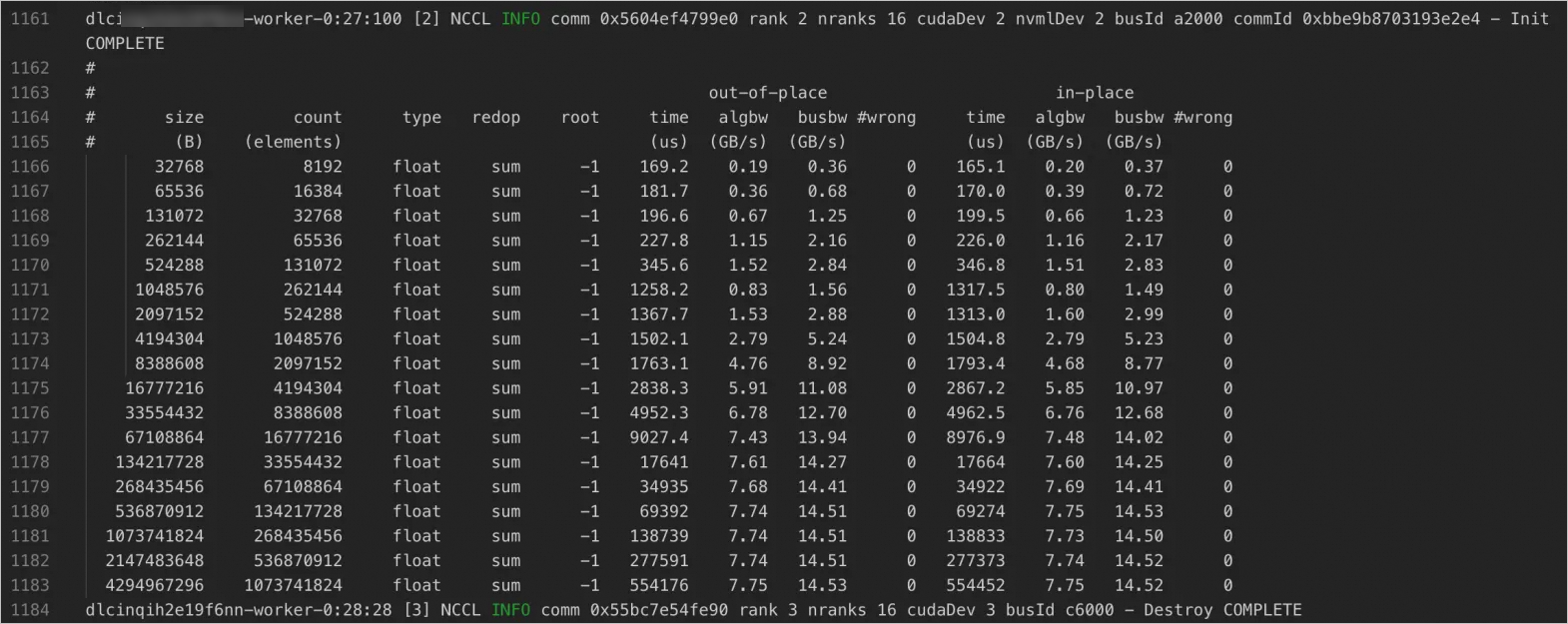
The following figure shows sample NCCL test results for eRDMA network bandwidth.