Create acceleration slots bound to OSS, NAS, or MaxCompute. Configure mount targets for training clusters to access pre-processed datasets.
Prerequisites
Create a dataset acceleration instance. For more information, see Create and manage dataset acceleration instances.
Create a slot
-
Log on to the PAI console. Choose in the left-side navigation pane.
-
Open the creation panel.
-
Method 1: On the Acceleration Slots tab, click Create Acceleration Slot.
-
Method 2: Create from instance details page.
NoteWith this method, the Instance parameter is automatically set to current instance and cannot be changed.
-
On the Acceleration Instances tab, click the target instance name to open its details page.
-
On the Dataset Acceleration Slots tab, click Create Acceleration Slot.
-
-
-
Configure key parameters in the Create Acceleration Slot panel.
Parameter
Description
Instance
Existing acceleration instance.
Bind Cloud Product
Cloud product matching the data source type configured for the acceleration instance.
Object Storage Service (OSS)
-
Read/Write Permissions: Read and write permissions for OSS. Options: Read-only or Read/Write.
-
Select OSS Path: Storage folder for the dataset in OSS.
General-purpose NAS, Extreme NAS
-
Select File System: ID of an existing file system.
-
File System Mount Target: Mount target to access the file system.
-
File System Path: Existing storage path in NAS. Default:
/.
Maximum Capacity
Capacity for the acceleration slot. Must be greater than or equal to the dataset size. Configure based on the dataset size to accelerate.
Mount Target
Configurable only for Alibaba Cloud Object Storage Service (OSS).
Mount target attaches Dataset Accelerator to training cluster. Training tasks access acceleration slots through mount targets to read datasets with improved efficiency.
Two configuration methods:
-
Select Mount Target: Existing mount target.
-
Create Mount Target: Configure parameters to create a mount target.
-
Mount Target Type: Only VPC is supported.
-
VPC Network: Existing VPC. If none available, click Create VPC to create one.
-
vSwitch: Existing vSwitch. If none available, click Create vSwitch to create one.
-
Note-
Dataset Accelerator supports only VPC mount targets.
-
VPC mount target can be used by training clusters in the same VPC with different vSwitches.
-
File system uses one IP address when adding a mount target. Select a vSwitch with many available private IP addresses.
-
Mount target can be attached only by training clusters in the same VPC network.
Enable Automatic Recycling
Turn on Enable Automatic Recycling to configure runtime or stop time for the acceleration slot.
-
-
Click Submit.
System initializes the acceleration slot. Use the slot after its Status changes to Running.
Manage slots
Manage slots on the Acceleration Slots tab or instance details page. Operations are identical on both pages.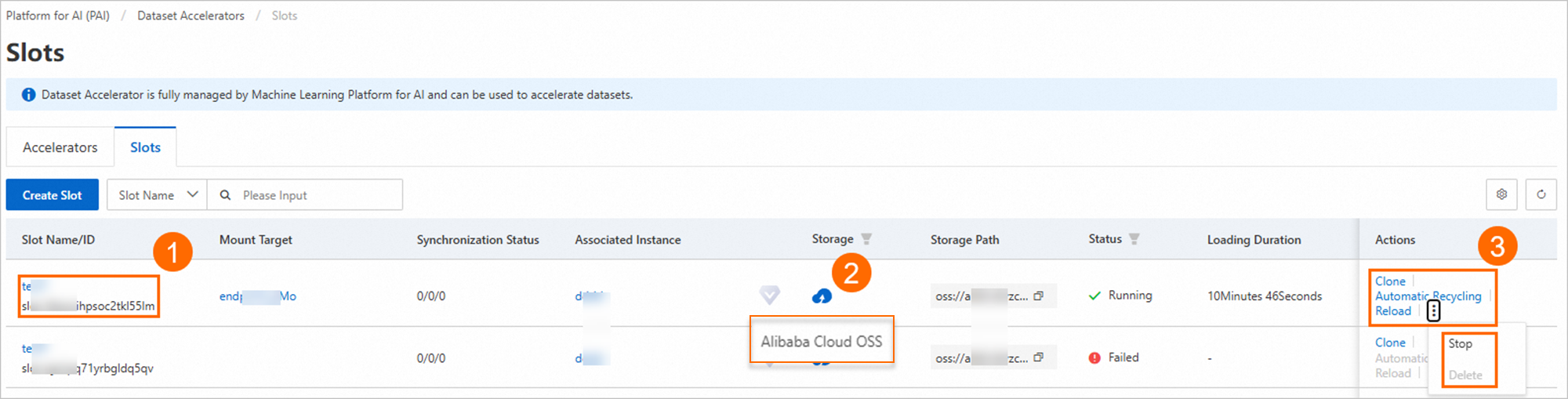
-
Click slot name to view Basic Information.
-
Hover over storage class icon to view dataset storage class.
-
Stop, delete, or clone slots. Click Automatic Recycling to configure runtime or automatic stop time.
Manage mount targets
Click slot name to open details page. Manage mount targets on this page.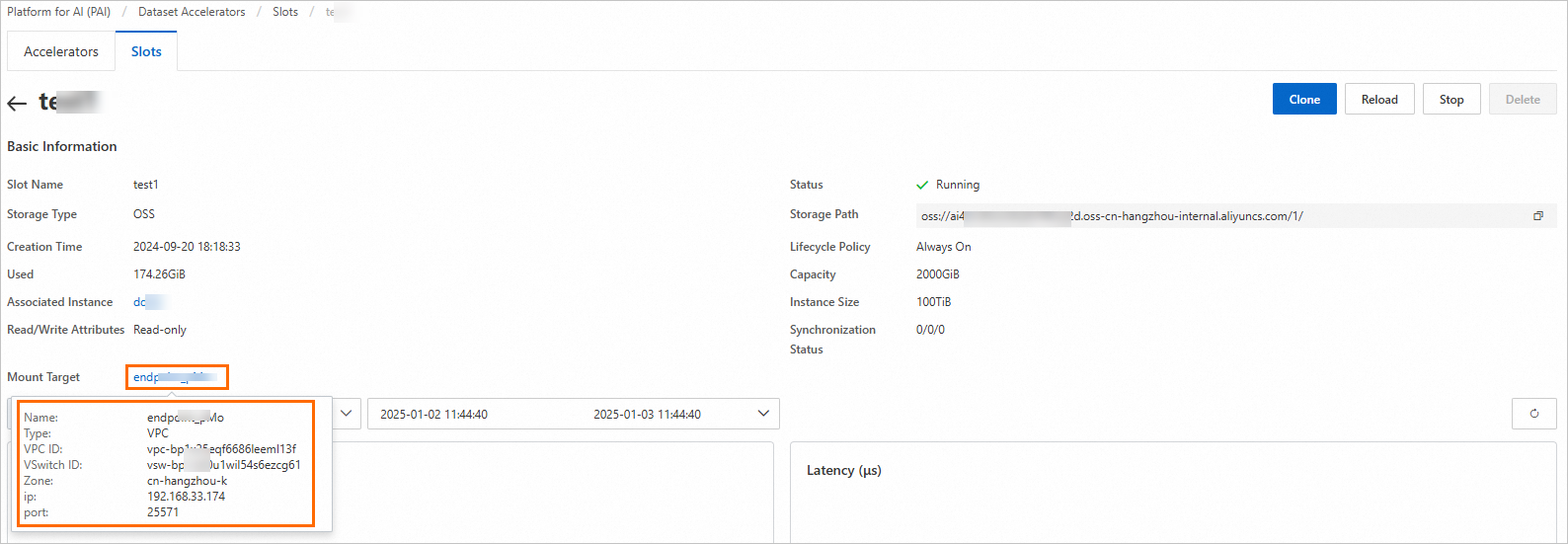
-
View configuration: Hover over mount target name to view configuration information.
-
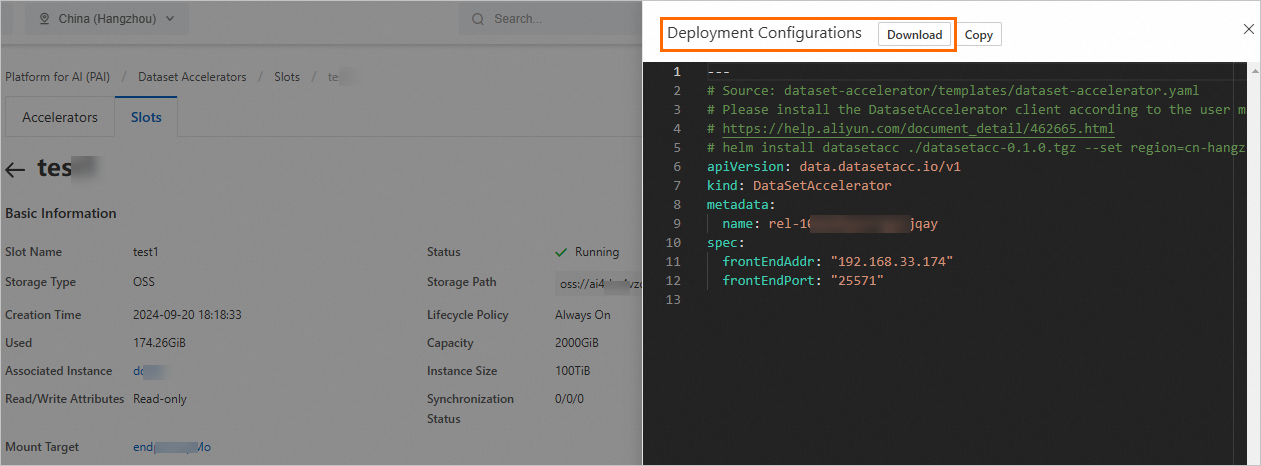
View deployment configuration: Click mount target name to display deployment configuration for installing Dataset Accelerator client.
-
Download deployment configuration: In Deployment Configuration panel, click Download to download YAML file. Use this file to configure Dataset Accelerator in training cluster.
What to do next
Enable dataset acceleration when creating DSW instances or submitting DLC jobs. For more information, see Use a Dataset Accelerator in PAI.