EAS provides computing power check and fault tolerance features. These features automatically check the health of resources, such as GPU computing power and node communication, to improve troubleshooting efficiency and ensure service availability and stability for large-scale deployments.
Use cases
The computing power check and fault tolerance feature is for multi-node distributed inference services deployed on Lingjun resources.
Core concepts
Check timing:
Before instance startup: Checks run before the program in a service instance (Pod) starts. This helps prevent startup failures caused by resource faults and identify hardware or network issues in advance.
During instance runtime: Checks run as a background process during service runtime.
Check item:
Before instance startup: Supports compute performance check, node communication check, and cross-check for computing and communication.
During instance runtime: Only supports C4D (checks the health of GPUs).
For more information about check items, see Appendix: Check item descriptions.
Abnormal state handling:
Instance startup failure: If an issue is detected, the system terminates the current instance startup.
No action: If an issue is detected, the system only records an event and takes no other action.
Procedure
Enable and configure computing power check
Log on to the PAI console. Select a region on the top of the page. Then, select the desired workspace and click Elastic Algorithm Service (EAS).
Click Deploy Service and select Custom Deployment in the Custom Model Deployment section.
In the Features section, under the Stability guarantee, enable Compute monitoring & fault tolerance. Configure the check parameters in the panel that appears on the right. To configure the JSON file directly, see Appendix: JSON file parameter descriptions.
NoteYou can add both Before running and Instance running checks.
Configure checks before instance startup (Optional)
Detection timing: Select Before running.
Check item: Select check items as needed, such as Run Compute Performance Check and Run Node Communication Check. By default, the platform enables the GPU GEMM, All-Reduce-Single node, and All-Reduce-Node-Node checks.
Set maximum check duration: Based on the selected check items, refer to the estimated durations in the check item descriptions (checks run in sequential execution) to set a timeout period. The default is 5 minutes. If a check does not complete within this time, it fails.
Handle abnormal status: The default is Instance startup failed.
Configure checks during instance runtime (Optional)
Detection timing: Select Instance running.
Check items: Currently, only C4D is supported.
Handle abnormal status: Currently, only Ignore is supported.
View the computing power health check result
After configuring this feature, you can view the check report in two ways:
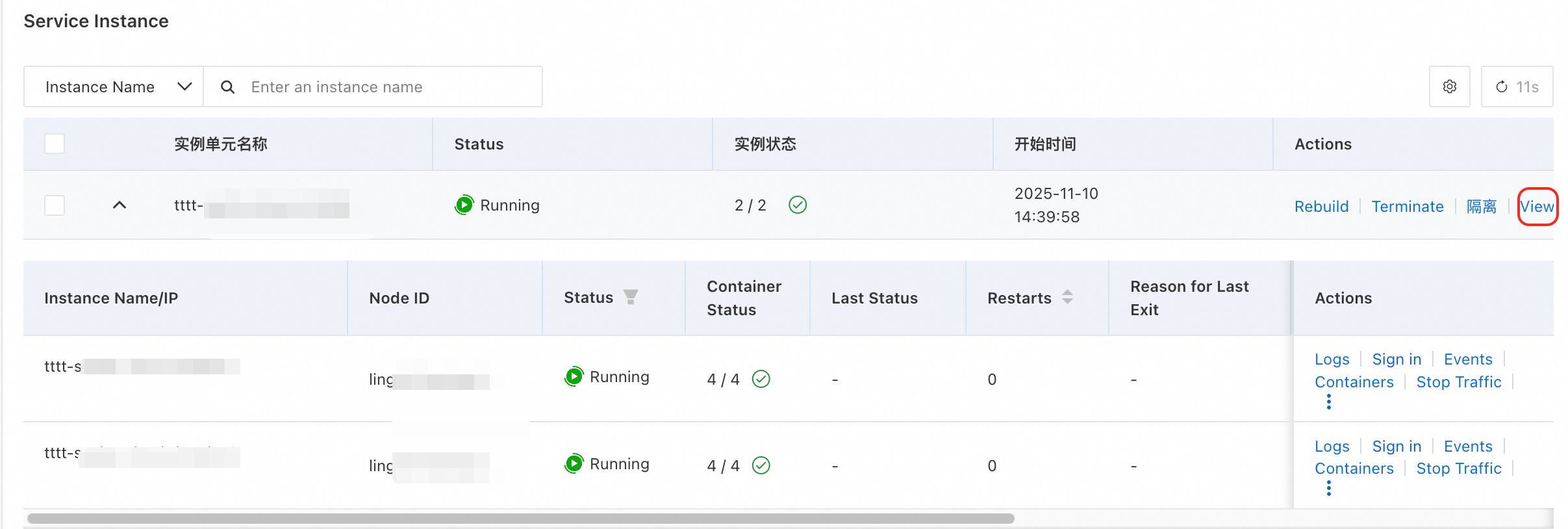
Method 1: From the instance list
On the service details page, click the Overview tab.
In the Service Instance section, find the target instance and click View results in the Action column.
Method 2: From deployment events
On the service details page, click the Deployment Events tab.
Find an event with the type
SanityCheckSucceededorSanityCheckFailedand click View results in the Action column.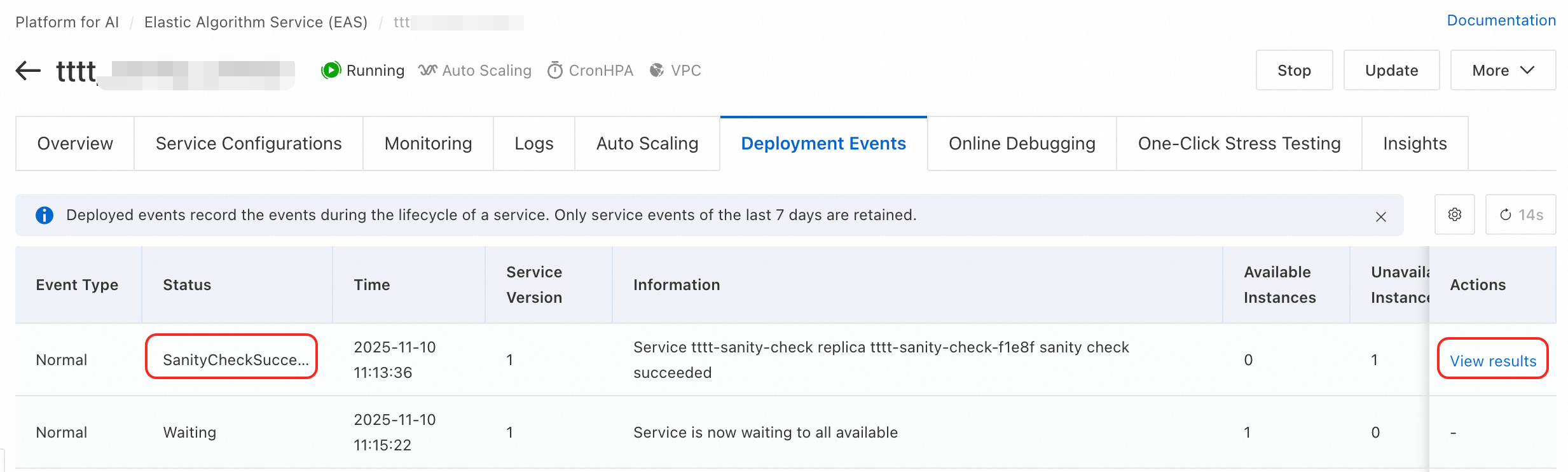
The Computing Power Health Check Result drawer appears on the right. You can view detailed reports for each check item in this drawer.
FAQ
Q: What are the common causes for an All-Reduce check failure?
An All-Reduce check failure usually indicates network communication issues between nodes. These issues can include high network latency, severe packet loss, or incorrect Remote Direct Memory Access (RDMA) configuration between nodes. You can use the detailed data in the report to focus on troubleshooting nodes with slow communication.
Appendix: Check item descriptions
Check item | Description (Recommended scenario) | Estimated check duration | |
Before instance startup | |||
Compute performance check | GPU GEMM | Detects GPU GEMM performance and identifies:
| 1 minute |
GPU Kernel Launch | Detects GPU kernel launch latency and identifies:
| 1 minute | |
Node communication check | All-Reduce | Detects node communication performance to identify slow or faulty nodes. In different communication patterns, this check identifies:
| Single collection communication detection 5 minutes |
All-to-All | |||
All-Gather | |||
Multi-All-Reduce | |||
PyTorch-Gloo | Uses PyTorch Gloo to check node communication and identify faulty communication nodes. | 1 minute | |
Network Connectivity | Checks network connectivity of the head or tail nodes to identify nodes with abnormal connectivity. | 2 minutes | |
Cross-check for computing and communication | MatMul/All-Reduce Overlap | Detects single-node performance when communication and computation kernels overlap. This check identifies:
| 1 minute |
During instance runtime | |||
C4D | Checks the health of GPU cards while the instance is running. | ||
Appendix: JSON file parameter descriptions
Configuration example
{
    "aimaster": {
        "runtime_check": {
            "fail_action": "retain",
            "micro_benchmarks": "c4d"
        },
        "sanity_check": {
            "fail_action": "retain",
            "micro_benchmarks": "gemm_flops,all_reduce_1,all_reduce_2,kernel_launch,all_reduce,all_to_all_2,all_gather_2,all_gather,multi_all_reduce_2,multi_all_reduce,pytorch_gloo_2,network_connectivity,comp_comm_overlap",
            "timeout": 100
        }
    }
}
Parameter descriptions
Parameter | Description | ||
aimaster | runtime_check During instance runtime | fail_action | How to handle abnormal states. |
micro_benchmarks | The check item. Valid value: c4d. | ||
sanity_check Before instance startup | fail_action | How to handle abnormal states. | |
micro_benchmarks | The check items. Separate multiple items with commas. | ||
timeout | The maximum check duration, in minutes. | ||