Deploy a scalable job service for Kohya training in integrated or independent mode, call the service, and manage training tasks.
Prerequisites
You have created an Object Storage Service (OSS) bucket to store model and configuration files generated during training. For more information, see Create buckets.
Deploy a scalable Kohya training service
This section uses the kohya_ss preset image provided by PAI as an example.
-
Log on to the PAI console. Select a region on the top of the page. Then, select the desired workspace and click Elastic Algorithm Service (EAS).
-
Deploy the training service.
The following deployment methods are available:
Integrated deployment
In integrated deployment, the
queue service,persistent frontend service, andscalable job serviceare deployed as a single unit.-
Click Deploy Service, and then in the Custom Model Deployment area, click JSON Deployment.
-
Enter the following JSON configuration.
{
  "cloud": {
    "computing": {
      "instance_type": "ecs.gn6i-c4g1.xlarge"
    }
  },
  "containers": [
    {
      "image": "eas-registry-vpc.cn-hangzhou.cr.aliyuncs.com/pai-eas/kohya_ss:2.2"
    }
  ],
  "features": {
    "eas.aliyun.com/extra-ephemeral-storage": "30Gi"
  },
  "front_end": {
    "image": "eas-registry-vpc.cn-hangzhou.cr.aliyuncs.com/pai-eas/kohya_ss:2.2",
    "port": 8001,
    "script": "python -u kohya_gui.py --listen 0.0.0.0 --server_port 8001 --data-dir /workspace --headless --just-ui --job-service"
  },
  "metadata": {
    "cpu": 4,
    "enable_webservice": true,
    "gpu": 1,
    "instance": 1,
    "memory": 15000,
    "name": "kohya_job",
    "type": "ScalableJobService"
  },
  "name": "kohya_job",
  "storage": [
    {
      "mount_path": "/workspace",
      "oss": {
        "path": "oss://examplebucket/kohya/",
        "readOnly": false
      },
      "properties": {
        "resource_type": "model"
      }
    }
  ]
}
Key parameters:
Parameter
Description
metadata
name
Custom service name. Must be unique within the region.
type
Service type. Set to ScalableJobService for integrated deployment.
enable_webservice
Set to true to deploy the frontend web application.
front_end
image
Frontend instance image. Select the kohya_ss image with version 2.2.
NoteImage versions are updated frequently. Select the latest version when deploying.
script
Startup command for the frontend instance:
python -u kohya_gui.py --listen 0.0.0.0 --server_port 8000 --headless --just-ui --job-service. Parameters:-
--listen: Binds to the specified IP address for external requests.
-
--server_port: The listening port.
-
--just-ui: Starts the service in UI-only frontend mode.
-
--job-service: Routes training tasks to the scalable job service.
port
Port number. Must match the server_port value in front_end.script.
containers
image
Defaults to the frontend instance image if not specified.
instance_type
Instance type for the scalable job service. Must be a GPU type. Defaults to the cloud.computing.instance_type value if not specified.
storage
path
OSS path in the same region to store training output. Example:
oss://examplebucket/kohya/.readOnly
Set to false to allow saving model files to OSS.
mount_path
Customizable mount path. Set to
/workspacein this example.cloud
instance_type
Instance type for the service. In integrated deployment, this applies to both frontend and job instances. Must be a GPU type for Kohya training.
-
-
Click Deploy.
Independent deployment
In independent deployment, the scalable job service and frontend service are deployed separately. This allows a single scalable job service to accept requests from multiple frontend services.
-
Deploy the scalable job service.
-
Click Deploy Service, and then in the Custom Model Deployment section, click JSON Deployment.
-
Enter the following JSON configuration for the scalable job service.
{
  "cloud": {
    "computing": {
      "instance_type": "ecs.gn6i-c4g1.xlarge"
    }
  },
  "containers": [
    {
      "image": "eas-registry-vpc.cn-hangzhou.cr.aliyuncs.com/pai-eas/kohya_ss:2.2"
    }
  ],
  "features": {
    "eas.aliyun.com/extra-ephemeral-storage": "30Gi"
  },
  "metadata": {
    "instance": 1,
    "name": "kohya_scalable_job",
    "type": "ScalableJob"
  },
  "storage": [
    {
      "mount_path": "/workspace",
      "oss": {
        "path": "oss://examplebucket/kohya/",
        "readOnly": false
      },
      "properties": {
        "resource_type": "model"
      }
    }
  ]
}
Key parameters:
Parameter
Description
metadata
name
Custom service name. Must be unique within the region.
type
Service type. Set to ScalableJob for independent deployment.
containers
image
Image for the scalable job service. Select the kohya_ss image with version 2.2.
NoteImage versions are updated frequently. Select the latest version when deploying.
storage
path
OSS path in the same region to store training output. Example:
oss://examplebucket/kohya/.readOnly
Set to false to allow saving model files to OSS.
mount_path
Customizable mount path. Set to
/workspacein this example.cloud
instance_type
Instance type for the scalable job service. Kohya training requires a GPU type.
-
Click Deploy.
-
After deployment, click Invocation Information in the Service Type column. On the Public Endpoint tab, copy and save the endpoint and token.
-
-
(Optional) Deploy the frontend service.
-
Click Deploy Service, and then in the Custom Model Deployment section, click JSON Deployment.
-
Enter the following JSON configuration for the frontend service.
{
  "cloud": {
    "computing": {
      "instance_type": "ecs.g6.large"
    }
  },
  "containers": [
    {
      "image": "eas-registry-vpc.cn-hangzhou.cr.aliyuncs.com/pai-eas/kohya_ss:2.2",
      "port": 8000,
      "script": "python kohya_gui.py --listen 0.0.0.0 --server_port 8000 --headless --just-ui --job-service --job-service-endpoint 166233998075****.vpc.cn-hangzhou.pai-eas.aliyuncs.com --job-service-token test-token --job-service-inputname kohya_scalable_job"
    }
  ],
  "metadata": {
    "enable_webservice": true,
    "instance": 1,
    "name": "kohya_scalable_job_front"
  },
  "storage": [
    {
      "mount_path": "/workspace",
      "oss": {
        "path": "oss://examplebucket/kohya/",
        "readOnly": false
      },
      "properties": {
        "resource_type": "model"
      }
    }
  ]
}
Key parameters:
Parameter
Description
metadata
name
Custom name for the frontend service.
enable_webservice
Set to true to deploy the frontend web application.
containers
image
Frontend service image. Select the kohya_ss image with version 2.2.
NoteImage versions are updated frequently. Select the latest version when deploying.
script
Startup command for the frontend service:
python kohya_gui.py --listen 0.0.0.0 --server_port 8000 --headless --just-ui --job-service --job-service-endpoint 166233998075****.vpc.cn-hangzhou.pai-eas.aliyuncs.com --job-service-token test-token --job-service-inputname kohya_scaled_job. Parameters:-
--listen: Binds to the specified IP address for external requests.
-
--server_port: The listening port.
-
--just-ui: Starts the service in UI-only frontend mode.
-
--job-service: Routes training tasks to the scalable job service.
-
--job-service-endpoint: Endpoint of the scalable job service.
-
--job-service-token: Token of the scalable job service.
-
--job-service-inputname: Service name of the scalable job service.
port
Port number. Must match the server_port value in containers.script.
storage
path
OSS path in the same region to store training output. Example:
oss://examplebucket/kohya/.readOnly
Set to false to allow saving model files to OSS.
mount_path
Customizable mount path. Set to
/workspacein this example.cloud
instance_type
Instance type for the frontend service. A CPU type is sufficient.
-
-
-
Click Deploy.
-
Call the Kohya training service
Call from the web UI
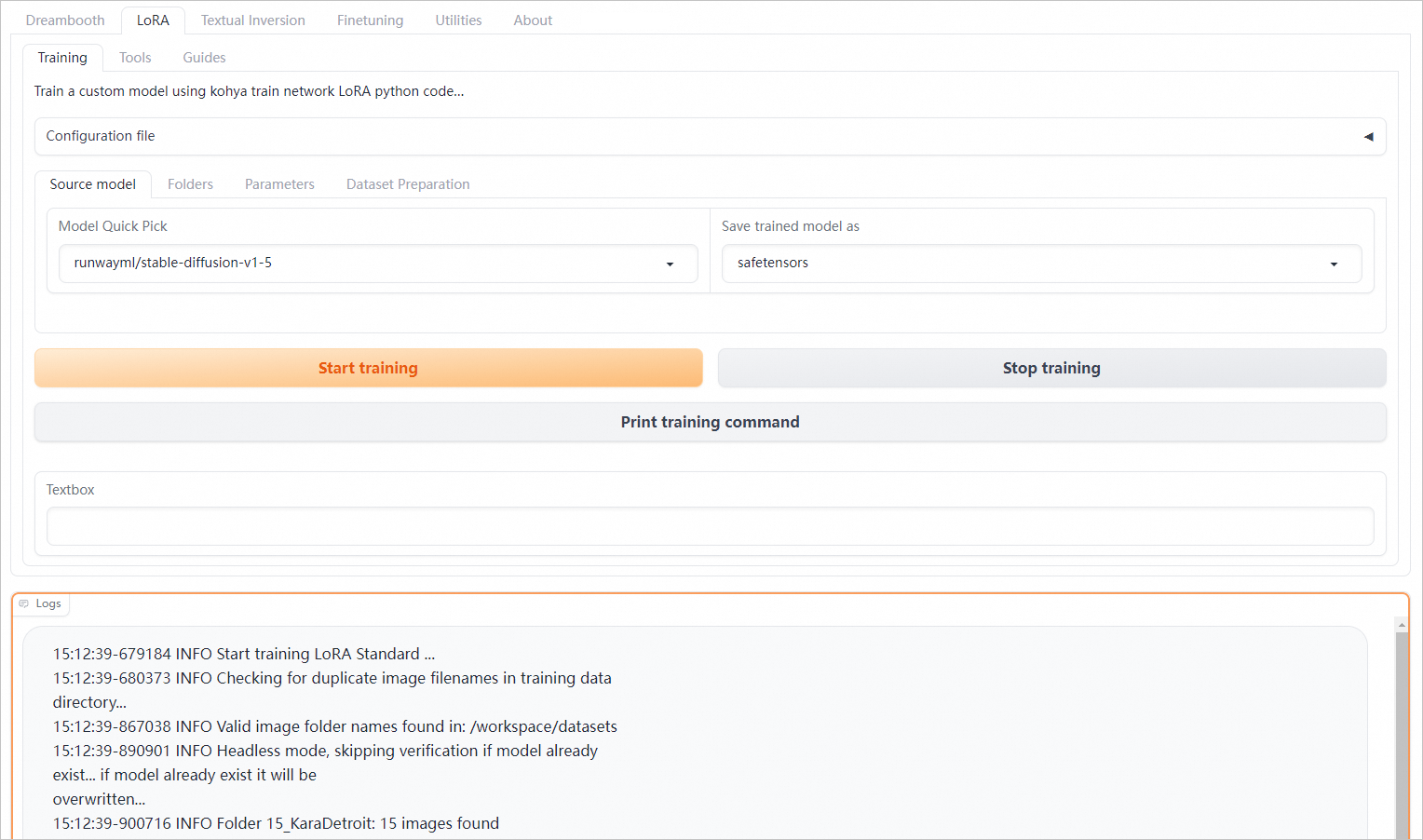
If the frontend service uses the kohya preset image (version 2.2 or later), the scalable job service feature is supported. After deployment, click View Web App in the Service Type column to configure LoRA training parameters and train a Kohya model. For more information, see Train a LoRA model.
-
Click Start training to submit a training job. The button is disabled until the current job completes or is terminated. Scalable job service instances auto-scale based on the number of training jobs.
-
Click Stop training to stop the current training task.
Call from a custom frontend
Use the SDK for Python to call the scalable job service, send command task requests to the queue, and retrieve execution logs. If you use a custom frontend image, implement the following API operations in the image to call the scalable job service from the web UI.
-
Obtain the endpoint and token of the scalable job service.
Integrated deployment
On the Elastic Algorithm Service (EAS) page, click the service name to open the service details page. In the Basic Information section, click View Endpoint Information. On the Public Endpoint tab, obtain the endpoint and token:
-
Service endpoint: Format is
<queue_name>.<service_name>.<uid>.<region>.pai-eas.aliyuncs.com. Example:kohya-job-queue-b****4f0.kohya-job.175805416243****.cn-beijing.pai-eas.aliyuncs.com. The<queue_name>is the part of the queue service instance name before -0. Find this name in the service instance list on the Service Details page.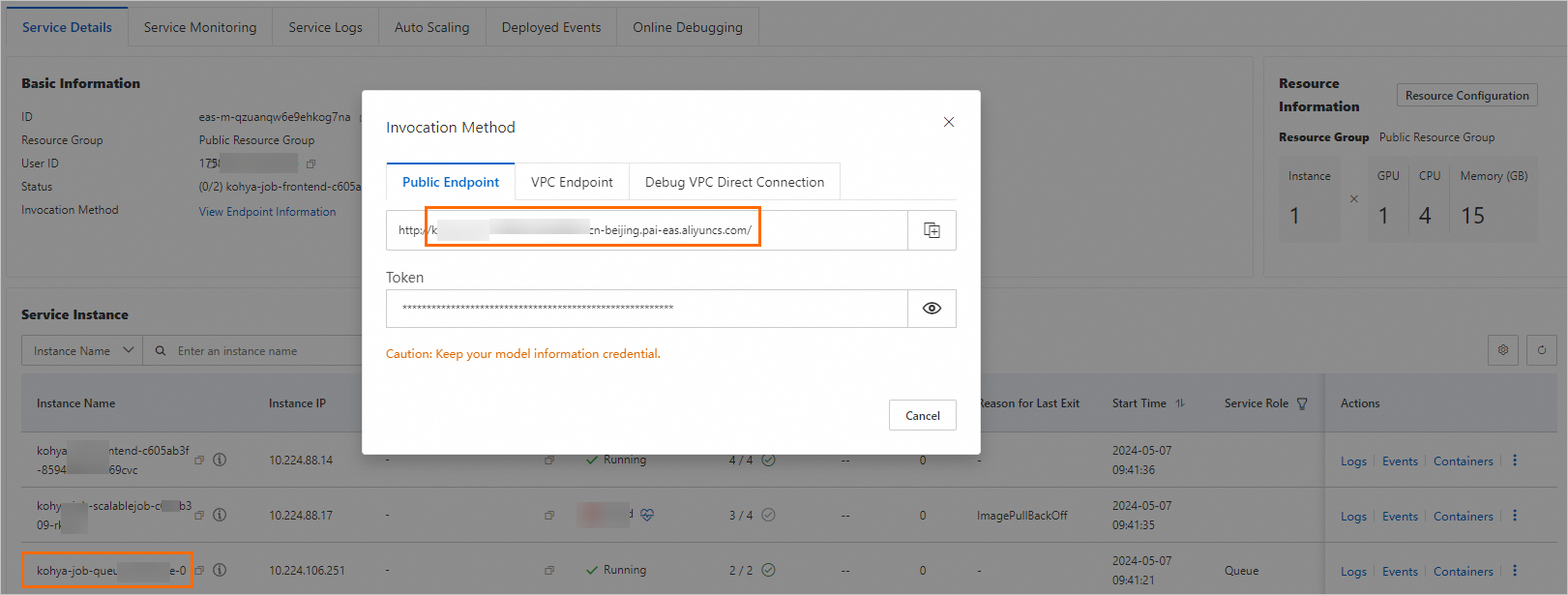
-
Token: Example:
OGZlNzQwM2VlMWUyM2E2ZTAyMGRjOGQ5MWMyOTFjZGExNDgwMT****==
Independent deployment
On the Elastic Algorithm Service (EAS) page, click Invocation Information in the Service Type column of the scalable job service to obtain the endpoint and token:
-
Endpoint: Example:
175805416243****.cn-beijing.pai-eas.aliyuncs.com -
Token: Example:
Njk5NDU5MGYzNmRlZWQ3ND****QyMDIzMGM4MjExNmQ1NjE1NzY5Mw==
-
-
Install the SDK for Python.
pip install -U eas-prediction --userFor more information about SDK API operations, see SDK for Python Usage Guide.
-
Create clients for the input queue and the output queue.
Integrated deployment
from eas_prediction import QueueClient

if __name__ == '__main__':
    token = 'OGZlNzQwM2VlMWUyM2E2ZTAyMGRjOGQ5MWMyOTFjZGExNDgwMT****=='
    input_url = 'kohya-job-queue-bf****f0.kohya-job.175805416243****.cn-hangzhou.pai-eas.aliyuncs.com'
    sink_url = input_url + '/sink'

    # Create an input queue to send training and termination requests for command tasks.
    inputQueue = QueueClient(custom_url = input_url)
    inputQueue.set_token(token)
    inputQueue.init(gid="superwatcher")

    # Create an output queue to obtain the task state and logs.
    sinkQueue = QueueClient(custom_url = sink_url)
    sinkQueue.set_token(token)
    sinkQueue.init()
Parameters:
-
token: Replace with the token obtained in the preceding step.
-
input_url: Replace with the endpoint obtained in the preceding step.
Independent deployment
from eas_prediction import QueueClient

if __name__ == '__main__':
    endpoint = '166233998075****.cn-hangzhou.pai-eas.aliyuncs.com'
    token = 'YmE3NDkyMzdiMzNmMGM3ZmE4ZmNjZDk0M2NiMDA3OT****c1MTUxNg=='
    input_name = 'kohya_scalable_job'
    sink_name = input_name + '/sink'

    # Create an input queue to send training and termination requests for command tasks.
    inputQueue = QueueClient(endpoint, input_name)
    inputQueue.set_token(token)
    inputQueue.init()

    # Create an output queue to obtain the task state and logs.
    sinkQueue = QueueClient(endpoint, sink_name)
    sinkQueue.set_token(token)
    sinkQueue.init()
Parameters:
-
endpoint: Replace with the endpoint obtained in the preceding step.
-
token: Replace with the service token obtained in the preceding step.
-
input_name: Name of the scalable job service.
-
-
Send a training task request to the input queue.
Integrated deployment
from eas_prediction import QueueClient
import uuid

if __name__ == '__main__':
    token = 'OGZlNzQwM2VlMWUyM2E2ZTAyMGRjOGQ5MWMyOTFjZGExNDgwMT****=='
    input_url = 'kohya-job-queue-bf****f0.kohya-job.175805416243****.cn-hangzhou.pai-eas.aliyuncs.com'
    sink_url = input_url + '/sink'

    # Create a client for the input queue to send command requests.
    inputQueue = QueueClient(custom_url = input_url)
    inputQueue.set_token(token)
    inputQueue.init(gid="superwatcher")

    # Generate a unique taskId for each task request.
    task_id = uuid.uuid1().hex
    # Create a command string.
    cmd = "for i in {1..10}; do date; sleep 1; done;"
    # Specify command as the taskType and specify the taskId.
    tags = {"taskType": "command", "taskId": task_id}
    # Send a command training task request to the input queue.
    index, request_id = inputQueue.put(cmd, tags)
    print(f'send index: {index}, request id: {request_id}')
Key parameters:
Parameter
Description
token
Replace with the token obtained in the preceding step.
input_url
Replace with the endpoint obtained in the preceding step.
cmd
Command to execute. For Python commands, add -u for real-time log output.
tags
Training task request tags:
-
taskType: Must be
command. -
taskId: Unique identifier for the training task.
Independent deployment
from eas_prediction import QueueClient
import uuid

if __name__ == '__main__':
    endpoint = '166233998075****.cn-hangzhou.pai-eas.aliyuncs.com'
    token = 'M2EyNWYzNDJmNjQ5ZmUzMmM0OTMyMzgzYj****djN2IyODc1MTM5ZQ=='
    input_name = 'kohya_scalable_job'

    # Create a client for the input queue to send command requests.
    inputQueue = QueueClient(endpoint, input_name)
    inputQueue.set_token(token)
    inputQueue.init(gid="superwatcher")

    # Generate a unique taskId for each task request.
    task_id = uuid.uuid1().hex
    # Create a command string.
    cmd = "for i in {1..10}; do date; sleep 1; done;"
    # Specify command as the taskType and specify the taskId.
    tags = {"taskType": "command", "taskId": task_id}
    # Send a command training task request to the input queue.
    index, request_id = inputQueue.put(cmd, tags)
    print(f'send index: {index}, request id: {request_id}')
Key parameters:
Parameter
Description
endpoint
Replace with the endpoint obtained in the preceding step.
token
Replace with the service token obtained in the preceding step.
cmd
Command to execute. For Python commands, add -u for real-time log output.
tags
Training task request tags:
-
taskType: Must be
command. -
taskId: Unique identifier for the training task.
-
-
Query the queue status of the request.
Integrated deployment
from eas_prediction import QueueClient
import uuid

if __name__ == '__main__':
    token = 'OGZlNzQwM2VlMWUyM2E2ZTAyMGRjOGQ5MWMyOTFjZGExNDgwMT****=='
    input_url = 'kohya-job-queue-bf****f0.kohya-job.175805416243****.cn-hangzhou.pai-eas.aliyuncs.com'
    sink_url = input_url + '/sink'

    # Create a client for the input queue to send command requests.
    inputQueue = QueueClient(custom_url = input_url)
    inputQueue.set_token(token)
    inputQueue.init(gid="superwatcher")

    # Send a command request to the input queue.
    task_id = uuid.uuid1().hex
    cmd = "for i in {1..100}; do date; sleep 1; done;"
    tags = {"taskType": "command", "taskId": task_id}
    index, request_id = inputQueue.put(cmd, tags)

    # Query the queue status of the request data.
    search_info = inputQueue.search(index)
    print("index: {}, search info: {}".format(index, search_info))
Parameters:
-
token: Replace with the token obtained in the preceding step.
-
input_url: Replace with the endpoint obtained in the preceding step.
Independent deployment
from eas_prediction import QueueClient
import uuid

if __name__ == '__main__':
    endpoint = '166233998075****.cn-hangzhou.pai-eas.aliyuncs.com'
    token = 'M2EyNWYzNDJmNjQ5ZmUzMmM0OTMyMzgzYjBjOTdjN2I****1MTM5ZQ=='
    input_name = 'kohya_scalable_job'

    # Create a client for the input queue to send command requests.
    inputQueue = QueueClient(endpoint, input_name)
    inputQueue.set_token(token)
    inputQueue.init(gid="superwatcher")

    # Send a command request to the input queue.
    task_id = uuid.uuid1().hex
    cmd = "for i in {1..100}; do date; sleep 1; done;"
    tags = {"taskType": "command", "taskId": task_id}
    index, request_id = inputQueue.put(cmd, tags)

    # Query the queue status of the request data.
    search_info = inputQueue.search(index)
    print("index: {}, search info: {}".format(index, search_info))
Parameters:
-
endpoint: Replace with the endpoint obtained in the preceding step.
-
token: Replace with the service token obtained in the preceding step.
Sample response in JSON format:
{
	'IsPending': False,
	'WaitCount': 0
}
Response fields:
Parameter
Description
IsPending
Whether the request is being processed:
-
True: Request is being processed.
-
False: Request is in the queue.
WaitCount
Position of the request in the queue. Valid only when IsPending is False. Returns 0 when IsPending is True.
-
-
Obtain the execution result from the output queue.
Training task logs are written to the output queue in real time. Call
queue.get(request_id=request_id, length=1, timeout='0s', tags=tags)to retrieve logs for a specific task_id. Example:Integrated deployment
from eas_prediction import QueueClient
import json
import uuid

if __name__ == '__main__':
    token = 'OGZlNzQwM2VlMWUyM2E2ZTAyMGRjOGQ5MWMyOTFjZGExNDgwMT****=='
    input_url = 'kohya-job-queue-bf****f0.kohya-job.175805416243****.cn-hangzhou.pai-eas.aliyuncs.com'
    sink_url = input_url + '/sink'

    # Create a client for the input queue to send command requests.
    inputQueue = QueueClient(custom_url = input_url)
    inputQueue.set_token(token)
    inputQueue.init(gid="superwatcher")

    # Create a client for the output queue to obtain command execution logs.
    sinkQueue = QueueClient(custom_url = sink_url)
    sinkQueue.set_token(token)
    sinkQueue.init()

    # Send a command request to the input queue.
    cmd = "for i in {1..10}; do date; sleep 1; done;"
    task_id = uuid.uuid1().hex
    tags = {"taskType": "command", "taskId": task_id}
    index, request_id = inputQueue.put(cmd, tags)

    # Obtain the output logs of the training task with the specified taskId from the output queue in real time.
    running = True
    while running:
        dfs = sinkQueue.get(length=1, timeout='0s', tags=tags)
        if len(dfs) == 0:
            continue
        df = dfs[0]
        data = json.loads(df.data.decode())
        state = data["state"]
        print(data.get("log", ""))
        if state in {"Exited", "Stopped", "Fatal", "Backoff"}:
            running = False
Parameters:
-
token: Replace with the token obtained in the preceding step.
-
input_url: Replace with the endpoint obtained in the preceding step.
Independent deployment
from eas_prediction import QueueClient
import json
import uuid

if __name__ == '__main__':
    endpoint = '166233998075****.cn-hangzhou.pai-eas.aliyuncs.com'
    token = 'M2EyNWYzNDJmNjQ5ZmUzMmM0OTMyMzgzYjBjOTdjN2IyOD****M5ZQ=='
    input_name = 'kohya_scalable_job'
    sink_name = input_name + '/sink'

    # Create a client for the input queue to send command requests.
    inputQueue = QueueClient(endpoint, input_name)
    inputQueue.set_token(token)
    inputQueue.init(gid="superwatcher")

    # Create a client for the output queue to obtain command execution logs.
    sinkQueue = QueueClient(endpoint, sink_name)
    sinkQueue.set_token(token)
    sinkQueue.init()

    # Send a command request to the input queue.
    cmd = "for i in {1..10}; do date; sleep 1; done;"
    task_id = uuid.uuid1().hex
    tags = {"taskType": "command", "taskId": task_id}
    index, request_id = inputQueue.put(cmd, tags)

    # Obtain the output logs of the training task with the specified taskId from the output queue in real time.
    running = True
    while running:
        dfs = sinkQueue.get(length=1, timeout='0s', tags=tags)
        if len(dfs) == 0:
            continue
        df = dfs[0]
        data = json.loads(df.data.decode())
        state = data["state"]
        print(data.get("log", ""))
        if state in {"Exited", "Stopped", "Fatal", "Backoff"}:
            running = False
Parameters:
-
endpoint: Replace with the endpoint obtained in the preceding step.
-
token: Replace with the service token obtained in the preceding step.
Sample response in bytes format:
{
	"taskId": "e97409eea4a111ee9cb600163e08****",
	"command": "python3 -u test.py --args=xxx",
	"state": "Running",
	"log": "prepare tokenizer\\n"
}
Response fields:
Field
Description
taskId
Unique identifier of the training task.
command
Command executed by the job.
state
Task state:
-
Running: Task is executing.
-
Exited: Task completed.
-
Fatal: Execution exception occurred.
-
Stopping: Task is being stopped.
-
Stopped: Task was stopped.
log
Output log. The complete log is a sequence of entries for the same taskId.
-
-
Stop the training task.
To stop a submitted task, first check whether it is in the queued or running state by calling queue.search(index), then stop it accordingly. Example:
Integrated deployment
from eas_prediction.queue_client import QueueClient
import uuid

if __name__ == '__main__':
    token = 'OGZlNzQwM2VlMWUyM2E2ZTAyMGRjOGQ5MWMyOTFjZGExNDgwMT****=='
    input_url = 'kohya-job-queue-bf****f0.kohya-job.175805416243****.cn-hangzhou.pai-eas.aliyuncs.com'
    sink_url = input_url + '/sink'

    # Create a client for the input queue to send command and termination requests.
    inputQueue = QueueClient(custom_url = input_url)
    inputQueue.set_token(token)
    inputQueue.init(gid="superwatcher")

    # Send a command request to the input queue.
    cmd = "for i in {1..10}; do date; sleep 1; done;"
    task_id = uuid.uuid1().hex  # The taskId of this task request.
    tags = {"taskType": "command", "taskId": task_id}
    index, request_id = inputQueue.put(cmd, tags)
    print(f'cmd send, index: {index}, task_id: {task_id}')

    job_index = index  # The index returned when the task request is sent.

    pending_detail = inputQueue.search(job_index)
    print(f'search info: {pending_detail}')
    if len(pending_detail) > 0 and pending_detail.get("IsPending", True) == False:
        # The command task is still in the queue. Delete it directly from the input queue.
        inputQueue.delete(job_index)
        print(f'delete task index: {job_index}')
    else:
        # The command task is running. Send a stop signal to the input queue.
        stop_data = "stop"
        tags = {"_is_symbol_": "true", "taskId": task_id}
        inputQueue.put(stop_data, tags)
        print(f'stop task index: {job_index}')
Key parameters:
Parameter
Description
token
Replace with the token obtained in the preceding step.
input_url
Replace with the endpoint obtained in the preceding step.
stop_data
Set to
stop.tags
-
_is_symbol_: Required. Set to true to indicate a termination request.
-
task_id: ID of the training task to stop.
Independent deployment
from eas_prediction.queue_client import QueueClient
import uuid

if __name__ == '__main__':
    endpoint = '166233998075****.cn-hangzhou.pai-eas.aliyuncs.com'
    token = 'M2EyNWYzNDJmNjQ5ZmUzMmM0OTMyMzgzYjBjOTdjN2IyODc1MTM5****'
    input_name = 'kohya_scalable_job'

    # Create a client for the input queue to send command and termination requests.
    inputQueue = QueueClient(endpoint, input_name)
    inputQueue.set_token(token)
    inputQueue.init(gid="superwatcher")

    # Send a command request to the input queue.
    cmd = "for i in {1..10}; do date; sleep 1; done;"

    # The taskId of this task request.
    task_id = uuid.uuid1().hex
    tags = {"taskType": "command", "taskId": task_id}
    index, request_id = inputQueue.put(cmd, tags)
    print(f'cmd send, index: {index}, task_id: {task_id}')

    job_index = index  # The index returned when the task request is sent.

    pending_detail = inputQueue.search(job_index)
    print(f'search info: {pending_detail}')
    if len(pending_detail) > 0 and pending_detail.get("IsPending", True) == False:
        # The command task is still in the queue. Delete it directly from the input queue.
        inputQueue.delete(job_index)
        print(f'delete task index: {job_index}')
    else:
        # The command task is running. Send a stop signal to the input queue.
        stop_data = "stop"
        tags = {"_is_symbol_": "true", "taskId": task_id}
        inputQueue.put(stop_data, tags)
        print(f'stop task index: {job_index}')
Key parameters:
Parameter
Description
endpoint
Replace with the endpoint obtained in the preceding step.
token
Replace with the service token obtained in the preceding step.
stop_data
Set to
stop.tags
-
_is_symbol_: Required. Set to true to indicate a termination request.
-
task_id: ID of the training task to stop.
-
Related documentation
-
For an overview of scalable job services, see Scalable job service overview.
-
To use the scalable job service for inference, see Deploy an online service for generating ID photos.