The Factorization Machine (FM) algorithm is a general-purpose predictive model suited for high-dimensional sparse data. It models pairwise feature interactions using latent vectors, extending classical matrix factorization. Common use cases include recommendation systems and click-through rate (CTR) prediction.
How it works
The FM algorithm comprises two processes: FM training and FM prediction. These two processes correspond to the model construction and application phases, respectively.
FM training: The core objective of this process is to learn the model parameters from a given training dataset so that the model can accurately predict the target variable. During this phase, the algorithm analyzes the input data and optimizes the parameters to ensure the efficiency and accuracy of the model.
FM prediction: In this process, the already trained model is used to make predictions on new input data. During the FM prediction phase, the model parameters are fixed, allowing the model to compute and output the predicted results for the new data using these established parameters.
Configure the components
Method 1: Configure on the pipeline page
FM training
On the pipeline page, add an FM Train component and configure the following parameters.
Fields setting
| Parameter | Description |
|---|---|
| Feature columns | Select feature columns from the input table. STRING and DOUBLE types are supported. |
| Label column | Select the label column. Only DOUBLE type is supported. |
Parameters setting
| Parameter | Required | Default | Description |
|---|---|---|---|
| Task type | Yes | regression | Task type: regression or binary_classification. For binary classification, label values must be 0 or 1. |
| Number of iterations | No | 10 | Total number of training epochs. More epochs can improve accuracy but increase training time. |
| Regularization coefficient | No | 0.01,0.01,0.01 | Three comma-separated floats representing the regularization coefficients for the 0th, 1st, and 2nd order terms. Example: 0.01,0.01,0.01. Increase to reduce overfitting. |
| Learning rate | No | 0.01 | Step size for parameter updates. If training diverges, reduce this value. |
| Parameter initialization standard deviation | No | 0.05 | Standard deviation for initializing model parameters. DOUBLE type. |
| Dimensions | No | 1,1,10 | Three comma-separated positive integers specifying the lengths of the 0th, 1st, and 2nd order terms. The third value (default: 10) controls the size of the factorization vectors. |
| Output table lifecycle | No | — | Lifecycle of the output table. Available only in Machine Learning Studio. |
Advanced options
Available only in Machine Learning Designer. Select Advanced options to configure the Flink configuration item. For details, see Configure Flink.
Tuning
| Running mode | Description |
|---|---|
| MaxCompute | Use MaxCompute or Flink computing resources. For worker and memory configuration, see Appendix: How to estimate resource usage. |
| Flink | Use Flink computing resources. For worker and memory configuration, see Appendix: How to estimate resource usage. |
| DLC | Use DLC computing resources. Configure specifications based on the prompts. |
FM prediction
On the pipeline page, add an FM Prediction component and configure the following parameters.
Parameters setting
| Parameter | Required | Default | Description |
|---|---|---|---|
| Prediction result column | No | prediction_result | Name of the output column for prediction results. |
| Output detail column | No | prediction_detail | Name of the output column for prediction details. |
| Reserved columns | No | All columns | Columns to include in the output table. |
Advanced configuration
Available only in Machine Learning Designer. Select Advanced configuration to configure Number of threads used by each worker and Type of model size.
Tuning
| Running mode | Description |
|---|---|
| MaxCompute | Use MaxCompute or Flink computing resources. For worker and memory configuration, see Appendix: How to estimate resource usage. |
| Flink | Use Flink computing resources. For worker and memory configuration, see Appendix: How to estimate resource usage. |
| DLC | Use DLC computing resources. Configure specifications based on the prompts. |
Method 2: Use PAI commands
Use PAI commands to configure the FM Train and FM Prediction components.
FM Train
| Parameter | Required | Default | Description |
|---|---|---|---|
tensorColName | Yes | — | Feature column name. Data must be in key-value format. Separate multiple names with commas. Example: 1:1.0,3:1.0. |
labelColName | Yes | — | Label column name. Only numeric types are supported. For binary_classification, values must be 0 or 1. |
task | Yes | regression | Task type. Valid values: regression, binary_classification. |
numEpochs | No | 10 | Number of training iterations. |
dim | No | 1,1,10 | Three comma-separated positive integers specifying the lengths of the 0th, 1st, and 2nd order terms. The third value controls the size of the factorization vectors. |
learnRate | No | 0.01 | Learning rate. If training diverges, reduce this value. |
lambda | No | 0.01,0.01,0.01 | Three comma-separated floats representing the regularization coefficients for the 0th, 1st, and 2nd order terms. |
initStdev | No | 0.05 | Standard deviation for parameter initialization. |
FM Prediction
| Parameter | Required | Default | Description |
|---|---|---|---|
predResultColName | No | prediction_result | Name of the prediction result column. |
predScoreColName | No | prediction_score | Name of the prediction score column. |
predDetailColName | No | prediction_detail | Name of the prediction detail column. |
keepColNames | No | All columns | Columns to include in the output table. |
Example
The following example uses the FM recommendation model based on the Alink framework template.
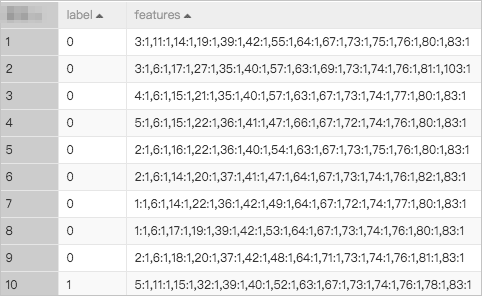
Input data:
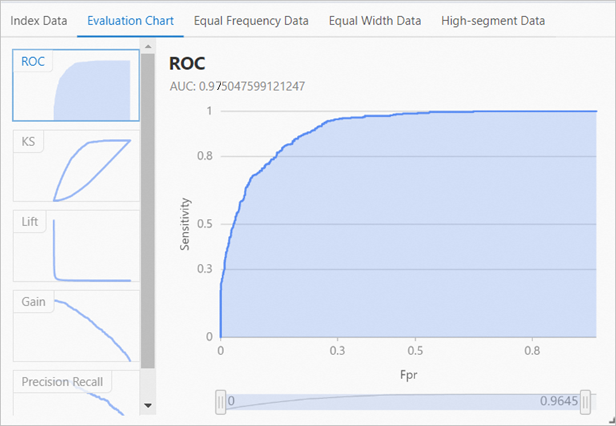
After training, the model achieves an area under the curve (AUC) of approximately 0.97.
What's next
Create an FM recommendation model based on the Alink framework