General computing resources are suitable for small- to medium-scale AI training and inference. To use them, you must create a dedicated resource group and purchase the necessary computing resources.
Billing
Dedicated resource groups use a pre-paid model, which means you pay for resources before you use them. For billing details, see Billing of AI computing resources.
Account and permission requirements
-
Alibaba Cloud account (Recommended): You can use an Alibaba Cloud account to perform all operations without additional permissions.
-
RAM user: An Alibaba Cloud account must grant permissions to manage the resource pool or grant the AliyunPAIFullAccess policy to the RAM user.
ImportantThe AliyunPAIFullAccess policy grants full control over all Platform for AI (PAI) resources and features. Grant this policy with caution. We recommend using an Alibaba Cloud account for these operations.
Create a dedicated resource group
-
Log on to the Platform for AI (PAI) console and navigate to the AI Computing Resources > Resource Pool page.
-
On the General Computing Resources tab, click Create Resource Group.
-
In the Create Resource Group dialog box, set the following parameters, and then click OK.
Parameter
Description
Type
Select Dedicated Resource Group.
Edition
-
1.0: Resources are limited to the Data Science Workshop (DSW) and Deep Learning Containers (DLC) modules.
-
2.0: Resources can be used in the Data Science Workshop (DSW), Deep Learning Containers (DLC), and Elastic Algorithm Service (EAS) modules.
Availability Zone
If this option is enabled, the resource group can only purchase computing resources from the selected zone.
VPC
From the drop-down lists, select an existing VPC, vSwitch, and security group. This is optional.
ImportantWhen you plan the vSwitch CIDR block, avoid the system-reserved CIDR blocks 10.224.0.0/16 and 10.240.0.0/12.
Security Group
vSwitch
Internet Gateway
After selecting a VPC, if you need internet access, you can choose one of the following options:
-
Public Gateway: The associated VPC uses shared bandwidth to access the internet. Download speeds may be slow during peak usage.
-
Private Gateway (recommended): This provides dedicated bandwidth that you can configure based on your needs. If you select this option, you must create an internet NAT gateway for the VPC, associate an elastic IP address (EIP), and configure an SNAT entry. For detailed instructions, see Improve internet access speed by using a private gateway.
-
Purchase general computing resources
Follow these steps to purchase general computing resources for your dedicated resource group. For billing details, see Billing of AI computing resources.
-
On the General Computing Resources tab, find your resource group in the list and click Create Order in the Manage column.
-
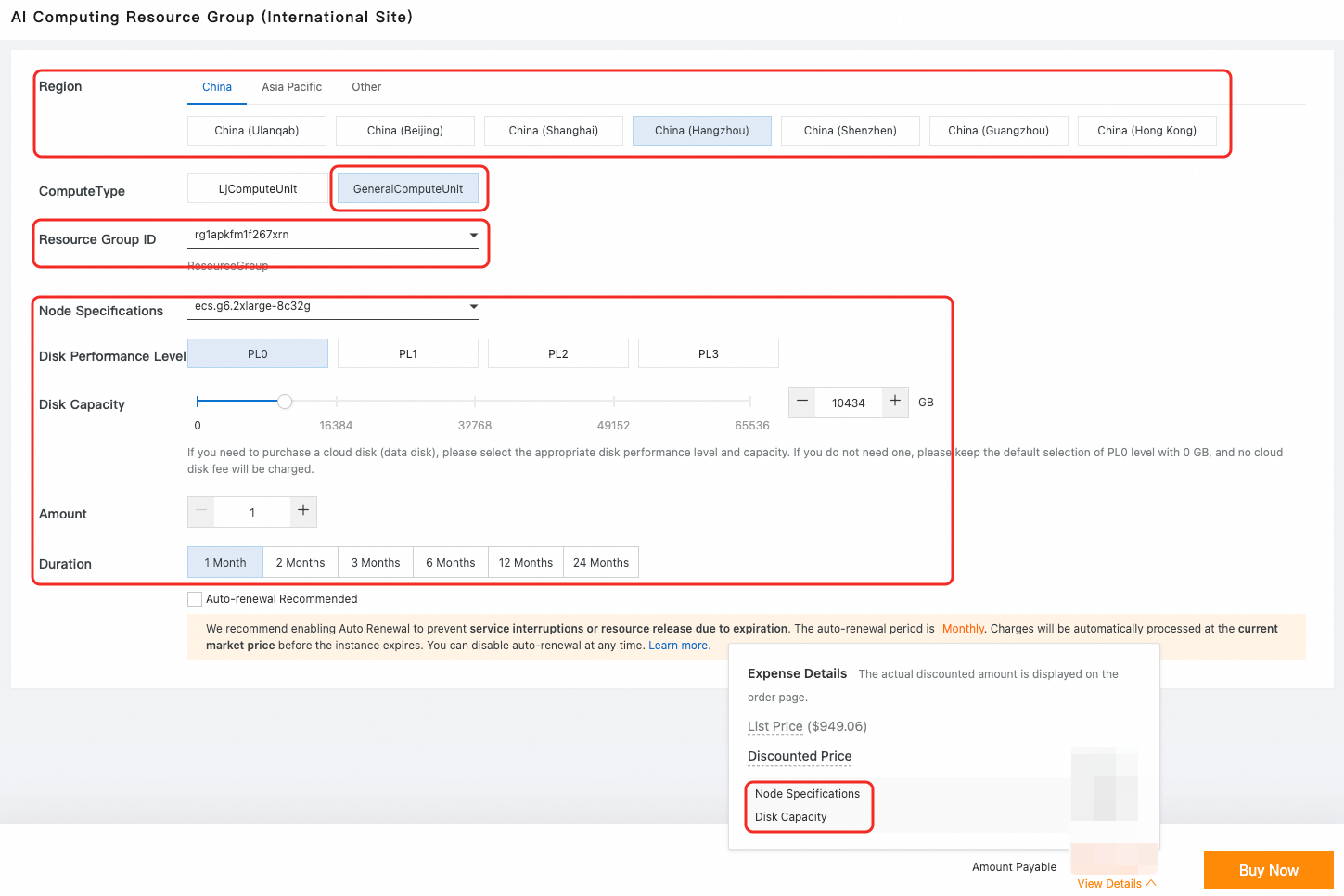
On the purchase page, the Resource Group ID, Region and Zone, and Resource Type are automatically selected. Configure parameters such as Node Specifications, Cloud Disk Level, Cloud Disk Size, Quantity, and Duration as needed. After you configure the parameters, click Buy Now.
You can purchase the following two types of resources:
-
Compute node: Required. Select the required resource specifications.
-
Cloud disk (data disk): Optional. Select a suitable cloud disk performance level and capacity as needed.
NoteThe purchased cloud disk serves as a data disk and is available in four performance levels: PL0, PL1, PL2, and PL3. For guidance on selecting a performance level, see ESSD cloud disks. Cloud disks are billed on a subscription basis. For details, see Billing of AI computing resources.
-
-
After you complete the payment, the purchased general computing nodes and cloud disks are displayed in the order list.
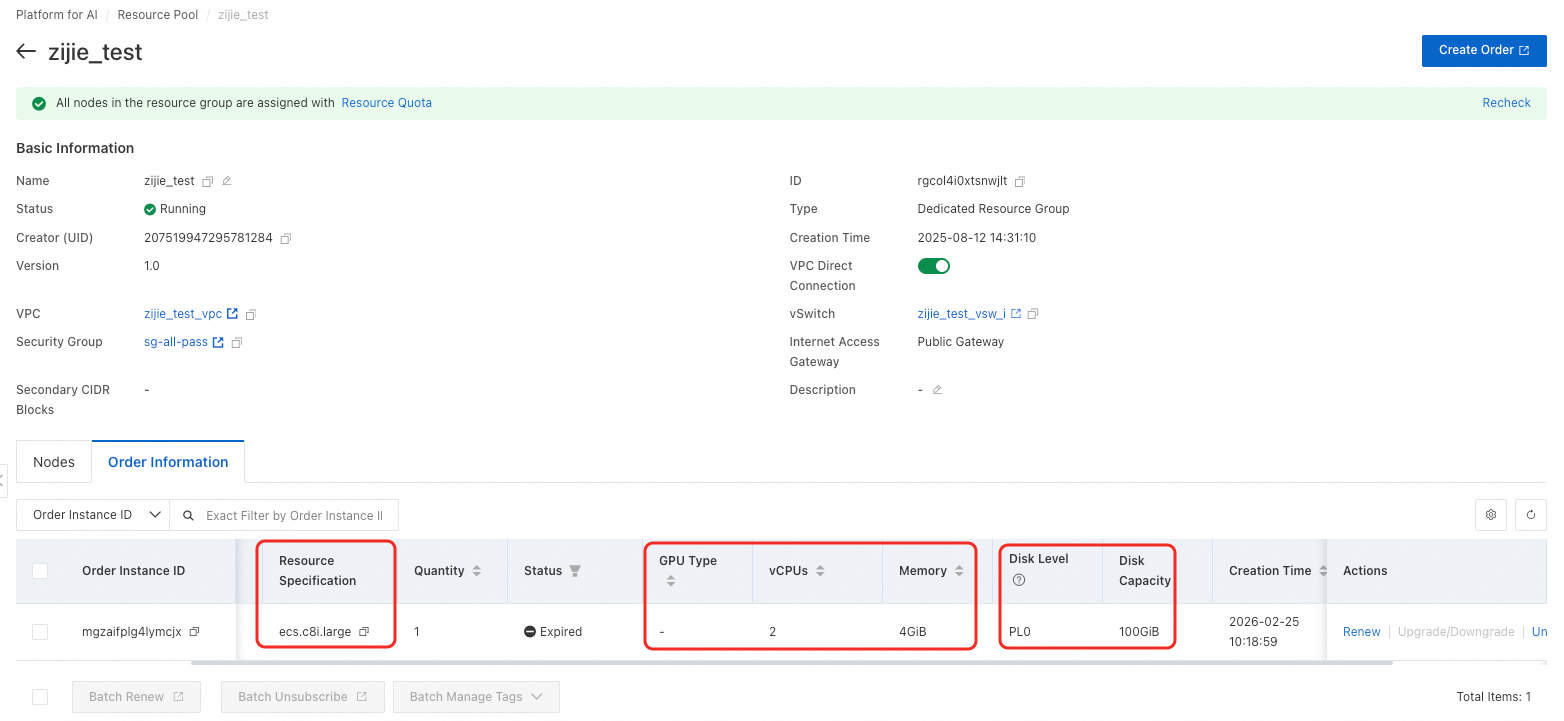
The system splits the order into individual node instances to simplify management tasks like renewals and subscription cancellations.
FAQ
Q: What do I do if the error "The order does not contain information for the current resource group" appears?
-
Cause: The resource group ID and region do not match because you switched regions.
-
Solution: Switch back to the resource group's default region.
Q: What do I do if the error "The specified instance type is out of stock in zone" appears?
-
Cause: The selected specification is out of stock in the corresponding region or zone, or it is unavailable in the zone of the VPC selected for the resource group.
-
Solution: Select a different node specification, or create a new resource group without configuring a VPC and try again.
Q: What do I do if the error "The current kind of instance is temporarily not supported. Please choose another kind of ecs to purchase" appears?
-
Cause: The selected specification type is not supported for purchase in the corresponding region.
-
Solution: Select a different node specification.
Next steps
After you create the resource group and purchase computing resources, you can perform the following operations:
-
View basic information and manage your purchased resources on the resource group page. For instructions, see Manage resources.
-
Configure a resource quota to allocate resources to training tasks. For instructions, see General computing resource quota.
-
To use pre-paid resources for online model inference, you must purchase dedicated inference resources. See Use EAS resource groups for instructions.