All Products
Search
Document Center

Object Storage Service:Tutorial: Build an intelligent semantic search system for IPC devices

Last Updated:Dec 16, 2025

You can use the data indexing feature of Object Storage Service (OSS) to build an intelligent semantic search system for videos collected by Internet Protocol (IP) cameras. This system lets you perform semantic searches on your videos and is ideal for scenarios such as intelligent security.

Solution overview

image

To build an intelligent semantic search system, follow these two steps:

  1. Create a bucket and upload videos: Create a bucket to store the original video files collected by IP cameras. Then, upload the video files to be processed. This provides the foundation for subsequent video searches.

  2. Enable the AISearch feature: Enable the AISearch feature for the bucket to enable intelligent searches based on natural language descriptions.

Benefits

  • Semantic search: Supports precise searches based on natural language descriptions and multiple combined conditions. This lets you quickly locate target frames and fulfill search requirements in complex scenarios.

  • Multimodal search: Provides unified management and search capabilities for data such as videos, images, and text. This lowers the technical barrier and operations and maintenance (O&M) costs.

  • Horizontal scaling: OSS offers unlimited capacity and elastic scalability. It can easily handle massive data growth.

1. Create a bucket and upload videos

  1. Log on to the OSS console.

  2. Go to the Buckets page and click Create Bucket.

  3. On the Create Bucket page, enter a bucket name that is related to your business, such as ipc-videos-oss-metaquery-demo. You can keep the default settings for the other parameters.

  4. Click Create. After the bucket is created, click View Bucket.

  5. On the File List page, click Upload File > Scan File. Select the video files that you want to upload, such as Video A.mp4, Video B.mp4, and Video C.mp4. Keep the default configurations for the other parameters, and click Upload File.

  6. (Optional) Configure tags for the uploaded video files. In the Actions column for the target file, choose more > More > Tagging. In the dialog box that appears, add tag key-value pairs. For example, set the tag key to need-seek and the value to true to use as a filter condition when you create the index. Set the tag key to camera and the value to camera-a to use as a filter condition for index queries. Click OK. Adding tags to videos allows for more precise filtering during indexing and searching.

2. Enable the AISearch feature

Enable the AISearch feature for the bucket to enable precise searches on videos based on natural language descriptions and multiple combined conditions.

  1. In the navigation pane on the left, choose File Management > Data Indexing.

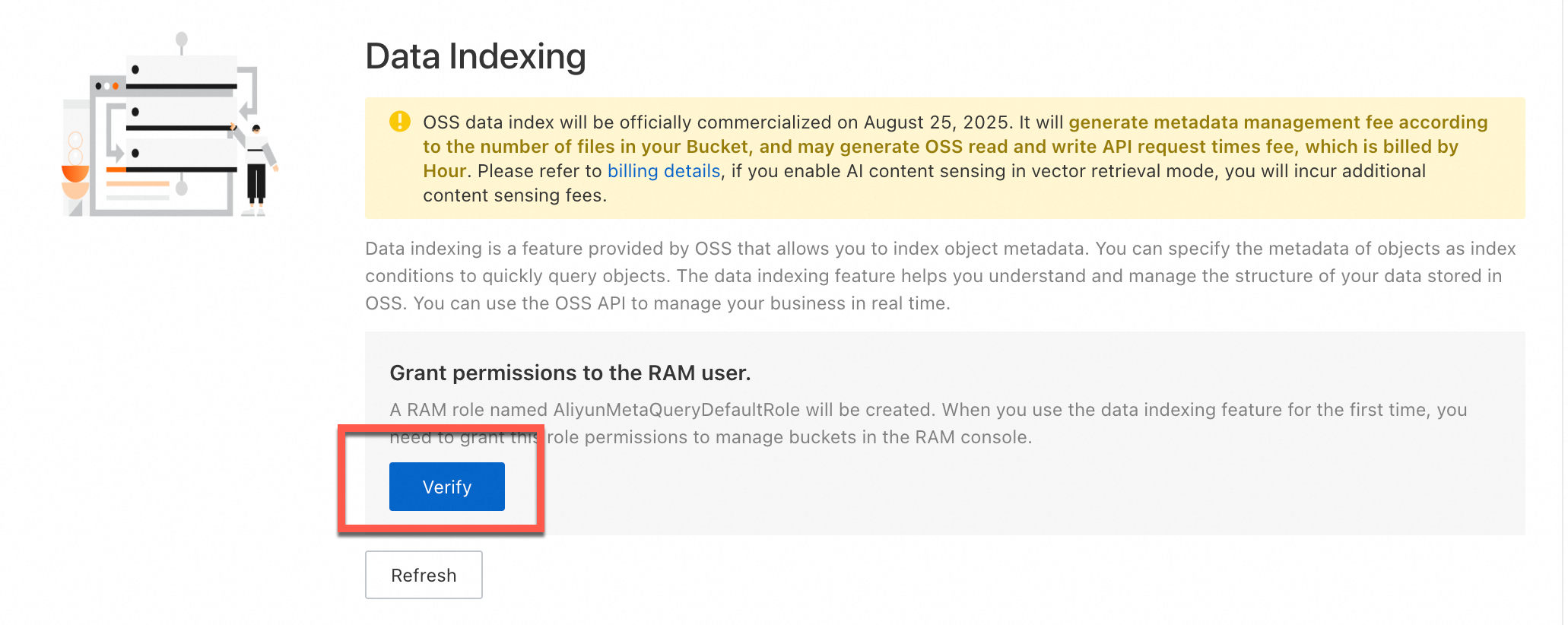
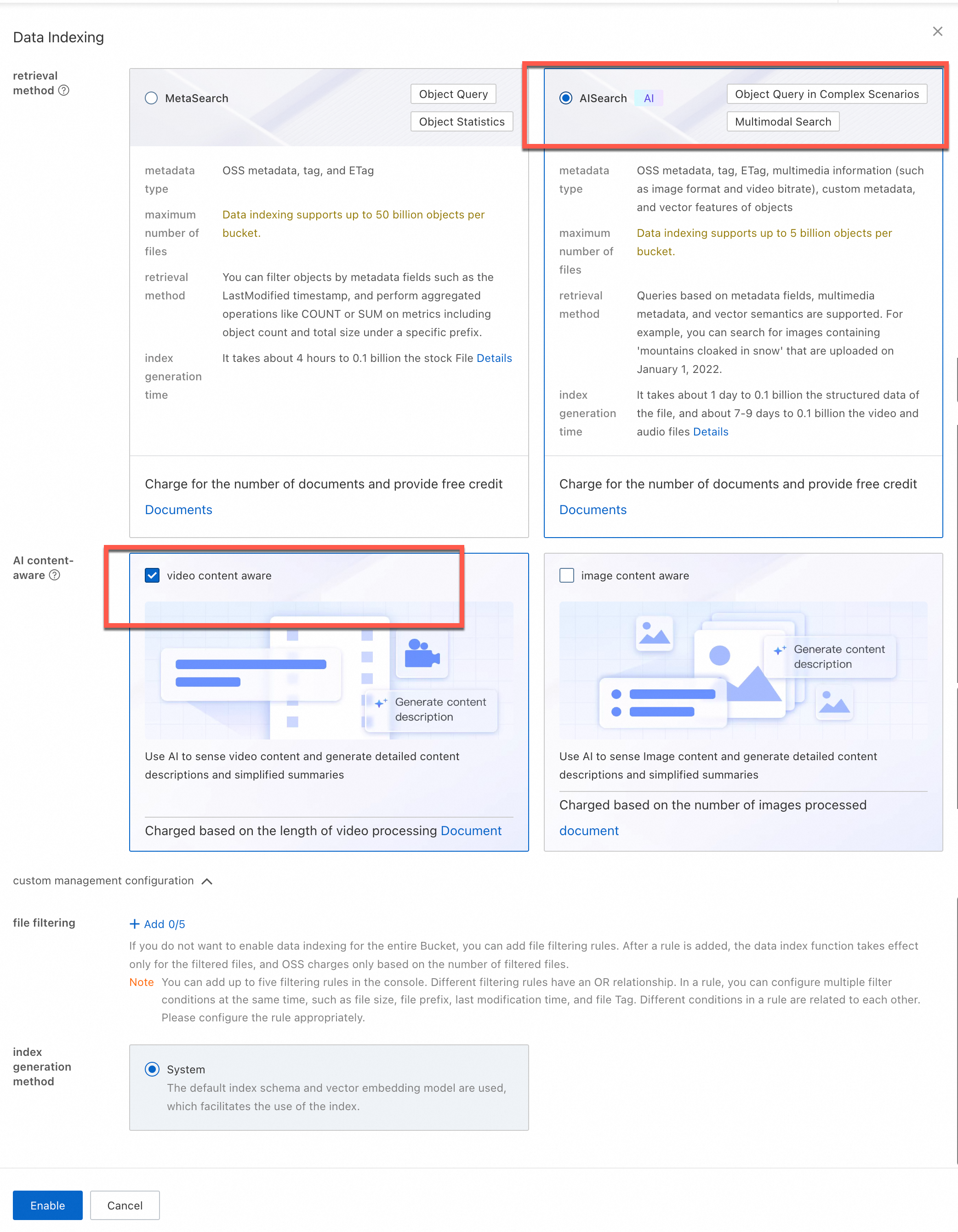
  2. On the Data Indexing page, if this is your first time using the data indexing feature, follow the instructions to grant permissions to the AliyunMetaQueryDefaultRole role. This allows OSS to manage the data in your bucket. After granting permissions, click Enable Data Indexing, and select AISearch.

  3. (Optional) AI Content Awareness: As needed, select Image Content Awareness or Video Content Awareness.

  4. (Optional) File filtering rules: Configure this option to perform AI analysis only on files that match specific rules. You can set up to five file filtering rules. You can filter by prefix, file size, tag, or LastModifiedTime. For example, add a tag filtering rule, set the key to need-seek, and set the value to true. After configuration, the system indexes only the files with this tag.

    Note

    If you enable file filtering, you are charged for data indexing, AISearch, and content awareness based only on the number of filtered files.

  5. Click Enable.

Note

Building the metadata index takes some time. The exact duration depends on the number of objects in the bucket. If it takes too long, you can refresh the page to check the enabling status.

image

image

Verify the results

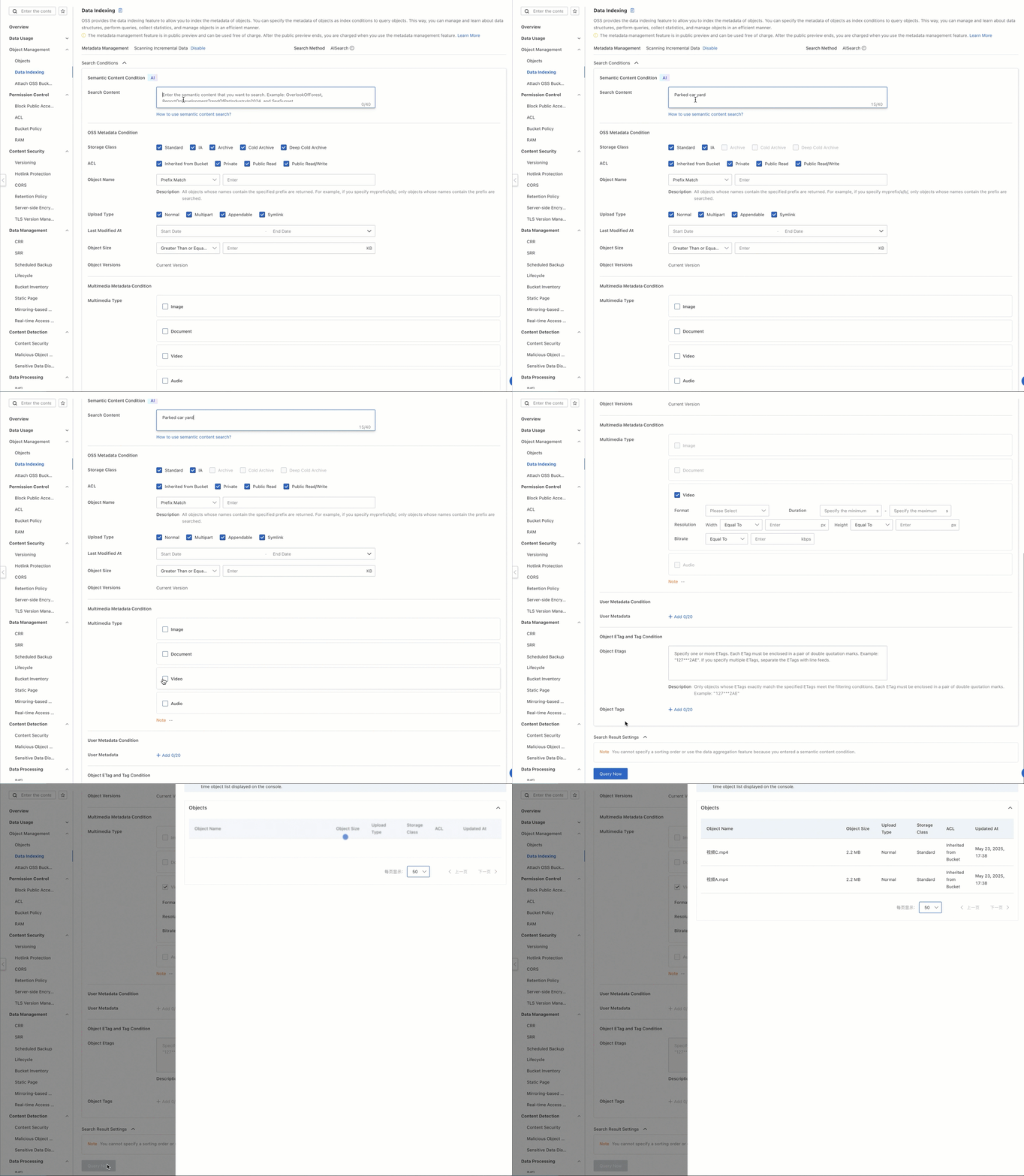
Simply enter a descriptive text, such as a yard with a parked car, and the system returns the relevant videos that match the description.

  1. On the Buckets page, click the name of your bucket.

  2. On the Files page, confirm that the videos are uploaded.

  3. In the navigation pane on the left, choose File Management > Data Indexing.

  4. On the Data Indexing page, enter a yard with a parked car in the search box. For Media Type, select Video.

  5. (Optional) For Object Tagging, set the key to camera and the value to camera-a. The system will return only videos with the tag camera=camera-a and filter out all other videos.

  6. Click Search.

  7. Copy the file path from the search results. Return to the Objects page, paste the copied file path into the search box, and search to view the video that matches the description.

2025-05-23_16-41-02 (1)

Going live

When you need to integrate this capability into a production environment, consider the following aspects:

Production data ingestion

In real-world business scenarios, monitoring devices, such as IP cameras, continuously generate large amounts of video data. We recommend that you integrate the OSS software development kit (SDK) to upload recorded video segments to a specified bucket in real time. This ensures the stability and timeliness of data uploads and improves the overall system's availability and real-time processing capabilities.

The following example shows how to use the OSS Python SDK to call the file upload manager to upload a video:

Code sample

import argparse
import alibabacloud_oss_v2 as oss
from alibabacloud_oss_v2.models import ListObjectsRequest, PutObjectTaggingRequest, Tagging, TagSet, Tag, PutObjectRequest
import os

def upload_video(client, bucket, video_config):
    """Upload a video"""
    try:
        # Check if the file exists
        if not os.path.exists(video_config['path']):
            print(f'File does not exist: {video_config["path"]}')
            return False

        # Create an object to upload the file
        uploader = client.uploader()

        # Execute the upload request - pass the filepath parameter correctly
        result = uploader.upload_file(
            filepath=video_config['path'],  # Add the filepath parameter
            request=PutObjectRequest(
                bucket=bucket,
                key=video_config['key']
            )
        )

        print(f'Upload {video_config["key"]} successful:')
        print(f'status code: {result.status_code},'
              f' request id: {result.request_id}')
        return True
    except Exception as e:
        print(f'Upload {video_config["key"]} failed: {str(e)}')
        return False

def main():
    # OSS configuration
    args = argparse.Namespace(
        region='cn-beijing',
        bucket='ipc-videos-oss-metaquery-demo',
        endpoint='https://oss-cn-beijing.aliyuncs.com'
    )

    # Configure the OSS client
    credentials_provider = oss.credentials.EnvironmentVariableCredentialsProvider()
    cfg = oss.config.load_default()
    cfg.credentials_provider = credentials_provider
    cfg.region = args.region
    cfg.endpoint = args.endpoint
    client = oss.Client(cfg)

    # Video file configuration, including different tags
    videos = [
        {
            'path': '<Your-Path>/VideoA.mp4',
            'key': 'VideoA.mp4'
        },
        {
            'path': '<Your-Path>/VideoB.mp4',
            'key': 'VideoB.mp4'
        },
        {
            'path': '<Your-Path>/VideoC.mp4',
            'key': 'VideoC.mp4'
        }
    ]

    # Upload all videos
    for video in videos:
        print(f"\nStart uploading video: {video['key']}")
        upload_video(
            client=client,
            bucket=args.bucket,
            video_config=video
        )

if __name__ == "__main__":
    main()

Integrate search capabilities

In a production environment, we recommend that you integrate the search feature into your backend service. Use the OSS SDK to automate calls and avoid manual operations in the console.

The following code sample shows how to build an XML request that complies with OSS MetaQuery specifications to retrieve search results:

Code sample

# -*- coding: utf-8 -*-
import argparse
import alibabacloud_oss_v2 as oss
# Parse the XML response
import xml.etree.ElementTree as ET
import json 
from datetime import datetime 

def get_search_conditions():
    """Get multi-conditional input from the user"""
    print("Enter a semantic description (example: a yard with a parked car)")
    query = input("> Semantic keywords: ").strip()
    while not query:
        print("Semantic keywords cannot be empty!")
        query = input("> Semantic keywords: ").strip()
    return query  

def build_metaquery_xml(query):
    """Build a MetaQuery XML that complies with OSS specifications"""
    xml_parts = [f'<Query>{query}</Query>']
    # Add the MediaTypes tag, hard-coded to video here
    xml_parts.append('<MediaTypes><MediaType>video</MediaType></MediaTypes>')

    meta_query_xml = f'''<MetaQuery>
    {"".join(xml_parts)}
</MetaQuery>'''
    return meta_query_xml  # Encode as a UTF-8 byte stream


def format_result(key, pre_url):
    """Format a single search result"""
    return f""" File path: {key}
 File address: {pre_url}
-----------------------"""

def semantic_search():
    # Assign values directly to command line arguments
    args = argparse.Namespace(
        region = 'cn-beijing',  # Replace with your region
        bucket = 'ipc-videos-oss-metaquery-demo',  # Replace with your bucket name
        endpoint = 'https://oss-cn-beijing.aliyuncs.com',  # Replace with your endpoint. You can leave this empty or delete it if not needed.
    )

    # Initialize the OSS client
    credentials = oss.credentials.EnvironmentVariableCredentialsProvider()
    cfg = oss.config.load_default()
    cfg.credentials_provider = credentials
    cfg.region = args.region
    if args.endpoint:
        cfg.endpoint = args.endpoint
    client = oss.Client(cfg)

    # Get user input
    query = get_search_conditions()  # Get only the query
    # Build the request
    try:
        # Construct the request body (XML data)
        data_str = build_metaquery_xml(query)

        # Define the operation input
        req = oss.OperationInput(
            op_name='DoMetaQuery',  # Custom action name
            method='POST',            # HTTP method
            parameters={              # Query parameters
                'metaQuery': '',
                'mode': 'semantic',
                'comp': 'query',
            },
            headers=None,             # Custom request headers (optional)
            body=data_str.encode("utf-8"),  # Request body (encoded as a UTF-8 byte stream)
            bucket=args.bucket,       # Target bucket name
        )

        # Call the generic interface to execute the operation
        resp = client.invoke_operation(req)

    except oss.exceptions.ServiceError as e:
        print(f" Server error: {e.message}")
        return
    
    root = ET.fromstring(resp.http_response.content.decode('utf-8'))
     # Find all File elements
    files = root.findall('.//File')
    
    print(f"\n Found {len(files)} matching results:")


    for i, file in enumerate(files, 1):
        print(f"\nFile {i}:")

        # Fetch and print various properties
        uri_element = file.find('URI')
        uri = uri_element.text if uri_element is not None else 'N/A'
        print(f"  URI: {uri}")

        key_element = file.find('Filename')
        key = key_element.text if key_element is not None else 'N/A'
        print(f"  File name: {key}")

        size_element = file.find('Size')
        size = size_element.text if size_element is not None else 'N/A'
        print(f"  Size: {size}")

        modified_time_element = file.find('FileModifiedTime')
        modified_time = modified_time_element.text if modified_time_element is not None else 'N/A'
        print(f"  Modified time: {modified_time}")

        content_type_element = file.find('ContentType')
        content_type = content_type_element.text if content_type_element is not None else 'N/A'
        print(f"  ContentType: {content_type}")

        media_type_element = file.find('MediaType')
        media_type = media_type_element.text if media_type_element is not None else 'N/A'
        print(f"  MediaType: {media_type}")

        # You can add fetching and printing for more properties as needed, such as ImageHeight, ImageWidth, OSSStorageClass, etc.
        # image_height_element = file.find('ImageHeight')
        # image_height = image_height_element.text if image_height_element is not None else 'N/A'
        # print(f"  ImageHeight: {image_height}")

        # Generate a signed URL (if needed)
        if key != 'N/A': # Generate a URL only if the file name exists
             try:
                pre_url = client.presign(
                    oss.GetObjectRequest(
                        bucket=args.bucket,  # Specify the bucket name
                        key=key,        # Specify the object key
                    )
                )
                print(f"  File address (signed URL): {pre_url.url}")
             except Exception as e:
                 print(f"  Failed to generate signed URL: {e}")


        print("-" * 20) # Separator
        
if __name__ == "__main__":
    semantic_search()

After you run the program, you can enter descriptive text, such as a yard with a parked car, to perform a search. The system uses the data index to return search results that match the description. You can use the URL to view the video details directly.

Found 1 matching result:

File 1:
  URI: oss://ipc-videos-oss-metaquery-demo/VideoA.mp4
  File name: VideoA.mp4
  Size: 2311252
  Modified time: 2025-05-23T17:38:10+08:00
  ContentType: video/mp4
  MediaType: video
  File address (signed URL): https://ipc-videos-oss-metaquery-demo.oss-cn-beijing.aliyuncs.com/VideoA.mp4?x-oss-signature-version=OSS4-HMAC-SHA256&x-oss-date=20250523T094511Z&x-oss-expires=900&x-oss-credential=LTAI********************%2F20250523%2Fcn-beijing%2Foss%2Faliyun_v4_request&x-oss-signature=0bf38092c42a179ff0e8334c8bea3fd92f5a78599038e816e2ed3e02755542af
--------------------

Set tag filters

When you deal with massive amounts of video data, managing files by path alone is often inefficient for searching and categorization. We recommend that you use the OSS tagging feature to add key-value tags to files. This lets you quickly filter and categorize data based on business needs, such as filtering by camera ID or geographic region.

Assume that the system has three video files to be analyzed (VideoA.mp4, VideoB.mp4, and VideoC.mp4) as follows:

VideoA.mp4

VideoB.mp4

VideoC.mp4

example

example (1)

example

Backyard video, marked as shot by camera-a

Vending video, marked as shot by camera-b

Backyard video, similar in content to Video A, marked as shot by camera-c

You can set tags directly when you upload a file. You can also manage them dynamically after the upload to meet various business needs.

Set tags during upload

You can set tags while uploading video files to integrate upload and tag management operations. This improves data management efficiency.

The following example shows how to use the file upload manager of the OSS Python SDK to upload a video file and set tags at the same time:

Code sample

import argparse
import alibabacloud_oss_v2 as oss
from alibabacloud_oss_v2.models import PutObjectRequest
import os

def upload_video_with_tags(client, bucket, video_config):
    """Upload a video with tags"""
    try:
        # Check if the file exists
        if not os.path.exists(video_config['path']):
            print(f'File does not exist: {video_config["path"]}')
            return False

        # Create an object to upload the file
        uploader = client.uploader()

        # Use the tagging string directly (encoding is not needed if keys and values are simple strings)
        tagging_str = f"camera={video_config['camera_tag']}"

        # Execute the upload request - carry tags directly
        result = uploader.upload_file(
            filepath=video_config['path'],
            request=PutObjectRequest(
                bucket=bucket,
                key=video_config['key'],
                tagging=tagging_str
            )
        )

        print(f'Upload {video_config["key"]} successful:')
        print(f'status code: {result.status_code},'
              f' request id: {result.request_id}')
        print(f'Tag added: {tagging_str}')
        return True
    except Exception as e:
        print(f'Upload {video_config["key"]} failed: {str(e)}')
        return False


def main():
    # OSS configuration
    args = argparse.Namespace(
        region='cn-beijing',
        bucket='ipc-videos-oss-metaquery-demo',
        endpoint='https://oss-cn-beijing.aliyuncs.com'
    )

    # Configure the OSS client
    credentials_provider = oss.credentials.EnvironmentVariableCredentialsProvider()
    cfg = oss.config.load_default()
    cfg.credentials_provider = credentials_provider
    cfg.region = args.region
    cfg.endpoint = args.endpoint
    client = oss.Client(cfg)

    # Video file configuration, including different tags
    videos = [
        {
            'path': '<Your-Path>/VideoA.mp4',
            'key': 'VideoA.mp4',
            'camera_tag': 'camera-a'
        },
        {
            'path': '<Your-Path>/VideoB.mp4',
            'key': 'VideoB.mp4',
            'camera_tag': 'camera-b'
        },
        {
            'path': '<Your-Path>/VideoC.mp4',
            'key': 'VideoC.mp4',
            'camera_tag': 'camera-c'
        }
    ]

    # Upload all videos and add tags
    for video in videos:
        print(f"\nStart uploading video: {video['key']}")
        upload_video_with_tags(
            client=client,
            bucket=args.bucket,
            video_config=video
        )


if __name__ == "__main__":
    main()
Manage tags after upload

If a file is already uploaded, you can still add or modify its tags at any time. This ensures dynamic maintenance and accuracy of data tags.

The following example shows how to call the API operation using the Python SDK to add tags:

Code sample

import argparse
import alibabacloud_oss_v2 as oss
from alibabacloud_oss_v2.models import GetObjectTaggingRequest, PutObjectTaggingRequest, Tagging, TagSet, Tag


def apply_tags_to_frame(client, bucket, frame_key, tags):
    """Add tags to a video"""
    try:
        # Build the tagging object
        tagging = Tagging(
            version=1,
            tag_set=TagSet(tags=tags)
        )
        
        # Create the request to update tags
        put_tag_request = PutObjectTaggingRequest(
            bucket=bucket,
            key=frame_key,
            tagging=tagging
        )
        
        # Update the object tags
        result = client.put_object_tagging(put_tag_request)
        
        # Convert tags to a string for printing
        tags_str = '&'.join([f"{tag.key}={tag.value}" for tag in tags])
        print(f"Successfully added tags to {frame_key}: {tags_str}")
        return True
    except Exception as e:
        print(f"Failed to add tags: {str(e)}")
        return False

def frame_tags():
    # OSS configuration
    args = argparse.Namespace(
        region='cn-beijing',   
        frame_bucket='ipc-videos-oss-metaquery-demo',     
        endpoint='https://oss-cn-beijing.aliyuncs.com'
    )
    
    # Configure the OSS client
    credentials_provider = oss.credentials.EnvironmentVariableCredentialsProvider()
    cfg = oss.config.load_default()
    cfg.credentials_provider = credentials_provider
    cfg.region = args.region
    cfg.endpoint = args.endpoint
    client = oss.Client(cfg)

    # Configure your video names
    videos = [
        'VideoA.mp4',    
        'VideoB.mp4',
        'VideoC.mp4'
    ]

    # Process each video
    for video_filename in videos:
        print(f"\nStart processing tags for video {video_filename}") # Print the original extracted file name

        # Remove the file name extension, for example, 'VideoA.mp4' -> 'VideoA'
        # The sample code extracts the last character of the video file name as the camera identifier. This is for reference only. You can add tags based on your actual business requirements.
        video_name_base = video_filename.split('.')[0] if '.' in video_filename else video_filename
        tags = [
            Tag(key='camera', value=f'camera-{video_name_base[-1].lower()}' if video_name_base else 'camera-unknown'),
            # Tag(key='category', value='video_monitoring')       # Add actual business category information
        ]

        # Add tags to the video
        apply_tags_to_frame(client, args.frame_bucket, video_filename, tags)

        print(f"Finished processing tags for video {video_filename}\n") # Print the original extracted file name

if __name__ == "__main__":
    frame_tags()
Search with tag filters

The following example shows how to use the OSS Python SDK to send a combined query request that uses both semantic understanding and tag filtering:

Code sample

# -*- coding: utf-8 -*-
import argparse
import alibabacloud_oss_v2 as oss
# Parse the XML response
import xml.etree.ElementTree as ET
import json
from datetime import datetime
# --- New import ---
from alibabacloud_oss_v2.models import GetObjectTaggingRequest
# --- End of new import ---

def get_inputs():
    """Get the user's semantic query (required) and filter conditions (optional)"""
    # 1. Get the required semantic query
    print(" Enter a semantic description (example: a yard with a parked car)")
    query = input("> Semantic keywords: ").strip()
    while not query:
        print(" Semantic keywords cannot be empty!")
        query = input("> Semantic keywords: ").strip()

    conditions = [] # Initialize the list of filter conditions
    target_tag = None # --- Used to store the target tag ---

    # 2. Get the optional tag filter
    print("\n (Optional) Enter tag filter conditions (used for client-side filtering, example: camera=camera-a, press Enter to skip)") 
    tag_input = input("> Tag (format key=value): ").strip()
    if tag_input:
        if '=' in tag_input:
            # conditions.append({
            #     'field': 'Tags',
            #     'value': tag_input,
            #     'op': 'eq'
            # })
            target_tag = tag_input
            print(f" Info: The tag '{target_tag}' will be used for client-side filtering after getting the results.")
        else:
             print(" Incorrect tag format, ignored. Use the 'key=value' format.")

    # --- Return target_tag ---
    return query, conditions, target_tag

def build_metaquery_xml(query, conditions):
    """Build a MetaQuery XML that complies with OSS specifications (includes semantic query and optional filters)"""
    # Always include the semantic query part
    xml_parts = [f'<Query>{query}</Query>']
    
    # Add the media type restriction
    xml_parts.append('<MediaTypes><MediaType>video</MediaType></MediaTypes>')
    
    # Add optional filter conditions - in semantic mode, only some fields are supported (such as Filename here)
    for cond in conditions:
        # In semantic mode, skip building SimpleQuery for the Tags field (although we no longer add Tags to conditions, this is kept just in case)
        if cond['field'] == 'Tags':
            continue

        json_query = json.dumps({
            "Field": cond['field'],
            "Value": cond['value'],
            "Operation": cond['op']
        }, ensure_ascii=False)
        xml_parts.append(f'<SimpleQuery>{json_query}</SimpleQuery>')

    # Combine into the complete MetaQuery XML
    meta_query_xml = f'''<MetaQuery>
    {"".join(xml_parts)}
</MetaQuery>'''
    return meta_query_xml

def format_result(key, pre_url):
    """Format a single search result"""
    return f""" File address: {pre_url}
 File path: {key}
-----------------------"""

def perform_search():
    # Assign values directly to command line arguments
    args = argparse.Namespace(
        region='cn-beijing',  # Replace with your region
        bucket='ipc-videos-oss-metaquery-demo',  # Replace with your bucket name
        endpoint='https://oss-cn-beijing.aliyuncs.com',  # Replace with your endpoint
    )

    # Initialize the OSS client
    credentials = oss.credentials.EnvironmentVariableCredentialsProvider()
    cfg = oss.config.load_default()
    cfg.credentials_provider = credentials
    cfg.region = args.region
    if args.endpoint:
        cfg.endpoint = args.endpoint
    client = oss.Client(cfg)

    # Get user input (semantic query + optional conditions + target tag)
    query, conditions, target_tag = get_inputs()

    # Build the request
    try:
        # Construct the request body (XML data)
        # --- Pass only conditions (without Tags) ---
        data_str = build_metaquery_xml(query, conditions)

        # Define the operation input
        req = oss.OperationInput(
            op_name='DoMetaQuery',
            method='POST',
            parameters={
                'metaQuery': '',
                'mode': 'semantic', # <-- Re-add semantic mode
                'comp': 'query',
            },
            headers=None,
            body=data_str.encode("utf-8"),
            bucket=args.bucket,
        )

        # Call the generic interface to execute the operation
        print("\n Sending DoMetaQuery request...")
        resp = client.invoke_operation(req)
        print(f"\n Request successful, HTTP status code: {resp.http_response.status_code}")
    except oss.exceptions.ServiceError as e:
        print(f" Server error (ServiceError): {e.message}")
        print(f"   - HTTP Status Code: {e.status_code}")
        print(f"   - Error Code: {e.error_code}")
        print(f"   - Request ID: {e.request_id}")
        return
    except oss.exceptions.ClientError as e: # Add catch for client errors
        print(f" Client or network error (ClientError): {e.message}")
        return
    except Exception as e: # Catch other possible exceptions
        print(f" Unknown error: {e}")
        import traceback
        traceback.print_exc() # Print the full traceback
        return


    # Parse and process the results...
    final_results_count = 0 # --- New: counter to tally the final matching results ---
    try:
        root = ET.fromstring(resp.http_response.content.decode('utf-8'))
        # Find all File elements
        files = root.findall('.//File')

        print(f"\n Got {len(files)} initial matching results from OSS, starting client-side tag filtering...")

        if not files:
            # Check for NextContinuationToken, paging may be needed
            next_token_elem = root.find('.//NextContinuationToken')
            if next_token_elem is not None and next_token_elem.text:
                print(" Note: There may be more results. The current implementation does not handle paging.")
            print("\n No initial matching results.")
            return # Return early if there are no files


        for i, file in enumerate(files, 1):
            # Get the file name
            key_element = file.find('Filename')
            if key_element is None:
                print(f" Warning: The {i}-th initial result is missing the Filename field, skipped.")
                continue
            key = key_element.text

            # --- Client-side tag filtering ---
            if target_tag:
                try:
                    tagging_req = GetObjectTaggingRequest(bucket=args.bucket, key=key)
                    tagging_resp = client.get_object_tagging(tagging_req)
                    # Check if the returned tag set contains the target tag
                    tag_found = False
                    target_k, target_v = target_tag.split('=', 1)

                    if tagging_resp.tag_set and tagging_resp.tag_set.tags: # Use .tags
                        for tag in tagging_resp.tag_set.tags: # Use .tags

                            if tag.key == target_k and tag.value == target_v:
                                tag_found = True
                                break
                    if not tag_found:
                        continue # Tag does not match, skip this file
                except oss.exceptions.ServiceError as tag_err:
                     if tag_err.status_code == 404 and tag_err.error_code == 'NoSuchTagSet':
                         continue
                     else:
                        print(f" Warning: Error getting tags for file '{key}': {tag_err.error_code} - {tag_err.message}, skipped.")
                        continue
                except Exception as tag_e:
                    print(f" Warning: Unknown error while getting or processing tags for file '{key}': {tag_e}, skipped.")
                    # --- Add traceback for debugging ---
                    import traceback
                    traceback.print_exc()
                    # --- End of addition ---
                    continue
            # --- End of client-side tag filtering ---

            # --- If it passed the tag filter (or no tag filter was set), process and print the result ---
            final_results_count += 1 # Increment the final result counter
            print(f"\n[{final_results_count}] File '{key}' matches all conditions:") # Print the final result number

            # Generate a signed URL
            try:
                pre_url = client.presign(
                    oss.GetObjectRequest(
                        bucket=args.bucket,
                        key=key,
                    )
                )
                print(format_result(key, pre_url.url))
            except Exception as presign_e:
                print(f" Warning: Error generating signed URL for file '{key}': {presign_e}")
                print(format_result(key, "[Could not generate URL]"))
        # --- Print final statistics after the loop ---
        print(f"\n Client-side filtering complete, found {final_results_count} final matching results.")

    except ET.ParseError as xml_e:
        print(f" Error: Error parsing OSS response XML - {xml_e}")
    except Exception as parse_e:
        print(f" Error: Unexpected error while processing results - {parse_e}")


if __name__ == "__main__":
    perform_search()

After you run the program, to filter for videos that contain a yard with a parked car, you can perform the following steps:

  1. In the descriptive field, enter the search keyword: a yard with a parked car

  2. Set the tag filter condition: camera = camera-a

In this example, both Video A and Video C contain scenes that match the description a yard with a parked car. However, because you set a tag filter that retains only the search results for videos tagged with camera-a, the final search result includes only Video A.

Sending DoMetaQuery request...

Request successful, HTTP status code: 200

Got 2 initial matching results from OSS, starting client-side tag filtering...

[1] File 'VideoA.mp4' matches all conditions:
 File address: https://ipc-videos-oss-metaquery-demo.oss-cn-beijing.aliyuncs.com/VideoA.mp4?x-oss-signature-version=OSS4-HMAC-SHA256&x-oss-date=20250526T054908Z&x-oss-expires=900&x-oss-credential=LTAI********************%2Fcn-beijing%2Foss%2Faliyun_v4_request&x-oss-signature=01bbf29790763d8e0f177d4cb0469cb00ae1c69d565219edb3866f75110b37ab
 File path: VideoA.mp4
-----------------------

 Client-side filtering complete, found 1 final matching result.