With OSS vector search, you can locate files across massive datasets by semantic content, metadata, multimedia properties, ETags, tags, and custom metadata.
Use cases
Personal and enterprise office scenarios
Search office files by semantic content — for example, "how to use the ERP system", "IT repair process", or "2024 business performance analysis" — instead of browsing folders manually.
Multimedia social media scenarios
In social media apps with user-uploaded images, semantic search lets users find photos by content — for example, "spring outing in the suburbs" or "Spring Festival reunion" — without manual tagging.
Cloud drive scenarios
Vector search enhances personal or enterprise cloud drives by enabling content-based searches for files, such as specific documents or photos in an album.
Video surveillance scenarios
Find specific surveillance footage by entering descriptive keywords such as "outdoor surveillance on a snowy day" or "orchard on a sunny day".
Limitations
-
Region availability
The vector search feature is available for buckets in the China (Qingdao), China (Beijing), China (Zhangjiakou), China (Hangzhou), China (Shanghai), China (Shenzhen), China (Guangzhou), China (Chengdu), China (Hong Kong), Singapore, Indonesia (Jakarta), and Germany (Frankfurt) regions.
NoteAudio search is not supported in the China (Hong Kong), Singapore, Indonesia (Jakarta), and Germany (Frankfurt) regions.
-
Bucket limitations
A bucket with vector search enabled can contain a maximum of 5 billion files. If the number of files in a bucket exceeds this limit, search performance may degrade. To process a larger volume of data, contact Technical Support for an assessment.
-
Multipart upload
When you use multipart upload, search results only include objects fully assembled with the CompleteMultipartUpload operation. The results do not include parts from uploads that have been initiated but not completed or aborted.
Performance reference
The following performance metrics apply to OSS vector search.
-
Internal bandwidth and QPS provided by OSS
OSS provides dedicated internal bandwidth and QPS for vector search. This capacity handles up to 1,250 requests per second and does not consume your bucket's QoS quota.
Region
Internal bandwidth
Default QPS
China (Beijing), China (Hangzhou), China (Shanghai), and China (Shenzhen)
10 Gbps
1250
Other regions
1 Gbps
1250
-
Estimated time to index existing files
Index building incurs API request fees for List, Head, and Get operations (API request fees). Video, audio, and document files take longer to index than images. Estimate your file count before enabling this feature.
-
If the bucket contains mainly structured data and image files:
-
10 million files in a single bucket: 2 to 3 hours
-
100 million files in a single bucket: 1 day
-
1 billion files in a single bucket: about 10 days
-
-
If the bucket contains mainly video, document, and audio files:
-
10 million files in a single bucket: about 2 to 3 days
-
100 million files in a single bucket: about 7 to 9 days
-
-
-
Estimated time to update indexes for incremental files
When file change QPS is below the default 1,250, files become searchable within minutes to hours. If your QPS exceeds this limit, contact Technical Support for assistance.
-
File search response performance
Searches return results within seconds. The default timeout is 30 seconds.
Enable vector search
OSS console
-
Log on to the OSS console.
-
Click Buckets, and then click the name of the target bucket.
-
In the left-side navigation pane, choose .
-
On the Data Indexing page, if you are using the data indexing feature for the first time, follow the on-screen instructions to grant permissions to the AliyunMetaQueryDefaultRole role. This allows OSS to manage data in the bucket. After you grant the permissions, click Enable Data Indexing.
-
Select AISearch and click Enable.
NoteBuilding the metadata index takes time depending on the number of objects. Refresh the page to check the status.
Alibaba Cloud SDK
Java
Only Java SDK 3.18.2 and later support vector search. For more information, see Vector search (Java SDK V1).
import com.aliyun.oss.*;
import com.aliyun.oss.common.auth.*;
import com.aliyun.oss.common.comm.SignVersion;
import com.aliyun.oss.model.MetaQueryMode;

public class OpenMetaQuery {
    public static void main(String[] args) throws com.aliyuncs.exceptions.ClientException {
        // The endpoint is set to China (Hangzhou) in this example. Replace it with the actual endpoint.
        String endpoint = "https://oss-cn-hangzhou.aliyuncs.com";
        // Specify the bucket name, for example, examplebucket.
        String bucketName = "examplebucket";
        // Obtain access credentials from environment variables. Before you run this sample code, make sure that the OSS_ACCESS_KEY_ID and OSS_ACCESS_KEY_SECRET environment variables are set.
        EnvironmentVariableCredentialsProvider credentialsProvider = CredentialsProviderFactory.newEnvironmentVariableCredentialsProvider();
        // Specify the region where the bucket is located. This example uses cn-hangzhou, which indicates the China (Hangzhou) region.
        String region = "cn-hangzhou";

        // Create an OSSClient instance.
        // When the OSSClient instance is no longer needed, call the shutdown method to release its resources.
        ClientBuilderConfiguration clientBuilderConfiguration = new ClientBuilderConfiguration();
        clientBuilderConfiguration.setSignatureVersion(SignVersion.V4);
        OSS ossClient = OSSClientBuilder.create()
                .endpoint(endpoint)
                .credentialsProvider(credentialsProvider)
                .clientConfiguration(clientBuilderConfiguration)
                .region(region)
                .build();

        try {
            // Enable the vector search feature.
            ossClient.openMetaQuery(bucketName, MetaQueryMode.SEMANTIC);
        } catch (OSSException oe) {
            System.out.println("Error Message:" + oe.getErrorMessage());
            System.out.println("Error Code:" + oe.getErrorCode());
            System.out.println("Request ID:" + oe.getRequestId());
            System.out.println("Host ID:" + oe.getHostId());
        } catch (ClientException ce) {
            System.out.println("Error Message: " + ce.getMessage());
        } finally {
            // Shut down the OSSClient.
            if(ossClient != null){
                ossClient.shutdown();
            }
        }
    }
}
Python
For more information, see Vector search.
import argparse
import alibabacloud_oss_v2 as oss

# Create a command-line argument parser and add a description.
parser = argparse.ArgumentParser(description="open meta query sample")
# Add the required command-line argument --region to specify the region where the bucket is located.
parser.add_argument('--region', help='The region in which the bucket is located.', required=True)
# Add the required command-line argument --bucket to specify the name of the bucket to operate on.
parser.add_argument('--bucket', help='The name of the bucket.', required=True)
# Add the optional command-line argument --endpoint to specify the domain name used to access OSS.
parser.add_argument('--endpoint', help='The domain names that other services can use to access OSS')

def main():
    # Parse command-line arguments.
    args = parser.parse_args()

    # Load authentication information from environment variables.
    credentials_provider = oss.credentials.EnvironmentVariableCredentialsProvider()

    # Use the default configurations provided by the SDK.
    cfg = oss.config.load_default()
    # Set the authentication information provider.
    cfg.credentials_provider = credentials_provider
    # Set the region based on command-line arguments.
    cfg.region = args.region
    # If an endpoint is provided, update the endpoint in the configuration.
    if args.endpoint is not None:
        cfg.endpoint = args.endpoint

    # Create an OSS client.
    client = oss.Client(cfg)

    # Build an OpenMetaQueryRequest to enable the AISearch feature for the bucket.
    result = client.open_meta_query(oss.OpenMetaQueryRequest(
            bucket=args.bucket,
            mode='semantic',# Set to "semantic" to select AISearch.
    ))

    # Print the status code and request ID of the request.
    print(f'status code: {result.status_code},'
          f' request id: {result.request_id},'
          )

# Call the main function when running as the main program.
if __name__ == "__main__":
    main()
Go
For more information, see Vector search (Go SDK V2).
package main
import (
"context"
"flag"
"log"
"github.com/aliyun/alibabacloud-oss-go-sdk-v2/oss"
"github.com/aliyun/alibabacloud-oss-go-sdk-v2/oss/credentials"
)
var (
region string
bucketName string
)
func init() {
// Set a command-line flag to specify the region.
flag.StringVar(®ion, "region", "", "The region in which the bucket is located.")
// Set a command-line flag to specify the bucket name.
flag.StringVar(&bucketName, "bucket", "", "The name of the bucket.")
}
func main() {
flag.Parse()
// Check if the bucket name is provided.
if len(bucketName) == 0 {
flag.PrintDefaults()
log.Fatalf("invalid parameters, bucket name required")
}
// Check if the region is provided.
if len(region) == 0 {
flag.PrintDefaults()
log.Fatalf("invalid parameters, region required")
}
// Create a client configuration and use credentials from environment variables.
cfg := oss.LoadDefaultConfig().
WithCredentialsProvider(credentials.NewEnvironmentVariableCredentialsProvider()).
WithRegion(region)
client := oss.NewClient(cfg) // Create an OSS client.
// Create a request to enable AISearch for the specified bucket.
request := &oss.OpenMetaQueryRequest{
Bucket: oss.Ptr(bucketName),
Mode: oss.Ptr("semantic"), // Set mode to "semantic" to enable semantic search capabilities.
}
result, err := client.OpenMetaQuery(context.TODO(), request)
if err != nil {
log.Fatalf("failed to open meta query %v", err)
}
log.Printf("open meta query result:%#v\n", result)
}
PHP
For more information, see Vector search (PHP SDK V2).
<?php

// Include the autoload file to load dependencies.
require_once __DIR__ . '/../vendor/autoload.php';

use AlibabaCloud\Oss\V2 as Oss;

// Define and describe command-line parameters.
$optsdesc = [
    "region" => ['help' => 'The region in which the bucket is located.', 'required' => True], // (Required) The region in which the bucket resides.
    "endpoint" => ['help' => 'The domain names that other services can use to access OSS.', 'required' => False], // (Optional) The endpoint that other services can use to access OSS.
    "bucket" => ['help' => 'The name of the bucket', 'required' => True], // (Required) The name of the bucket.
];

// Convert the descriptions to a list of long options required by getopt.
// Add a colon (:) to the end of each parameter to indicate that a value is required.
$longopts = \array_map(function ($key) {
    return "$key:";
}, array_keys($optsdesc));

// Parse the command-line parameters.
$options = getopt("", $longopts);

// Check whether the required parameters are configured.
foreach ($optsdesc as $key => $value) {
    if ($value['required'] === True && empty($options[$key])) {
        $help = $value['help']; // Obtain help information for the parameters.
        echo "Error: the following arguments are required: --$key, $help" . PHP_EOL;
        exit(1); // Exit the program if a required parameter is missing.
    }
}

// Assign the values parsed from the command-line parameters to the corresponding variables.
$region = $options["region"]; // The region in which the bucket resides.
$bucket = $options["bucket"]; // The name of the bucket.

// Load access credentials from environment variables.
// Use EnvironmentVariableCredentialsProvider to retrieve the AccessKey ID and AccessKey secret from environment variables.
$credentialsProvider = new Oss\Credentials\EnvironmentVariableCredentialsProvider();

// Use the default configuration of the SDK.
$cfg = Oss\Config::loadDefault();
$cfg->setCredentialsProvider($credentialsProvider); // Specify the credential provider.
$cfg->setRegion($region); // Specify the region in which the bucket resides.
if (isset($options["endpoint"])) {
    $cfg->setEndpoint($options["endpoint"]); // Specify the endpoint if one is provided.
}

// Create an OSSClient instance.
$client = new Oss\Client($cfg);

// Enable the AISearch feature.
$request = new Oss\Models\OpenMetaQueryRequest($bucket,'semantic');
$result = $client->openMetaQuery($request);

printf(
   'status code:' . $result->statusCode . PHP_EOL .
   'request id:' . $result->requestId
);
ossutil
The following command provides an example of how to enable vector search for a bucket named examplebucket:
ossutil api open-meta-query --bucket examplebucket --meta-query-mode semanticFor more information about how to use ossutil to perform vector search, see open-meta-query.
Initiate a vector search
OSS console
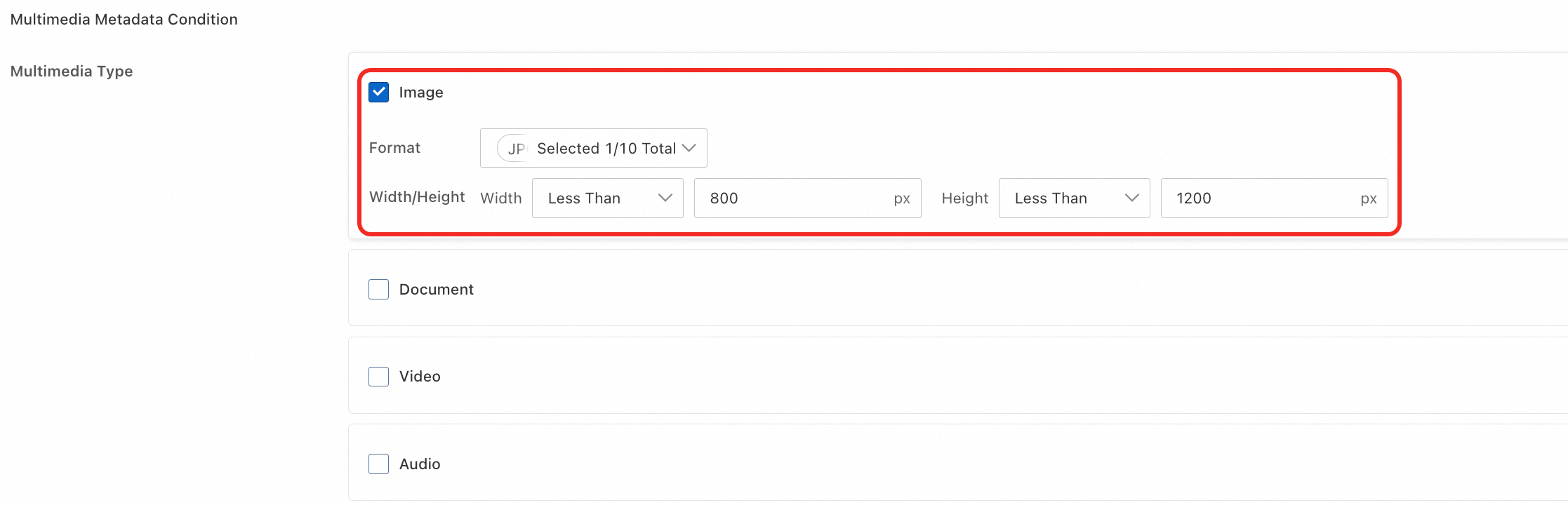
This section provides an example of how to search for files that contain "glowing buildings", are in JPG format, and have dimensions within 800 × 1,200 pixels. The expected search result is the "Night view by the river.jpg" image shown in the following figure.

-
Log on to the OSS console.
-
Click Buckets, and then click the name of the target bucket.
-
In the left-side navigation pane, choose .
-
Set the Search Criteria. Keep the default settings for other parameters.
-
In the Search Content section, enter a description of the image, for example, glowing buildings.

-
Multimedia Type, select Image.
-
Set Image Format to JPG/JPEG.
-
Set Image Width to less than 800px.
-
Set Image Height to less than 1200px.
-
-
-
Click Query Now. The search results are as expected. The file is successfully found based on the feature description.

For information about all search criteria and output settings, see Search criteria and output settings.
Alibaba Cloud SDK
Java
Only Java SDK 3.18.2 and later support vector search. For more information, see Vector search (Java SDK V1).
import com.aliyun.oss.*;
import com.aliyun.oss.common.auth.CredentialsProviderFactory;
import com.aliyun.oss.common.auth.EnvironmentVariableCredentialsProvider;
import com.aliyun.oss.common.comm.SignVersion;
import com.aliyun.oss.model.*;
import java.util.ArrayList;
import java.util.List;

public class DoMetaQuery {
    public static void main(String[] args) throws Exception {
        // The endpoint is set to China (Hangzhou) in this example. Replace it with the actual endpoint.
        String endpoint = "https://oss-cn-hangzhou.aliyuncs.com";
        // Specify the bucket name, for example, examplebucket.
        String bucketName = "examplebucket";
        // Obtain access credentials from environment variables. Before you run this sample code, make sure that the OSS_ACCESS_KEY_ID and OSS_ACCESS_KEY_SECRET environment variables are set.
        EnvironmentVariableCredentialsProvider credentialsProvider = CredentialsProviderFactory.newEnvironmentVariableCredentialsProvider();
        // Specify the region where the bucket is located. This example uses cn-hangzhou, which indicates the China (Hangzhou) region.
        String region = "cn-hangzhou";

        // Create an OSSClient instance.
        // When the OSSClient instance is no longer needed, call the shutdown method to release its resources.
        ClientBuilderConfiguration clientBuilderConfiguration = new ClientBuilderConfiguration();
        clientBuilderConfiguration.setSignatureVersion(SignVersion.V4);
        OSS ossClient = OSSClientBuilder.create()
                .endpoint(endpoint)
                .credentialsProvider(credentialsProvider)
                .clientConfiguration(clientBuilderConfiguration)
                .region(region)
                .build();

        try {
            int maxResults = 20;
            List<String> mediaTypes = new ArrayList<String>();
            mediaTypes.add("image");
            String query = "Snow";
            String simpleQuery = "{\"Operation\":\"gt\", \"Field\": \"Size\", \"Value\": \"30\"}";
            String sort = "Size";
            DoMetaQueryRequest doMetaQueryRequest = new DoMetaQueryRequest(bucketName, maxResults, query, sort, MetaQueryMode.SEMANTIC, mediaTypes, simpleQuery);
            DoMetaQueryResult doMetaQueryResult = ossClient.doMetaQuery(doMetaQueryRequest);
        } catch (OSSException oe) {
            System.out.println("Error Message: " + oe.getErrorMessage());
            System.out.println("Error Code:       " + oe.getErrorCode());
            System.out.println("Request ID:      " + oe.getRequestId());
            System.out.println("Host ID:           " + oe.getHostId());
        } catch (ClientException ce) {
            System.out.println("Error Message: " + ce.getMessage());
        } finally {
            if(ossClient != null){
                ossClient.shutdown();
            }
        }
    }
}
Python
For more information, see Vector search.
import argparse
import alibabacloud_oss_v2 as oss

# Create a command-line argument parser to process command-line input.
parser = argparse.ArgumentParser(description="do meta query semantic sample")
# Add the necessary command-line arguments.
parser.add_argument('--region', help='The region in which the bucket is located.', required=True)  # The region where the bucket is located.
parser.add_argument('--bucket', help='The name of the bucket.', required=True)  # The name of the bucket.
parser.add_argument('--endpoint', help='The domain names that other services can use to access OSS')  # The OSS domain name, which is optional.

def main():
    # Parse command-line arguments.
    args = parser.parse_args()

    # Load access credentials from environment variables.
    # Before running, you need to set the environment variables: OSS_ACCESS_KEY_ID and OSS_ACCESS_KEY_SECRET.
    credentials_provider = oss.credentials.EnvironmentVariableCredentialsProvider()

    # Load the default SDK configurations.
    cfg = oss.config.load_default()
    # Set the credential provider.
    cfg.credentials_provider = credentials_provider
    # Set the region.
    cfg.region = args.region
    # If an endpoint is provided, update the endpoint in the configuration.
    if args.endpoint is not None:
        cfg.endpoint = args.endpoint

    # Create an OSS client instance.
    client = oss.Client(cfg)

    # Initiate a metadata query request in AISearch mode.
    result = client.do_meta_query(oss.DoMetaQueryRequest(
            bucket=args.bucket,
            mode='semantic',
            meta_query=oss.MetaQuery(
                max_results=1000,
                query='An aerial view of a snow-covered forest',
                order='desc',
                media_types=oss.MetaQueryMediaTypes(
                    media_type=['image']
                ),
                simple_query='{"Operation":"gt", "Field": "Size", "Value": "30"}',
            ),
    ))

    # Print the retrieval results.
    print(vars(result))

if __name__ == "__main__":
    main()
Go
For more information, see Vector search (Go SDK V2).
package main
import (
"context"
"flag"
"log"
"github.com/aliyun/alibabacloud-oss-go-sdk-v2/oss"
"github.com/aliyun/alibabacloud-oss-go-sdk-v2/oss/credentials"
)
var (
region string
bucketName string
)
func init() {
// Set a command-line flag to specify the region.
flag.StringVar(®ion, "region", "", "The region in which the bucket is located.")
// Set a command-line flag to specify the bucket name.
flag.StringVar(&bucketName, "bucket", "", "The name of the bucket.")
}
func main() {
flag.Parse()
// Check if the bucket name is provided.
if len(bucketName) == 0 {
flag.PrintDefaults()
log.Fatalf("invalid parameters, bucket name required")
}
// Check if the region is provided.
if len(region) == 0 {
flag.PrintDefaults()
log.Fatalf("invalid parameters, region required")
}
// Create a client configuration and use credentials from environment variables and the specified region.
cfg := oss.LoadDefaultConfig().
WithCredentialsProvider(credentials.NewEnvironmentVariableCredentialsProvider()).
WithRegion(region)
client := oss.NewClient(cfg) // Create an OSS client.
// Perform an AISearch operation.
request := &oss.DoMetaQueryRequest{
Bucket: oss.Ptr(bucketName),
Mode: oss.Ptr("semantic"),
MetaQuery: &oss.MetaQuery{
MaxResults: oss.Ptr(int64(99)),
Query: oss.Ptr("Overlook the snow-covered forest"), // Provide the semantic query string. This is an example.
MediaTypes: &oss.MetaQueryMediaTypes{
MediaTypes: []string{"image"}, // Specify the media types to search. In this example, "image".
},
SimpleQuery: oss.Ptr(`{"Operation":"gt", "Field": "Size", "Value": "30"}`),
},
}
result, err := client.DoMetaQuery(context.TODO(), request)
if err != nil {
log.Fatalf("failed to do meta query %v", err)
}
log.Printf("do meta query result:%#v\n", result)
}
PHP
For more information, see Vector search (PHP SDK V2).
<?php

// Import the autoloader file to ensure that dependency libraries are correctly loaded.
require_once __DIR__ . '/../vendor/autoload.php';

use AlibabaCloud\Oss\V2 as Oss;

// Define the description of command line arguments.
$optsdesc = [
    "region" => ['help' => 'The region in which the bucket is located.', 'required' => True], // The region where the bucket is located. This parameter is required.
    "endpoint" => ['help' => 'The domain names that other services can use to access OSS.', 'required' => False], // The endpoint that other services can use to access OSS. This parameter is optional.
    "bucket" => ['help' => 'The name of the bucket', 'required' => True], // The name of the bucket. This parameter is required.
];

// Convert the argument description to the long option format required by getopt.
// A colon (:) after each argument indicates that the argument requires a value.
$longopts = \array_map(function ($key) {
    return "$key:";
}, array_keys($optsdesc));

// Parse the command line arguments.
$options = getopt("", $longopts);

// Check whether required arguments are specified.
foreach ($optsdesc as $key => $value) {
    if ($value['required'] === True && empty($options[$key])) {
        $help = $value['help']; // Obtain the help information of the argument.
        echo "Error: the following arguments are required: --$key, $help" . PHP_EOL;
        exit(1); // If a required argument is not specified, exit the program.
    }
}

// Extract values from the parsed arguments.
$region = $options["region"]; // The region where the bucket is located.
$bucket = $options["bucket"]; // The name of the bucket.

// Load the credential information from environment variables.
// Use EnvironmentVariableCredentialsProvider to read the Access Key ID and Access Key Secret from environment variables.
$credentialsProvider = new Oss\Credentials\EnvironmentVariableCredentialsProvider();

// Use the default configurations of the SDK.
$cfg = Oss\Config::loadDefault();
$cfg->setCredentialsProvider($credentialsProvider); // Set the credential provider.
$cfg->setRegion($region); // Set the region where the bucket is located.
if (isset($options["endpoint"])) {
    $cfg->setEndpoint($options["endpoint"]); // If an endpoint is provided, set the endpoint.
}

// Create an OSS client instance.
$client = new Oss\Client($cfg);

// Perform an AISearch query for objects that meet the specified conditions.
$request = new Oss\Models\DoMetaQueryRequest($bucket, new Oss\Models\MetaQuery(
    maxResults: 99,
    query: "Overlook the snow-covered forest",
    mediaTypes: new Oss\Models\MetaQueryMediaTypes('image'),
    simpleQuery: '{"Operation":"gt", "Field": "Size", "Value": "30"}',
), 'semantic');

$result = $client->doMetaQuery($request);
printf(
    'status code:' . $result->statusCode . PHP_EOL .
    'request id:' . $result->requestId . PHP_EOL .
    'result:' . var_export($result, true)
);
ossutil
The following command provides an example of how to query for files that meet specified conditions in a bucket named examplebucket.
ossutil api do-meta-query --bucket examplebucket --meta-query "{\"Query\":\"Overlooking the snow covered forest\",\"MediaTypes\":{\"MediaType\":\"image\"},\"SimpleQuery\":\"{\\\"Operation\\\":\\\"gt\\\", \\\"Field\\\": \\\"Size\\\", \\\"Value\\\": \\\"1\\\"}\"}" --meta-query-mode semanticFor more information about this command, see do-meta-query.
Disable vector search
-
Disabling vector search does not affect stored data. Re-enabling it triggers a full rescan and index rebuild, which takes time depending on file count.
-
Billing stops within one hour of disabling the feature. Bill generation may be delayed.
OSS console
Log on to the OSS console. On the Data Indexing page, click Disable next to Vector Search and confirm the action as prompted.

Alibaba Cloud SDK
Java
Only Java SDK 3.18.2 and later support vector search. For more information, see Vector search (Java SDK V1).
import com.aliyun.oss.*;
import com.aliyun.oss.common.auth.*;
import com.aliyun.oss.common.comm.SignVersion;

public class CloseMetaQuery {
    public static void main(String[] args) throws Exception {
        // The endpoint is set to China (Hangzhou) in this example. Replace it with the actual endpoint.
        String endpoint = "https://oss-cn-hangzhou.aliyuncs.com";
        // Specify the bucket name, for example, examplebucket.
        String bucketName = "examplebucket";
        // Obtain access credentials from environment variables. Before you run this sample code, make sure that the OSS_ACCESS_KEY_ID and OSS_ACCESS_KEY_SECRET environment variables are set.
        EnvironmentVariableCredentialsProvider credentialsProvider = CredentialsProviderFactory.newEnvironmentVariableCredentialsProvider();
        // Specify the region where the bucket is located. This example uses cn-hangzhou, which indicates the China (Hangzhou) region.
        String region = "cn-hangzhou";

        // Create an OSSClient instance.
        // When the OSSClient instance is no longer needed, call the shutdown method to release its resources.
        ClientBuilderConfiguration clientBuilderConfiguration = new ClientBuilderConfiguration();
        clientBuilderConfiguration.setSignatureVersion(SignVersion.V4);
        OSS ossClient = OSSClientBuilder.create()
                .endpoint(endpoint)
                .credentialsProvider(credentialsProvider)
                .clientConfiguration(clientBuilderConfiguration)
                .region(region)
                .build();

        try {
            // Disable the vector search feature for the bucket.
            ossClient.closeMetaQuery(bucketName);
        } catch (OSSException oe) {
            System.out.println("Error Message:" + oe.getErrorMessage());
            System.out.println("Error Code:" + oe.getErrorCode());
            System.out.println("Request ID:" + oe.getRequestId());
            System.out.println("Host ID:" + oe.getHostId());
        } catch (ClientException ce) {
            System.out.println("Error Message: " + ce.getMessage());
        } finally {
            // Shut down the OSSClient.
            if(ossClient != null){
                ossClient.shutdown();
            }
        }
    }
}
Python
For more information, see Vector search.
import argparse
import alibabacloud_oss_v2 as oss

# Create a command-line argument parser to process command-line arguments.
parser = argparse.ArgumentParser(description="close meta query sample")
parser.add_argument('--region', help='The region in which the bucket is located.', required=True)
parser.add_argument('--bucket', help='The name of the bucket.', required=True)
parser.add_argument('--endpoint', help='The domain names that other services can use to access OSS')

def main():
    # Parse command-line arguments.
    args = parser.parse_args()

    # Load credential information from environment variables.
    credentials_provider = oss.credentials.EnvironmentVariableCredentialsProvider()

    # Use the default configurations of the SDK.
    cfg = oss.config.load_default()
    # Set the credential provider to the credentials obtained from environment variables.
    cfg.credentials_provider = credentials_provider
    # Set the region information in the configuration.
    cfg.region = args.region
    # If an endpoint is provided, set the endpoint in the configuration.
    if args.endpoint is not None:
        cfg.endpoint = args.endpoint

    # Create an OSS client.
    client = oss.Client(cfg)

    # Call the close_meta_query method to disable the retrieval feature for the bucket.
    result = client.close_meta_query(oss.CloseMetaQueryRequest(
            bucket=args.bucket,
    ))

    # Print the status code and request ID of the response.
    print(f'status code: {result.status_code}, request id: {result.request_id}')

# Execute the main function when this script is run directly.
if __name__ == "__main__":
    main()
Go
For more information, see Vector search (Go SDK V2).
package main
import (
"context"
"flag"
"log"
"github.com/aliyun/alibabacloud-oss-go-sdk-v2/oss"
"github.com/aliyun/alibabacloud-oss-go-sdk-v2/oss/credentials"
)
var (
region string
bucketName string
)
func init() {
// Set a command-line flag to specify the region.
flag.StringVar(®ion, "region", "", "The region in which the bucket is located.")
// Set a command-line flag to specify the bucket name.
flag.StringVar(&bucketName, "bucket", "", "The name of the bucket.")
}
func main() {
flag.Parse()
// Check if the bucket name is provided.
if len(bucketName) == 0 {
flag.PrintDefaults()
log.Fatalf("invalid parameters, bucket name required")
}
// Check if the region is provided.
if len(region) == 0 {
flag.PrintDefaults()
log.Fatalf("invalid parameters, region required")
}
// Create a client configuration and use credentials from environment variables and the specified region.
cfg := oss.LoadDefaultConfig().
WithCredentialsProvider(credentials.NewEnvironmentVariableCredentialsProvider()).
WithRegion(region)
client := oss.NewClient(cfg) // Create an OSS client.
// Create a request to disable AISearch for the specified bucket.
request := &oss.CloseMetaQueryRequest{
Bucket: oss.Ptr(bucketName), // Specify the target bucket.
}
result, err := client.CloseMetaQuery(context.TODO(), request)
if err != nil {
log.Fatalf("failed to close meta query %v", err)
}
log.Printf("close meta query result:%#v\n", result)
}PHP
For more information, see Vector search (PHP SDK V2).
<?php

// Import the autoloader file to ensure that dependency libraries are correctly loaded.
require_once __DIR__ . '/../vendor/autoload.php';

use AlibabaCloud\Oss\V2 as Oss;

// Define the description of command line arguments.
$optsdesc = [
    "region" => ['help' => 'The region in which the bucket is located.', 'required' => True], // The region where the bucket is located. This parameter is required.
    "endpoint" => ['help' => 'The domain names that other services can use to access OSS.', 'required' => False], // The endpoint that other services can use to access OSS. This parameter is optional.
    "bucket" => ['help' => 'The name of the bucket', 'required' => True], // The name of the bucket. This parameter is required.
];

// Convert the argument description to the long option format required by getopt.
// A colon (:) after each argument indicates that the argument requires a value.
$longopts = \array_map(function ($key) {
    return "$key:";
}, array_keys($optsdesc));

// Parse the command line arguments.
$options = getopt("", $longopts);

// Check whether required arguments are specified.
foreach ($optsdesc as $key => $value) {
    if ($value['required'] === True && empty($options[$key])) {
        $help = $value['help']; // Obtain the help information of the argument.
        echo "Error: the following arguments are required: --$key, $help" . PHP_EOL;
        exit(1); // If a required argument is not specified, exit the program.
    }
}

// Extract values from the parsed arguments.
$region = $options["region"]; // The region where the bucket is located.
$bucket = $options["bucket"]; // The name of the bucket.

// Load the credential information from environment variables.
// Use EnvironmentVariableCredentialsProvider to read the Access Key ID and Access Key Secret from environment variables.
$credentialsProvider = new Oss\Credentials\EnvironmentVariableCredentialsProvider();

// Use the default configurations of the SDK.
$cfg = Oss\Config::loadDefault();
$cfg->setCredentialsProvider($credentialsProvider); // Set the credential provider.
$cfg->setRegion($region); // Set the region where the bucket is located.
if (isset($options["endpoint"])) {
    $cfg->setEndpoint($options["endpoint"]); // If an endpoint is provided, set the endpoint.
}

// Create an OSS client instance.
$client = new Oss\Client($cfg);

// Create a CloseMetaQueryRequest object to disable the retrieval feature for the bucket.
$request = new \AlibabaCloud\Oss\V2\Models\CloseMetaQueryRequest(
    bucket: $bucket
);

// Execute the operation to disable the retrieval feature.
$result = $client->closeMetaQuery($request);

// Print the result of disabling the retrieval feature.
printf(
    'status code:' . $result->statusCode . PHP_EOL . // The HTTP status code. For example, 200 indicates that the request is successful.
    'request id:' . $result->requestId . PHP_EOL     // The request ID, which is used for debugging or request tracking.
);
ossutil
The following command provides an example of how to disable the vector search feature for a bucket named examplebucket:
ossutil api close-meta-query --bucket examplebucketFor more information about this command, see close-meta-query.
Search criteria and output settings
Search criteria
Set one or more of the following search criteria.
Result output settings
When you search by semantic content, you cannot specify a sorting method or use data aggregation.
Sort results and run basic aggregations.
-
Object Sorting Method: Sort results by last modified time, filename, or file size in ascending or descending order.
-
Data Aggregation: Perform calculations on search results, such as counting distinct values, counting by group, and calculating the maximum, minimum, average, and sum.
API reference
These operations use REST APIs. To call the APIs directly, you must write code to calculate signatures.
Enable vector search: OpenMetaQuery.
Query files: DoMetaQuery.
Disable vector search: CloseMetaQuery.
Billing
-
Vector search fees consist of two main parts:
-
Vector search feature fees
This covers object metadata management, charged at OSS data indexing rates. Data indexing fees.
-
API request fees
API request fees are incurred during index building and incremental updates. You are charged by the number of API calls:
Actions
API
Build indexes for files in the bucket.
HeadObject and GetObject
The bucket contains files that have tags.
GetObjectTag
The bucket contains files that have custom metadata.
GetObjectMeta
The bucket contains symbolic link files.
GetSymlink
Scan files in the bucket.
ListObjects
-
-
If you want to stop incurring related charges, disable vector search in a timely manner.
FAQ
Why can't I find a file immediately after it is uploaded?
Index generation takes time after upload. If a file does not appear in results immediately, wait a few moments and search again.