All Products
Search
Document Center

Object Storage Service:Create an intelligent semantic indexing system for IP cameras

Last Updated:May 15, 2025

You can use the data indexing and frame capture features of Object Storage Service (OSS) to create an intelligent semantic indexing system for videos collected by IP cameras. This system can capture frames from the collected videos and search for videos based on semantic content, which is suitable for scenarios such as intelligent security.

Solution overview

image

To create an intelligent semantic indexing system, perform the following steps:

  1. Create a bucket in which videos are stored: Create a bucket to store videos collected by IP cameras, upload the videos to be processed, and capture key frames based on a preset time interval for subsequent video search.

  2. Create a bucket in which frames are stored: Create a bucket to store key frames captured from the videos and enable the AISearch feature for intelligent video search based on semantic content.

Benefits

  • Intelligent media processing: OSS and Intelligent Media Management (IMM) are used together to process and analyze large-scale video data, automatically process large-scale video data uploaded to OSS, extract key frames, generate metadata, and support subsequent semantic retrieval.

  • Semantic retrieval: OSS precisely retrieves data based on a combination of natural language descriptions and multiple conditions. This allows you to quickly retrieve destination images and meet retrieval requirements in complex scenarios. Semantic retrieval provides more accurate event matching and reduces manual filtering costs.

  • Cross-modal retrieval: The intelligent semantic indexing system provides centralized management and cross-modal retrieval capabilities for multi-modal data, such as videos, images, and texts. Relying on OSS and IMM, the intelligent semantic indexing system is an out-of-the-box solution, which significantly reduces the technical threshold and O&M costs.

  • Flexible scaling: The distributed storage architecture of OSS supports dynamic scaling to easily cope with large amounts of data. Computing resources can be dynamically scaled based on the load to ensure stable system performance.

1. Configure a bucket in which videos are stored

1.1 Create a bucket and upload videos collected from devices

  1. Log on to the OSS console.

  2. In the left-side navigation pane, click Buckets. On the Buckets page, click Create Bucket.

  3. On the Create Bucket page, specify the name of the bucket. We recommend that you use a business-related name, such as ipc-videos-oss-metaquery-demo. Retain the default settings for other parameters.

  4. Click Create. On the page that appears, click Go to Bucket.

  5. On the Objects page, click Upload Object > Select Files, select the video objects that you want to upload, such as Video A.mp4, and retain the default settings for other parameters. Click Upload Object.

1.2 Bind an IMM project to the bucket

To use frame capture provided by IMM, you must bind an IMM project to the bucket.

  1. In the left-side navigation pane, choose Data Processing > Media Processing. On the page that appears, activate IMM and authorize a RAM role, and then click Map Project to Bucket.

  2. In the Map Project dialog box, select Create Project for IMM Configuration, enter the project name in the Project Name field, such as video-snapshot, and then click OK. The system automatically creates the corresponding IMM project in the region in which the bucket is located and binds the IMM project to the current bucket.

1.3 Create a style for frame capture

Creates a style for frame capture. Frames are captured from a video at a fixed time interval until the video ends, and saved with the original size in the JPG format.

  1. On the Video Processing > Video Capture and click Create Style.

  2. In the Create Style panel, configure the following parameters:

    1. Style Name: specify a business-related name. Example: ipc-snap.

    2. Output Format: select jpg from the drop-down list.

    3. Frame Capture Mode: select Capture Frames at Intervals and specify the interval. For example, you can enter 1000, which specifies one frame is captured per second.

    4. Retain the default settings for other parameters.

  3. Click OK.

image

1.4 Compile code for frame capture

The video object uploaded to the bucket can be captured based on the created style for frame capture. The following sample code provides an example on how to use OSS SDK for Python to perform frame capture.

Prepare the environment

Before you use OSS SDK for Python to perform frame capture, make sure that you have configured the development environment and access credentials. For more information, see Get Started.

Sample code

# -*- coding: utf-8 -*-
import base64
import argparse
import alibabacloud_oss_v2 as oss


def video_processor():
    # Configure basic OSS parameters.
    args = argparse.Namespace(
        region='cn-beijing',
        target_bucket='ipc-frames-oss-metaquery-demo',    
        bucket='ipc-videos-oss-metaquery-demo',     
        endpoint='https://oss-cn-beijing.aliyuncs.com'
    )
    
    # Configure an OSSClient instance.
    credentials_provider = oss.credentials.EnvironmentVariableCredentialsProvider()
    cfg = oss.config.load_default()
    cfg.credentials_provider = credentials_provider
    cfg.region = args.region
    cfg.endpoint = args.endpoint
    client = oss.Client(cfg)

    # Specify the video objects that you want to process.
    videos = [('Video A.mp4', '2025-04-07'), 
              ('Video B.mp4', '2025-04-07'), 
              ('Video C.mp4', '2025-04-07')]
    
    for video, date in videos:
        # Store the captured images in the destination directory by date.
        target_key = f"{date}/{video}/{{index}}.{{autoext}}"
        
        # Specify the configured style for frame capture.
        style = 'style/ipc-snap'
        
        # Base64-encode the destination bucket name and object name to make sure that they are URL-safe.
        target_bucket_base64 = base64.urlsafe_b64encode(args.target_bucket.encode()).decode()
        target_key_base64 = base64.urlsafe_b64encode(target_key.encode()).decode()
        
        # Create a process instruction that includes the style and destination path.
        process = f"{style}|sys/saveas,b_{target_bucket_base64},o_{target_key_base64}"
        
        try:
            # Send an asynchronous request.
            result = client.async_process_object(oss.AsyncProcessObjectRequest(
                bucket=args.bucket,
                key=video,
                process=process
            ))
            
            print(f"Status Code: {result.status_code}")
            print(f"RequestId: {result.request_id}")
            print(f"TaskId: {result.task_id}")
            print(f"EventId: {result.event_id}")
            print(f"ProcessRequestId: {result.process_request_id}")
            
        except Exception as e:
            print(f"Error: {e}")

if __name__ == "__main__":
    video_processor()

2. Configure a bucket to store frames

2.1 Create a bucket

Create a bucket to store frames captured from IP cameras. This way, the video objects and frames are stored in different buckets to optimize data management.

  1. In the left-side navigation pane, click Buckets. On the Buckets page, click Create Bucket.

  2. On the Create Bucket page, specify the name of the bucket. We recommend that you use a business-related name, such as ipc-frames-oss-metaquery-demo. Retain the default settings for other parameters.

  3. Click Create. On the page that appears, click Go to Bucket.

2.2 Enable AISearch for the bucket

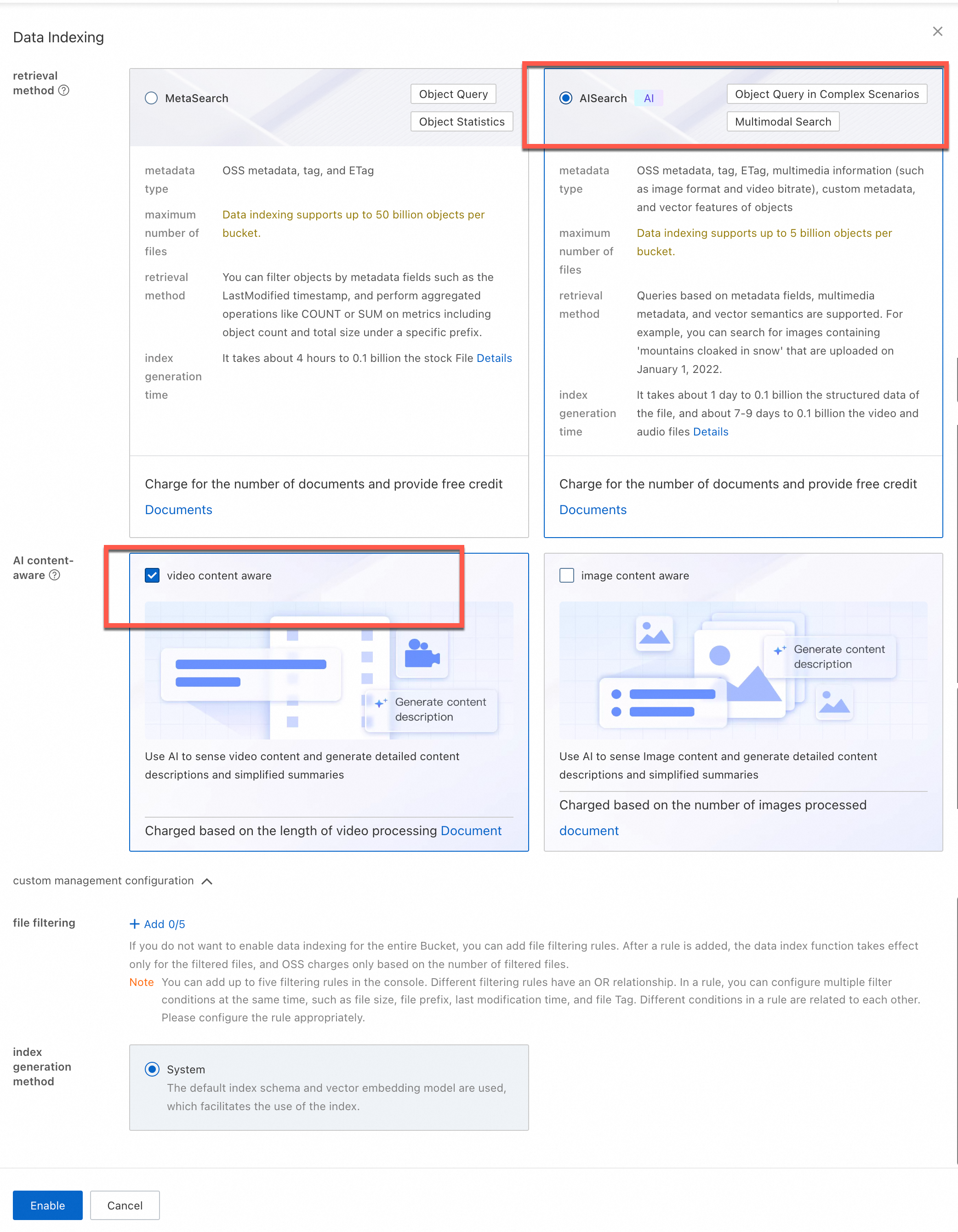
Enable AISearch for the bucket. In this case, you can accurately retrieve frames based on natural language descriptions and multiple conditions.

  1. In the left-side navigation tree, choose Object Management > Data Indexing.

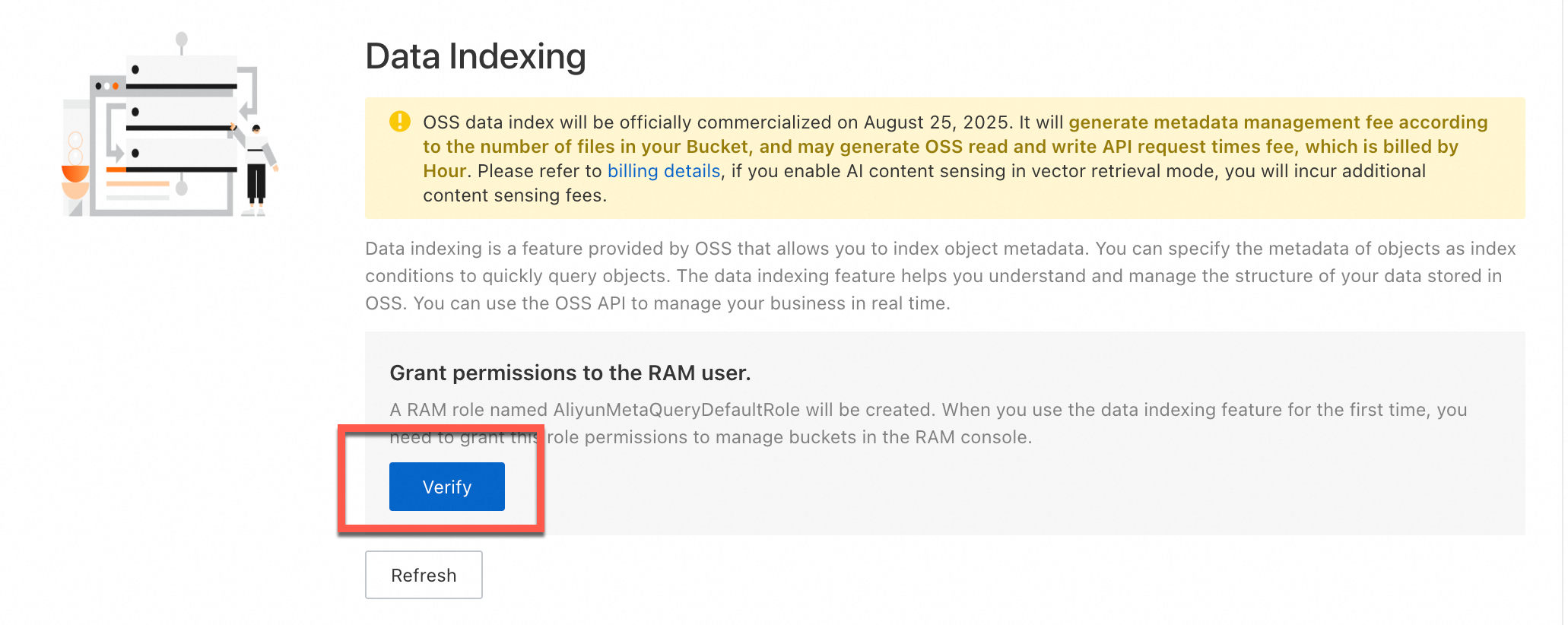
  2. On the Data Indexing page, click Enable Now.

  3. In the Data Indexing dialog box, select AISearch and click Enable.

Note

The time required to create a metadata index varies based on the number of objects in the bucket. You can refresh the Data Indexing page to check whether AISearch is enabled.

image

image

Verify the result

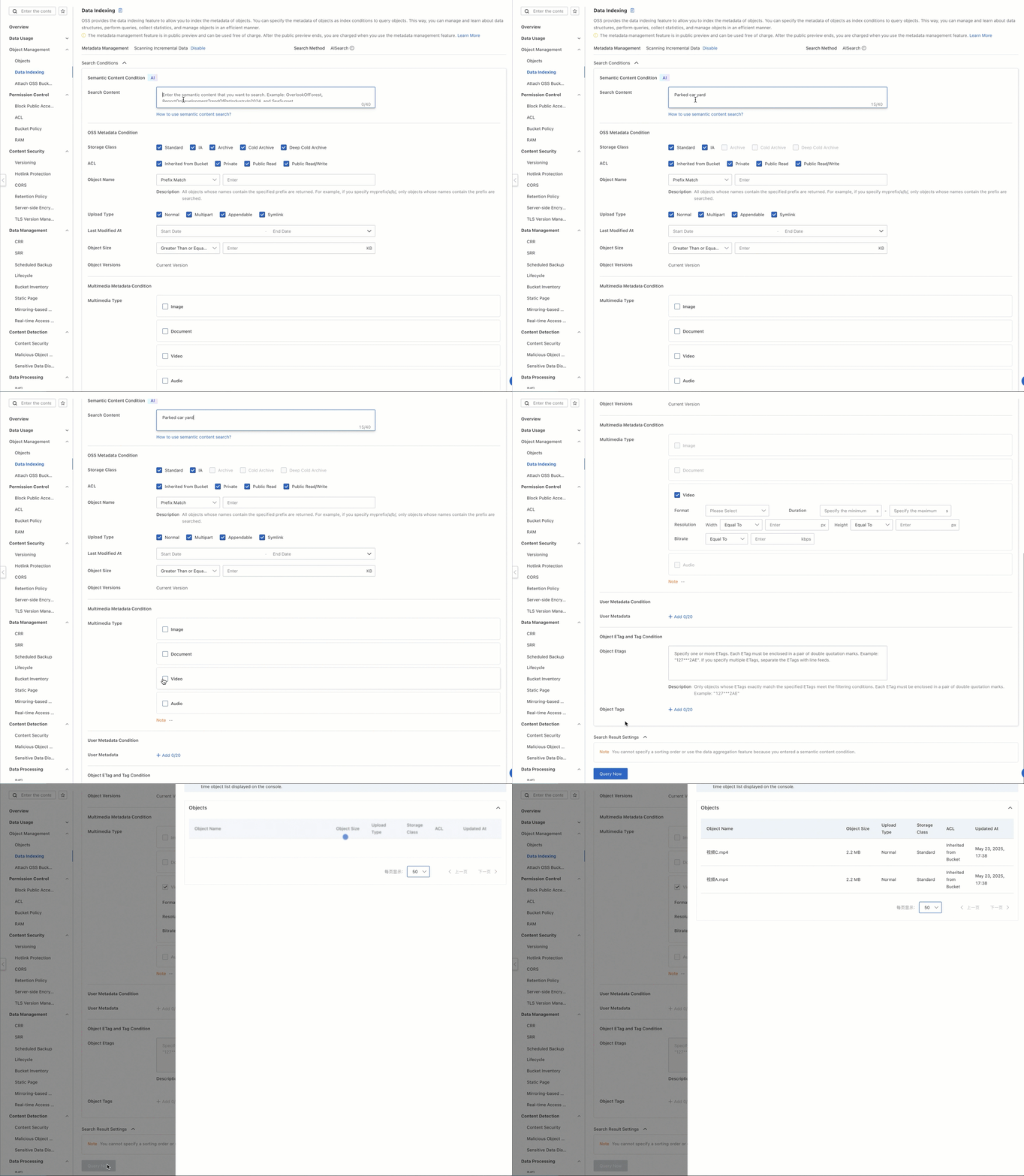
Specify descriptions, such as yard with a car, and frames that match the description are returned.

  1. On the Buckets page, click the name of the bucket in which frames are stored.

  2. On the Objects page, check the captured frames.

  3. In the left-side navigation tree, choose Object Management > Data Indexing.

  4. On the Data Indexing page, enter yard with a car in the Search Content field, set Multimedia Type to Image, and then click Query Now.

  5. Copy the paths of the objects. On the Objects page, enter the paths of the objects and find the captured frames.

2025-04-08_16-21-10 (2)

Apply the solution to a production environment

The current intelligent semantic indexing system is created. To seamlessly integrate the system into your product and apply it to the production environment, call operations by using the consumer application and use the natural language descriptions to quickly query and retrieve desired frames or video objects.

The following sample code from the consumer application provides an example on how to create an XML MetaQuery request that complies with OSS specifications:

Sample code

# -*- coding: utf-8 -*-
import argparse
import alibabacloud_oss_v2 as oss
# Parse the response in the XML format.
import xml.etree.ElementTree as ET
import json 
from datetime import datetime 

def get_search_conditions():
    """Obtain the multiple conditions specified by the user."""
    print("Specify a semantic description (Example: yard with a car)")
    query = input("> Semantic keywords: ").strip()
    while not query:
        print("Semantic keywords cannot be empty!")
        query = input("> Semantic keywords: ").strip()
    return query  

def build_metaquery_xml(query):
    """Create an XML MetaQuery request that complies with OSS specifications"""
    xml_parts = [f'<Query>{query}</Query>']

    meta_query_xml = f'''<MetaQuery>
    {"".join(xml_parts)}
</MetaQuery>'''
    return meta_query_xml # Encode the results to a UTF-8 byte stream.


def format_result(key, pre_url):
    """Format a search result"""
    return f"""Object path: {key}
 Object URL: {pre_url}
-----------------------"""

def semantic_search():
    # Assign values to the command line parameters.
    args = argparse.Namespace(
        region='cn-beijing', # Specify the region in which the bucket is located.
        bucket='ipc-frames-oss-metaquery-demo', # Specify the name of the bucket.
        endpoint='https://oss-cn-beijing.aliyuncs.com', # Specify the endpoint of the region in which the bucket is located. If you do not require it, leave the parameter empty or delete the parameter.
    )

    # Initialize the OSSClient instance.
    credentials = oss.credentials.EnvironmentVariableCredentialsProvider()
    cfg = oss.config.load_default()
    cfg.credentials_provider = credentials
    cfg.region = args.region
    if args.endpoint:
        cfg.endpoint = args.endpoint
    client = oss.Client(cfg)

    # Obtain user configurations.
    query=get_search_conditions()# Query search conditions.
    # Create a request.
    try:
        # Create the XML request body.
        data_str=build_metaquery_xml (query) # Do not pass conditions.

        # Specify the operation inputs.
        req = oss.OperationInput(
            op_name='DoMetaQuery', # Specify the name of the custom operation.
            method='POST', # The HTTP method.
            parameters ={# The query parameters.
                'metaQuery': '',
                'mode': 'semantic',
                'comp': 'query',
            },
            headers=None, # Optional. The custom request headers.
            body=data_str.encode("utf-8"), # The request body, which is encoded as a UTF-8 byte stream.
            bucket=args.bucket,          # The name of the destination bucket.
        )

        # Call the operation.
        resp = client.invoke_operation(req)

    except oss.exceptions.ServiceError as e:
        print(f "Server error:{e.message}")
        return
    
    root = ET.fromstring(resp.http_response.content.decode('utf-8'))
     # Find all File elements.
    files = root.findall('.//File')
    
    print(f"\n A total of {len(objects)} match the conditions:")


    for i, file in enumerate(files, 1):
        # Query the name of the object.
        key_element = file.find('Filename')
        if key_element is None:
            continue # Skips the current loop iteration if no object name is returned.
        key = key_element.text
        
        
        # Generate a presigned URL.
        pre_url = client.presign(
            oss.GetObjectRequest(
                bucket=args.bucket,  # Specify the name of the bucket.
                key=key, # Specify the name of the object.
            )
        )
        
        print(format_result(key, pre_url.url))


if __name__ == "__main__":
    semantic_search()

After you run the program, specify a description to query objects. Example: yard with a car. The system returns the results that contain the paths and URLs of the captured frames. You can view the frame details by using the URLs.

Four matching results found:")
Object path: 2025-04-07/Video A/2.jpg
Object URL: https://ipc-frames-oss-metaquery-demo.oss-cn-beijing.aliyuncs.com/2025-04-07/%E8%A7%86%E9%A2%91A/2.jpg?x-oss-signature-version=OSS4-HMAC-SHA256&x-oss-date=20250407T025024Z&x-oss-expires=900&x-oss-credential=LTAI********************%2F20250407%2Fcn-beijing%2Foss%2Faliyun_v4_request&x-oss-signature=d2d849c56e230f6beaf199ee1ca756bb99b3f6a14ce64c1fa710127149375fac
------------------------
Object path: 2025-04-07/Video C/2.jpg
Object URL: https://ipc-frames-oss-metaquery-demo.oss-cn-beijing.aliyuncs.com/2025-04-07/%E8%A7%86%E9%A2%91C/2.jpg?x-oss-signature-version=OSS4-HMAC-SHA256&x-oss-date=20250407T025024Z&x-oss-expires=900&x-oss-credential=LTAI********************%2F20250407%2Fcn-beijing%2Foss%2Faliyun_v4_request&x-oss-signature=1b3b456a32f9d0823dcfe5408d156df74e138a194bc06095877e00dd8079511e
------------------------
Object path: 2025-04-07/Video C/1.jpg
Object URL: https://ipc-frames-oss-metaquery-demo.oss-cn-beijing.aliyuncs.com/2025-04-07/%E8%A7%86%E9%A2%91C/1.jpg?x-oss-signature-version=OSS4-HMAC-SHA256&x-oss-date=20250407T025024Z&x-oss-expires=900&x-oss-credential=LTAI********************%2F20250407%2Fcn-beijing%2Foss%2Faliyun_v4_request&x-oss-signature=1fc66719db2bbe611bc86a63a863d7f94ad9aebf14ccfaff8579938094ace3ef
------------------------
Object path: 2025-04-07/Video A/1.jpg
Object URL: https://ipc-frames-oss-metaquery-demo.oss-cn-beijing.aliyuncs.com/2025-04-10/%E8%A7%86%E9%A2%91A/1.jpg?x-oss-signature-version=OSS4-HMAC-SHA256&x-oss-date=20250407T025024Z&x-oss-expires=900&x-oss-credential=LTAI********************%2F20250407%2Fcn-beijing%2Foss%2Faliyun_v4_request&x-oss-signature=4dd7f808872b9d4c988efe78a09cb91fd2accbb3e9c12df7cdbdf60bdcc2e7a7
------------------------

Learn more

Add tags to a captured frame

To achieve more efficient retrieval, you can use the object tagging feature of OSS to add metadata tags to key frames. For example, you can use tags to identify the source of a video or business scenarios, which allows you to quickly retrieve the target frames in a large number of objects.

If you want to analyze three video objects: Video A.mp4, Video B.mp4, and Video C.mp4.

Video A.mp4

Video B.mp4

Video C.mp4

example

example (1)

example

Collected from a backyard camera and tagged as Shoot by camera-a.

Collected from a camera in the shop and tagged as Shoot by camera-b.

Collected from a backyard camera and tagged as Shoot by camera-c.

The following sample code provides an example on how to use OSS SDK for Python to add tags to each video after you upload the video. You only need to modify the tag based on your business requirements to implement automatic tag management, which supports subsequent combined retrieval.

Sample code

import argparse
import alibabacloud_oss_v2 as oss
from alibabacloud_oss_v2.models import GetObjectTaggingRequest, PutObjectTaggingRequest, Tagging, TagSet, Tag

def list_and_process_frames(client, bucket, prefix, tags):
    """List and process all objects whose names contain a specific prefix"""
    try:
        # Create a request to list objects.
        list_request = oss.models.ListObjectsRequest(
            bucket=bucket,
            prefix=prefix
        )
        
        # Obtain and process the objects.
        result = client.list_objects(list_request)
        if result.contents:
            for obj in result.contents:
                apply_tags_to_frame(client, bucket, obj.key, tags)
                    
    except Exception as e:
        print(f "Failed to process the directory: {str(e)}")

def apply_tags_to_frame(client, bucket, frame_key, tags):
    """Add tags to a captured frame"""
    try:
        # Specify a tag.
        tagging = Tagging(
            version=1,
            tag_set=TagSet(tags=tags)
        )
        
        # Create a request to update tags.
        put_tag_request = PutObjectTaggingRequest(
            bucket=bucket,
            key=frame_key,
            tagging=tagging
        )
        
        # Update object tags.
        result = client.put_object_tagging(put_tag_request)
        
        # Convert the tags to a string for display.
        tags_str = '&'.join([f"{tag.key}={tag.value}" for tag in tags])
        print(f "Successfully add tags to the image named {frame_key}: {tags_str}")
        return True
    except Exception as e:
        print(f "Failed to add tags to the image: {str(e)}")
        return False

def frame_tags():
    # Configure basic OSS parameters.
    args = argparse.Namespace(
        region='cn-beijing',   
        frame_bucket='ipc-frames-oss-metaquery-demo',     
        endpoint='https://oss-cn-beijing.aliyuncs.com'
    )
    
    # Configure an OSSClient instance.
    credentials_provider = oss.credentials.EnvironmentVariableCredentialsProvider()
    cfg = oss.config.load_default()
    cfg.credentials_provider = credentials_provider
    cfg.region = args.region
    cfg.endpoint = args.endpoint
    client = oss.Client(cfg)

    # Specify the prefix contained in the name of the stored frames.
    videos = [
        {
            'frame_prefix': '2025-04-07/Video A.mp4/' 
        },    
        {
            'frame_prefix': '2025-04-07/Video B.mp4/'
        },
        {
            'frame_prefix': '2025-04-07/Video C.mp4/'
        }
    ]

    # Process the frames of each video.
    for video in videos:


        # Extract the video name from frame_prefix. For example, extract 'Video A.mp4' from '2025-04-07/Video A.mp4/'.
        prefix_parts = video['frame_prefix'].strip('/').split('/')
        video_filename=prefix_parts [-1] if prefix_parts else '' # Obtain the last non-empty part. Example: Video A.mp4.

        # Remove the object name extension. For example, remove the object name extension of 'Video A.mp4' to obtain 'Video A'.
        video_name_base = video_filename.split('.')[0] if '.' in video_filename else video_filename

        print(f"\n Start processing the frames of the video named {video_filename}") # Display the original extracted object name.

        tags = [
            # Specify the camera name by using the last word of the video name with the extension removed.
            Tag(key='camera', value=f'camera-{video_name_base[-1].lower()}' if video_name_base else 'camera-unknown'),
            # Tag(key='category', value='video_monitoring') # Add a tag to the frame by using the actual business classification information.
        ]

        # Process all frames of the video.
        list_and_process_frames(client, args.frame_bucket, video['frame_prefix'], tags)

        print(f"\n Finish processing the frames of the video named {video_filename}") # Display the original extracted object name.

if __name__ == "__main__":
    frame_tags()

The following sample code from the consumer application provides an example on how to use semantic descriptions and other conditions, such as tags, to perform a combined query to obtain search results:

Sample code

# -*- coding: utf-8 -*-
import argparse
import alibabacloud_oss_v2 as oss
# Parse the response in the XML format.
import xml.etree.ElementTree as ET
import json
from datetime import datetime
# --- Import required resources---
from alibabacloud_oss_v2.models import GetObjectTaggingRequest
# --- Import completed---

def get_inputs():
    """Obtain semantic descriptions (required) and filter conditions (optional)"""
    # 1. Obtain required semantic descriptions.
    print("Specify a semantic description (Example: yard with a car)")
    query = input("> Semantic keywords: ").strip()
    while not query:
        print("Semantic keywords cannot be empty!")
        query = input("> Semantic keywords: ").strip()

    conditions = [] # Initialize the filter conditions.
    target_tag=None# --- New: used to store destination tags.---

    # 2. (Optional) Obtain tag filtering conditions.
    print("\n  Specify the tag filtering conditions used for client filtering. (Example: camera=camera-a. Press Enter to skip.)") # Modify the prompt.
    tag_input=input ("> Tag (Format: key=value): ").strip()
    if tag_input:
        if '=' in tag_input:
            # --- Modify: no longer add to conditions, but save to target_tag ---
            # conditions.append({
            #     'field': 'Tags',
            #     'value': tag_input,
            #     'op': 'eq'
            # })
            target_tag = tag_input
            print(f "Information: The tag '{target_tag}' will be filtered on the client after the result is obtained. ")
            # --- Modification complete---
        else:
             print("The tag format is invalid and has been ignored. Format: 'key=value'.")


    # 3. (Optional) Obtain path prefix filtering conditions.
    print("\n (Optional) Enter the path prefix filter conditions. (Example: YYYY-MM-DD. Press Enter to skip.)")
    date_prefix=input ("> Path prefix: ").strip()
    if date_prefix:
        conditions.append({
            'field': 'Filename',
            'value': date_prefix,
            'op': 'prefix'
        })

    # --- Modify: return target_tag ---
    return query, conditions, target_tag
    # --- Modification complete---

def build_metaquery_xml(query, conditions):
    """Create an XML MetaQuery request that complies with OSS specifications (including semantic descriptions and optional filter conditions)."""
    # Always include the semantic query condition.
    xml_parts = [f'<Query>{query}</Query>']

    # Add optional filtering conditions. In semantic mode, only specific fields are supported, such as Filename in this example.
    for cond in conditions:
        # Skip the SimpleQuery construction of the Tags field in semantic mode. Although tags are no longer added in conditions, retaining this as a precaution).
        if cond['field'] == 'Tags':
            # print(f "Information: The tag filtering condition '{cond['value']}' is ignored in semantic search mode. ") # This line is no longer needed.
            continue

        json_query = json.dumps({
            "Field": cond['field'],
            "Value": cond['value'],
            "Operation": cond['op']
        }, ensure_ascii=False)
        xml_parts.append(f'<SimpleQuery>{json_query}</SimpleQuery>')

    """The preceding configurations create an XML MetaQuery request"""
    meta_query_xml = f'''<MetaQuery>
    {"".join(xml_parts)}
</MetaQuery>'''
    return meta_query_xml

def format_result(key, pre_url):
    """Format a search result"""
    return f""" Object URL: {pre_url}
 Object path: {key}
-----------------------"""

def perform_search():
    # Assign values to the command line parameters.
    args = argparse.Namespace(
        region='cn-beijing', # Specify the region in which the bucket is located.
        bucket='ipc-frames-oss-metaquery-demo', # Specify the name of the bucket.
        endpoint='https://oss-cn-beijing.aliyuncs.com', # Specify the endpoint of the region in which the bucket is located.
    )

    # Initialize the OSSClient instance.
    credentials = oss.credentials.EnvironmentVariableCredentialsProvider()
    cfg = oss.config.load_default()
    cfg.credentials_provider = credentials
    cfg.region = args.region
    if args.endpoint:
        cfg.endpoint = args.endpoint
    client = oss.Client(cfg)

    # Obtain user configurations (semantic description, filter conditions, and destination tags).
    # --- Modify: receive target_tag ---
    query, conditions, target_tag = get_inputs()
    # --- Modification complete---

    # Create a request.
    try:
        # Create the XML request body.
        # --- Pass only conditions. ---
        data_str = build_metaquery_xml(query, conditions)
        
        print(f"\n Generate an XML MetaQuery request:\n{data_str}")

        # Specify the operation inputs.
        req = oss.OperationInput(
            op_name='DoMetaQuery',
            method='POST',
            parameters={
                'metaQuery': '',
                'mode': 'semantic', # <-- Reenter the semantic mode.
                'comp': 'query',
            },
            headers=None,
            body=data_str.encode("utf-8"),
            bucket=args.bucket,
        )

        # Call the operation.
        print("\n Send a DoMetaQuery request.")
        resp = client.invoke_operation(req)
        print(f"\n Request succeeded. HTTP status code: {resp.http_response.status_code}")
    # --- Modify exceptions ---
    except oss.exceptions.ServiceError as e:
        print(f" Server error(ServiceError): {e.message}")
        print(f"   - HTTP Status Code: {e.status_code}")
        print(f"   - Error Code: {e.error_code}")
        print(f"   - Request ID: {e.request_id}")
        return
    except oss.exceptions.ClientError as e: # Capture client errors.
        print(f "Client or network error (ClientError):{e.message}")
        return
    except Exception as e: # Capture other possible exceptions.
        print(f "Unknown error: {e}")
        import traceback
        traceback.print_exc() # Display the complete traceback.
        return

    # --- Modification complete---

    # Parse and process the results.
    final_results_count = 0 # --- Add a counter for the final results ---
    try:
        root = ET.fromstring(resp.http_response.content.decode('utf-8'))
        # Find all File elements.
        files = root.findall('.//File')

        print(f"\n Obtain {len(files)} preliminary matching results from OSS and start tag filtering...")

        if not files:
            # Check the NextContinuationToken parameter.
            next_token_elem = root.find('.//NextContinuationToken')
            if next_token_elem is not None and next_token_elem.text:
                print("Note: More results may be displayed in other pages.")
            print("\n No results found.")
            return # You are notified in advance if no objects are found.


        for i, file in enumerate(files, 1):
            # Query the name of the object.
            key_element = file.find('Filename')
            if key_element is None:
                print(f "Warning: The Filename field is not configured for the {i}th preliminary result. Skip the result.")
                continue
            key = key_element.text

            # --- Client tag filtering ---
            if target_tag:
                try:
                    tagging_req = GetObjectTaggingRequest(bucket=args.bucket, key=key)
                    tagging_resp = client.get_object_tagging(tagging_req)
                    # Check whether the returned tag set contains the destination tag.
                    tag_found = False
                    target_k, target_v = target_tag.split('=', 1)

                    # --- Modify: use .tags instead of .tag.---
                    if tagging_resp.tag_set and tagging_resp.tag_set.tags: # Use .tags.
                        for tag in tagging_resp.tag_set.tags: # Use .tags.
                    # --- Modification complete---
                            if tag.key == target_k and tag.value == target_v:
                                tag_found = True
                                break
                    if not tag_found:
                        continue # The tag does not match. Skip this object.
                except oss.exceptions.ServiceError as tag_err:
                     if tag_err.status_code == 404 and tag_err.error_code == 'NoSuchTagSet':
                         continue
                     else:
                        print(f "Warning: An error occurred while obtaining the tag of the object named '{key}': {tag_err.error_code} - {tag_err.message}. Skip the error.")
                        continue
                except Exception as tag_e:
                    print(f "Warning: An unknown error occurred while obtaining or processing the tag of the object named '{key}': {tag_e}. Skip the error.")
                    # --- Add traceback to facilitate debugging---
                    import traceback
                    traceback.print_exc()
                    # --- Add complete---
                    continue
            # --- Client tag filtering completed---

            # --- If the tag filter conditions are passed or not specified, process and display the result.---
            final_results_count += 1 # Add 1 to the final result.
            print(f"\n[{final_results_count}] file '{key}' meets all conditions:") # Display the final result.

            # Generate a presigned URL.
            try:
                pre_url = client.presign(
                    oss.GetObjectRequest(
                        bucket=args.bucket,
                        key=key,
                    )
                )
                print(format_result(key, pre_url.url))
            except Exception as presign_e:
                print(f "Warning: An error occurred while generating the presigned URL of the object named '{key}': {presign_e}")
                print(format_result(key, "[Failed to generate the URL]"))
        # --- Display the final statistics after the loop ends.---
        print(f"\n Client filtering complete. {final_results_count} results found.")

    except ET.ParseError as xml_e:
        print(f" Error: An error occurred while parsing the response in the XML format - {xml_e}")
    except Exception as parse_e:
        print(f" Error: An unexpected error occurred while processing results- {parse_e}")


if __name__ == "__main__":
    perform_search()

After you run the intelligent semantic indexing system, to filter video objects whose content is related to "yard with a car", perform the following steps:

  1. Enter the search keywords in the description field: yard with a car

  2. Specify tag filtering conditions: camera = camera-a

In the current video objects, both the Video A and the Video C conforms to the description of yard with a car. However, due to tag filtering conditions, only the retrieval objects with the camera-a tag are retained. In this case, only Video A meets all conditions.

Send a DoMetaQuery request.

The request is successful. HTTP status code: 200.

Obtain 4 preliminary matching results from OSS and start client tag filtering...

[1] Object named '2025-04-07/Video A/2.jpg' meets all conditions.
 Object URL: https://ipc-frames-oss-metaquery-demo.oss-cn-beijing.aliyuncs.com/2025-04-07/%E8%A7%86%E9%A2%91A/2.jpg?x-oss-signature-version=OSS4-HMAC-SHA256&x-oss-date=20250407T025459Z&x-oss-expires=900&x-oss-credential=LTAI********************%2F20250407%2Fcn-beijing%2Foss%2Faliyun_v4_request&x-oss-signature=5e9d684ec141f9570f2f95713de492ac8291a39d1d655e4bb4c4d35b40d1e554
 Object path: 2025-04-07/Video A/2.jpg
-----------------------

[2] Object named '2025-04-07/Video A/1.jpg' meets all conditions.
 Object URL: https://ipc-frames-oss-metaquery-demo.oss-cn-beijing.aliyuncs.com/2025-04-07/%E8%A7%86%E9%A2%91A/1.jpg?x-oss-signature-version=OSS4-HMAC-SHA256&x-oss-date=20250407T025459Z&x-oss-expires=900&x-oss-credential=LTAI********************%2F20250407%2Fcn-beijing%2Foss%2Faliyun_v4_request&x-oss-signature=1c13310abdd764e8ac9f67e27a179f02949eaf47c4ed68358eefcb1965a6dd1e
 Object path: 2025-04-07/Video A/1.jpg
-----------------------
 Client filtering completed. 2 results found.

Configure an event notification rule for frame capture

In actual applications, frames are captured asynchronously. You cannot obtain the processing results of captured frames directly when the frame capture task is complete. If you want to obtain the processing results of captured frames, we recommend that you use Simple Message Queue (formerly MNS) (SMQ) to configure event notifications. This way, you can receive instant notifications when the frame capture task is complete. You do not need to repeatedly query the task status.

To configure an event notification rule for frame capture, you must create a message topic that is in the same region in which the bucket in which your video objects are stored. For more information, see Get started with topic-based messaging. The following sample code shows how to configure an event notification rule when you capture frames from a video object. The topic name must be Base64-encoded. For example, if the topic name is test-topic, the encoded name is dGVzdC10b3BpYw.

Sample code

# -*- coding: utf-8 -*-
import base64
import argparse
import alibabacloud_oss_v2 as oss


def video_processor():
    # Configure basic OSS parameters.
    args = argparse.Namespace(
        region='cn-beijing',
        target_bucket='ipc-frames-oss-metaquery-demo',    
        bucket='ipc-videos-oss-metaquery-demo',     
        endpoint='https://oss-cn-beijing.aliyuncs.com'
    )
    
    # Configure an OSSClient instance.
    credentials_provider = oss.credentials.EnvironmentVariableCredentialsProvider()
    cfg = oss.config.load_default()
    cfg.credentials_provider = credentials_provider
    cfg.region = args.region
    cfg.endpoint = args.endpoint
    client = oss.Client(cfg)

    # Specify the video objects that you want to process.
    videos = [('Video A.mp4', '2025-04-07'), 
              ('Video B.mp4', '2025-04-07'), 
              ('Video C.mp4', '2025-04-07')]
    
    for video, date in videos:
        # Store the captured images in the destination directory by date.
        target_key = f"{date}/{video}/{{index}}.{{autoext}}"
        
        # Specify the configured style for frame capture.
        style = 'style/ipc-snap'
        
        # Base64-encode the destination bucket name and object name to make sure that they are URL-safe.
        target_bucket_base64 = base64.urlsafe_b64encode(args.target_bucket.encode()).decode()
        target_key_base64 = base64.urlsafe_b64encode(target_key.encode()).decode()
        
        # Create a process instruction that includes the style and destination path. Send the conversion result notification to the SMQ with the topic named test-topic. 
        process = f"{style}|sys/saveas,b_{target_bucket_base64},o_{target_key_base64}/notify,topic_dGVzdC10b3BpYw"
        
        try:
            # Send an asynchronous request.
            result = client.async_process_object(oss.AsyncProcessObjectRequest(
                bucket=args.bucket,
                key=video,
                process=process
            ))
            
            print(f"Status Code: {result.status_code}")
            print(f"RequestId: {result.request_id}")
            print(f"TaskId: {result.task_id}")
            print(f"EventId: {result.event_id}")
            print(f"ProcessRequestId: {result.process_request_id}")
            
        except Exception as e:
            print(f"Error: {e}")

if __name__ == "__main__":
    video_processor()