Add watermarks to images stored in OSS to protect ownership and prevent unauthorized use.
Scenarios
-
Copyright protection: A watermark on your images indicates copyright ownership and prevents unauthorized use.
-
Brand promotion: A watermark containing your brand logo or name on images, videos, or documents increases brand awareness.
-
Tamper prevention: A watermark on official documents, certificates, or reports deters tampering and reduces the risk of forgery.
-
Preventing image theft: Adding a watermark deters image theft, as online images are easily copied and republished.
-
Legal compliance: Some laws or contracts require you to add a watermark to specific content before publication.
Limits
-
You can use object URLs, OSS SDKs, or API operations to configure IMG parameters that are used to process images. In this example, object URLs are used. You can use object URLs to configure IMG parameters only for public-read images. If you want to configure IMG parameters for private images, use OSS SDKs or API operations. For more information, see Image processing methods.
-
Watermark images must be stored in the same bucket. Upload online or local images to the bucket first.
-
Supported image watermark formats: JPG, PNG, BMP, WebP, and TIFF.
-
Up to three image watermarks per image. Watermarks cannot completely overlap.
-
Text watermarks do not support Traditional Chinese characters.
Parameters
action: watermark
Parameters are grouped by type in the following tables.
-
Basic parameters
Parameter
Required
Description
Value
t
No
Watermark opacity.
[0, 100]
Default: 100 (fully opaque).
g
No
Watermark position on the image.
-
nw: top-left
-
north: top-center
-
ne: top-right
-
west: middle-left
-
center: center
-
east: middle-right
-
sw: bottom-left
-
south: bottom-center
-
se (default): bottom-right
Positions are illustrated in the diagram below.
x
No
Horizontal offset from the image edge. Applies only when
gis set tonw,west,sw,ne,east, orse.[0, 4096]
Default: 10
Unit: pixels (px)
y
No
Vertical offset from the image edge. Applies only when
gis set tonw,north,ne,sw,south, orse.[0, 4096]
Default: 10
Unit: pixels (px)
voffset
No
Vertical offset when
gis set towest,center, oreast.[-1000, 1000]
Default: 0
Unit: pixels (px)
fill
No
Whether to tile the watermark across the source image.
NoteTo use the tiled watermark feature for image watermarks, submit a request in Quota Center.
-
1: Tiles the image or text watermark across the source image.
-
0 (default): Does not tile the watermark across the source image.
padx
No
Horizontal spacing between tiled watermarks. Applies only when
fillis set to 1.[0, 4096]
Default: 0
Unit: pixels (px)
pady
No
Vertical spacing between tiled watermarks. Applies only when
fillis set to 1.[0, 4096]
Default: 0
Unit: pixels (px)
These offsets control both single watermark position and tiled watermark layout.
The following diagram shows the reference positions and their corresponding values.

-
-
Image watermark parameters
Parameter
Required
Description
Value
image
Yes
Full path of the watermark image object, URL-safe Base64-encoded (URL-safe Base64 encoding). For example, encode the path
image/panda.pngto getaW1hZ2UvcGFuZGEucG5n.NoteWatermark images must be objects stored in the same bucket.
A URL-safe Base64-encoded string.
-
Watermark image preprocessing parameters
You can use all parameters of the resize, custom crop, indexed slice, rounded corners, and rotate actions to preprocess the watermark image. Additionally, watermark image preprocessing supports the scaling parameter P:
Parameter
Description
Value
P
Scales the watermark image as a percentage of the source image dimensions. For example, setting this to 10 on a 100 × 100 px source image scales the watermark to 10 × 10 px. If the source image changes to 200 × 200 px, the watermark scales to 20 × 20 px.
[1, 100]
-
Text watermark parameters
Parameter
Required
Description
Value
text
Yes
Text content of the watermark, URL-safe Base64-encoded (URL-safe Base64 encoding).
The text string must not exceed 64 bytes before Base64 encoding.
type
No
Font of the text watermark. The font name must be URL-safe Base64-encoded.
For supported fonts and their encoded values, see the font type and encoding table.
Default: wqy-zenhei (encoded as d3F5LXplbmhlaQ)
color
No
Color of the text watermark.
An RGB hexadecimal color value. For example, 000000 for black and FFFFFF for white.
Default: 000000 (black)
size
No
Font size of the text watermark.
(0, 1000]
Default: 40
Unit: pixels (px)
shadow
No
Shadow opacity of the text watermark.
[0, 100]
Default: 0 (no shadow).
rotate
No
Clockwise rotation angle of the text.
[0, 360]
Default: 0 (no rotation).
The following table lists available fonts and their encoded values for the type parameter.
Parameter value
Description
Encoded value
wqy-zenhei
WenQuanYi Zen Hei
d3F5LXplbmhlaQ
wqy-microhei
WenQuanYi Micro Hei
d3F5LW1pY3JvaGVp
fangzhengshusong
Fangzheng Shusong
ZmFuZ3poZW5nc2h1c29uZw
fangzhengkaiti
Fangzheng Kaiti
ZmFuZ3poZW5na2FpdGk
fangzhengheiti
Fangzheng Heiti
ZmFuZ3poZW5naGVpdGk
fangzhengfangsong
Fangzheng Fangsong
ZmFuZ3poZW5nZmFuZ3Nvbmc
droidsansfallback
DroidSansFallback
ZHJvaWRzYW5zZmFsbGJhY2s
-
Text and image watermark parameters
Parameter
Required
Description
Value
order
No
Display order of the text and image watermarks.
0 or 1
-
0 (default): The image watermark is in front.
-
1: The text watermark is in front.
align
No
Alignment of the text and image watermarks.
0, 1, or 2
-
0: The watermarks are top-aligned.
-
1: The watermarks are center-aligned.
-
2 (default): The watermarks are bottom-aligned.
interval
No
Spacing between the text and image watermarks.
[0, 1000]
Default: 0
Unit: pixels (px)
-
Watermark encoding
Parameters such as text content, font, and image name must be URL-safe Base64-encoded:
-
Encode the content as Base64.
-
Replace the following characters in the resulting string:
-
Replace each plus sign (+) with a hyphen (-).
-
Replace each forward slash (/) with an underscore (_).
-
Remove all trailing equal signs (=).
-
Use a base64url encoder to encode parameters such as text content, text color, font, and watermark image name.
This encoded content is only for specific parameters of the watermark operation. Do not use this encoded content in the signature string (Signature).
Methods
Public images
Add a watermark to a public-read or public-read-write image by appending IMG parameters to the image URL.
Example 1: Add a text watermark
This example uses the example.jpg image from the oss-console-img-demo-cn-hangzhou-3az bucket in the China (Hangzhou) region. The URL to access the image is https://oss-console-img-demo-cn-hangzhou-3az.oss-cn-hangzhou.aliyuncs.com/example.jpg
The following examples show how to add a text watermark to the example.jpg image:
-
Add a "Hello World" text watermark
URL-safe Base64-encode the text "Hello World" (Encode watermark parameters). The encoded result is
SGVsbG8gV29ybGQ, and the URL for image processing is https://oss-console-img-demo-cn-hangzhou-3az.oss-cn-hangzhou.aliyuncs.com/example.jpg?x-oss-process=image/watermark,text_SGVsbG8gV29ybGQ.
-
Add a text watermark with multiple image processing parameters
To add a "Hello World" text watermark to the example.jpg image, you can configure the following processing parameters for both the source image and the watermark:
-
Resize example.jpg to 300 × 300 pixels:
resize,w_300,h_300 -
Set the font to WenQuanYi Zen Hei:
type_d3F5LXplbmhlaQ(d3F5LXplbmhlaQ is the Base64-encoded value for WenQuanYi Zen Hei) -
Set the watermark content to "Hello World":
text_SGVsbG8gV29ybGQ -
Set the text color to white and the font size to 30 pixels:
color_FFFFFF,size_30 -
Set the text shadow transparency to 50%:
shadow_50 -
Set the watermark position to the lower-right corner, with a horizontal offset of 10 pixels and a vertical offset of 10 pixels:
g_se,x_10,y_10
The URL for image processing is: https://oss-console-img-demo-cn-hangzhou-3az.oss-cn-hangzhou.aliyuncs.com/example.jpg?x-oss-process=image/resize,w_300,h_300/watermark,type_d3F5LXplbmhlaQ,size_30,text_SGVsbG8gV29ybGQ,color_FFFFFF,shadow_50,t_100,g_se,x_10,y_10

-
Example 2: Add an image watermark
The following examples show how to add an image watermark to the example.jpg image:
-
Add the panda.png image as a watermark
URL-safe Base64-encode the watermark image name, panda.png. The encoded result is
cGFuZGEucG5n. The URL for image processing is https://oss-console-img-demo-cn-hangzhou-3az.oss-cn-hangzhou.aliyuncs.com/example.jpg?x-oss-process=image/watermark,image_cGFuZGEucG5n.The full path of the watermark image must be URL-safe Base64-encoded to ensure it is correctly transmitted in the URL. For example, if the watermark image is named
panda.pngand is located in theimagedirectory, you must perform URL-safe Base64 encoding on the full pathimage/panda.png. The encoded string isaW1hZ2UvcGFuZGEucG5n.
-
Add an image watermark with multiple image processing parameters
To add the panda.png image watermark to the example.jpg image, you can configure the following processing parameters for both the source image and the watermark:
-
Resize example.jpg to 300 × 300 pixels:
resize,w_300,h_300 -
Set the quality of example.jpg to 90%:
quality,q_90 -
Add the panda.png image watermark:
watermark,image_cGFuZGEucG5n(cGFuZGEucG5n is the Base64-encoded value for panda.png) -
Set the transparency of the image watermark to 90%:
t_90 -
Set the image watermark position to the lower-right corner, with a horizontal offset of 10 pixels and a vertical offset of 10 pixels:
g_se,x_10,y_10
-
-
Preprocess the image watermark and configure multiple image processing parameters
To add the panda.png image watermark to the example.jpg image, you can configure the following processing parameters for both the source image and the watermark:
-
Resize the width of example.jpg to 300 pixels:
resize,w_300 -
Preprocess the watermark image panda.png by scaling it to 30% of its original size:
image_cGFuZGEucG5nP3gtb3NzLXByb2Nlc3M9aW1hZ2UvcmVzaXplLFBfMzA(The valuecGFuZGEucG5nP3gtb3NzLXByb2Nlc3M9aW1hZ2UvcmVzaXplLFBfMzAis the Base64-encoded string forpanda.png?x-oss-process=image/resize,P_30) -
Set the watermark transparency to 90%, its position to the lower-right corner, and its horizontal and vertical offsets to 10 pixels:
t_90,g_se,x_10,y_10
The URL for image processing is: https://oss-console-img-demo-cn-hangzhou-3az.oss-cn-hangzhou.aliyuncs.com/example.jpg?x-oss-process=image/resize,w_300/watermark,image_cGFuZGEucG5nP3gtb3NzLXByb2Nlc3M9aW1hZ2UvcmVzaXplLFBfMzA,t_90,g_se,x_10,y_10

-
-
Add multiple image watermarks
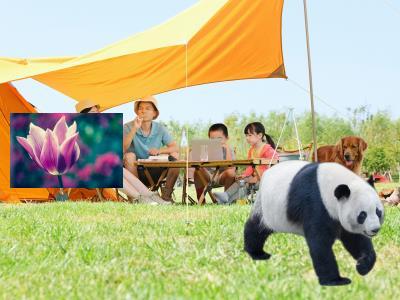
In this example, two image watermarks, panda.png and Tulips.jpg, are added to example.jpg.
-
URL-safe Base64-encode the watermark image name, panda.png. The encoded result is
cGFuZGEucG5n. The image processing parameter iswatermark,image_cGFuZGEucG5n. -
URL-safe Base64-encode the watermark image name, Tulips.jpg. The encoded result is
VHVsaXBzLmpwZw. To position the image watermark in the middle-left of the source image with horizontal and vertical offsets of 10 pixels, the image processing parameter iswatermark,image_VHVsaXBzLmpwZw,g_west,x_10,y_10.
The URL for image processing is:
-

Example 3: Add a text and image watermark
This example shows how to add a text and image watermark to the example.jpg image:
By combining the encoded values for panda.png and "Hello World" from the previous examples, you can construct the following URL for image processing: https://oss-console-img-demo-cn-hangzhou-3az.oss-cn-hangzhou.aliyuncs.com/example.jpg?x-oss-process=image/watermark,image_cGFuZGEucG5nP3gtb3NzLXByb2Nlc3M9aW1hZ2UvcmVzaXplLFBfMzA,text_SGVsbG8gV29ybGQ.
Private images
Use Alibaba Cloud SDKs or the REST API to add watermarks to private images.
Alibaba Cloud SDKs
The following sample code demonstrates adding a watermark with common Alibaba Cloud SDKs. For other languages, see Overview.
Java
Alibaba Cloud SDK for Java 3.17.4 or later is required.
import com.aliyun.oss.*;
import com.aliyun.oss.common.auth.*;
import com.aliyun.oss.common.comm.SignVersion;
import com.aliyun.oss.model.GetObjectRequest;
import java.io.File;

public class Demo {
    public static void main(String[] args) throws Throwable {
        // Specify the endpoint. In this example, the endpoint for the China (Hangzhou) region is used. Specify your actual endpoint.
        String endpoint = "https://oss-cn-hangzhou.aliyuncs.com";
        // Specify the region where your bucket is located, for example, cn-hangzhou.
        String region = "cn-hangzhou";
        // Obtain access credentials from environment variables. Before you run the sample code, make sure that the OSS_ACCESS_KEY_ID and OSS_ACCESS_KEY_SECRET environment variables are configured.
        EnvironmentVariableCredentialsProvider credentialsProvider = CredentialsProviderFactory.newEnvironmentVariableCredentialsProvider();
        // Specify the bucket name. Example: examplebucket.
        String bucketName = "examplebucket";
        // Specify the full path of the object. The full path cannot contain the bucket name.
        String objectName = "src.jpg";
        // Specify the destination path for the local file, such as D:\\localpath\\example-new.jpg. The file is created or overwritten.
        String pathName = "D:\\dest.jpg";

        // Create an OSSClient instance.
        // Call the shutdown method to release resources when the OSSClient instance is no longer needed.
        ClientBuilderConfiguration clientBuilderConfiguration = new ClientBuilderConfiguration();
        clientBuilderConfiguration.setSignatureVersion(SignVersion.V4);
        OSS ossClient = OSSClientBuilder.create()
                .endpoint(endpoint)
                .credentialsProvider(credentialsProvider)
                .clientConfiguration(clientBuilderConfiguration)
                .region(region)
                .build();

        try {
            // Add a "Hello World" text watermark to the image.
            String image = "image/watermark,text_SGVsbG8gV29ybGQ";
            GetObjectRequest request = new GetObjectRequest(bucketName, objectName);
            request.setProcess(image);
            // Save the processed image to your local machine as example-new.jpg.
            // If you specify only the filename (for example, example-new.jpg) without a full path, the file is saved to the local directory of the project.
            ossClient.getObject(request, new File("D:\\dest.jpg"));
        } catch (OSSException oe) {
            System.out.println("Caught an OSSException, which means your request made it to OSS, "
                    + "but was rejected with an error response for some reason.");
            System.out.println("Error Message:" + oe.getErrorMessage());
            System.out.println("Error Code:" + oe.getErrorCode());
            System.out.println("Request ID:" + oe.getRequestId());
            System.out.println("Host ID:" + oe.getHostId());
        } catch (ClientException ce) {
            System.out.println("Caught an ClientException, which means the client encountered "
                    + "a serious internal problem while trying to communicate with OSS, "
                    + "such as not being able to access the network.");
            System.out.println("Error Message:" + ce.getMessage());
        } finally {
            if (ossClient != null) {
                ossClient.shutdown();
            }
        }
    }
}
PHP
Alibaba Cloud SDK for PHP 2.7.0 or later is required.
<?php
if (is_file(__DIR__ . '/../autoload.php')) {
    require_once __DIR__ . '/../autoload.php';
}
if (is_file(__DIR__ . '/../vendor/autoload.php')) {
    require_once __DIR__ . '/../vendor/autoload.php';
}
use OSS\Credentials\EnvironmentVariableCredentialsProvider;
use OSS\OssClient;

// Obtain access credentials from environment variables. Before you run the sample code, make sure that the OSS_ACCESS_KEY_ID and OSS_ACCESS_KEY_SECRET environment variables are configured.
$provider = new EnvironmentVariableCredentialsProvider();
// Specify the endpoint of the region where the bucket is located. For example, if the bucket is in the China (Hangzhou) region, set the endpoint to https://oss-cn-hangzhou.aliyuncs.com.
$endpoint = "https://oss-cn-hangzhou.aliyuncs.com";
// Specify the bucket name. Example: examplebucket.
$bucket= "examplebucket";
// Specify the full path of the object, for example, exampledir/exampleobject.jpg. The full path cannot contain the bucket name.
$object = "src.jpg";
// Specify the destination path for the local file, such as D:\\localpath\\example-new.jpg. The file is created or overwritten.
// If you specify only the filename (for example, example-new.jpg) without a full path, the file is saved to the local directory of the project.
$download_file = "D:\\dest.jpg";

$config = array(
        "provider" => $provider,
        "endpoint" => $endpoint,
        "signatureVersion" => OssClient::OSS_SIGNATURE_VERSION_V4,
        // Specify the general-purpose region ID.
        "region" => "cn-hangzhou"
    );
$ossClient = new OssClient($config);

// Add a "Hello World" text watermark to the image.
$image = "image/watermark,text_SGVsbG8gV29ybGQ";

$options = array(
    OssClient::OSS_FILE_DOWNLOAD => $download_file,
    OssClient::OSS_PROCESS => $image);

// Save the processed image to your local machine.
$ossClient->getObject($bucket, $object, $options);
Python
Alibaba Cloud SDK for Python 2.18.4 or later is required.
# -*- coding: utf-8 -*-
import oss2
from oss2.credentials import EnvironmentVariableCredentialsProvider

# Obtain access credentials from environment variables. Before you run the sample code, make sure that the OSS_ACCESS_KEY_ID and OSS_ACCESS_KEY_SECRET environment variables are configured.
auth = oss2.ProviderAuthV4(EnvironmentVariableCredentialsProvider())
# Specify the endpoint of the region where the bucket is located. For example, if the bucket is in the China (Hangzhou) region, set the endpoint to https://oss-cn-hangzhou.aliyuncs.com.
endpoint = 'https://oss-cn-hangzhou.aliyuncs.com'
# Specify the general-purpose region ID.
region = 'cn-hangzhou'
bucket = oss2.Bucket(auth, endpoint, 'examplebucket', region=region)
# Specify the name of the source image. If the image is not in the root directory of the bucket, you must specify the full path, for example, exampledir/example.jpg.
key = 'src.jpg'
# Specify the name for the processed image.
new_pic = 'D:\\dest.jpg'

# Add a "Hello World" text watermark to the image.
image = 'image/watermark,text_SGVsbG8gV29ybGQ'
bucket.get_object_to_file(key, new_pic, process=image)
Go
Alibaba Cloud SDK for Go 3.0.2 or later is required.
package main

import (
	"fmt"
	"os"

	"github.com/aliyun/aliyun-oss-go-sdk/oss"
)

func HandleError(err error) {
	fmt.Println("Error:", err)
	os.Exit(-1)
}

func main() {
	// Obtain access credentials from environment variables. Before you run the sample code, make sure that the OSS_ACCESS_KEY_ID and OSS_ACCESS_KEY_SECRET environment variables are configured.
	provider, err := oss.NewEnvironmentVariableCredentialsProvider()
	if err != nil {
		fmt.Println("Error:", err)
		os.Exit(-1)
	}

	// Create an OSSClient instance.
	// Specify the endpoint for your bucket. In this example, the endpoint for the China (Hangzhou) region is used. Specify your actual endpoint.
	client, err := oss.New("https://oss-cn-hangzhou.aliyuncs.com", "", "", oss.SetCredentialsProvider(&provider), oss.AuthVersion(oss.AuthV4), oss.Region("cn-hangzhou"))
	if err != nil {
		HandleError(err)
	}

	// Specify the name of the bucket where the source image is stored. Example: examplebucket.
	bucketName := "examplebucket"
	bucket, err := client.Bucket(bucketName)
	if err != nil {
		HandleError(err)
	}

	// Specify the name of the source image. If the image is not in the root directory of the bucket, you must specify the full path, for example, exampledir/example.jpg.
	sourceImageName := "src.jpg"
	// Specify a name for the processed image.
	targetImageName := "D://dest.jpg"
	// Add a "Hello World" text watermark to the image.
	image := "image/watermark,text_SGVsbG8gV29ybGQ"
	err = bucket.GetObjectToFile(sourceImageName, targetImageName, oss.Process(image))
	if err != nil {
		HandleError(err)
	}
}
REST API
For highly customized applications, call the REST API directly. This requires manual signature calculation in your code. Signature V4 (Recommended).
You can watermark images by adding watermark parameters to the GetObject operation.
GET /oss.jpg?x-oss-process=image/watermark,w_100 HTTP/1.1
Host: oss-example.oss-cn-hangzhou.aliyuncs.com
Date: Fri, 28 Oct 2022 06:40:10 GMT
Authorization: OSS4-HMAC-SHA256 Credential=LTAI********************/20250417/cn-hangzhou/oss/aliyun_v4_request,Signature=a7c3554c729d71929e0b84489addee6b2e8d5cb48595adfc51868c299c0c218e
FAQ
Using online or local images as watermarks
The watermark image must be in the same bucket as the source image. Upload online or local images to the bucket first.
"Font content is too large" error
Text watermarks are limited to 64 characters (each Chinese character counts as three). If you get the "font content is too large" error, shorten the text. Example 1: Add a text watermark.
Image watermark failure on private objects
Private objects require a signed URL. Include IMG parameters when generating the signature rather than appending them afterward. Generate a signed object URL that includes IMG parameters.
Background color for image watermarks
No.
Accessing images with a signed URL
Private objects require a signed URL. Include IMG parameters when generating the signature rather than appending them afterward. Image Processing (Java SDK V1).
Vertically arranging watermarks
Yes. Use multiple watermark actions to arrange watermarks vertically.

Dynamically resizing watermarks
IMG does not support dynamic watermark resizing. Implement custom logic on your client or server to detect the source image dimensions and calculate the watermark size before calling the OSS API.
Maximum number of watermarks
Up to three watermarks. To add more, submit a ticket.