This topic describes the causes of and solutions to 403 errors from OSS.
AbnormalBucketOwnerStatus
This error is returned if the Alibaba Cloud account that owns the target bucket has an abnormal status.
Abnormal bucket owner status
-
Cause: The service is unavailable to the owner of the target bucket.
-
Solution: Check whether the user's Alibaba Cloud account has been deleted or is restricted for security reasons. Also, confirm whether the provider has suspended the service due to overdue payments.
AccessDenied
This error occurs when a user lacks the required permissions to perform a specific operation.
Access denied by authorizer's policy
-
Cause: You do not have the permissions to perform the related operation.
-
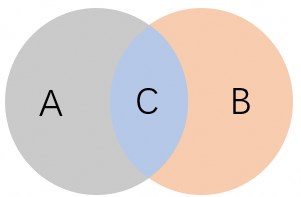
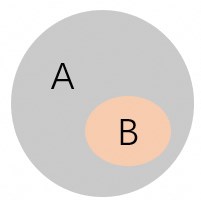
Solution: The final permissions of an STS token are the intersection of the permissions from the RAM role set in Step 4 and those specified by the Policy parameter in Step 5. Use the following examples to check the intersection of permissions set in these two steps.
-
Example 1
In the following figure, A represents the permissions of the RAM role, B represents the permissions set by the policy parameter, and C represents the final permissions of the temporary credentials.
-
Example 2
In the following figure, A represents the RAM role permissions, and B represents the permissions set by the policy parameter. The permissions set by the policy parameter are a subset of the RAM role permissions. Therefore, B represents the final permissions of the temporary credentials.
-
Access denied by bucket policy
-
Cause: The bucket policy denies access.
-
Solution: Configure the bucket policy based on your use case. For more information, see Configure bucket policies to authorize other users to access specified resources.
Access denied by VPC endpoint policy
-
Cause: The policy attached to the client's VPC endpoint denies access to unauthorized buckets.
-
Solution: Check the policy configured for the VPC endpoint.
AccessDenied
-
Cause: You do not have the required access permissions.
-
Solution:
-
Ensure that the correct AccessKey ID and AccessKey Secret are used. For more information, see Create an access key pair.
-
Ensure that the RAM user has the necessary permissions to perform operations on the bucket or object.
-
Anonymous access forbidden
-
Cause: Anonymous users do not have the required permissions to perform the operation.
-
Solution: Use a bucket policy to grant anonymous users the permissions to access specified resources in the target bucket. For more information, see Configure bucket policies to authorize other users to access specified resources.
Anonymous access to bucket denied
-
Cause: Anonymous users do not have permissions to access this bucket.
-
Solution: Use a bucket policy to grant anonymous users the permissions to access the target bucket. For more information, see Configure bucket policies to authorize other users to access specified resources.
Anonymous access to object denied
-
Cause: Anonymous users do not have permissions to access this object.
-
Solution: Use a bucket policy to grant anonymous users the permissions to access specified resources in the target bucket. For more information, see Configure bucket policies to authorize other users to access specified resources.
Hierarchical namespace is disabled
-
Cause: The hierarchical namespace feature is disabled for the bucket.
-
Solution: Enable the hierarchical namespace feature when you create a bucket. Then, you can rename directories or files. For more information about the regions that support the hierarchical namespace feature and its use cases, see Enable the hierarchical namespace feature.
Invalid according to Policy: Policy Condition failed: " + RelatedUnit; //XXX
-
Cause: The conditions specified in the policy form field are invalid.
-
Solution: Ensure that you specify valid conditions in the policy form field. For more information about the supported conditions and matching methods in the policy form field, see Appendix: Post Policy.
Invalid according to Policy: Policy Condition failed: ["eq", "$Content-Type", "image/png"]
-
Cause: The type of the uploaded file does not match the specified Content-Type.
-
Solution: The Content-Type in a policy is used to limit the type of file that you can upload by using a form. If Content-Type is limited to image/png, you can upload only files of the image/png type. To upload files of other types, add the corresponding Content-Type value to the policy. For a list of common Content-Type values, see How do I set Content-Type (MIME)?.
Policy expired
-
Cause: The policy form field in the PostObject request is invalid.
-
Solution: The
policyform field in a Post request is used to verify the validity of the request. A policy is a JSON text that is encoded in UTF-8 and Base64. The policy declares the conditions that the Post request must meet. The following code shows the format of a Post policy:{ "expiration": "2014-12-01T12:00:00.000Z", "conditions": [ {"bucket": "johnsmith" }, ["starts-with", "$key", "user/eric/"] ] }For more information about the conditions supported in a policy, see Appendix: Post Policy.
Invalid date (should be seconds since epoch)
-
Cause: The timestamp of the request is invalid.
-
Solution: The value of the
Expiresparameter must be a Unix time, which is the number of seconds that have elapsed since 00:00:00 UTC on January 1, 1970. This value specifies the expiration time of the URL.
Query string authentication requires the Signature, Expires and OSSAccessKeyId parameters
-
Cause: The signed URL is missing required parameters.
-
Solution: A signed URL must contain at least the Signature, Expires, and OSSAccessKeyId parameters. The following is an example of a signed URL:
http://oss-example.oss-cn-hangzhou.aliyuncs.com/oss-api.pdf?OSSAccessKeyId=nz2pc56s936**9l&Expires=1141889120&Signature=vjbyPxybdZaNmGa%2ByT272YEAiv****. For more information about signed URLs, see Include a signature in a URL.
Request has expired
-
Cause: The request has expired.
-
Solution: Set a reasonable value for the Expires parameter based on your use case. For more information about how to set the Expires parameter when you upload a file, see PutObject, PostObject, AppendObject, and InitiateMultipartUpload.
Objects in different data centers
-
Cause: Cross-region file copy is not supported.
-
Solution: Objects can be copied only between buckets in the same region. The buckets can be the same or different. For more information, see CopyObject.
The bucket you are attempting to access must be addressed using the specified endpoint. Please send all future requests to this endpoint
-
Cause: The endpoint used to access the bucket is incorrect.
-
Solution: Ensure that you use the correct endpoint to access the bucket. For example, if a bucket is in the
oss-cn-hangzhouregion, its public endpoint isoss-cn-hangzhou.aliyuncs.com. For more information about endpoints, see Access OSS over IPv6.
This request is forbidden by KMS
-
Cause: You do not have the permissions to use KMS.
-
Solution: Ensure that you have the permissions to use the specified CMK ID. For more information, see Server-side encryption.
You are denied by bucket referer policy
-
Cause: Hotlink protection verification failed.
-
Solution: Configure a Referer whitelist and specify whether to allow empty Referer headers to restrict access to resources in a bucket to only the domains in the whitelist. For more information, see Configure hotlink protection.
You do not have read acl permission on this object
-
Cause: You do not have permissions to read the ACL of the object.
-
Solution: Contact the object owner to grant you the
GetObjectACLpermission.
You do not have read permission on this object
-
Cause: You do not have permissions to read the object.
-
Solution: Contact the object owner to grant you read permissions on the object.
You do not have write acl permission on this object
-
Cause: You do not have permissions to write to the ACL of the object.
-
Solution: Contact the object owner to grant you the
PutObjectACLpermission.
You do not have write permission on this object
-
Cause: You do not have permissions to write to the object.
-
Solution: Contact the object owner to grant you write permissions on the object.
You have no right to access this object
-
Cause: The RAM user does not have permissions to access this object.
-
Solution: Verify that the RAM user has the necessary permissions to perform operations on the object. For more information about how to set different access permissions for different use cases, see Tutorial: Use RAM policies to control access to OSS.
You have no right to access this object because of bucket acl
-
Cause: You do not have permissions to access the object.
-
Solution: Grant the requester the necessary OSS access permissions, such as
PutObject,GetObject, andAppendObject. For more information, see Common examples of RAM policies.
AccessForbidden
This error is returned when a CORS request is not allowed or other access restrictions are in effect.
CORSResponse: This CORS request is not allowed. This is usually because the evaluation of Origin, request method / Access-Control-Request-Method or Access-Control-Request-Headers are not whitelisted by the resource's CORS spec
-
Cause: CORS is unconfigured or misconfigured.
-
Solution: For more information, see Configure cross-origin resource sharing.
AccessKeyIdAndSecurityTokenNotMatch
This error is returned when the provided AccessKey ID and STS token do not match.
The OSS AccessKey ID and STS token you provided do not match
-
Cause: The provided AccessKey ID does not match the STS token.
-
Solution: For more information, see Use an STS token to access OSS.
BucketDisable
This error is returned when the bucket is disabled for security reasons.
BucketDisable
-
Cause: The bucket is disabled for security reasons.
-
Solution: Check whether your account has overdue payments, or contact technical support to perform a security check.
BucketNotBelongTo
This error is returned when a user attempts to access a bucket that does not belong to them.
The bucket you access does not belong to you
-
Cause: You are not the owner of the target bucket.
-
Solution: Only the bucket owner has the required permissions to perform this operation.
CnameDenied
This error is returned when a domain name binding operation is denied.
The cname belongs to another user
-
Cause: The domain name is already bound to another bucket.
-
Solution: Change the domain name, or verify the ownership of the domain name to forcibly bind it. Verifying the ownership of the domain name unbinds it from the other bucket. For more information, see Bind a custom domain name.
ImageDamage
This error is returned when an uploaded or processed image file is damaged and cannot be recognized.
The image file may be damaged
-
Cause: The system cannot recognize or process the image file because it is damaged or is missing information.
-
Solution: Ensure the integrity of the source file. If the file is damaged, upload the local file again.
InvalidAccessKeyId
This error is returned when the provided AccessKey ID is in an incorrect format, does not exist, or is disabled.
The OSS AccessKey ID contains non-acceptable characters, which accepts only alphanumeric characters[0-9a-zA-Z] and several special characters[._=]
-
Cause: The entered AccessKey ID contains unsupported characters.
-
Solution: Re-enter the correct AccessKey ID of the RAM user or Alibaba Cloud account. For more information, see Create an access key pair.
The OSS AccessKey ID you provided does not exist in our records
-
Cause: The STS token has expired.
-
Solution: Use the temporary access key pair (AccessKey ID and AccessKey Secret) to request a new STS token from your app server. For more information, see Obtain an STS token.
The OSS AccessKey ID you provided is disabled
-
Cause: The AccessKey ID is disabled.
-
Solution: Re-enable the access key pair.
InvalidObjectState
This error is returned when an object is in a state that does not support the current operation.
Invalid operation for object state
-
Cause: When you download an Archive object, an invalid object state error occurs in the following scenarios:
-
A RestoreObject request was not submitted, or the last submitted RestoreObject request has timed out.
-
A RestoreObject request was submitted, but the data restoration operation is not complete.
-
-
Solution: For more information, see RestoreObject.
InvalidSecurityToken
This error is returned when the provided STS token is invalid.
The STS token you provided is invalid
-
Cause: The STS token is invalid.
-
Solution: For more information, see Use an STS token to access OSS.
KmsInDebt
This error is returned when access to KMS is denied because the Alibaba Cloud account has an overdue payment.
Current user is indebted
-
Cause: When an Alibaba Cloud account has an overdue payment, access to Key Management Service (KMS) is denied.
-
Solution: Pay any outstanding balance on your Alibaba Cloud account to restore access to KMS.
KmsInDebtOverdue
This error is returned when a payment for KMS is overdue.
Current user is indebted Overdue
-
Cause: A payment for KMS is overdue.
-
Solution: Renew the service in a timely manner to continue using KMS.
KmsUbsmsInvalidBid
This error is returned when the requester has not activated KMS.
Your account partner does not have KMS Service
-
Cause: KMS is not activated for the requester.
-
Solution: Before you use server-side encryption with KMS-managed keys (SSE-KMS) to encrypt OSS data, you must activate KMS. For more information, see Activate KMS.
NonStandardHostForbidden
This error is returned when the host that is used does not conform to the standard OSS domain name format.
Your host is invalid. Please use Open Storage Service standard host
-
Cause: The host format is incorrect.
-
Solution: Use the standard domain name format to access OSS resources. For more information, see Access OSS over IPv6.
PermanentRedirect
This error occurs when the access endpoint is inconsistent with the bucket's regional endpoint.
The bucket you are attempting to access must be addressed using the specified endpoint. Please send all future requests to this endpoint
-
Cause: When you use an SDK to access a bucket in OSS, the endpoint is either not specified or incorrect. For example, this error occurs if you create a bucket in the China (Qingdao) region but use the default endpoint
oss-cn-hangzhou.aliyuncs.comto send a request. -
Solution: Ensure that the request endpoint matches the bucket's endpoint. For example, to access buckets in the China (Qingdao) and China (Hangzhou) regions, we recommend that you create multiple OSS clients and add the
oss-cn-hangzhou.aliyuncs.comandoss-cn-qingdao.aliyuncs.comendpoints to the clients.
RequestTimeTooSkewed
This error is returned when the difference between the request time and the current time on the OSS server is too large.
Significant difference between request time and current time
-
Cause: The request time differs from the current time on the OSS server by more than 15 minutes.
-
Solution: Check the system time of the device that sends the request and adjust it to the correct time based on the time zone.
Adjust the system time of the device that sends the request based on the following standards:
-
OSS uses Greenwich Mean Time (GMT). The system time of your device must be adjusted to GMT or its corresponding time zone. GMT is the time in the zero time zone, also known as Coordinated Universal Time (UTC).
-
To view the time zone on a Windows system, click .
For example, +08:00 in the time zone bar indicates that the system time zone of the device is UTC+8.
-
To view the time zone on a Linux or Unix system, run the
date -Rcommand.In the following figure, +0800 indicates that the system time zone of the device is UTC+8.

-
-
OSS is available in multiple regions, and all regions use GMT for timekeeping. The system time of the device that sends the request must be synchronized with a standard time source.
-
SecondLevelDomainForbidden
This error is returned when you use a second-level domain name to access OSS or the domain name format is incorrect.
Please use virtual hosted style to access
-
Cause: The host format is incorrect.
-
Solution: When you access OSS over the internet, use a URL to represent the OSS resource that you want to access. The structure of an OSS URL is
<Schema>://<Bucket>.<public endpoint>/<Object>.Schemacan be HTTP or HTTPS.Bucketis the name of your bucket.public endpointis the endpoint for public access to the data center where the bucket is located.Objectis the access path of the file uploaded to OSS.For example, if the region is China (Hangzhou), the bucket name is examplebucket, and the object path is
destfolder/example.txt, the public access URL ishttps://examplebucket.oss-cn-hangzhou.aliyuncs.com/destfolder/example.txt.
Access via third-level domain name required
-
Cause: The request domain name for the bucket is not a third-level domain name.
-
Solution: With the exception of the GetService (ListBuckets) API, all network requests to OSS use a third-level domain name that contains information about a specific bucket. The access domain structure is
BucketName.Endpoint, where BucketName is the name of the bucket and Endpoint is the regional domain name for the bucket. For example,https://examplebucket.oss-cn-hangzhou.aliyuncs.com.
SecurityTokenExpired
This error is returned when the provided STS token has expired.
The STS token you provided has expired
-
Cause: The STS token has expired.
-
Solution: Request a new token from STS.
SecurityTokenNotSupported
This error is returned when an STS token is used in a region or for an API operation that does not support STS tokens.
STS token is not supported in this region
-
Cause: The current region does not support the use of STS tokens.
-
Solution: For more information about which regions support the use of STS tokens, see Endpoints.
This API does not support an STS token
-
Cause: This API operation cannot be called with an STS token.
-
Solution: STS tokens are suitable only for temporarily authorizing specific users to access OSS resources. To grant other users access to a bucket, see Access control overview to select an appropriate authorization mechanism.
SignatureDoesNotMatch
This error is returned when the signature provided by the client does not match the signature calculated by the server.
The request signature we calculated does not match the signature you provided
-
Cause: When you use an API or SDK to access OSS, the client must include signature information for the OSS server to authenticate the request. If the server returns this error message, it indicates that the signature provided in the request does not match the signature calculated by the server, and the request is rejected.
-
Solution: Perform the following steps to troubleshoot the issue.
-
Ensure that the AccessKey ID and AccessKey Secret used for signing are correct.
You can use the AccessKey ID and AccessKey Secret to log on to ossbrowser to verify that they are correct. For more information, see Install ossbrowser 1.0.
-
Check whether the signature algorithm is correct.
OSS supports two methods to include a signature in a request. For more information, see Include a signature in the header and Include a signature in a URL. The following section describes the algorithms for these two signature methods:
-
Include a signature in the header
StringToSign = VERB + "\n" + Content-MD5 + "\n" + Content-Type + "\n" + Date + "\n" + CanonicalizedOSSHeaders + CanonicalizedResource Signature = base64(hmac-sha1(AccessKeySecret, StringToSign) -
Include a signature in a URL
StringToSign = VERB + "\n"
              + CONTENT-MD5 + "\n"
              + CONTENT-TYPE + "\n"
              + EXPIRES + "\n"
              + CanonicalizedOSSHeaders
              + CanonicalizedResource
Signature = urlencode(base64(hmac-sha1(AccessKeySecret, StringToSign)))
If your business scenario allows, we recommend that you use an Alibaba Cloud SDK to access OSS. This way, you do not need to manually calculate the signature. For more information, see Use an Alibaba Cloud SDK to initiate a request.
-
-
Compare the
StringToSignfield in the response body with the content of the request to check for differences.The
StringToSignfield represents the string-to-sign, which is the content that you encrypt with the AccessKey Secret in the signature algorithm.The following code provides a request example:
PUT /bucket/abc?acl
Date: Wed, 24 May 2023 02:12:30 GMT
Authorization: OSS qn6q**************:77Dv****************
x-oss-abc: mymeta
The string-to-sign for the preceding request is:
PUT\n\n\nWed, 24 May 2023 02:12:30 GMT\nx-oss-abc:mymeta\n/bucket/abc?acl
-
TransferAccelerationDisabled
This error is returned when transfer acceleration is used in a region where this feature is not supported.
Transfer acceleration is disabled
-
Cause: The current region does not support the transfer acceleration feature.
-
Solution: Contact technical support to resolve this issue.
UserDisable
This error is returned when the user account is disabled or OSS is not activated.
UserDisable
-
Causes:
-
The account has overdue payments or is disabled for security reasons.
-
OSS is not activated.
-
-
Solutions:
-
Check whether the account has overdue payments, or contact technical support to perform a security check.
-
Activate OSS.
-
WORMConfigurationLocked
This error is returned when an attempt is made to delete a retention policy after it is locked.
The WORM configuration is locked
-
Cause: You attempted to delete a locked retention policy.
-
Solution: After a retention policy is locked, you cannot delete the policy or shorten its retention period. You can only extend the retention period. For more information, see Retention policies.