OSS Connector model broadcasting loads model data from OSS on a single node and distributes it to other nodes through a chain topology, reducing back-to-source traffic and speeding up multi-node model deployment.
How it works
When multiple nodes pull model files from OSS simultaneously, the concurrent downloads can saturate the source's egress bandwidth, causing startup delays or failures. This bottleneck is especially severe in regions with lower OSS egress bandwidth.
With model broadcasting, only one or a few nodes load data directly from OSS when multiple inference instances start. The data is then distributed through a chain topology, leveraging node storage and network resources to reduce back-to-source traffic and improve distribution efficiency.
Model files are passed serially from one node to the next; each node receives and forwards data once. A single data stream typically saturates the network bandwidth of most instance types, and the chain topology avoids the bottlenecks of tree-based transport where a node must serve multiple downstream nodes.
OSS Connector preloads model files into a memory buffer using high-concurrency downloads. The inference engine loads the model into GPU memory as needed, and the buffer is released after a delay once inference completes. Model broadcasting extends this by sharing the buffer across nodes through DADI P2P, requiring only a Redis or Tair service for node discovery and metadata management. This adds lightweight buffer-sharing logic while fully utilizing idle node bandwidth during model loading.

Model broadcasting pulls only a single data stream from OSS for each model, reducing source load during batch startups. If source performance remains a bottleneck, combine this feature with OSS Accelerator or the distributed cache version of DADI P2P.
Prerequisites
-
OSS Connector for AI/ML v1.2.0 or later is installed. Improve model deployment efficiency with OSS Connector for AI/ML.
-
A Redis or Tair instance is available for node discovery and metadata management.
Configure the database
Model broadcasting requires a Redis or Tair service for node discovery and metadata management.
Option 1: Purchase and configure Tair (Recommended)
Tair is Alibaba Cloud's fully managed cloud database service, compatible with the Redis protocol.
-
Create a Tair instance (version 6.0 or later, minimum specifications). Quick start overview.
-
Configure a whitelist so that inference nodes can access the Tair instance.
-
Note the
Connection Address,Port Number,Username, andPasswordfor the model broadcasting configuration.
Option 2: Deploy a standalone Redis service
You can also deploy Redis in a Kubernetes cluster.
The following YAML deploys Redis with ACL authentication.
-
Create an ACL configuration file and generate a Kubernetes secret.
# Create ACL content cat > users.acl << EOF user default off -@all user Username on >Password ~* &* +@all EOF # Create a secret kubectl create secret generic redis-acl-secret \ --from-file=users.acl \ --dry-run=client -o yaml | kubectl apply -f -NoteReplace
UsernameandPasswordwith your actual username and password. -
Apply the following YAML to deploy Redis.
# redis-service.yaml apiVersion: v1 kind: Service metadata: name: redis spec: selector: app: model-redis ports: - protocol: TCP port: 6379 targetPort: 6379 --- # redis-deployment.yaml apiVersion: apps/v1 kind: Deployment metadata: name: model-redis-deployment spec: replicas: 1 selector: matchLabels: app: model-redis template: metadata: labels: app: model-redis spec: containers: - name: redis image: mirrors-ssl.aliyuncs.com/redis:8.4.0 ports: - containerPort: 6379 command: ["redis-server"] args: - "--aclfile" - "/etc/redis/users.acl" - "--maxmemory" - "900mb" - "--maxmemory-policy" - "volatile-lru" - "--save" - "" - "--appendonly" - "no" - "--loglevel" - "notice" resources: requests: memory: "1Gi" cpu: "100m" limits: memory: "1Gi" cpu: "200m" volumeMounts: - name: acl-config mountPath: /etc/redis/users.acl subPath: users.acl volumes: - name: acl-config secret: secretName: redis-acl-secret -
Deploy the Redis service.
kubectl apply -f redis-service.yaml
Enable model broadcasting
Add the model broadcasting configuration to the OSS Connector configuration file at /etc/oss-connector/config.json.
{
  ...
  "broadcast": {
    "enableBroadcast": true,
    "tenant": "${P2P_KEY_PREFIX}",
    "db": {
      "host": "${P2P_REDIS_HOST}",
      "port": 6379,
      "username": "${P2P_REDIS_USERNAME}",
      "password": "${P2P_REDIS_PASSWD}"
    }
  },
  "bindPort": 19898
  ...
}
Configuration parameters:
|
Parameter |
Description |
|
broadcast.enableBroadcast |
Enables model broadcasting. Set to |
|
broadcast.tenant |
Tenant name. Nodes with the same tenant share model broadcasting. Use a unique tenant per service. |
|
broadcast.db.host |
Connection address of the Redis or Tair service. |
|
broadcast.db.port |
Port of the Redis or Tair service. Default: 6379. |
|
broadcast.db.username |
Username for the Redis or Tair service. |
|
broadcast.db.password |
Password for the Redis or Tair service. |
|
bindPort |
Port for serving data to other nodes. Default: 19898. |
Model broadcasting supports multi-instance Kubernetes deployments. Deploy a model broadcasting service with multiple instances.
Limit the cache size
During broadcasting, nodes cache model data in memory for other nodes. You can limit this cache size:
-
Method 1: Set an environment variable
export CONNECTOR_MAX_CACHE_ADVISE_GB=100 -
Method 2: Set in the configuration file
Set
prefetch.maxCacheAdviseGBin/etc/oss-connector/config.json:{ ... "prefetch": { "vcpus": 16, "workers": 24, "maxCacheAdviseGB": 100 }, ... }
-
The memory limit is a soft limit.
-
Environment variables take precedence over the configuration file.
Performance report
Performance test results for model broadcasting with the Qwen2.5-72B model (135.437 GB) across regions.
Test in Beijing region
Test environment
|
Item |
Configuration |
|
OSS |
China (Beijing), intranet download bandwidth 250 Gbps |
|
Node configuration |
ecs.g9i.24xlarge, network 32/48 Gbps (peak), 96 vCPUs, 384 GiB |
|
Model |
Qwen2.5-72B, 135.437 GB |
|
Metrics |
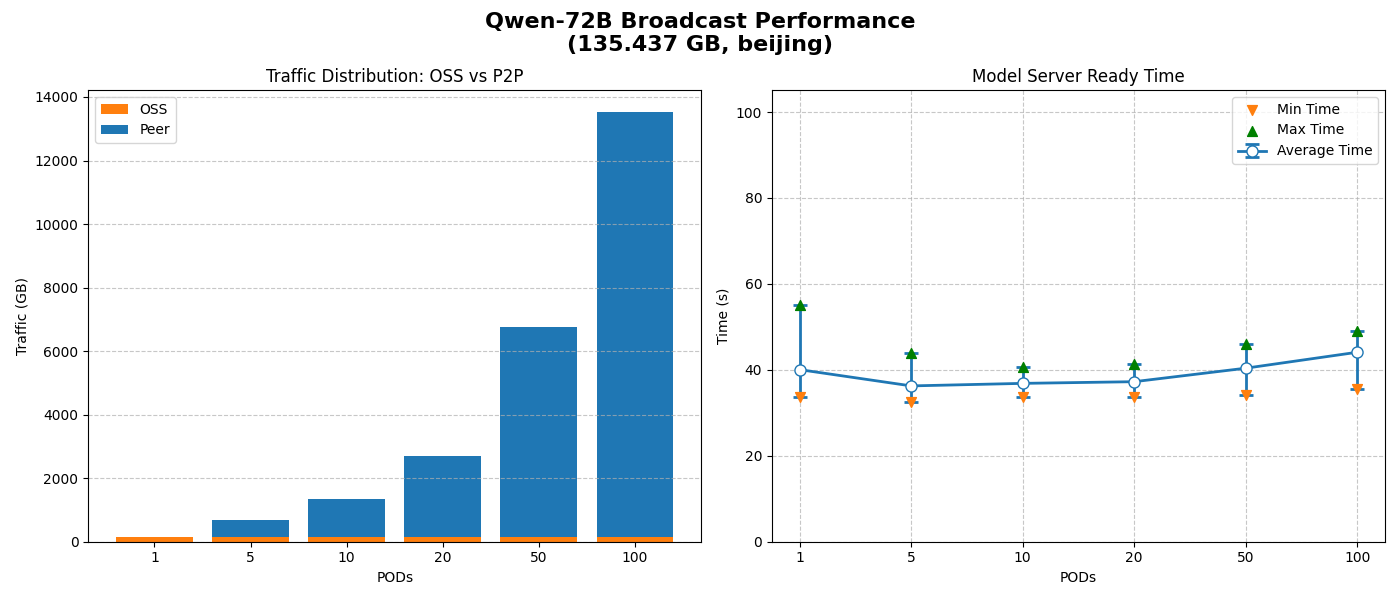
Time from vLLM API server startup to service readiness, along with OSS and P2P traffic. |
Unlimited cache size
-
Only one back-to-source stream is used; all other data transfers via P2P, minimizing OSS bandwidth pressure.
-
Average model-ready time stays near O(1) regardless of node count, demonstrating excellent horizontal scaling.
Limited cache size
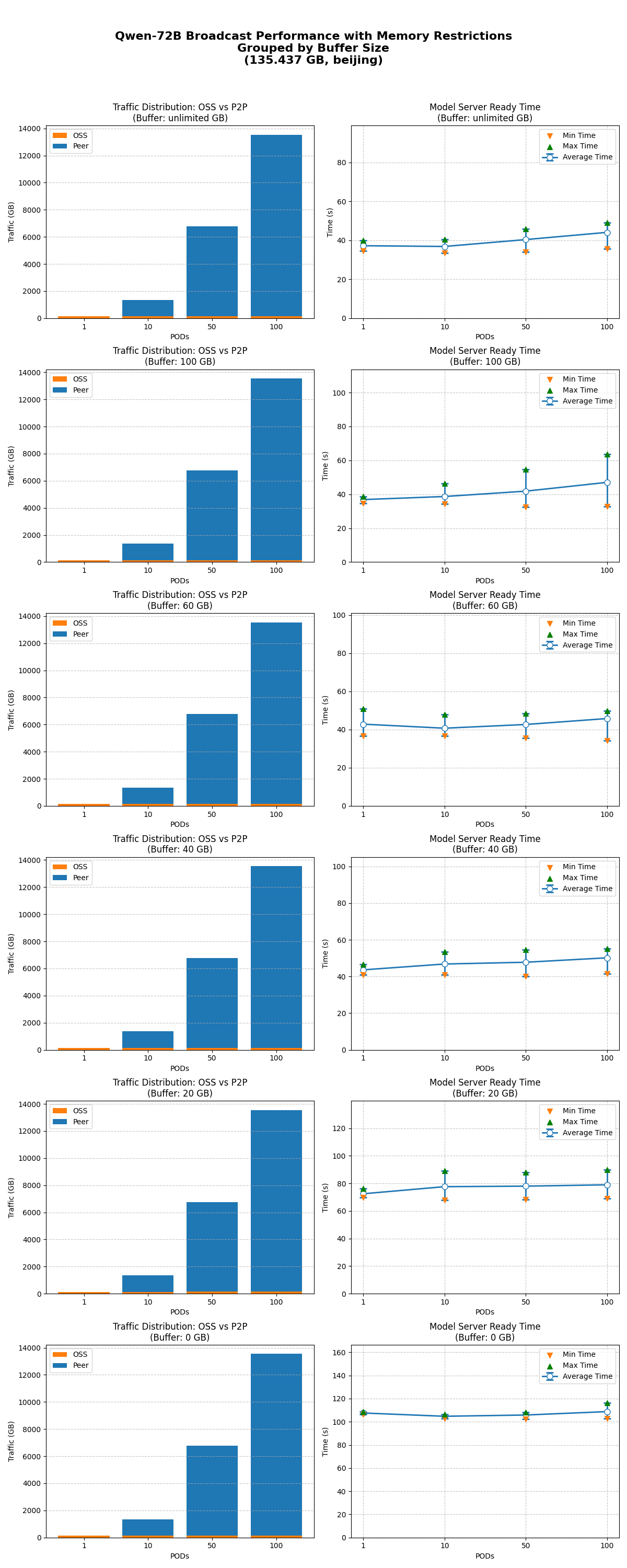
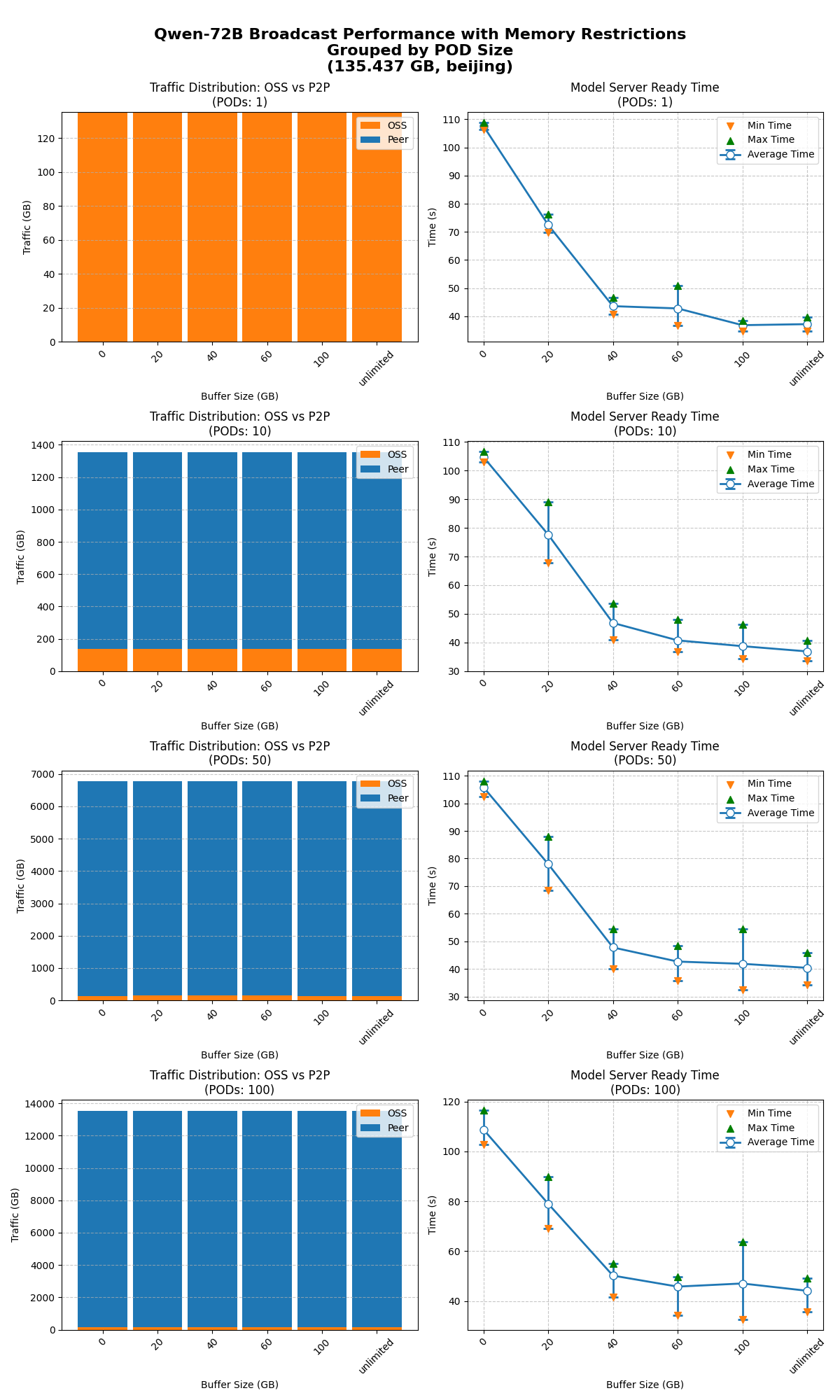
The model-ready time was tested for 1, 10, 50, and 100 nodes starting simultaneously with the cache size unlimited and limited to 100, 60, 40, 20, and 0 GB.
-
Model broadcasting works as expected across all cache size limits.
-
Cache limit impact is consistent across concurrency levels. A cache of 40 GB or more has no significant effect on model-ready time. Performance declines noticeably at 20 GB or less.
Test in Ulanqab region
Test environment
|
Item |
Configuration |
|
OSS |
China (Ulanqab), intranet download bandwidth 10 Gbps |
|
Node configuration |
ecs.g9i.24xlarge, network 32/48 Gbps (peak), 96 vCPUs, 384 GiB |
|
Model |
Qwen2.5-72B, 135.437 GB |
The model-ready time was tested for 1, 10, 50, and 100 nodes starting simultaneously with the cache size unlimited and limited to 60 and 0 GB.
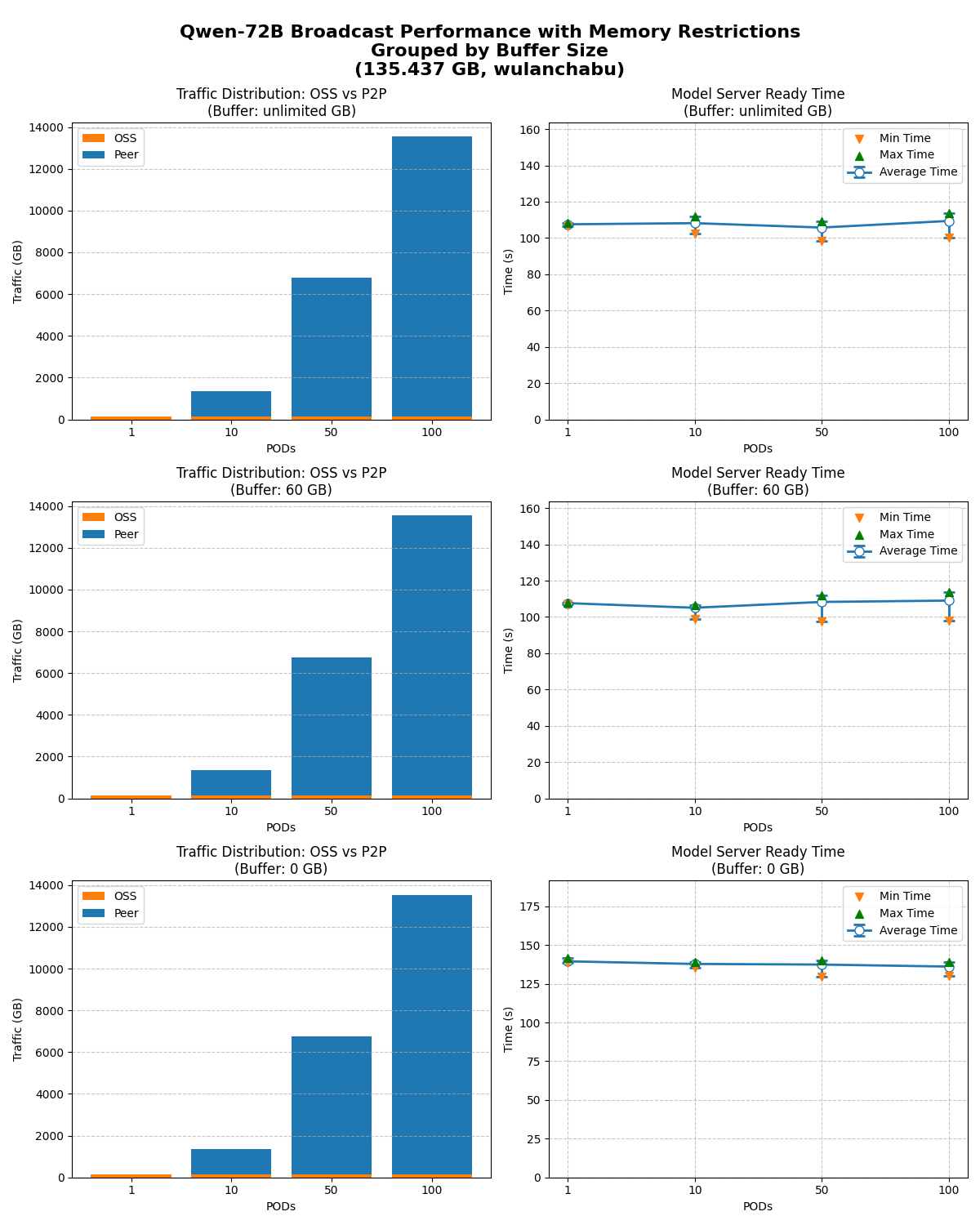
Even with limited OSS download bandwidth, model broadcasting maintains excellent horizontal scaling and minimizes source bandwidth pressure.