OSS SDK for Swift requires access credentials to authenticate your requests. Alibaba Cloud uses these credentials to verify your identity and check your permissions.
Use STS temporary credentials whenever possible. They have a limited validity period, automatically expire, and significantly reduce the risk of credential leakage compared to long-term AccessKey pairs.
Prerequisites
Before you begin, ensure that you have:
An Alibaba Cloud account or a RAM user with the required OSS permissions
OSS SDK for Swift installed in your project
For regions and endpoints supported by OSS, see Regions and endpoints.
Choose a credential provider
All examples follow the same pattern: create a credential provider, pass it to Configuration, then create a Client.
| Credential provider | Best for | Credential type | Validity | Rotation |
|---|---|---|---|---|
| AccessKey of a RAM user | Secure backend environments requiring long-term, stable access | AccessKey | Long-term | Manual rotation |
| STS temporary credential | Untrusted environments, frontend clients, or any scenario requiring limited-scope access | STS token | Temporary | Manual refresh |
| Custom credential provider | When the built-in providers don't fit your requirements | Custom | Custom | Custom |
Use the AccessKey of a RAM user
Use the AccessKey ID and AccessKey secret of a RAM user to authenticate requests. This method suits backend services in secure environments where credentials don't need to rotate frequently.
Never use the AccessKey of your Alibaba Cloud root account — it has unrestricted access to all resources and poses a serious security risk if leaked. Instead, create a RAM user with only the permissions your application needs. The AccessKey ID and AccessKey secret are shown only when you create the pair; save them immediately. If you lose them, you must create a new pair. For instructions, see Create an AccessKey.
Set credentials via environment variables (recommended)
Storing credentials in environment variables keeps them out of your source code.
Linux
Add the variables to ~/.bashrc:
echo "export OSS_ACCESS_KEY_ID='<your-access-key-id>'" >> ~/.bashrc
echo "export OSS_ACCESS_KEY_SECRET='<your-access-key-secret>'" >> ~/.bashrc
source ~/.bashrc
Verify:
echo $OSS_ACCESS_KEY_ID
echo $OSS_ACCESS_KEY_SECRET
macOS
First, check your default shell:
echo $SHELLZsh
echo "export OSS_ACCESS_KEY_ID='<your-access-key-id>'" >> ~/.zshrc
echo "export OSS_ACCESS_KEY_SECRET='<your-access-key-secret>'" >> ~/.zshrc
source ~/.zshrc
Bash
echo "export OSS_ACCESS_KEY_ID='<your-access-key-id>'" >> ~/.bash_profile
echo "export OSS_ACCESS_KEY_SECRET='<your-access-key-secret>'" >> ~/.bash_profile
source ~/.bash_profile
Verify:
echo $OSS_ACCESS_KEY_ID
echo $OSS_ACCESS_KEY_SECRET
Windows
CMD
setx OSS_ACCESS_KEY_ID "<your-access-key-id>"
setx OSS_ACCESS_KEY_SECRET "<your-access-key-secret>"
Verify:
echo %OSS_ACCESS_KEY_ID%
echo %OSS_ACCESS_KEY_SECRET%
PowerShell
[Environment]::SetEnvironmentVariable("OSS_ACCESS_KEY_ID", "<your-access-key-id>", [EnvironmentVariableTarget]::User)
[Environment]::SetEnvironmentVariable("OSS_ACCESS_KEY_SECRET", "<your-access-key-secret>", [EnvironmentVariableTarget]::User)
Verify:
[Environment]::GetEnvironmentVariable("OSS_ACCESS_KEY_ID", [EnvironmentVariableTarget]::User)
[Environment]::GetEnvironmentVariable("OSS_ACCESS_KEY_SECRET", [EnvironmentVariableTarget]::User)
After setting the variables, restart your IDE, terminal, background services, or any other tools that need to pick up the new values.
Use EnvironmentCredentialsProvider to read credentials from environment variables at runtime:
import AlibabaCloudOSS
import Foundation

@main
struct Main {
    static func main() async {
        // Specify the region where your bucket is located, for example, cn-hangzhou.
        let region = "cn-hangzhou"
        // Optional: specify a custom endpoint, for example, https://oss-cn-hangzhou.aliyuncs.com.
        let endpoint: String? = nil

        // Read credentials from OSS_ACCESS_KEY_ID and OSS_ACCESS_KEY_SECRET environment variables.
        let credentialsProvider = EnvironmentCredentialsProvider()

        let config = Configuration.default()
            .withRegion(region)
            .withCredentialsProvider(credentialsProvider)

        if let endpoint = endpoint {
            config.withEndpoint(endpoint)
        }

        let client = Client(config)

        // Use client to upload, download, or manage objects.
    }
}
Set credentials in code (testing only)
Never embed credentials directly in production code. This approach is for local testing only.
Use StaticCredentialsProvider to pass the AccessKey pair directly:
import AlibabaCloudOSS
import Foundation

@main
struct Main {
    static func main() async {
        let region = "cn-hangzhou"
        let endpoint: String? = nil

        // Replace with your RAM user's AccessKey pair.
        let accessKeyId = "yourAccessKeyID"
        let accessKeySecret = "yourAccessKeySecret"

        let credentialsProvider = StaticCredentialsProvider(
            accessKeyId: accessKeyId,
            accessKeySecret: accessKeySecret
        )

        let config = Configuration.default()
            .withRegion(region)
            .withCredentialsProvider(credentialsProvider)

        if let endpoint = endpoint {
            config.withEndpoint(endpoint)
        }

        let client = Client(config)
    }
}
Use an STS temporary credential
Security Token Service (STS) issues short-lived credentials — an AccessKey ID, AccessKey secret, and a security token — that automatically expire after a configurable period. This limits the potential impact if a credential is compromised, making STS the recommended approach for untrusted environments.
To get an STS temporary credential:
Via API: AssumeRole
STS endpoints: Service endpoints
STS credentials expire after the period you set at creation time. Once expired, they cannot be used again — obtain a new set for continued access.
Set credentials via environment variables (recommended)
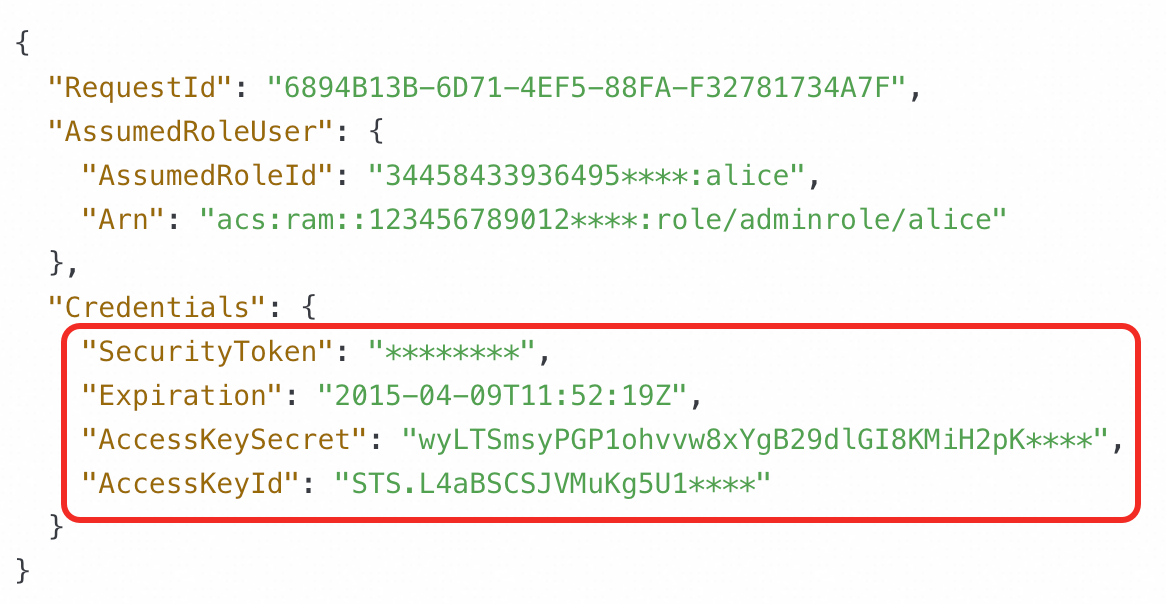
Use the STS-issued credentials, not the AccessKey pair of your RAM user. The AccessKey ID from STS starts with STS., for example, STS.L4aBSCSJVMuKg5U1****.
macOS, Linux, or Unix
export OSS_ACCESS_KEY_ID=<STS_ACCESS_KEY_ID>
export OSS_ACCESS_KEY_SECRET=<STS_ACCESS_KEY_SECRET>
export OSS_SESSION_TOKEN=<STS_SECURITY_TOKEN>
Windows
set OSS_ACCESS_KEY_ID=<STS_ACCESS_KEY_ID>
set OSS_ACCESS_KEY_SECRET=<STS_ACCESS_KEY_SECRET>
set OSS_SESSION_TOKEN=<STS_SECURITY_TOKEN>
Read STS credentials from environment variables using EnvironmentCredentialsProvider:
import AlibabaCloudOSS
import Foundation

@main
struct Main {
    static func main() async {
        let region = "cn-hangzhou"
        let endpoint: String? = nil

        // Reads OSS_ACCESS_KEY_ID, OSS_ACCESS_KEY_SECRET, and OSS_SESSION_TOKEN
        // from environment variables.
        let credentialsProvider = EnvironmentCredentialsProvider()

        let config = Configuration.default()
            .withRegion(region)
            .withCredentialsProvider(credentialsProvider)

        if let endpoint = endpoint {
            config.withEndpoint(endpoint)
        }

        let client = Client(config)
    }
}
Set credentials in code (testing only)
Never embed credentials directly in production code. This approach is for local testing only.
Use StaticCredentialsProvider with the STS-issued AccessKey ID, AccessKey secret, and security token:
import AlibabaCloudOSS
import Foundation

@main
struct Main {
    static func main() async {
        let region = "cn-hangzhou"
        let endpoint: String? = nil

        // Use STS-issued credentials. Do not use the AccessKey ID and AccessKey secret of an Alibaba Cloud account.
        // The AccessKey ID obtained from STS starts with "STS.".
        let accessKeyId = "yourAccessKeyID"
        let accessKeySecret = "yourAccessKeySecret"
        let securityToken = "yourSecurityToken"

        let credentialsProvider = StaticCredentialsProvider(
            accessKeyId: accessKeyId,
            accessKeySecret: accessKeySecret,
            securityToken: securityToken
        )

        let config = Configuration.default()
            .withRegion(region)
            .withCredentialsProvider(credentialsProvider)

        if let endpoint = endpoint {
            config.withEndpoint(endpoint)
        }

        let client = Client(config)
    }
}
Use a custom credential provider
When the built-in providers don't meet your needs — for example, when your credentials come from a secrets manager or a custom token service — implement a custom credential provider.
The SDK offers two interfaces depending on whether you need automatic credential refresh.
ClosureCredentialsProvider
Use ClosureCredentialsProvider when you want full control over how credentials are fetched.
import AlibabaCloudOSS
import Foundation

@main
struct Main {
    static func main() async {
        let region = "cn-hangzhou"
        let endpoint: String? = nil

        // Option 1: fetch a long-term AccessKey credential.
        let credentialsProvider = ClosureCredentialsProvider {
            // Add your credential-fetching logic here.
            let accessKeyId = "yourAccessKeyID"
            let accessKeySecret = "yourAccessKeySecret"
            return Credentials(accessKeyId: accessKeyId, accessKeySecret: accessKeySecret)
        }

        // Option 2: fetch an STS temporary credential (uncomment to use).
        // let credentialsProvider = ClosureCredentialsProvider {
        //     let accessKeyId = "yourAccessKeyID"
        //     let accessKeySecret = "yourAccessKeySecret"
        //     let securityToken = "yourSecurityToken"
        //     return Credentials(
        //         accessKeyId: accessKeyId,
        //         accessKeySecret: accessKeySecret,
        //         securityToken: securityToken
        //     )
        // }

        let config = Configuration.default()
            .withRegion(region)
            .withCredentialsProvider(credentialsProvider)

        if let endpoint = endpoint {
            config.withEndpoint(endpoint)
        }

        let client = Client(config)
    }
}
RefreshCredentialsProvider
Use RefreshCredentialsProvider when your application makes repeated requests and you need credentials to refresh automatically before they expire. This avoids failed requests caused by expired tokens.
The provider calls your closure to fetch a new credential based on two settings:
`refreshInterval`: how often to check for a refresh (default: 300 seconds)
`expiration`: the expiry time of the current credential — if set, the provider triggers a refresh before this time
If you don't set expiration, the credential is never automatically refreshed.
import AlibabaCloudOSS
import Foundation

@main
struct Main {
    static func main() async {
        let region = "cn-hangzhou"
        let endpoint: String? = nil

        // refreshInterval controls how often the provider checks for a credential refresh.
        // Default is 300 s; set to 500 s here.
        let credentialsProvider = RefreshCredentialsProvider(refreshInterval: 500) {
            // Add your credential-fetching logic here.
            let accessKeyId = "yourAccessKeyID"
            let accessKeySecret = "yourAccessKeySecret"
            let securityToken = "yourSecurityToken"

            // Setting expiration tells the provider to refresh the credential
            // before it expires, based on refreshInterval.
            let expiration = Date()  // Replace with the actual expiry time from your token service.

            return Credentials(
                accessKeyId: accessKeyId,
                accessKeySecret: accessKeySecret,
                securityToken: securityToken,
                expiration: expiration
            )
        }

        let config = Configuration.default()
            .withRegion(region)
            .withCredentialsProvider(credentialsProvider)

        if let endpoint = endpoint {
            config.withEndpoint(endpoint)
        }

        let client = Client(config)
    }
}
FAQ
How do I tell STS credentials apart from a RAM user's AccessKey pair?
The AccessKey ID issued by STS always starts with STS. — for example, STS.L4aBSCSJVMuKg5U1****. A RAM user's AccessKey ID does not have this prefix. When initializing a credential provider with STS credentials, make sure you're using the STS-issued AccessKey ID and security token, not the RAM user's long-term AccessKey pair.
Can I view a RAM user's AccessKey secret after creation?
The AccessKey secret is shown only once, when the AccessKey pair is first created. It cannot be retrieved later. If you lose it, create a new AccessKey pair in the RAM console and update your application to use the new pair. To view the AccessKey ID of an existing pair, see View the information about AccessKey pairs of a RAM user.
How do I fix an AccessDenied error when uploading objects?
An AccessDenied error has two common causes: an incorrect AccessKey pair, or insufficient permissions.
First, verify the AccessKey pair is correct. Since the AccessKey secret can't be retrieved after creation, if you're unsure whether the secret is right, create a new AccessKey pair and update your application.
If the AccessKey pair is correct, check that the RAM user has the required upload permissions for the target bucket in the RAM console.
How do I fix a connection error when accessing OSS over a public endpoint?
A connection error usually means the endpoint doesn't match your bucket's region. Check the bucket's region in the OSS console, then confirm you're using the correct public endpoint for that region. For example, a bucket in China (Hangzhou) uses oss-cn-hangzhou.aliyuncs.com. For the full list, see Regions and endpoints. Also confirm your network has internet access.
How do I identify the type of an error?
OSS uses standard error codes to describe what went wrong. See Error codes for a complete reference, or 02-AUTH for authentication-specific errors.