The Jaeger client for C# is no longer maintained. Use the OpenTelemetry SDK for .NET instead. The instructions below apply only to existing Jaeger-based implementations.
Instrument a .NET application with Jaeger to report trace data to Managed Service for OpenTelemetry. After data arrives, the console displays application topology, traces, abnormal and slow transactions, and SQL analysis.
Prerequisites
Before you begin, make sure that you have:
Jaeger 1.0.2
.NET 6.0 or .NET Core 3.1
A Jaeger endpoint from the Managed Service for OpenTelemetry console (see the "Get the Jaeger endpoint" section below)
The dotnet-demo sample project cloned locally
Reporting architecture
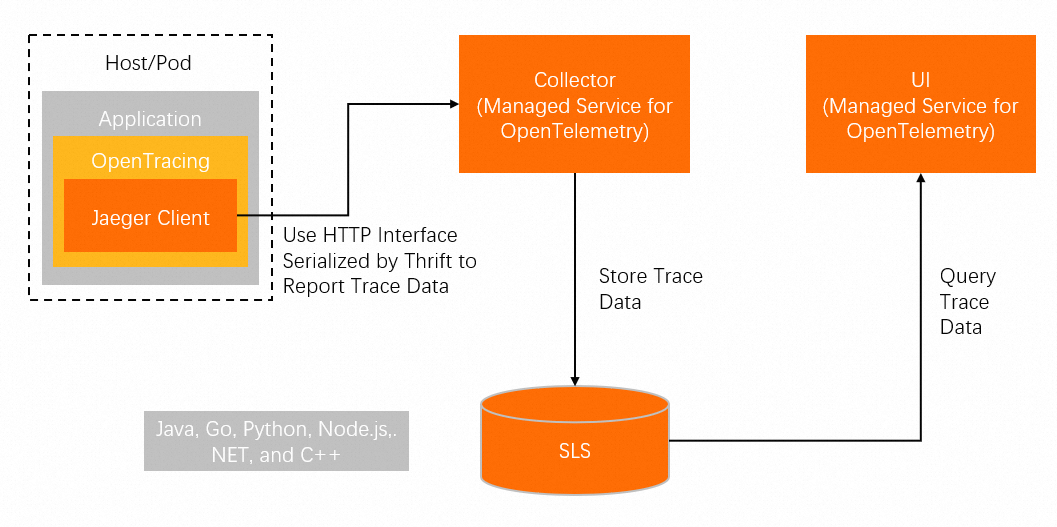
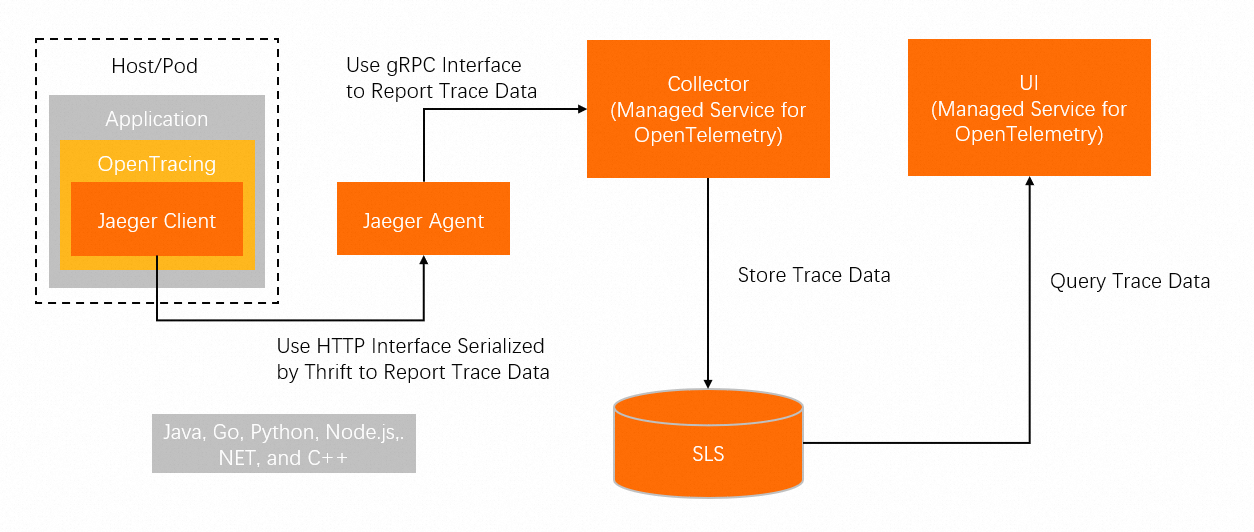
Two methods are available for reporting trace data:
Direct reporting (without Jaeger Agent):
Agent-based reporting (through Jaeger Agent):
Background information
Jaeger is an open source distributed tracing system created by Uber. It is compatible with the OpenTracing API and is a member of the Cloud Native Computing Foundation (CNCF). Jaeger gathers real-time monitoring data from various heterogeneous systems.
The OpenTracing community provides components that support the following .NET frameworks:
Get the Jaeger endpoint
Log on to the Managed Service for OpenTelemetry console.
In the left-side navigation pane, click Cluster Configurations. Then, click the Access point information tab.
In the top navigation bar, select a region. In the Cluster Information section, turn on Show Token.
In the Client section, click Jaeger or Zipkin.
Copy the endpoint from the Related Information column.
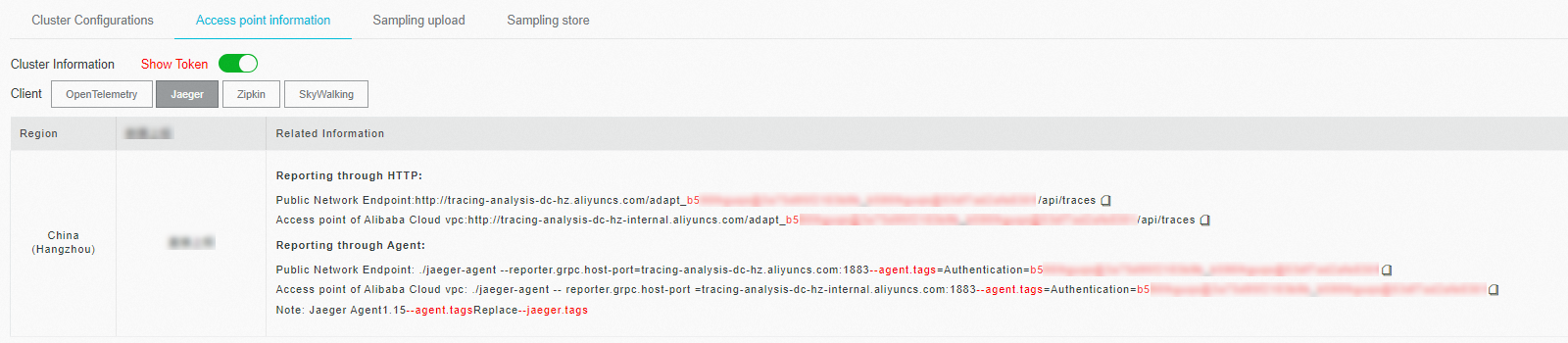
If your application runs in an Alibaba Cloud production environment, use a VPC endpoint. Otherwise, use the public endpoint. For Zipkin, use the v2 endpoint unless you have a specific reason to use v1.
Instrument a .NET 6.0 application
Requirements:
Jaeger 1.0.2
.NET 6.0
Configure the tracer and run the sample
Step 1: Configure the Jaeger tracer.
Open dotnet-demo/net6.0/Shared/JaegerServiceCollectionExtensions.cs and set the Jaeger endpoint and application name:
public static class JaegerServiceCollectionExtensions
{
    // Replace with your Jaeger endpoint. See "Get the Jaeger endpoint" above.
    private static readonly Uri _jaegerUri = new Uri("http://tracing-analysis-dc-sz.aliyuncs.com/adapt_your_token/api/traces");

    public static IServiceCollection AddJaeger(this IServiceCollection services)
    {
        if (services == null)
            throw new ArgumentNullException(nameof(services));

        services.AddSingleton<ITracer>(serviceProvider =>
        {
            // Uses the assembly name as the service name.
            string serviceName = Assembly.GetEntryAssembly().GetName().Name;

            ILoggerFactory loggerFactory = serviceProvider.GetRequiredService<ILoggerFactory>();

            ISampler sampler = new ConstSampler(sample: true);

            IReporter reporter = new RemoteReporter.Builder()
                .WithSender(new HttpSender.Builder(_jaegerUri.ToString()).Build())
                .Build();

            ITracer tracer = new Tracer.Builder(serviceName)
                .WithLoggerFactory(loggerFactory)
                .WithSampler(sampler)
                .WithReporter(reporter)
                .Build();

            GlobalTracer.Register(tracer);

            return tracer;
        });

        // Prevent endless loops when OpenTracing tracks HTTP requests to Jaeger.
        services.Configure<HttpHandlerDiagnosticOptions>(options =>
        {
            options.IgnorePatterns.Add(request => _jaegerUri.IsBaseOf(request.RequestUri));
        });

        return services;
    }
}
Step 2: Run the sample application.
cd dotnet-demo/net6.0/CustomersApi
dotnet run --framework:net6.0
Step 3: Generate trace data.
Open http://localhost:5001/health in a browser.
Step 4: Verify.
Follow the steps in the "Verify trace data reporting" section below.
Instrument a .NET Core 3.1 application
Requirements:
Jaeger 1.0.2
.NET Core 3.1
Three instrumentation methods are available for .NET Core 3.1:
| Method | When to use |
|---|---|
| ASP.NET Core middleware | Web applications built on ASP.NET Core |
| gRPC middleware | Applications that use gRPC for service communication |
| Manual instrumentation | Custom tracing needs or frameworks without existing plug-ins |
Auto-instrument with ASP.NET Core
Step 1: Configure the Jaeger tracer.
Open dotnet-demo/netcoreapp3.1/Shared/JaegerServiceCollectionExtensions.cs and set the Jaeger endpoint. The configuration is identical to the .NET 6.0 version above.
Step 2: Install the ASP.NET Core middleware.
cd dotnet-demo/netcoreapp3.1/Shared
dotnet add package OpenTracing.Contrib.NetCore
Step 3: Install the middleware in the application project and run it.
cd dotnet-demo/netcoreapp3.1/CustomersApi
dotnet add package OpenTracing.Contrib.NetCore
dotnet run --framework:netcoreapp3.1
Step 4: Generate trace data.
Open http://localhost:5001/health in a browser.
Step 5: Verify.
Follow the steps in the "Verify trace data reporting" section below.
Auto-instrument with gRPC
gRPC instrumentation adds tracing to both the server and client sides of gRPC calls.
Step 1: Install the NuGet packages.
dotnet add package OpenTracing.Contrib.grpc
dotnet add package Jaeger
Step 2: Initialize the tracer.
public static Tracer InitTracer(string serviceName, ILoggerFactory loggerFactory)
{
    Configuration.SamplerConfiguration samplerConfiguration = new Configuration.SamplerConfiguration(loggerFactory)
        .WithType(ConstSampler.Type)
        .WithParam(1);
    Configuration.SenderConfiguration senderConfiguration = new Configuration.SenderConfiguration(loggerFactory)
        // Replace with your Jaeger endpoint. See "Get the Jaeger endpoint" above.
        .WithEndpoint("http://tracing-analysis-dc-sz.aliyuncs.com/adapt_your_token/api/traces");
    Configuration.ReporterConfiguration reporterConfiguration = new Configuration.ReporterConfiguration(loggerFactory)
        .WithSender(senderConfiguration);

    return (Tracer)new Configuration(serviceName, loggerFactory)
        .WithSampler(samplerConfiguration)
        .WithReporter(reporterConfiguration)
        .GetTracer();
}
Step 3: Add server-side instrumentation.
Build a ServerTracingInterceptor and bind it to the gRPC service:
ILoggerFactory loggerFactory = new LoggerFactory().AddConsole();
ITracer tracer = TracingHelper.InitTracer("dotnetGrpcServer", loggerFactory);
ServerTracingInterceptor tracingInterceptor = new ServerTracingInterceptor(tracer);
Server server = new Server
{
    Services = { Greeter.BindService(new GreeterImpl()).Intercept(tracingInterceptor) },
    Ports = { new ServerPort("localhost", Port, ServerCredentials.Insecure) }
};
Step 4: Add client-side instrumentation.
Build a ClientTracingInterceptor and bind it to the channel:
ILoggerFactory loggerFactory = new LoggerFactory().AddConsole();
ITracer tracer = TracingHelper.InitTracer("dotnetGrpcClient", loggerFactory);
ClientTracingInterceptor tracingInterceptor = new ClientTracingInterceptor(tracer);
Channel channel = new Channel("127.0.0.1:50051", ChannelCredentials.Insecure);

var client = new Greeter.GreeterClient(channel.Intercept(tracingInterceptor));
Step 5: Run the server and client.
Start the gRPC server in one terminal:
cd dotnet-demo/netcoreapp3.1/GreeterServer
dotnet run --framework:netcoreapp3.1
Start the gRPC client in another terminal:
cd dotnet-demo/netcoreapp3.1/GreeterClient
dotnet run --framework:netcoreapp3.1
If Greeting: Hello you appears, the connection is working. Trace data from dotnetGrpcServer and dotnetGrpcClient is now being reported.
Manually instrument a .NET application
Use manual instrumentation when existing plug-ins do not cover your use case or when you need fine-grained control over which operations are traced.
Step 1: Install the NuGet packages.
dotnet add package Microsoft.Extensions.Logging.Console
dotnet add package Jaeger
Step 2: Build the ITracer object.
The ITracer interface is defined by OpenTracing. Use the Jaeger library to create an implementation that specifies the endpoint and sampling configuration:
public static ITracer InitTracer(string serviceName, ILoggerFactory loggerFactory)
{
    Configuration.SamplerConfiguration samplerConfiguration = new Configuration.SamplerConfiguration(loggerFactory)
        .WithType(ConstSampler.Type)
        .WithParam(1);
    Configuration.SenderConfiguration senderConfiguration = new Configuration.SenderConfiguration(loggerFactory)
        // Replace with your Jaeger endpoint. See "Get the Jaeger endpoint" above.
        .WithEndpoint("http://tracing-analysis-dc-sz.aliyuncs.com/adapt_your_token/api/traces");

    Configuration.ReporterConfiguration reporterConfiguration = new Configuration.ReporterConfiguration(loggerFactory)
        .WithSender(senderConfiguration);

    return (Tracer)new Configuration(serviceName, loggerFactory)
        .WithSampler(samplerConfiguration)
        .WithReporter(reporterConfiguration)
        .GetTracer();
}
Step 3: Register the tracer globally.
GlobalTracer.Register(InitTracer("dotnetManualDemo", loggerFactory));Step 4: Create spans to record operations.
Create a root span for the request:
ITracer tracer = GlobalTracer.Instance;
ISpan span = tracer.BuildSpan("parentSpan").WithTag("mytag", "parentSpan").Start();
tracer.ScopeManager.Activate(span, false);
// ... your business logic here
span.Finish();
To record nested operations within the same request, create child spans with AsChildOf:
ITracer tracer = GlobalTracer.Instance;
ISpan parentSpan = tracer.ActiveSpan;
ISpan childSpan = tracer.BuildSpan("childSpan").AsChildOf(parentSpan).WithTag("mytag", "spanSecond").Start();
tracer.ScopeManager.Activate(childSpan, false);
// ... your business logic here
childSpan.Finish();
Step 5 (optional): Add custom tags.
Attach metadata to spans for filtering and debugging:
tracer.activeSpan().setTag("http.status_code", "200");Step 6: Propagate context across services.
In a distributed system, trace context (TraceId, ParentSpanId, SpanId, Sampled) travels with each remote procedure call (RPC) request. Use Inject on the client and Extract on the server to pass context through HTTP headers.
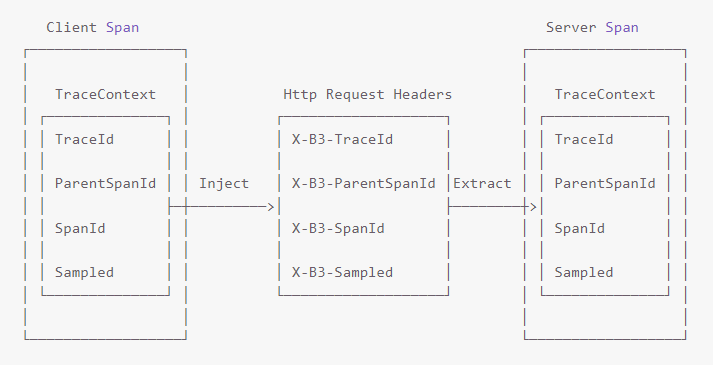
Inject context on the client side:
Tracer.Inject(span.Context, BuiltinFormats.HttpHeaders, new HttpHeadersInjectAdapter(request.Headers));Extract context on the server side:
ISpanContext extractedSpanContext = _tracer.Extract(BuiltinFormats.HttpHeaders, new RequestHeadersExtractAdapter(request.Headers));
ISpan childSpan = _tracer.BuildSpan(operationName).AsChildOf(extractedSpanContext);
Step 7: Run the sample.
cd dotnet-demo/netcoreapp3.1/ManualDemo
dotnet run --framework:netcoreapp3.1
Trace data from dotnetManualDemo appears in the Managed Service for OpenTelemetry console.
Verify trace data reporting
Log on to the ARMS console.
In the left-side navigation pane, choose Application Monitoring > Applications.
Search for your application by name.
If the  icon appears in the Language column, the application is connected to Application Monitoring. A hyphen (-) indicates a connection to Managed Service for OpenTelemetry.
FAQ
No trace data appears after running the demo
Check that the endpoint in senderConfiguration is correct and reachable from your environment:
Configuration.SenderConfiguration senderConfiguration = new Configuration.SenderConfiguration(loggerFactory)
    // Verify this endpoint matches the one from the console.
    .WithEndpoint("http://tracing-analysis-dc-sz.aliyuncs.com/adapt_your_token/api/traces");
If your application runs inside a VPC, make sure you are using the VPC endpoint rather than the public one.
How do I configure the sample rate?
For more information, see the jaeger-client-csharp sampler documentation.
What's next
Use OpenTelemetry to submit the trace data of .NET applications -- Migrate to the actively maintained OpenTelemetry SDK.