This topic describes how to use OpenSearch Vector Search Edition SDKs for Java in asynchronous mode, Java, Python, and Go to query the statistics of a table.
Dependencies
Java
<dependency>
    <groupId>com.aliyun</groupId>
    <artifactId>aliyun-sdk-ha3engine-vector</artifactId>
    <version>1.1.8</version>
</dependency>
Python
# Requires: Python >=3.6
pip install alibabacloud_ha3engine_vector
Go
go get github.com/aliyun/alibabacloud-ha3-go-sdk@v1.1.8-vectorJava in asynchronous mode
<dependency>
  <groupId>com.aliyun</groupId>
  <artifactId>aliyun-sdk-ha3engine-async</artifactId>
  <version>1.1.4</version>
</dependency>
Parameters
You must configure the following parameters in SDKs for Java and Python: endpoint, instance_id, access_user_name, and access_pass_word.
endpoint: the internal or public endpoint.
You can view the endpoints in the Network Information and API Endpoint sections of the Instance Details page.
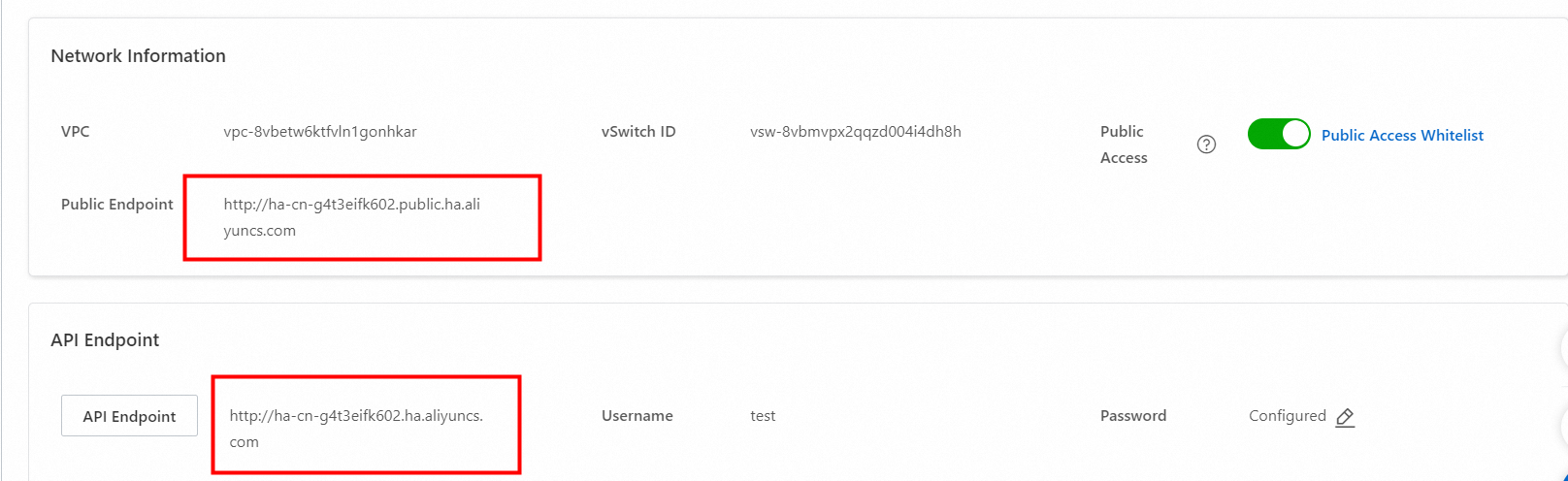
After you turn on Public Access, you can access the OpenSearch Vector Search Edition instance by using a public endpoint on your on-premises machine. A public endpoint contains the word "public". You can configure an IP address whitelist for access to the instance. For more information, see Network Information section in the "View instance details" topic.
If you use an Elastic Compute Service (ECS) instance to access the OpenSearch Vector Search Edition instance, you can specify the same vSwitch as that of the ECS instance to access the OpenSearch Vector Search Edition instance by using the API endpoint.
instance_id: the ID of the OpenSearch Vector Search Edition instance.

access_user_name: the username.
access_pass_word: the password.
You can view the username and password in the API Endpoint section of the Instance Details page. The password is specified when you purchase the instance and can be modified.

SDK example
Java
import java.util.ArrayList;
import java.util.Arrays;
import java.util.Map;

import com.aliyun.ha3engine.vector.Client;
import com.aliyun.ha3engine.vector.models.Config;
import com.aliyun.ha3engine.vector.models.SearchResponse;
import com.aliyun.tea.TeaException;

import org.junit.Before;
import org.junit.Test;

public class Demo {

    /**
     * The engine client of the OpenSearch Vector Search Edition instance.
     */
    private Client client;

    @Before
    public void clientInit() throws Exception {
        /*
          Initialize the engine client.
         */
        Config config = new Config();

        // The name of the instance. You can view the instance name in the upper-left corner of the Instance Details page. Example: ha-cn-i7*****605.
        config.setInstanceId("ha-cn-i7*****605");
        // The username. You can view the username in the API Endpoint section of the Instance Details page.
        config.setAccessUserName("username");
        // The password. You can modify the password in the API Endpoint section of the Instance Details page.
        config.setAccessPassWord("password");
        // The API endpoint of the instance. You can view the API endpoint in the API Endpoint section of the Instance Details page.
        config.setEndpoint("ha-cn-i7*****605.public.ha.aliyuncs.com");

        client = new Client(config);
    }

    @Test
    public void stats() throws Exception {
        try {
            SearchResponse searchResponse = client.stats("test");
            System.out.println("Result:\n" + searchResponse.getBody());
        } catch (TeaException e) {
            System.out.println(e.getCode());
            System.out.println(e.getMessage());
            Map<String, Object> exceptionData = e.getData();
            System.out.println(com.aliyun.teautil.Common.toJSONString(exceptionData));
        }
    }

}
Python
from alibabacloud_ha3engine_vector.client import Client
from alibabacloud_ha3engine_vector.models import Config

config = Config(
    # The API endpoint of the instance. You can view the API endpoint in the API Endpoint section of the Instance Details page.
    endpoint="http://ha-cn-i7*****605.public.ha.aliyuncs.com",
    # The username. You can view the username in the API Endpoint section of the Instance Details page.
    access_user_name="username",
    # The password. You can modify the password in the API Endpoint section of the Instance Details page.
    access_pass_word="password")
client = Client(config)

result = client.stats("gist")
Go
package main

import (
	"fmt"
	"github.com/alibabacloud-go/tea/tea"
	ha3engine "github.com/aliyun/alibabacloud-ha3-go-sdk/client"
)

func main() {

	// Create a Config instance.
	config := &ha3engine.Config{
		// The API endpoint of the instance. You can view the API endpoint in the API Endpoint section of the Instance Details page.
		Endpoint: tea.String("ha-cn-i7*****605.public.ha.aliyuncs.com"),
		// The username. You can view the username in the API Endpoint section of the Instance Details page.
		AccessUserName: tea.String("username"),
		// The password. You can modify the password in the API Endpoint section of the Instance Details page.
		AccessPassWord: tea.String("password"),
	}

	// Initialize a client for sending requests.
	client, _clientErr := ha3engine.NewClient(config)

	// If an error occurs when the system creates the client, _clientErr and an error message are returned.
	if _clientErr != nil {
		fmt.Println(_clientErr)
		return
	}

	stats(client)
}

/**
 * Query data statistics
 */
func stats(client *ha3engine.Client) {
	response, _requestErr := client.Stats(tea.String("api"))

	// If an error occurs when the system sends the request, _requestErr and an error message are returned.
	if _requestErr != nil {
		fmt.Println(_requestErr)
		return
	}

	// Display the response if no error occurs.
	fmt.Println(response)
}
Java in asynchronous mode
import com.aliyun.ha3engine.async.AsyncClient;
import com.aliyun.ha3engine.async.models.SearchResponse;
import com.aliyun.ha3engine.async.models.StatsRequest;
import com.aliyun.sdk.ha3engine.async.core.AsyncConfigInfoProvider;
import com.aliyun.tea.TeaException;
import darabonba.core.client.ClientOverrideConfiguration;
import org.junit.Before;
import org.junit.Test;

import java.util.Map;
import java.util.concurrent.CompletableFuture;
import java.util.concurrent.ExecutionException;

/**
 * @author alibaba
 */
public class SearchDoc {

    /**
     * The engine client of the OpenSearch Vector Search Edition instance.
     */
    private AsyncClient client;

    @Before
    public void clientInit() {
        // The username and password that are used to access the instance. You can view the username and password in the API Endpoint section of the Instance Details page.
        AsyncConfigInfoProvider provider = AsyncConfigInfoProvider.create("username", "password");
        // Initialize the asynchronous client.
        client = AsyncClient.builder()
                .credentialsProvider(provider)
                .overrideConfiguration(
                        ClientOverrideConfiguration.create()
                                .setEndpointOverride("ha-cn-i7*****605.public.ha.aliyuncs.com")
                                .setProtocol("http")
                ).build();
    }

    @Test
    public void searchDoc() {
        try {
            StatsRequest statsRequest = StatsRequest.builder().tableName("table_name").build();
            CompletableFuture<SearchResponse> searchResponseCompletableFuture = client.stats(statsRequest);
            String responseBody = searchResponseCompletableFuture.get().getBody();

            System.out.println("result: " + responseBody);
        } catch (ExecutionException | InterruptedException e) {
            System.out.println(e.getMessage());
        } catch (TeaException e) {
            System.out.println(e.getCode());
            System.out.println(e.getMessage());
            Map<String, Object> exceptionData = e.getData();
            System.out.println(com.aliyun.teautil.Common.toJSONString(exceptionData));
        }
    }
}
Additional information
For information about the response to a request, see Response parameters.
Do not run the
go get github.com/aliyun/alibabacloud-ha3-go-sdkcommand to pull dependencies. The SDK dependencies for OpenSearch Vector Search Edition and OpenSearch Retrieval Engine Edition are classified into the same tag in GitHub. You must specify the corresponding edition based on the instance edition when you pull dependencies.