Background information
Parameter Store is a feature provided by CloudOps Orchestration Service (OOS), which allows you to store data in the cloud. If you want to use the data that is stored in the cloud, you can use Parameter Store to use, update, and maintain the stored data.
In addition, Parameter Store provides encryption parameters. For example, if you want to change the passwords of multiple Elastic Compute Service (ECS) instances at a time, you can use one of the following methods:
Use Alibaba Cloud SDKs to change instance passwords.
Use an OOS template to change instance passwords.
No matter which method you use, it is not secure if your password is entered in plaintext. Also, you cannot view the historical records of password changes.
If you use the second method, OOS provides you with the feature to integrate encryption parameters, which prevents passwords from being entered in plaintext. The following section describes how to change instance passwords by using an OOS template.
When you use this template, the related ECS instances are restarted. Make sure that the restart of ECS instances does not affect your business.
Procedure
Log on to the OOS console.
In the left-side navigation pane, click Parameter Store. On the Parameter Store page, click the Encryption Parameters tab.
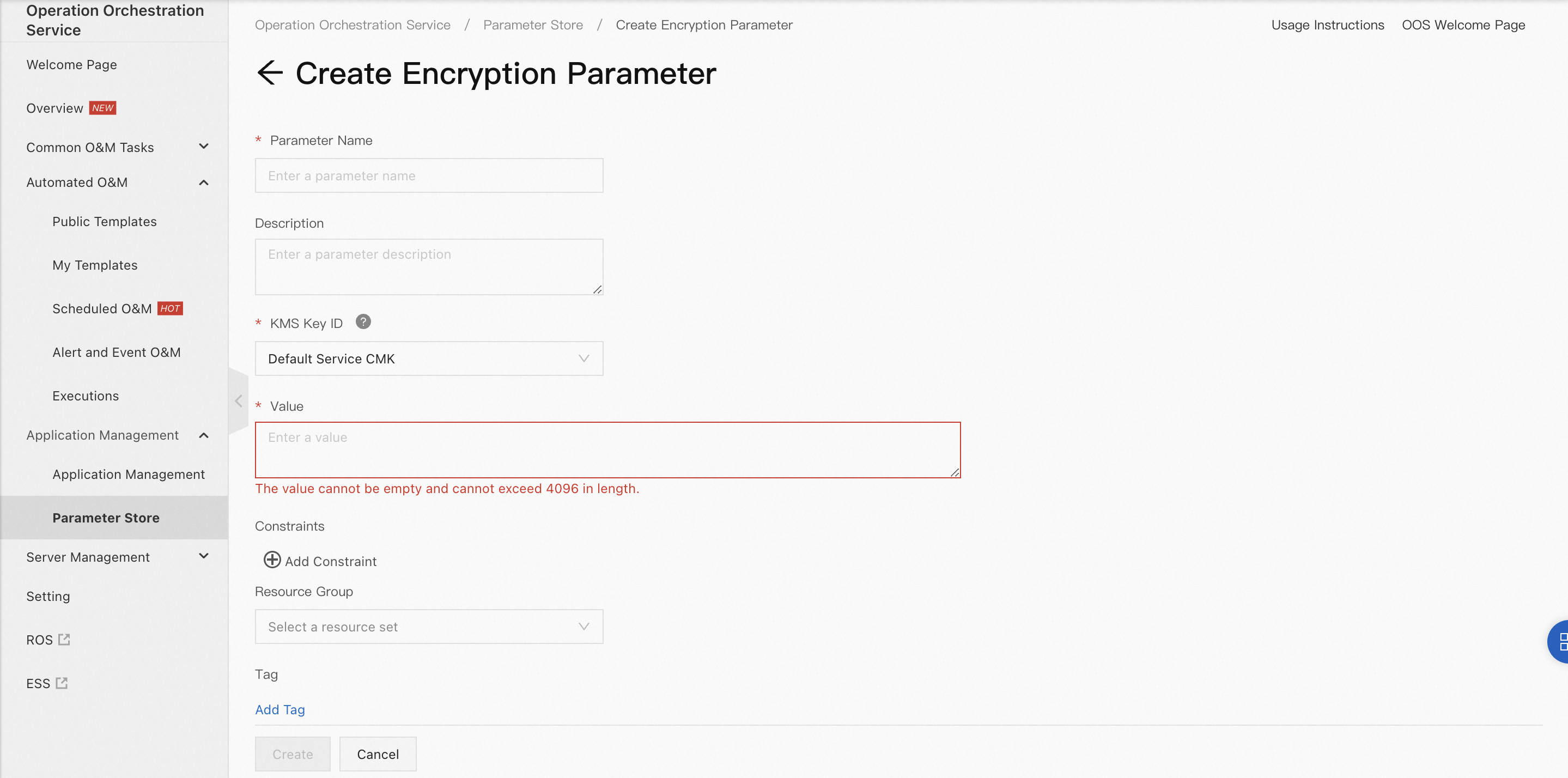
Create encryption parameters.
Before you change instance passwords in batches, you must create encryption parameters that contain the passwords. For more information, see the "Create encryption parameters" section of the Manage encryption parameters topic.
Create a template for changing the instance password.
To use the encryption parameters, you can create a template to change instance passwords. For more information about how to create a template, see Create a template. In this example, a test template is used. For more information, see the Appendix 1: Template for changing instance passwords section of this topic.

Create an execution.
On the Custom Template page, select the template that you create and click Create Execution in the Actions column. On the Create Task page, configure the required parameters in the Basic Information step and click Next Step: Parameter Settings.
In the Parameter Settings step, configure the parameters.
Select the region and ECS instances.
Click the Select Parameter from Parameter Store icon to the right of the field of the password parameter.
In the Select Parameter dialog box, set the Parameter Type parameter to Encryption Parameters, search for and select the encryption parameter that you created, and then click OK.
Click Next Step: OK. Confirm the parameters and click Create. Wait until the state of the execution changes to Success.
Verify whether the encryption parameter that is used in the template takes effect.
Use the password that is specified by the encryption parameter to connect to an ECS instance. If you can connect to the ECS instance, the encryption parameter takes effect. The following figure shows an example.

Appendix 1: Template for changing instance passwords
FormatVersion: OOS-2019-06-01
Description:
  en: Bulky modify the password of an ECS instance(Resetting the password will restart the ECS instance you selected).

Parameters:
  regionId:
    Type: String
    Description:
      en: The id of region.

    AssociationProperty: RegionId
    Default: '{{ ACS::RegionId }}'
  targets:
    Type: Json
    AssociationProperty: Targets
    AssociationPropertyMetadata:
      ResourceType: 'ALIYUN::ECS::Instance'
      RegionId: regionId
  password:
    Description:
      en: The password of the ECS instance. The password must be 8 to 30 characters in length and contain at least three of the following character types: uppercase letters, lowercase letters, digits, and special characters.

    Type: String
  rateControl:
    Description:
      en: Concurrency ratio of task execution.

    Type: Json
    AssociationProperty: RateControl
    Default:
      Mode: Concurrency
      MaxErrors: 0
      Concurrency: 10
  OOSAssumeRole:
    Description:
      en: The RAM role to be assumed by OOS.

    Type: String
    Default: OOSServiceRole
RamRole: '{{ OOSAssumeRole }}'
Tasks:
  - Name: getInstance
    Description:
      en: Views the ECS instances.

    Action: 'ACS::SelectTargets'
    Properties:
      ResourceType: 'ALIYUN::ECS::Instance'
      RegionId: '{{ regionId }}'
      Filters:
        - '{{ targets }}'
    Outputs:
      instanceIds:
        Type: List
        ValueSelector: 'Instances.Instance[].InstanceId'
  - Name: resetPassword
    Action: 'ACS::ECS::ResetPassword'
    Description:
      en: Modify the password of an ECS instance.

    Properties:
      regionId: '{{ regionId }}'
      instanceId: '{{ ACS::TaskLoopItem }}'
      password: '{{ password }}'
    Loop:
      RateControl: '{{ rateControl }}'
      Items: '{{ getInstance.instanceIds }}'
    Outputs:
      instanceId:
        Type: String
        ValueSelector: instanceId