When multiple jobs share execution dependencies, managing their scheduling individually becomes error-prone. SchedulerX workflows let you define job dependencies and run them as a single unit, with one scheduling cycle controlling all jobs. Triggers include cron expressions and API operations.
Workflows support cross-application orchestration -- a single workflow can include jobs from different applications.
Before you begin
A workflow requires at least two jobs with defined dependencies. To schedule a single job, use the Task Management page instead.
Jobs in a workflow cannot be scheduled independently. All jobs follow the workflow's scheduling cycle.
How data flows between jobs
When jobs run inside a workflow, upstream jobs can pass string results to downstream jobs through a built-in data transfer mechanism. Only Java jobs support this feature. For distributed Java jobs, use MapReduce models to transfer data.
The data flow works through two APIs:
Upstream job                          Downstream job
┌─────────────────────┐               ┌──────────────────────────────┐
│ return new           │               │ List<JobInstanceData> data   │
│   ProcessResult(     │  ──string──►  │   = context.getUpstreamData()│
│     true, "payload") │               │                              │
└─────────────────────┘               └──────────────────────────────┘
Return a result -- Each job returns a
ProcessResultcontaining a status flag and a string payload. The downstream job receives this payload automatically.Read upstream data -- A downstream job calls
context.getUpstreamData()to retrieve results from all parent nodes.
Each entry in the upstream data list is a JobInstanceData object:
| Property | Type | Description |
|---|---|---|
JobName | String | Name of the upstream job that produced the data |
Data | String | The string payload returned by that job |
Data transfer constraints
| Constraint | Detail |
|---|---|
| Supported job types | Java jobs only |
| Distributed Java jobs | Must use MapReduce models |
| Maximum payload size | 1,000 bytes per ProcessResult |
| Size measurement | Byte length, not character count. Multi-byte characters (such as Chinese characters) consume multiple bytes and can cause the result to exceed this limit |
| Exceeding the limit | The job may fail |
Pass data between jobs
Return execution results
Add a ProcessResult at the end of your processor to return data to downstream jobs:
/**
 * @param status  true if the job succeeded, false otherwise
 * @param result  the data payload (must be less than 1,000 bytes)
 */
public ProcessResult(boolean status, String result) throws Exception;
Retrieve upstream data
Call getUpstreamData() from JobContext inside your processor. A job can have multiple parent nodes, so the method returns a list:
List<JobInstanceData> upstreamDatas = JobContext.getUpstreamData();Iterate over the list and use getJobName() to identify which parent produced each result:
for (JobInstanceData item : upstreamDatas) {
    String jobName = item.getJobName();
    String data = item.getData();
    // Process data based on the source job
}
Example: Sum results from upstream jobs
This example creates three jobs -- jobA, jobB, and jobC -- where jobC receives and sums the results from jobA and jobB.
Data flow:
jobA (returns "1") ──┐
                     ├──► jobC (sums upstream values → "3")
jobB (returns "2") ──┘
Step 1: Create the job processors
public class TestSimpleJobA extends JavaProcessor {
    @Override
    public ProcessResult process(JobContext context) throws Exception {
        System.out.println("TestSimpleJobA " + DateTime.now().toString("yyyy-MM-dd HH:mm:ss"));
        return new ProcessResult(true, String.valueOf(1));
    }
}

public class TestSimpleJobB extends JavaProcessor {
    @Override
    public ProcessResult process(JobContext context) throws Exception {
        System.out.println("TestSimpleJobB " + DateTime.now().toString("yyyy-MM-dd HH:mm:ss"));
        return new ProcessResult(true, String.valueOf(2));
    }
}

public class TestSimpleJobC extends JavaProcessor {
    @Override
    public ProcessResult process(JobContext context) throws Exception {
        // Retrieve results from all upstream jobs
        List<JobInstanceData> upstreamDatas = context.getUpstreamData();
        int sum = 0;
        for (JobInstanceData jobInstanceData : upstreamDatas) {
            System.out.println("jobName=" + jobInstanceData.getJobName()
                    + ", data=" + jobInstanceData.getData());
            sum += Integer.valueOf(jobInstanceData.getData());
        }
        System.out.println("TestSimpleJobC sum=" + sum);
        return new ProcessResult(true, String.valueOf(sum));
    }
}
Step 2: Configure the workflow
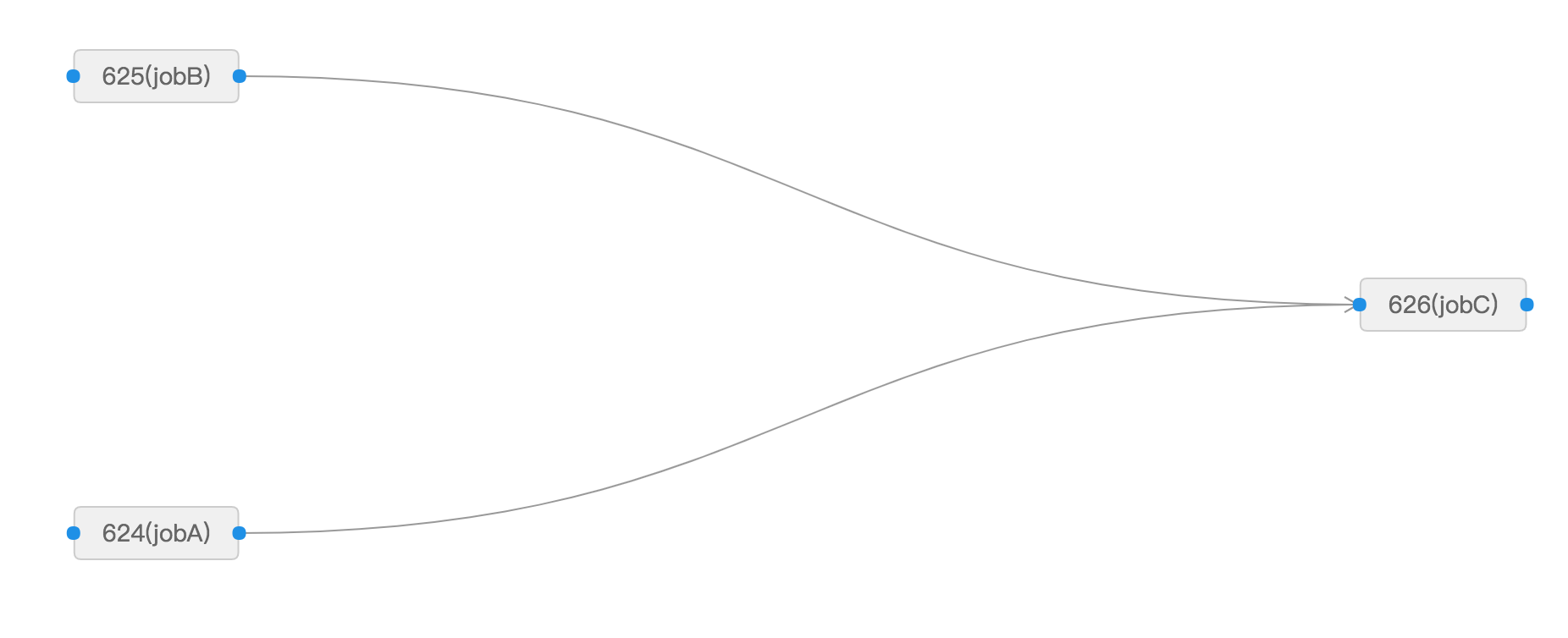
Create three jobs named jobA, jobB, and jobC in the SchedulerX console. Set up the workflow so that jobC depends on both jobA and jobB:
Step 3: Verify the results
Trigger the workflow.
In the left-side navigation pane, click Execution List.
Click the Process instance List tab.
Find the workflow execution record and click Details in the Actions column.
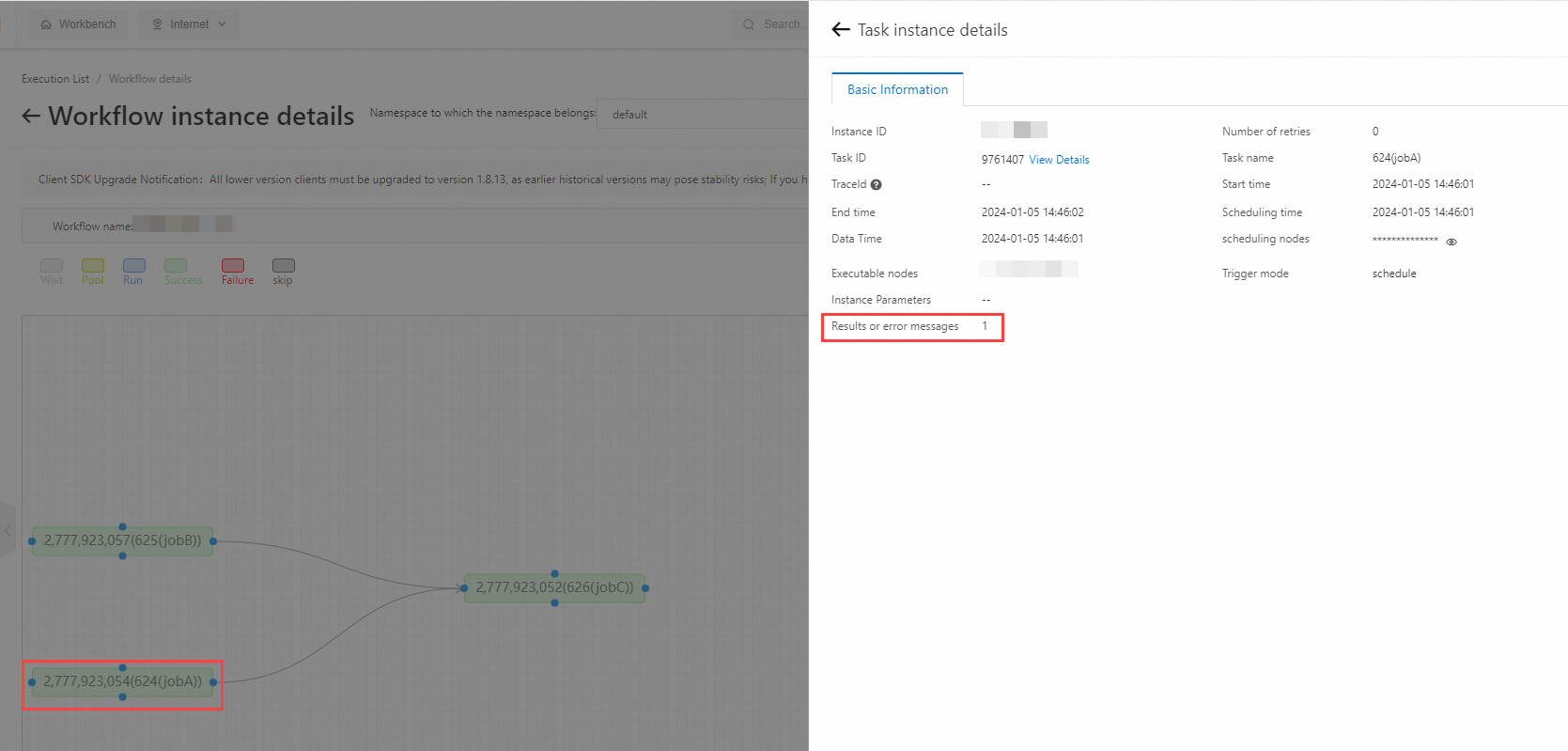
On the Task instance details panel, open the Basic Information tab to view the Results or error messages value.
For jobA, the result is 1:
Repeat for jobB (result: 2) and jobC (result: 3).
The console output of jobC confirms the data transfer:
jobName=jobB, data=2
jobName=jobA, data=1
TestSimpleJobC sum=3
What's next
For workflow creation and management, see Manage workflows.