In a microservices architecture, if a service has specific access control requirements and you do not expect the service to be called by any other services, you can use the authentication mechanism. This way, the service can be successfully called only by the authenticated services that have predefined permissions. This ensures the security and reliability of the system.
Background information
The following example shows how to use service authentication for Spring Cloud applications. Service authentication for Dubbo applications is similar.
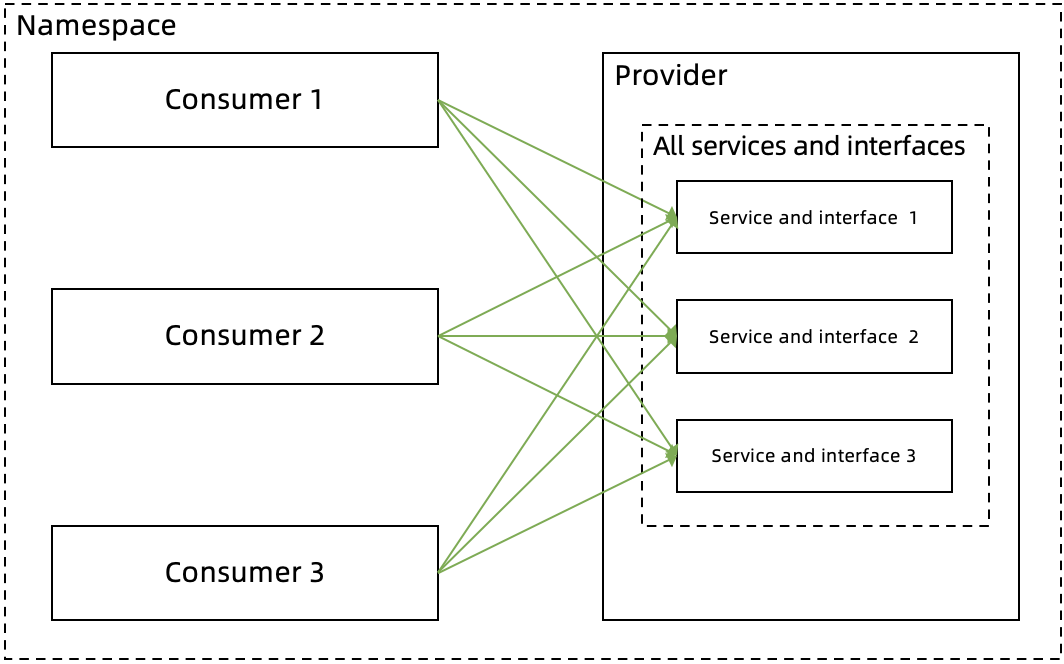
No service authentication rules are configured.
Consumers 1, 2, and 3 and a service provider are deployed in the same namespace. By default, Consumers 1, 2, and 3 can call all the paths (Paths 1, 2, and 3) of the provider.
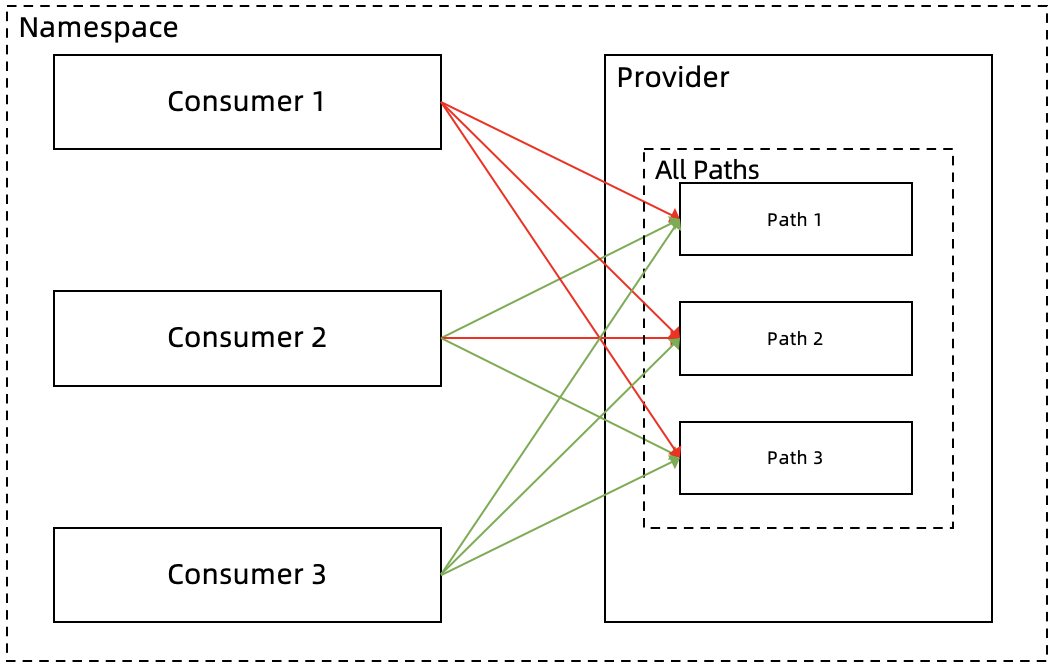
Service authentication rules are configured.
An authentication rule for all paths is configured.
In this example, an authentication rule for all paths of the provider is configured to deny access requests from Consumer 1. This way, only access requests from Consumers 2 and 3 are allowed.
An authentication rule for a specified path is configured.
Path 2 involves key business or data and is not expected to be accessible for Consumer 2. Therefore, in addition to the authentication rule for all paths, an authentication rule for Path 2 is configured to deny call requests from Consumer 2 by using a blacklist. This way, Consumer 2 can call only Path 1 and Path 3 of the provider.
The following figure shows the call relationship after the authentication rules are configured.
Procedure
Log on to the MSE console, and select a region in the top navigation bar.
In the left-side navigation pane, choose Microservices Governance > Security > Service Authentication.
On the Service Authentication page, click Create rules.
In the Create rules panel, configure the parameters and click OK.
Parameter
Description
Rule name
The name of the service authentication rule that you want to create. The name must be 1 to 64 characters in length, and can contain letters, digits, underscores (_), and hyphens (-).
Called party type
Select Application or K8s Namespace based on your business requirements.
Callee (Application)
If you select Application for Type of Callee, you must configure this parameter.
Callee (K8s Namespace)
If you select K8s Namespace for Type of Callee, you must select the cluster in which the called application resides and the namespace to which the called application belongs.
Called framework
The framework used by the called application. Select Spring Cloud or Dubbo based on your business requirements.
Add All Interface Rules
ImportantYou can add only one authentication rule for all interfaces.
Path of Callee
The default value of this parameter is All Paths and cannot be changed.
NoteThis parameter is valid only for Spring Cloud applications.
Callee Interface
The default value is All Paths and cannot be changed.
NoteThis parameter is valid only for Dubbo applications.
Authentication method
The service authentication method. Valid values: Whitelist (Allowed to Call) and Blacklist (Called Prohibited). Select a method based on your business requirements.
Caller (Application)
The caller applications that need to be authenticated. You can click Add Caller to add multiple caller applications.
Add Specified Interface Rule
ImportantThe rules that you configure for specified interfaces overwrite the rule that is configured for all interfaces. Exercise caution when you create rules for specified interfaces.
Path of Callee
The path of the called application.
NoteThis parameter is valid only for Spring Cloud applications.
Callee Interface
The service and interface of the called application.
NoteThis parameter is valid only for Dubbo applications.
Authentication method
The service authentication method. Valid values: Whitelist (Allowed to Call) and Blacklist (Called Prohibited). Select a method based on your business requirements.
Caller (Application)
The applications that need to be authenticated. Click Add Caller to add multiple caller applications.
Use Default Values
Specifies whether to enable the service authentication rule after the rule is created.
If you turn on this switch, the service authentication rule is enabled after the rule is created. By default, this switch is turned on.
If you turn off this switch, the rule is disabled after the rule is created. To enable the rule, find the rule on the Service Authentication page, and click Enable in the Actions column.
Verify the result
After the service authentication rule is created and enabled, check whether the rule takes effect based on your business requirements.
Related operations
After you create a service authentication rule, you can edit the rule. You can also disable or enable the rule based on the status of the rule. If the service authentication rule is no longer required, you can delete the rule.