Microservices Engine (MSE) allows you to grant operational permissions on MSE to RAM users, avoiding the security risks of exposing your Alibaba Cloud account AccessKeys. Create a RAM user and grant permissions so they can use MSE.
Use cases
Your enterprise uses Microservices Engine (MSE) and needs to manage permissions for employees based on their roles:
-
For security reasons, you do not want to expose your Alibaba Cloud account AccessKeys directly to employees. Instead, you want to grant permissions to their respective accounts.
-
Users can access only the resources they are authorized for. All costs are billed to the main enterprise account, so individual accounts do not require separate billing.
-
You can revoke permissions from a user account or delete the account at any time.
-
As a managed product, MSE involves two main roles: developers and operations personnel. Operations personnel are responsible for managing clusters, namespaces, and permissions, while developers are responsible for managing configurations and services.
Usage
The following figure shows the engine management link and its access permissions. After an Alibaba Cloud account grants permissions to a RAM user, the RAM user gains the corresponding permissions on the console and through the OpenAPI.
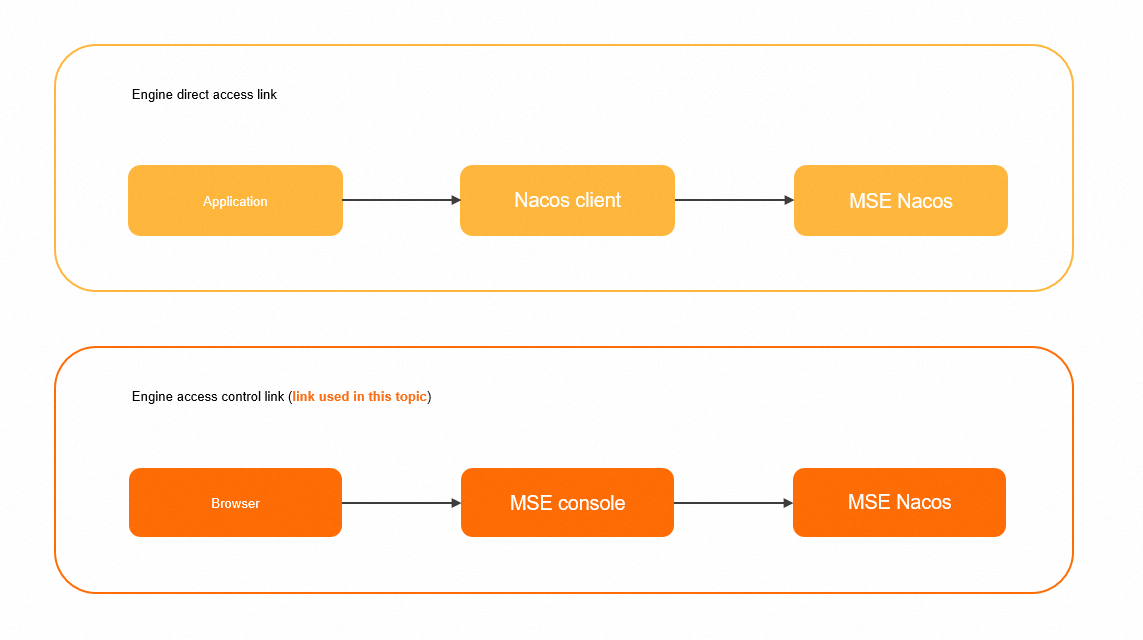
To configure access authentication for the engine direct connection link, which allows a Nacos client to access MSE's Nacos engine as a RAM user, see Authorize SDK access.
Step 1: Create a RAM user
Log on to the RAM console with your Alibaba Cloud account and create a RAM user.
-
Log on to the RAM console with your Alibaba Cloud account (primary account) or a RAM user that has administrative permissions (
AliyunRAMFullAccess). -
In the left-side navigation pane, choose .
-
On the Users page, click Create User.
-
On the Create User page, in the User Account Information section, set the basic information for the user.
-
Logon Name (Required): The name can contain letters, digits, periods (.), hyphens (-), and underscores (_). It can be up to 64 characters long.
-
Display Name (Optional): The name can be up to 128 characters long.
-
Tag (Optional): Click
 , and then enter a tag key and a tag value. Tags help you manage users.
NoteClick Add User to create multiple RAM users at a time.
-
-
In the Access Method section, select Console Password Logon or Programmatic Access.
-
Console Password Logon: Allows you to configure basic security settings for console logon, such as auto-generating or customizing a login password, requiring a password reset at the next logon, and requiring multi-factor authentication (MFA).
NoteIf you set a custom logon password, the password must meet the complexity rules that you configure under . For more information about how to set password complexity rules, see Set a password policy for RAM users.
-
Programmatic Access: An AccessKey pair is automatically generated for the RAM user to access Alibaba Cloud through an API or other development tools.
NoteWe recommend selecting only Console Access for RAM users. This prevents former employees from accessing Alibaba Cloud resources with an AccessKey.
-
-
Click OK.
Step 2: Add permissions to the RAM user
You must grant the required permissions to a RAM user before they can use Alibaba Cloud services.
-
Log on to the RAM console as a RAM administrator.
-
In the left-side navigation pane, choose Identities > Users.
-
On the Users page, find the target RAM user and click Add Permissions in the Actions column.
You can also select multiple RAM users and click Add Permissions below the user list to grant permissions in batches.
-
In the Grant Permission panel, select Policies. In the text box, enter the name of the policy that you want to add, click the policy in the search results, and then click OK.
-
System policies (coarse-grained authorization)
MSE provides two system policies for coarse-grained authorization.
Policy name
Description
AliyunMSEFullAccess
Grants a RAM user full management permissions in the console.
AliyunMSEReadOnlyAccess
Grants a RAM user read-only access to all resources under the Alibaba Cloud account.
NoteGrant AliyunMSEFullAccess to operations personnel who need to create and delete resources, and AliyunMSEReadOnlyAccess to developers who only need to view resources. For more granular control over developer permissions, use custom policies.
-
Custom policies (fine-grained authorization)
Note-
For more fine-grained authorization, create custom policies.
-
For information about the authorization granularity and configurations for Nacos registries, see Fine-grained authorization for registries. For information about the authorization granularity and configurations for Nacos configuration centers, see Fine-grained authorization for configuration centers.
The following table maps MSE actions to RAM permissions to help you create custom policies.
Action
Description
Read-only
CreateCluster
Creates a cluster.
No
DeleteCluster
Deletes a cluster.
No
QueryClusterDetail
Retrieves the details of a cluster.
Yes
RestartCluster
Restarts a cluster.
No
RetryCluster
Retries a cluster operation.
No
UpdateCluster
Updates a cluster.
No
CreateNacosConfig
Creates a Nacos configuration.
No
DeleteNacosConfig
Deletes a Nacos configuration.
No
DeleteNacosConfigs
Deletes Nacos configurations in a batch.
No
GetNacosConfig
Retrieves a Nacos configuration.
Yes
GetNacosHistoryConfig
Retrieves the history of a Nacos configuration.
Yes
UpdateNacosConfig
Updates a Nacos configuration.
No
UpdateNacosInstance
Updates an instance.
No
DeleteNacosService
Deletes a service.
No
CreateNacosService
Creates a service.
No
UpdateNacosService
Updates a service.
No
CreateNacosInstance
Creates an instance.
No
UpdateNacosCluster
Updates a service cluster.
No
The following API operations support only account-level authorization and do not support filtering by instance.
Action
Description
Read-only
ListClusters
Retrieves a list of clusters.
Yes
ListServiceQuotas
Queries quota limits. We recommend granting this permission.
Yes
The following API operations support only instance-level authorization and do not support fine-grained filtering.
Action
Description
Read-only
ListNacosConfigs
Retrieves a list of Nacos configurations.
Yes
ListNacosHistoryConfigs
Retrieves the version history of Nacos configurations.
Yes
ListAnsServices
Retrieves a list of all services.
Yes
ListAnsServiceClusters
Retrieves the clusters within a service.
Yes
ListAnsInstances
Retrieves the instances of a service.
Yes
-
Example 1: Grant a RAM user read and write permissions on the instance
mse-cn-0pp1j8om80a.NoteIn this document,
mse-cn-0pp1j8om80arefers to an InstanceId, not a ClusterId.{ "Statement": [ { "Action": "mse:ListClusters", "Resource": "acs:mse:*:*:*", "Effect": "Allow" }, { "Action": "mse:*", "Resource": "acs:mse:*:*:instance/mse-cn-0pp1j8om80a", "Effect": "Allow" } ], "Version": "1" }Example 2: Grant a RAM user read permissions on all instances.
 {
  "Statement": [
    {
        "Action": [
        "mse:List*",
        "mse:Query*",
        "mse:Get*"
      ],
      "Resource": "acs:mse:*:*:*",
      "Effect": "Allow"
    }
  ],
  "Version": "1"
}
Example 3: Grant a RAM user read and write permissions on configurations for instance
mse-cn-0pp1j8om80a, scoped to namespace3fd98c48-a709-4061-bba1-e341d79d681b.This complex scenario requires the following permissions:
-
Permission to list clusters, which allows the user to find the target cluster.
-
All read permissions on the cluster, which allows the user to access the instance and view all its resources.
-
Permission to create and modify configurations in the specified namespace.
{
    "Version": "1",
    "Statement": [{
            "Action": [
                "mse:ListClusters"
            ],
            "Resource": [
                "acs:mse:*:*:*"
            ],
            "Effect": "Allow"
        },
        {
            "Action": [
                "mse:List*",
                "mse:Query*",
                "mse:Get*"
            ],
            "Resource": [
                "acs:mse:*:*:instance/mse-cn-0pp1j8om8"
            ],
            "Effect": "Allow"
        },
        {
            "Action": [
                "mse:CreateNacosConfig",
                "mse:UpdateNacosConfig"
            ],
            "Resource": [
                "acs:mse:*:*:instance/mse-cn-0pp1j8om8/3fd98c48-a709-4061-bba1-e341d79d681b"
            ],
            "Effect": "Allow"
        }
    ]
}
Example 4: Grant a RAM user read and write permissions on the configuration with a specific DataId in instance
mse-cn-0pp1j8om80a.This complex scenario requires the following permissions:
-
Permission to list clusters, which allows the user to find the target cluster.
-
All read permissions on the cluster, which allows the user to access the instance and view all its resources.
-
Permission to create and modify configurations in the specified namespace.
-
Permission to create and modify configurations in the specified group.
-
Resource ARN format:
acs:mse:*:*:instance/${instanceId}/${namespaceId}/${groupId}/${dataId}
{
    "Version": "1",
    "Statement": [{
            "Action": [
                "mse:ListClusters"
            ],
            "Resource": [
                "acs:mse:*:*:*"
            ],
            "Effect": "Allow"
        },
        {
            "Action": [
                "mse:List*",
                "mse:Query*",
                "mse:Get*"
            ],
            "Resource": [
                "acs:mse:*:*:instance/mse-cn-0pp1j8om8"
            ],
            "Effect": "Allow"
        },
        {
            "Action": [
                "mse:CreateNacosConfig",
                "mse:UpdateNacosConfig"
            ],
            "Resource": [

                "acs:mse:*:*:instance/mse-cn-0pp1j8om8/3fd98c48-a709-4061-bba1-e341d79d681b/DEFAULT_GROUP/prod.yaml"
            ],
            "Effect": "Allow"
        }
    ]
}
Example 5: Grant a RAM user read and write permissions on the configuration of a specific service in instance
mse-cn-0pp1j8om80a.This complex scenario requires the following permissions:
-
Permission to list clusters, which allows the user to find the target cluster.
-
All read permissions on the cluster, which allows the user to access the instance and view all its resources.
-
Permission to create and modify configurations in the specified namespace.
-
Permission to create and modify configurations in the specified group.
-
Resource ARN format:
acs:mse:*:*:instance/${instanceId}/${namespaceId}/${groupId}/${serviceName}{ "Version": "1", "Statement": [{ "Action": [ "mse:ListClusters" ], "Resource": [ "acs:mse:*:*:*" ], "Effect": "Allow" }, { "Action": [ "mse:List*", "mse:Query*", "mse:Get*" ], "Resource": [ "acs:mse:*:*:instance/mse-cn-0pp1j8om8" ], "Effect": "Allow" }, { "Action": [ "mse:CreateNacosConfig", "mse:UpdateNacosConfig" ], "Resource": [ "acs:mse:*:*:instance/mse-cn-0pp1j8om8/3fd98c48-a709-4061-bba1-e341d79d681b/DEFAULT_GROUP/test-service" ], "Effect": "Allow" } ] }
-
-
In the Grant Permission panel, after the permissions are granted, click Close.
Next steps
After creating a RAM user, share their logon credentials (username and password) or AccessKey. The user can then use these credentials to log on to the console or make API calls.
-
Log on to the console
-
Go to the RAM User Logon page.
-
On the RAM User Logon page, enter the RAM username and click Next. Enter the RAM user password and then click Log On.
NoteThe RAM user logon name is in the format
<$username>@<$AccountAlias>or<$username>@<$AccountAlias>.onaliyun.com. <$AccountAlias> is the account alias. If no account alias is set, the ID of the Alibaba Cloud account is used by default. -
From the user's home page, click a product that you are authorized to access.
-
-
Call API operations
Use the RAM user's AccessKey ID and AccessKey Secret in your code to make API calls.