This topic introduces Qwen real-time speech and audiovisual translation, including model capabilities, supported models, and integration. The models use audio and image input to translate in real time and output text or speech in the target language for voice communication and video translation.
Try an online demo with one-click deployment using Function Compute .
Features
- Multi-language support: Translates between 60 languages — 29 with audio and text output, 31 with text-only output — including Chinese, English, French, German, Russian, Japanese, Korean, Spanish, Portuguese, and Arabic.
- Visual enhancement: Analyzes visual cues, such as lip movements, gestures, and on-screen text, to improve translation accuracy, especially in noisy environments or for ambiguous words.
- 2.3-second latency: Delivers simultaneous interpretation with latency as low as 2.3 seconds.
- Real-time speaker diarization: Distinguishes different speakers and their speech when multiple people take turns speaking, so listeners can clearly understand who said what.
- Lossless simultaneous interpretation: Predicts semantic units to resolve cross-language word order differences, achieving quality comparable to offline translation.
- Natural voice: Matches the intonation and emotion of the source audio automatically.
- Hotword configuration: Configurable hotwords improve translation accuracy for specific terms.
- Voice cloning: Clones the speaker's voice for translated output. Supports real-time cloning and pre-cloned voice profiles.
Procedure
1. Configure the connection
Set model to a supported model when connecting. The connection example below uses qwen3.8-livetranslate-flash-realtime.
When connecting over WebSocket, use the following parameters:
NoteSupports access over AOQ, WebRTC, and WebSocket. For client-side integration that prioritizes stable latency, resilience on weak networks, and built-in full-duplex noise suppression and echo cancellation, AOQ is recommended. For a protocol comparison, see Realtime API overview.
| Parameter | Description |
|---|---|
endpoint | China (Beijing) region: wss://{WorkspaceId}.cn-beijing.maas.aliyuncs.com/api-ws/v1/realtime. Replace {WorkspaceId} with your actual workspace ID. Singapore region: wss://{WorkspaceId}.ap-southeast-1.maas.aliyuncs.com/api-ws/v1/realtime. Replace |
query parameter | The model query parameter must be set to the model name. Example: |
message header | Use a Bearer Token for authentication: Authorization: Bearer DASHSCOPE_API_KEY
|
Sample connection code (Python):
Python sample code for WebSocket connection
# pip install websocket-client
import json
import websocket
import os

API_KEY=os.getenv("DASHSCOPE_API_KEY")
API_URL = "wss://{WorkspaceId}.ap-southeast-1.maas.aliyuncs.com/api-ws/v1/realtime?model=qwen3.8-livetranslate-flash-realtime"

headers = [
    "Authorization: Bearer " + API_KEY
]

def on_open(ws):
    print(f"Connected to server: {API_URL}")
def on_message(ws, message):
    data = json.loads(message)
    print("Received event:", json.dumps(data, indent=2))
def on_error(ws, error):
    print("Error:", error)

ws = websocket.WebSocketApp(
    API_URL,
    header=headers,
    on_open=on_open,
    on_message=on_message,
    on_error=on_error
)

ws.run_forever()
2. Configure language, modality, and voice
Configure the session through session.update:
-
Target language: Set
session.translation.language, such asenfor English. Withqwen3.8-livetranslate-flash-realtime, the source language is detected automatically.NoteWith
qwen3.5-livetranslate-flash-realtime, setsession.input_audio_transcription.languageto specify the source language, or omit it for automatic detection. -
Output modalities: With
qwen3.8-livetranslate-flash-realtime, setsession.output_modalitiesto["text"]for text only or["text", "audio"]for text and audio (default).NoteWith
qwen3.5-livetranslate-flash-realtime, usesession.modalities. The supported values and default are the same. -
Source transcription: With
qwen3.8-livetranslate-flash-realtime, source transcription is always enabled and cannot be disabled. Receive increments throughconversation.item.input_audio_transcription.deltaand complete transcripts throughconversation.item.input_audio_transcription.completed.NoteWith
qwen3.5-livetranslate-flash-realtime, source transcription is enabled by default. Setsession.input_audio_transcription.modeltoqwen3-asr-flash-realtimeto enable it ornullto disable it. Receive increments throughconversation.item.input_audio_transcription.textand complete transcripts throughconversation.item.input_audio_transcription.completed. -
Audio and voice: With
qwen3.8-livetranslate-flash-realtime, defaults are 16000 Hz PCM input, 24000 Hz PCM output, and voiceTina. Checksession.audio.output.voicein session.created for the voice. To preserve the speaker’s voice, see Voice cloning.NoteWith
qwen3.5-livetranslate-flash-realtime, configure audio throughsession.sample_rate,session.input_audio_format, andsession.output_audio_format, and the voice throughsession.voice. The default voice is alsoTina. -
Hotwords: Set
session.translation.corpus.phrasesto specify preferred translations. See Configure hotwords.NoteWe recommend using no more than 1,000 hotwords.
3. Input audio and images
Send Base64-encoded audio and image data using the input_audio_buffer.append and input_image_buffer.append events. Audio input is required; image input is optional.
Images can be from a local file or captured in real time from a video stream.
With qwen3.8-livetranslate-flash-realtime, the default is session.audio.input.turn_detection.type = speaker_detection. Send audio continuously; the server detects speech boundaries and generates translation responses without a manual commit for each utterance. See Identify speakers for configuration and speaker identifiers.
qwen3.5-livetranslate-flash-realtime: VAD and Manual modes
How the model determines that an utterance is complete depends on the VAD mode or Manual mode configured via the turn_detection parameter:
- VAD mode (default): The client continuously sends input_audio_buffer.append events. When the server detects speech start/end, it returns
input_audio_buffer.speech_startedandinput_audio_buffer.speech_stoppedevents respectively, automatically commits the audio buffer, and triggers translation. Translation responses are generated synchronously with the streaming audio and typically begin during audio input, without waiting for the speech to end. - Manual mode: Set
session.turn_detectiontonull. After the client finishes sending a complete utterance, it sends an input_audio_buffer.commit event to commit the audio buffer. After the server returns aninput_audio_buffer.committedevent to confirm, it automatically starts generating the translation response; the client does not need to send any other event to trigger the response. To clear uncommitted audio before committing, send an input_audio_buffer.clear event.
4. Receive the model response
With qwen3.8-livetranslate-flash-realtime, handle responses according to the output modalities:
- Text only: Concatenate the
deltavalues fromresponse.text.deltato obtain the translation. - Text and audio: Concatenate
deltafromresponse.audio_transcript.deltafor text, and Base64-decodedeltafromresponse.audio.deltato obtain audio chunks.
response.done indicates the end of a response. See Server events for event fields.
qwen3.5-livetranslate-flash-realtime: Response event differences
-
Output source language recognition results
Set
session.input_audio_transcription.modeltoqwen3-asr-flash-realtime. The server then returns both the translation and the speech recognition result (original text) for the input audio.The server returns these events:
conversation.item.input_audio_transcription.text: Streams the recognition results.conversation.item.input_audio_transcription.completed: Returns the final result after the recognition is complete.conversation.item.input_audio_transcription.failed: Returns error information when recognition fails.
Translation responses are generated synchronously with the streaming audio and typically do not require waiting for speech to end (see the VAD/Manual mode description in the previous section). The response format depends on the output modality.
-
Text-only output
The server streams incremental translated text (including confirmed text and tentative predicted text) through response.text.text events; upon completion, the full translated text is returned in a response.text.done event.
-
Text and audio output
-
Text
The server streams incremental translated text through response.audio_transcript.text events; upon completion, the full translated text is returned in a response.audio_transcript.done event.
-
Audio
The server returns incremental, Base64-encoded audio data in response.audio.delta events.
-
Text
Importantqwen3.5-livetranslate-flash-realtime uses the response.text.text event for incremental text delivery, which differs from the response.text.delta event used by Omni (full-duplex voice conversation) models. These events have different field structures and semantics — do not use them interchangeably.
5. End the session
After sending all audio, send a session.finish event, then wait for the server to return a session.finished event before closing the WebSocket connection.
If you close the WebSocket without sending session.finish, the server's VAD cannot detect the end of the final speech segment. This causes translation results for that segment to be lost entirely, and the connection may hang indefinitely. Always send this event before disconnecting.
Supported models
Recommended models
| Model | Version | Context window | Max input | Max output |
|---|---|---|---|---|
| (tokens) | ||||
| qwen3.8-livetranslate-flash-realtime | Stable | 53248 | 49152 | 4096 |
qwen3.5-livetranslate-flash-realtime
| Stable | 53248 | 49152 | 4096 |
qwen3.5-livetranslate-flash-realtime-2026-05-19 | Snapshot | |||
Getting started
Translate microphone input in real time
-
Use Python 3.10 or later and install
pyaudio:macOS
brew install portaudio && pip install pyaudioDebian/Ubuntu
sudo apt-get install python3-pyaudioCentOS
sudo yum install -y portaudio portaudio-devel && pip install pyaudioWindows
pip install pyaudioInstall the WebSocket dependency:
pip install websocket-client. -
Set these environment variables. The API key and workspace must belong to the region in the connection URL:
DASHSCOPE_API_KEY: An API key for the region and workspace. See Get an API key.DASHSCOPE_WORKSPACE_ID: Your workspace ID. See Workspaces and regions.
-
Save the code below as
livetranslate_client.py, runpython livetranslate_client.py, and speak into the microphone.
The example uses qwen3.8-livetranslate-flash-realtime to translate microphone input into English, print the text, and play the translated speech in real time. Input is mono, 16-bit, 16000 Hz PCM; playback is mono, 16-bit, 24000 Hz PCM. Press Ctrl+C to stop recording. The example sends session.finish, receives and plays the remaining results, and closes the connection after session.finished. Use headphones to keep translated speech from being recorded again.
import base64
import json
import os
import signal
import threading
import time

import pyaudio
import websocket

model = "qwen3.8-livetranslate-flash-realtime"
workspace_id = os.environ["DASHSCOPE_WORKSPACE_ID"]
api_key = os.environ["DASHSCOPE_API_KEY"]
url = (
    f"wss://{workspace_id}.ap-southeast-1.maas.aliyuncs.com"
    f"/api-ws/v1/realtime?model={model}"
)
stop_recording = False
send_errors = []
ws = None
audio = None
input_stream = None
output_stream = None
sender = None
previous_sigint_handler = None


def receive():
    event = json.loads(ws.recv())
    if event.get("type") == "error" or event.get("code"):
        raise RuntimeError(event)
    return event


def stop_input(signum, frame):
    global stop_recording
    stop_recording = True


def send_audio():
    try:
        while not stop_recording:
            chunk = input_stream.read(1600)
            ws.send(json.dumps({
                "type": "input_audio_buffer.append",
                "audio": base64.b64encode(chunk).decode("ascii"),
            }))
    except Exception as error:
        send_errors.append(error)
    finally:
        try:
            ws.send(json.dumps({"type": "session.finish"}))
        except Exception as error:
            send_errors.append(error)
            ws.close()


def receive_translation():
    while True:
        event = receive()
        event_type = event.get("type")
        if event_type in ("response.text.delta", "response.audio_transcript.delta"):
            print(event["delta"], end="", flush=True)
        elif event_type == "response.audio.delta":
            output_stream.write(base64.b64decode(event["delta"]))
        elif event_type == "response.done":
            if event["response"]["status"] != "completed":
                raise RuntimeError(event["response"])
            print()
        elif event_type == "session.finished":
            return


try:
    ws = websocket.create_connection(
        url, header={"Authorization": f"Bearer {api_key}"}, timeout=30
    )
    while receive().get("type") != "session.created":
        pass
    ws.send(json.dumps({
        "type": "session.update",
        "session": {
            "output_modalities": ["text", "audio"],
            "translation": {"language": "en"},
        },
    }))
    while receive().get("type") != "session.updated":
        pass
    audio = pyaudio.PyAudio()
    input_stream = audio.open(
        format=pyaudio.paInt16, channels=1, rate=16000,
        input=True, frames_per_buffer=1600,
    )
    output_stream = audio.open(
        format=pyaudio.paInt16, channels=1, rate=24000, output=True,
    )
    print("Start speaking. Press Ctrl+C to stop recording and wait for the remaining translation.")
    previous_sigint_handler = signal.signal(signal.SIGINT, stop_input)
    sender = threading.Thread(target=send_audio, daemon=True)
    sender.start()
    receive_translation()
    stop_recording = True
    sender.join()
    if send_errors:
        raise send_errors[0]
except Exception:
    if send_errors:
        raise send_errors[0]
    raise
finally:
    stop_recording = True
    if ws is not None:
        ws.close()
    if sender is not None:
        sender.join()
    for stream in (input_stream, output_stream):
        if stream is not None:
            stream.stop_stream()
            stream.close()
    if audio is not None:
        audio.terminate()
    if previous_sigint_handler is not None:
        signal.signal(signal.SIGINT, previous_sigint_handler)
Configure hotwords
Adding hotwords can improve translation accuracy when you need a fixed translation or need to distinguish between homophones. For example:
- Fixed wording: Alibaba Cloud's slogan, “计算,为了无法计算的价值。”, has the agreed English wording “Computing, for the value beyond computation.”. The wording and word order need to be preserved.
- Brand names that sound alike: Qoder sounds like the common word coder. When the speaker means the product Qoder, the translation needs to retain the brand's spelling.
The following table compares the outputs of two tests. Each pair uses the same audio and differs only in its hotword configuration.
| Content of the input audio | Without hotwords | With hotwords |
|---|---|---|
| 计算,为了无法计算的价值。 | Calculate. For values that cannot be calculated. | Computing, for the value beyond computation. |
| Qoder 是面向真实工作的 Agentic 平台。 | Coder is an agentic system designed for real-world work. platform. | Qoder, is an agentic platform designed for real-world work. |
Configuration
Set hotwords through session.translation.corpus.phrases, using key-value pairs to map source-language words or phrases to their preferred translations.
In the first session.update request from Getting started, merge the following translation object into the existing session. Keep the output modality, voice, and other settings for the session.
{
  "event_id": "configure-hotwords",
  "type": "session.update",
  "session": {
    "translation": {
      "language": "en",
      "corpus": {
        "phrases": {
          "计算,为了无法计算的价值。": "Computing, for the value beyond computation.",
          "Qoder": "Qoder"
        }
      }
    }
  }
}
Configure the session before sending audio. Wait for the server's session.updated event before sending input_audio_buffer.append events.
Identify speakers
qwen3.8-livetranslate-flash-realtime can identify different speakers and label them with speaker_id. Associate this ID with the source text and translation to display subtitles by speaker.
Keep the default speaker_detection, or configure it explicitly in session.update. threshold distinguishes silence from valid speech. Sounds below the threshold are filtered out before they reach the model. The threshold is fixed at 0.5.
{"type": "session.update", "session": {"audio": {"input": {"turn_detection": {"type": "speaker_detection", "threshold": 0.5}}}}}
Associate the events as follows:
- Record the
speaker_idand sourceitem_idfrominput_audio_buffer.speech_started. - Read the source text for that
item_idfromconversation.item.input_audio_transcription.delta. - In the translation's
conversation.item.created, associateitem.idwith the source ID in the event's top-levelprevious_item_id. - Use each translation increment's
item_idto find its source text and speaker, then update the subtitle.
Place these variables and functions before def receive_translation(): in the quick start microphone example. Within that function, call handle_speaker_event(event) immediately after event = receive(), and replace the original print(event["delta"], end="", flush=True) with pass so that the snippet handles all subtitle output. The snippet prints the speaker ID, source text, and translation as they change, so you can display subtitles by speaker. Keep the existing audio and session-completion handling.
speaker_by_source = {}
source_by_translation = {}
source_text = {}
translation_text = {}


def show_subtitle(translation_id):
    source_id = source_by_translation.get(translation_id)
    if source_id not in speaker_by_source or translation_id not in translation_text:
        return
    print({
        "speaker_id": speaker_by_source[source_id],
        "source": source_text.get(source_id, ""),
        "translation": translation_text[translation_id],
    })


def handle_speaker_event(event):
    event_type = event.get("type")
    if event_type in ("response.text.delta", "response.audio_transcript.delta"):
        item_id = event["item_id"]
        translation_text[item_id] = translation_text.get(item_id, "") + event["delta"]
        show_subtitle(item_id)
        return
    if event_type == "conversation.item.created":
        item = event["item"]
        if any(part.get("type") == "input_audio" for part in item.get("content", [])):
            return
        source_id = event.get("previous_item_id")
        if item.get("role") == "assistant" and source_id is not None:
            source_by_translation[item["id"]] = source_id
            show_subtitle(item["id"])
        return
    if event_type == "input_audio_buffer.speech_started" and "speaker_id" in event:
        source_id = event["item_id"]
        speaker_by_source[source_id] = event["speaker_id"]
    elif event_type == "conversation.item.input_audio_transcription.delta":
        source_id = event["item_id"]
        source_text[source_id] = source_text.get(source_id, "") + event["delta"]
    elif event_type == "conversation.item.input_audio_transcription.completed":
        source_id = event["item_id"]
        source_text[source_id] = event["transcript"]
    else:
        return
    for translation_id, mapped_source in source_by_translation.items():
        if mapped_source == source_id:
            show_subtitle(translation_id)
See Speaker IDs and Source/translation association for field definitions.
Improve translation with images
Qwen real-time translation models support image input to help disambiguate homonyms and recognize uncommon proper nouns during translation. Send no more than 2 images per second.
Download the following sample images: medical mask.png, masquerade mask.png
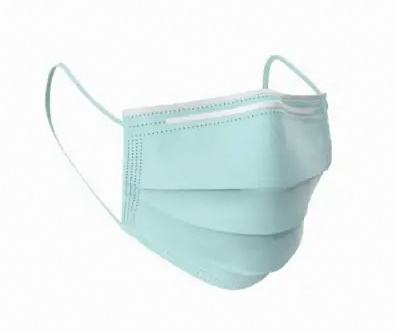

Reuse the quick start's microphone input and connection settings:
- Install
Pillow:pip install Pillow. - Set
translation.languagetozhfor Chinese output, then say “What is mask?” into the microphone when you run the example. - Place the image-loading code below before
def send_audio():in the microphone example, and replace the originalsend_audio()with this version. It uses the existinginput_stream,stop_recording,ws,send_errors, and imports.
import io
from PIL import Image

IMAGE_PATH = "medical-mask.png"
# IMAGE_PATH = "masquerade-mask.png"
with Image.open(IMAGE_PATH) as image:
    buffer = io.BytesIO()
    image.convert("RGB").save(buffer, format="JPEG")
image_bytes = buffer.getvalue()
if len(image_bytes) > 500_000:
    raise ValueError("JPEG > 500 KB")
image_b64 = base64.b64encode(image_bytes).decode("ascii")


def send_audio():
    try:
        last_image_time = None
        while not stop_recording:
            chunk = input_stream.read(1600)
            ws.send(json.dumps({
                "type": "input_audio_buffer.append",
                "audio": base64.b64encode(chunk).decode("ascii"),
            }))
            now = time.monotonic()
            if last_image_time is None or now - last_image_time >= 0.5:
                ws.send(json.dumps({
                    "type": "input_image_buffer.append",
                    "image": image_b64,
                }))
                last_image_time = now
    except Exception as error:
        send_errors.append(error)
    finally:
        try:
            ws.send(json.dumps({"type": "session.finish"}))
        except Exception as error:
            send_errors.append(error)
            ws.close()
Audio and images are interleaved, with at most one image every 0.5 seconds. Try each image and check whether “mask” is translated as the Chinese word for the corresponding object. After you press Ctrl+C to stop recording, the example requests session completion and receives the remaining results.
Voice cloning
The model clones the speaker's voice from input audio and uses it for translated output. Use a pre-cloned voice profile or clone in real time during translation. Useful for conference interpreting, live streaming, and video dubbing.
Real-time cloning: Both qwen3.8-livetranslate-flash-realtime and qwen3.5-livetranslate-flash-realtime clone voices from input audio during translation without an additional cloning fee. Model calls remain billed by token usage.
Create a voice in advance: The Voice Cloning API charges $0.01 per voice; failed creation is not billed. See that billing section for free-quota regions, limits, and validity. Translation using the created voice is billed by model token usage.
Set the following parameters in session.update to enable voice cloning:
-
session.enable_voice_clone: Set totrueto enable voice cloning. -
session.voice_clone_options.frequency: Controls when voice cloning occurs. Accepted values:never: Use a previously created voice without extracting a new voice during this session. Setsession.voiceto your cloned voice ID.once: Extract the voice once from input audio at the start of the session and reuse it for subsequent translations in this session. “Once” describes extraction, not a single audio output. Suitable for a single-speaker presentation; setsession.voicetodefault.always: Extract the voice before each translated-audio response, so output follows speaker changes. Suitable for multiple speakers; setsession.voicetodefault.
-
session.voice: Specifies the output voice. The value depends on thefrequencysetting:- Set to
default: Use withfrequencyset toonceoralways. Clones the speaker's voice from the input audio. A default voice is used until cloning completes. - Set to a custom cloned voice ID (for example,
qwen-translate-vc-xxx-yyy-zzz): Use withfrequencyset tonever. You must prepare the voice in advance using the Voice Cloning API withtarget_modelset to the translation model you use.
- Set to
When
frequencyis set toonceoralways, thevoiceparameter must be set todefault. Any other value causes the server to return an error.
Voice cloning configuration examples
With qwen3.8-livetranslate-flash-realtime, replace the session.update configuration in its Quick start example with the configuration for your scenario.
NoteWith qwen3.5-livetranslate-flash-realtime, replace session.output_modalities with session.modalities in the examples. The other cloning parameters are the same. Specify this model in the connection’s model parameter and handle its response events as described in Receive model responses.
Pre-cloned voice profile (for scenarios that require a fixed voice):
{
    "type": "session.update",
    "session": {
        "output_modalities": ["text","audio"],
        "voice": "qwen-translate-vc-xxx-yyy-zzz",
        "translation": {
            "language": "en"
        },
        "enable_voice_clone": true,
        "voice_clone_options": {
            "frequency": "never"
        }
    }
}
Reuse one voice in the current session (single-speaker presentations):
{
    "type": "session.update",
    "session": {
        "output_modalities": ["text","audio"],
        "voice": "default",
        "translation": {
            "language": "en"
        },
        "enable_voice_clone": true,
        "voice_clone_options": {
            "frequency": "once"
        }
    }
}
Follow the current speaker’s voice (multiple speakers):
{
    "type": "session.update",
    "session": {
        "output_modalities": ["text","audio"],
        "voice": "default",
        "translation": {
            "language": "en"
        },
        "enable_voice_clone": true,
        "voice_clone_options": {
            "frequency": "always"
        }
    }
}
One-click Function Compute deployment
To deploy the application:
-
Open the Function Compute template, enter your API key, and click Create and Deploy Default Environment to test the application.
-
Wait for about a minute. In Environment Details > Environment Context, retrieve the endpoint, change the protocol from http to https (for example, https://qwen-livetranslate-flash-realtime-intl.fcv3.xxx.ap-southeast-1.fc.devsapp.net/), and open the URL in a browser to interact with the model.
ImportantThis endpoint uses a self-signed certificate and is for temporary testing only. Your browser will display a security warning on your first visit. This is expected behavior. Do not use this endpoint in a production environment. To proceed, follow the on-screen instructions (for example, click Advanced → Proceed to (unsafe)).
If you are prompted to configure Resource Access Management permissions, follow the on-screen instructions.
To view the project source code, go to Resource Information > Function Resources .
Both Function Compute and Model Studio provide a free quota for new users, sufficient for basic debugging. After the free quota is used up, pay-as-you-go billing applies.
Interaction flow
With qwen3.8-livetranslate-flash-realtime, the server detects turns and generates responses by default. The following table summarizes the main interaction stages. See Server events for event fields.
Stage | Client action | Server events |
|---|---|---|
Create and configure the session | Connect and send |
|
Send audio |
| Source transcription is streamed through |
Receive translation and audio | Keep receiving server events | Translation is returned through |
End the session |
| Close the connection after receiving |
qwen3.5-livetranslate-flash-realtime: Interaction flow
Translation uses an event-driven WebSocket model. How speech boundaries are determined depends on VAD mode or Manual mode (see 3. Input audio and images). The table below is based on VAD mode (default) and annotates the different server events in Manual mode.
| Lifecycle | Client event | Server event |
|---|---|---|
Session initialization | session.update
| session.created
session.updated
|
User audio input | input_audio_buffer.append
input_image_buffer.append
input_audio_buffer.commit
| VAD mode: input_audio_buffer.speech_started
input_audio_buffer.speech_stopped
Manual mode: input_audio_buffer.committed
|
Server audio output | None | response.created
response.output_item.added
conversation.item.created
response.content_part.added
response.text.text
response.audio_transcript.text
response.audio.delta
response.text.done
response.audio_transcript.done
response.audio.done
response.content_part.done
response.output_item.done
response.done
|
Session termination | session.finish
| session.finished
|
After sending all audio, send a session.finish event and wait for session.finished before closing the WebSocket. If you close the connection without sending session.finish, the server cannot know that audio input has ended, and the recognition and translation results for the last speech segment will be lost.
API
For the connection workflow and examples, see AOQ integration. For supported models and versions, see Model and protocol support.
- Qwen-Livetranslate-Realtime.
- Realtime API overview (WebRTC protocol description)
Billing
Qwen3.8-LiveTranslate-Flash-Realtime and Qwen3.5-LiveTranslate-Flash-Realtime- Audio: 7 tokens per second of input audio; 12.5 tokens per second of output audio.
- Image: Every 32×32 pixels consumes 0.5 tokens. For token prices for each model, see Model pricing and billing.
Real-time cloning: Both qwen3.8-livetranslate-flash-realtime and qwen3.5-livetranslate-flash-realtime clone voices from input audio during translation without an additional cloning fee. Model calls remain billed by token usage.
Create a voice in advance: The Voice Cloning API charges $0.01 per voice; failed creation is not billed. See that billing section for free-quota regions, limits, and validity. Translation using the created voice is billed by model token usage.
Rate limits
For information about model rate limits, see Rate limiting.
Supported languages
Use the following language codes to specify the source and target languages.
Some target languages only support text.
Language code | Language | Output |
|---|---|---|
zh | Chinese | Audio + text |
en | English | Audio + text |
ar | Arabic | Audio + text |
de | German | Audio + text |
fr | French | Audio + text |
es | Spanish | Audio + text |
pt | Portuguese | Audio + text |
id | Indonesian | Audio + text |
it | Italian | Audio + text |
ko | Korean | Audio + text |
ru | Russian | Audio + text |
th | Thai | Audio + text |
vi | Vietnamese | Audio + text |
ja | Japanese | Audio + text |
tr | Turkish | Audio + text |
hi | Hindi | Audio + text |
ms | Malay | Audio + text |
nl | Dutch | Audio + text |
ur | Urdu | Audio + text |
nb | Norwegian Bokmål | Audio + text |
sv | Swedish | Audio + text |
da | Danish | Audio + text |
he | Hebrew | Audio + text |
fi | Finnish | Audio + text |
pl | Polish | Audio + text |
is | Icelandic | Audio + text |
cs | Czech | Audio + text |
fil | Filipino | Audio + text |
fa | Persian | Audio + text |
yue | Cantonese | Text |
el | Greek | Text |
af | Afrikaans | Text |
ast | Asturian | Text |
be | Belarusian | Text |
bg | Bulgarian | Text |
bn | Bengali | Text |
bs | Bosnian | Text |
ca | Catalan | Text |
ceb | Cebuano | Text |
et | Estonian | Text |
gl | Galician | Text |
gu | Gujarati | Text |
hr | Croatian | Text |
hu | Hungarian | Text |
jv | Javanese | Text |
kk | Kazakh | Text |
kn | Kannada | Text |
ky | Kyrgyz | Text |
lv | Latvian | Text |
mk | Macedonian | Text |
ml | Malayalam | Text |
mr | Marathi | Text |
pa | Punjabi | Text |
ro | Romanian | Text |
sk | Slovak | Text |
sl | Slovenian | Text |
sw | Swahili | Text |
tg | Tajik | Text |
az | Azerbaijani | Text |
uk | Ukrainian | Text |
Supported voices
For supported voices and the corresponding voice parameter values, see Voice list.