Qwen Code is a command-line AI agent optimized for Qwen3-Coder. It helps you code from the terminal.
Install Qwen Code
macOS and Linux
In your terminal, run the following command to install Qwen Code (version ≥ 0.11.1).
bash -c "$(curl -fsSL https://qwen-code-assets.oss-cn-hangzhou.aliyuncs.com/installation/install-qwen.sh)" -s --source bailianCheck the installed version:
qwen --versionWindows
Open Command Prompt as administrator
In the taskbar search box, type
CMD. Then select Run as administrator.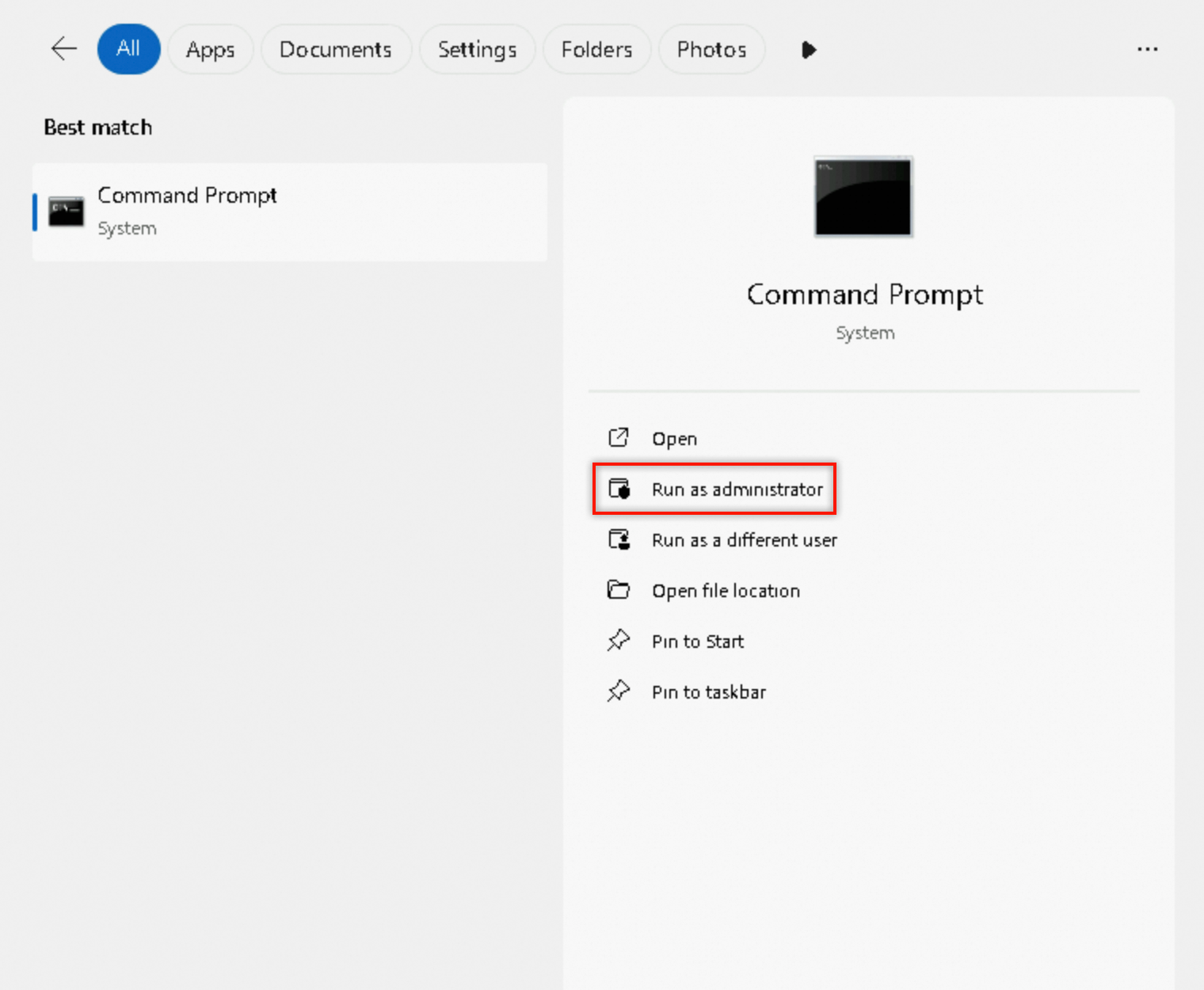
Run the installation command
In
CMD, run the following command to install Qwen Code (version≥ 0.11.1).curl -fsSL -o %TEMP%\install-qwen.bat https://qwen-code-assets.oss-cn-hangzhou.aliyuncs.com/installation/install-qwen.bat && %TEMP%\install-qwen.bat --source bailianView
Qwen Code's versionAfter installation, close the current
CMDwindow to apply environment variables. Open a newCMDwindow and run the following command to check the installed version.qwen --version
Set up authentication
Choose an authentication method:
API key (recommended for production)
Create or edit settings.json at the path below. Replace YOUR_API_KEY with your Model Studio API key:
-
macOS / Linux:
~/.qwen/settings.json -
Windows:
C:\Users\your_username\.qwen\settings.json
This document applies only to pay-as-you-go mode. If you are a Coding Plan user, use your exclusive base URL and API key instead. For details, see Coding Plan for Qwen Code.
{
  "env": {
    "BAILIAN_API_KEY": "YOUR_API_KEY"
  },
  "modelProviders": {
    "openai": [
      {
        "id": "qwen3.5-plus",
        "name": "[Bailian] qwen3.5-plus",
        "baseUrl": "https://dashscope-intl.aliyuncs.com/compatible-mode/v1",
        "envKey": "BAILIAN_API_KEY",
        "generationConfig": {
          "extra_body": {
            "enable_thinking": true
          }
        }
      },
      {
        "id": "qwen3-coder-plus",
        "name": "[Bailian] qwen3-coder-plus",
        "baseUrl": "https://dashscope-intl.aliyuncs.com/compatible-mode/v1",
        "envKey": "BAILIAN_API_KEY"
      },
      {
        "id": "qwen3-coder-next",
        "name": "[Bailian] qwen3-coder-next",
        "baseUrl": "https://dashscope-intl.aliyuncs.com/compatible-mode/v1",
        "envKey": "BAILIAN_API_KEY"
      }
    ]
  },
  "security": {
    "auth": {
      "selectedType": "openai"
    }
  },
  "model": {
    "name": "qwen3.5-plus"
  },
  "$version": 3
}
Qwen OAuth (1,000 free calls per day)
For faster setup without an API key:
-
Run
qwenin a terminal. -
Type
/authand select Qwen OAuth. -
Press Enter. On the redirected page, log in to your Qwen Chat account or scan the QR code to authenticate.
After authentication, Qwen Code provides 1,000 API calls per day, separate from Model Studio's free quota.
If you use up the 1,000 daily API calls and want to continue, use /auth to switch to the OpenAI authentication method.
If this is your first time using Qwen Chat, register an account.
Configuration reference
|
Configuration item |
Description |
|
modelProviders |
(Required) Set to |
|
id |
(Required) Model ID. Choose a model with strong coding capabilities (e.g., qwen3.5-plus, glm-5, kimi-k2.5). For supported models in each region, see the Model list. Some models, such as glm-5, are available only in the Chinese mainland deployment mode (China (Beijing) region). |
|
name |
(Optional) Display name of the model. If omitted, uses the id value. |
|
envKey |
(Required) Environment variable for the API key. Set to |
|
baseUrl |
(Required) Service endpoint based on your API key region:
|
|
generationConfig.extra_body.enable_thinking |
(Optional) Specifies whether to enable deep thinking. |
For more modelProviders configuration options, see the Qwen Code configuration documentation.
Start a session
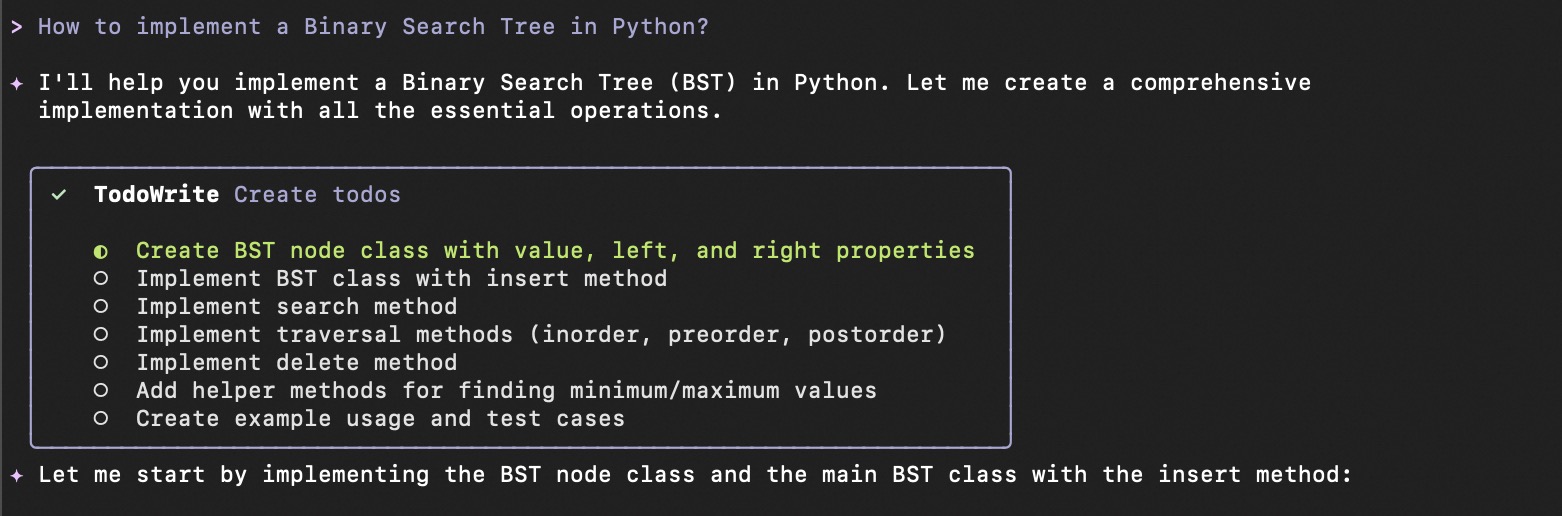
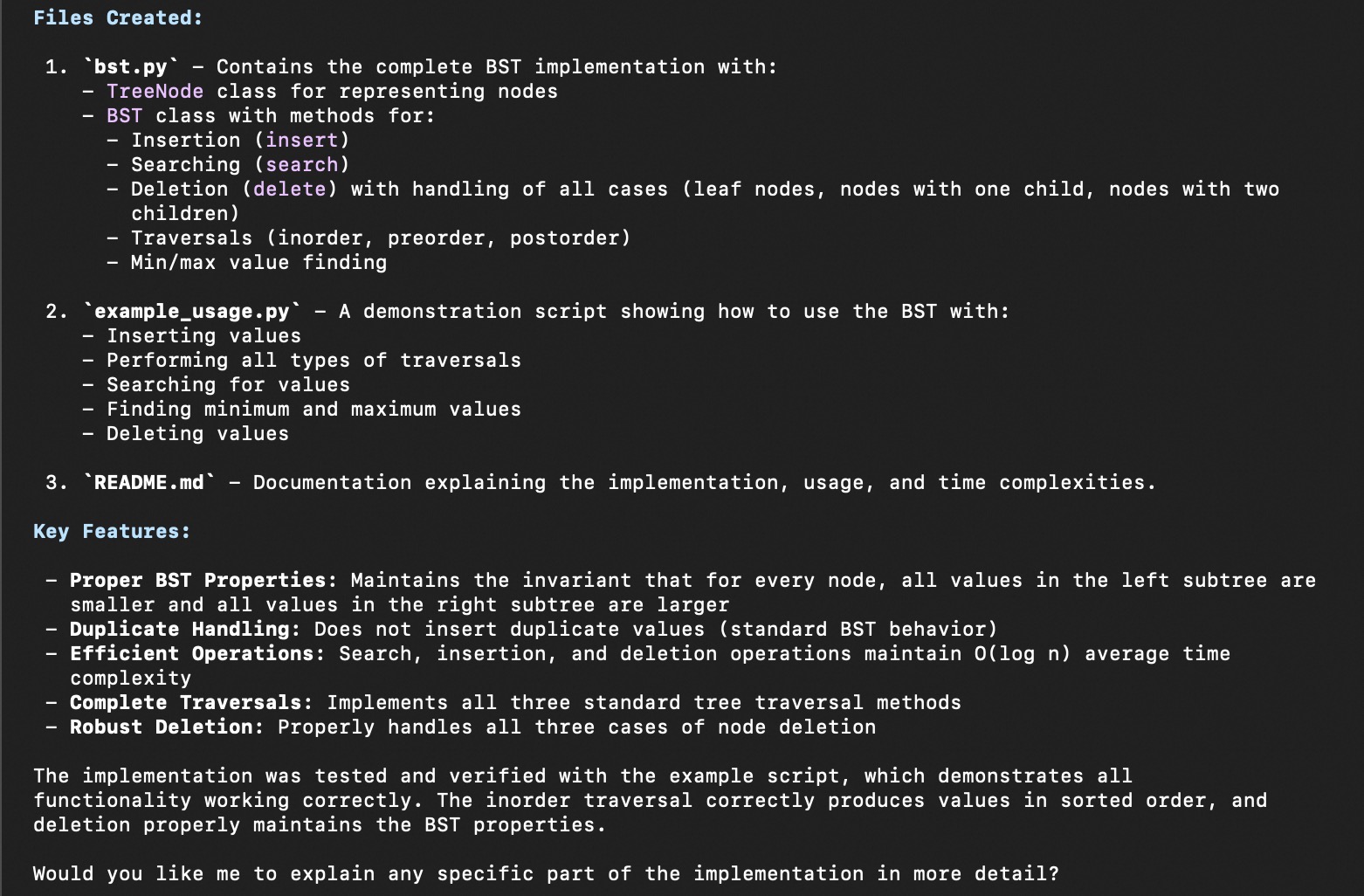
Run qwen in a terminal. Type a request (e.g., "How to implement a binary search tree in Python?"). Qwen Code creates an execution plan and requests permission to create, write, and run files.
Result:
Common commands
|
Command |
Description |
Example |
|
|
Switch the model used in the current session. |
|
|
|
Change the authentication method. |
|
|
|
Analyze the current directory and create an initial context file (QWEN.md) to define project-level instructions and context. |
|
|
|
Clear the terminal screen and start a new chat. |
|
|
|
Replace chat history with a summary to save tokens. |
|
|
|
Open the settings editor to configure language, theme, and other options. |
|
|
|
Generate a project summary from chat history. |
|
|
|
Resume a previous chat session. |
|
|
|
Show detailed performance statistics for the current session. |
|
|
|
Show help information for available commands. |
|
|
|
Exit Qwen Code. |
|
For advanced features, see the official Qwen Code documentation.
Free quota
Model Studio provides 1 million free tokens for models like Qwen3-Coder (Singapore region only). Free quota is consumed before paid usage. To check remaining quota, go to Models and click a model card. To avoid unexpected charges, enable Free quota only.
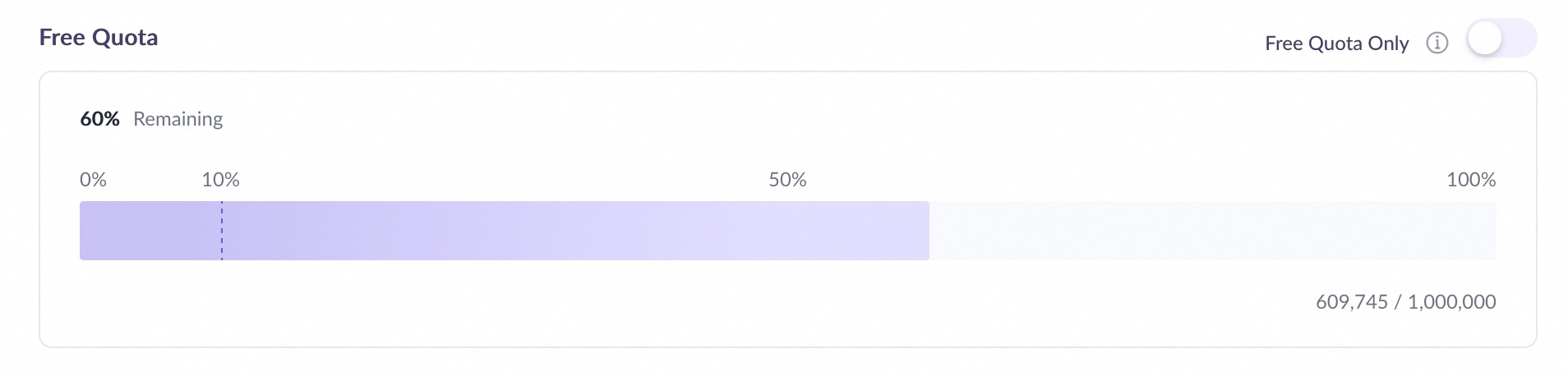
Qwen Code also provides 1,000 free calls per day through Qwen OAuth. This quota is separate from the Model Studio free quota.
Learn more
-
For advanced features such as sub-agents, MCP, and Skills, see the Qwen Code official documentation.
-
For use cases of Qwen Code, see Showcase.
FAQ
Why does Qwen Code consume tokens quickly?
Qwen Code may make multiple API calls per request, consuming tokens quickly. To reduce consumption:
-
Streamline the working directory
Start Qwen Code in a specific project directory. Avoid directories with too many files (e.g., root directory) to reduce token consumption.
-
Set a token limit
Create
.qwen/settings.jsonin the project root and restart Qwen Code. ThesessionTokenLimitfield sets the max tokens per API call:{ "sessionTokenLimit": 32000 }Because Qwen Code may make multiple API calls for a single request, the total token consumption can exceed the
sessionTokenLimitvalue. -
Use compression or cleanup commands
-
/compress: Compress conversation history to free up tokens and continue. -
/clear: Clear all conversation history and start a new session.
-
Q: How do I use the free quota of 1,000 calls per day?
A: Type /auth after starting Qwen Code and select Qwen OAuth. Press Enter and authenticate on the redirected page (log in to your Qwen Chat account or scan the QR code). After authentication, Qwen Code provides 1,000 API calls per day, separate from Model Studio's free quota.
If you use up the 1,000 daily API calls and want to continue, use /auth to switch to the OpenAI authentication method.
If this is your first time using Qwen Chat, register an account.
How do I switch models?
Type /model to select a different model from your settings.json. To add a new model, add its configuration to modelProviders and restart Qwen Code.
Why do I get a 401 Incorrect API key provided error?
This error usually indicates incorrect API configuration. Verify the API key in the error message matches your settings. Note: project-level settings.json overrides user-level settings.json. See Qwen Code troubleshooting for details.