Learn about WebSocket endpoints, interaction flows, and SDKs for Qwen-Omni-Realtime models.
Connection endpoints
Supported models: qwen3.8-omni-flash-realtime, qwen3.5-omni-plus-realtime, and qwen3.5-omni-flash-realtime.
China (Beijing)
wss://{WorkspaceId}.cn-beijing.maas.aliyuncs.com/api-ws/v1/realtime?model=qwen3.5-omni-plus-realtime
Singapore
wss://{WorkspaceId}.ap-southeast-1.maas.aliyuncs.com/api-ws/v1/realtime?model=qwen3.5-omni-plus-realtime
Replace {WorkspaceId} with the workspace ID for the selected region, and set model to the model to call. For authentication and prerequisites, see Connection overview.
Connection workflow
VAD mode
To enable VAD mode, set the session.turn_detection.type parameter of the client event to "server_vad". In this mode, the server performs Voice Activity Detection (VAD) on incoming audio and responds when it detects speech. This mode is the default and is designed for scenarios where the client continuously sends audio to the server.
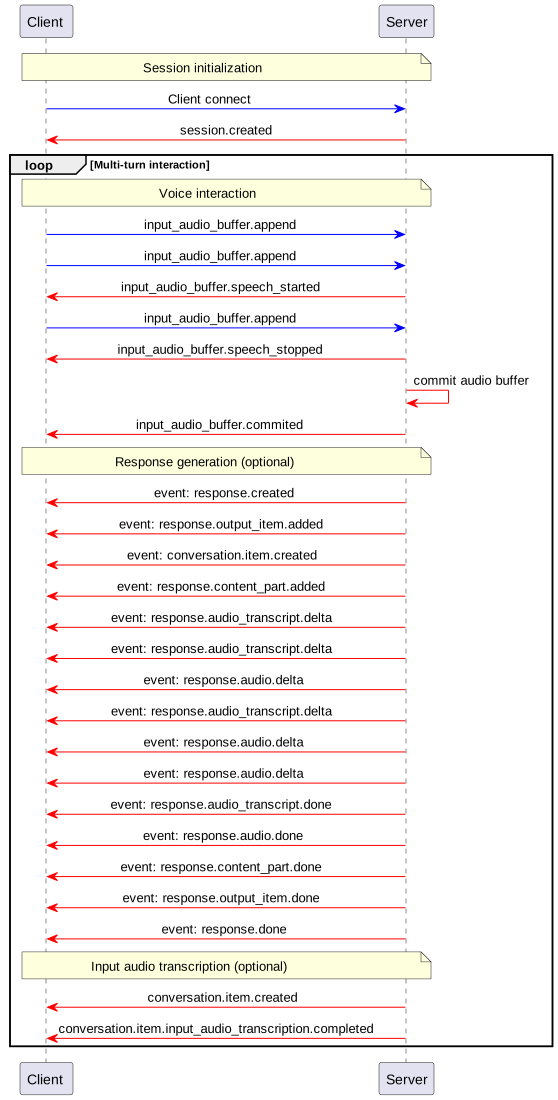
- The server sends the
input_audio_buffer.speech_startedevent when it detects the start of speech. - The client can append audio to the buffer at any time by sending an
input_audio_buffer.appendevent. - The server sends the
input_audio_buffer.speech_stoppedevent when it detects the end of speech. - The server commits the input audio buffer by sending an
input_audio_buffer.committedevent. - The server sends a
conversation.item.createdevent, which contains the user message item created from the audio buffer.
Function Calling flow
In VAD mode, when a response requires the client to execute a Function Calling tool, use this flow:
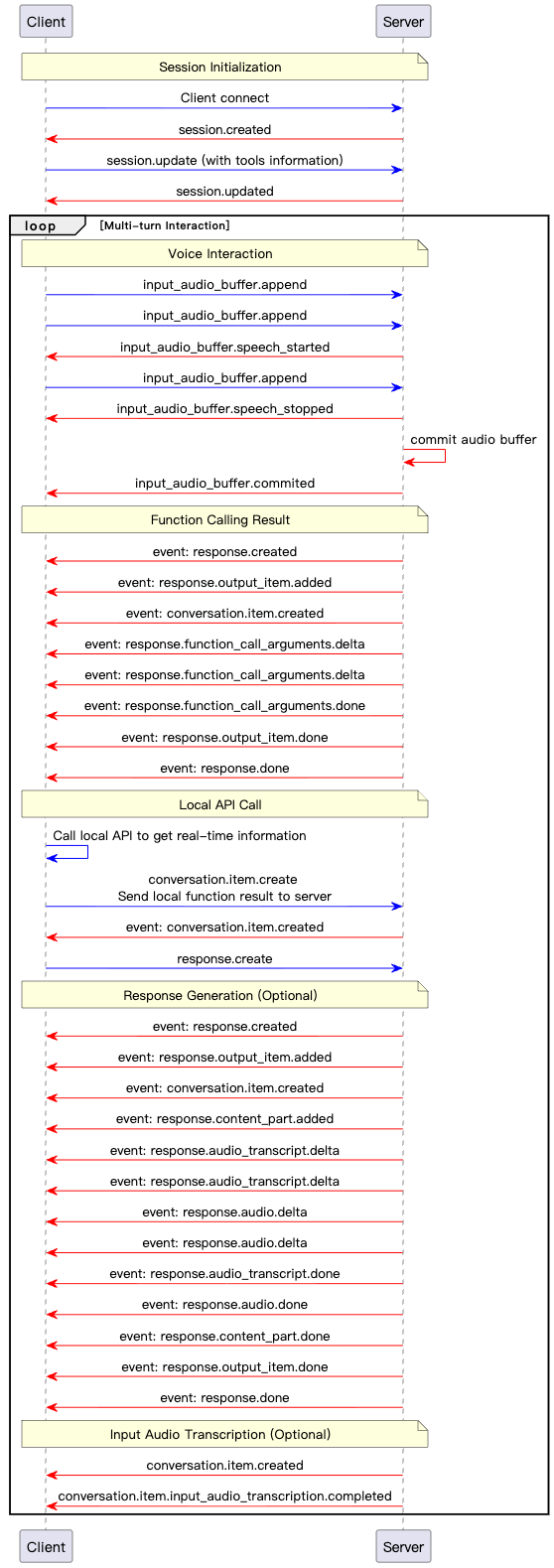
- After detecting the end of speech and generating a response, the server determines that a tool call is required.
- The server sends a
response.function_call_arguments.deltaevent, which contains incremental data for the tool call arguments. - The server sends a
response.function_call_arguments.doneevent to indicate that all tool call arguments have been sent. - The client executes the tool call and obtains the result.
- The client sends a
conversation.item.createevent that contains the tool call result. - The client sends a
response.createevent to trigger a response based on the tool call result.
Manual mode
To enable Manual mode, set the session.turn_detection parameter of the client event to null. In this mode, the client requests a server response by explicitly sending input_audio_buffer.commit and response.create events. This mode is suitable for push-to-talk scenarios, such as sending voice messages in chat applications.
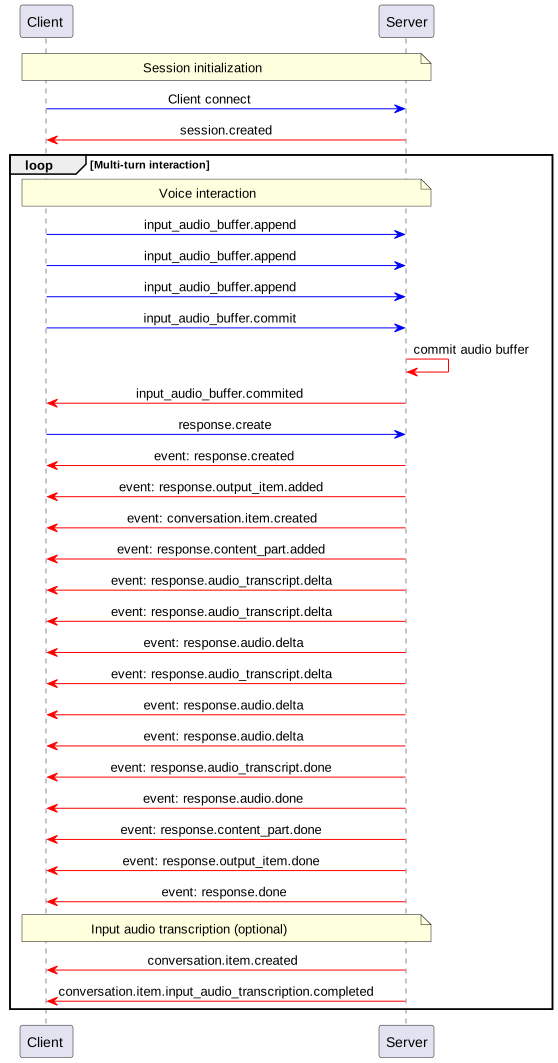
- The client can append audio to the buffer by sending an
input_audio_buffer.appendevent. - The client commits the input audio buffer by sending an
input_audio_buffer.commitevent. This commit creates a new user message item in the conversation. - The server responds by sending an
input_audio_buffer.committedevent. - The client sends a
response.createevent to trigger the model to generate the final response. - The server responds by sending a
conversation.item.createdevent.
Function Calling flow
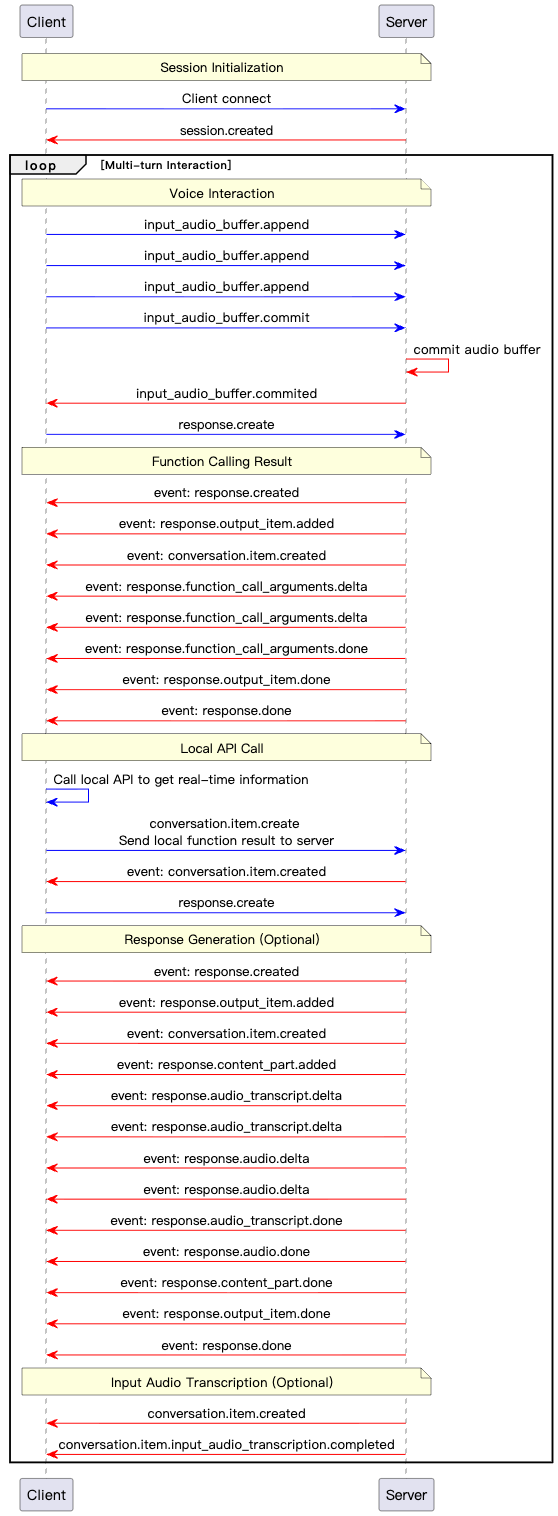
In Manual mode, when a response requires the client to execute a Function Calling tool, use this flow:
- After the client sends a
response.createevent, the server generates a response and detects that a tool call is required. - The server sends a
response.function_call_arguments.deltaevent, which contains incremental data for the tool call arguments. - The server sends a
response.function_call_arguments.doneevent to indicate that the transfer of tool call arguments is complete. - The client executes the tool call and obtains the result.
- The client sends the tool call result using a
conversation.item.createevent. - The client sends a
response.createevent to trigger the model to generate the final response. - The server generates a response based on the tool call result and sends it to the client using
response.audio.deltaorresponse.text.deltaevents.
MCP tool calls
This flow applies to Qwen3.8-Omni-Flash-Realtime with either VAD or Manual mode.
Function Calling and MCP can be configured together in session.tools. They cannot be used with web search (enable_search). Model Studio does not charge an additional MCP tool invocation fee. Model inference remains subject to model pricing.
Tool discovery
After the client configures MCP servers with session.update, the Realtime service discovers their tools asynchronously:
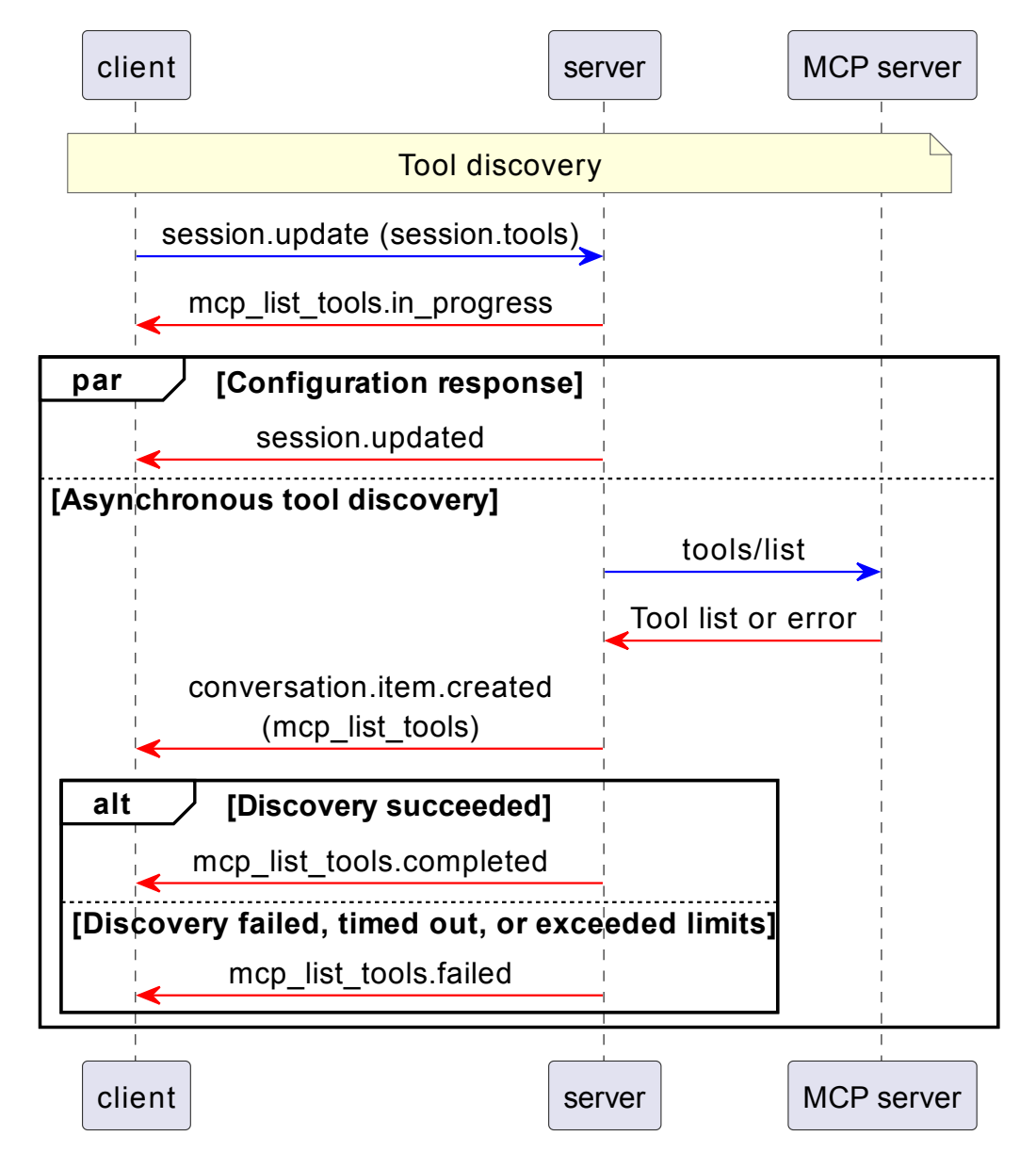
In the sequence diagrams in this section, opt indicates execution when a condition is met, alt indicates alternative branches selected by condition, and par indicates parallel processing.
- Send
session.updatewith MCP entries insession.tools. - Handle
mcp_list_tools.in_progress, which may arrive beforesession.updated.session.updatedconfirms acceptance of configuration, not tool availability. - The service discovers tools. It sends
conversation.item.createdwith amcp_list_toolsitem, followed bymcp_list_tools.completedormcp_list_tools.failedwith the sameitem_id. The item contains the final filtered tools or an error.
Audio input and response.create can continue during discovery, but only Responses created after discovery completes can use the corresponding tools.
MCP calls and continuation
When the model selects an MCP tool, the Realtime service executes the call. If approval is required, the client first responds to the approval request:
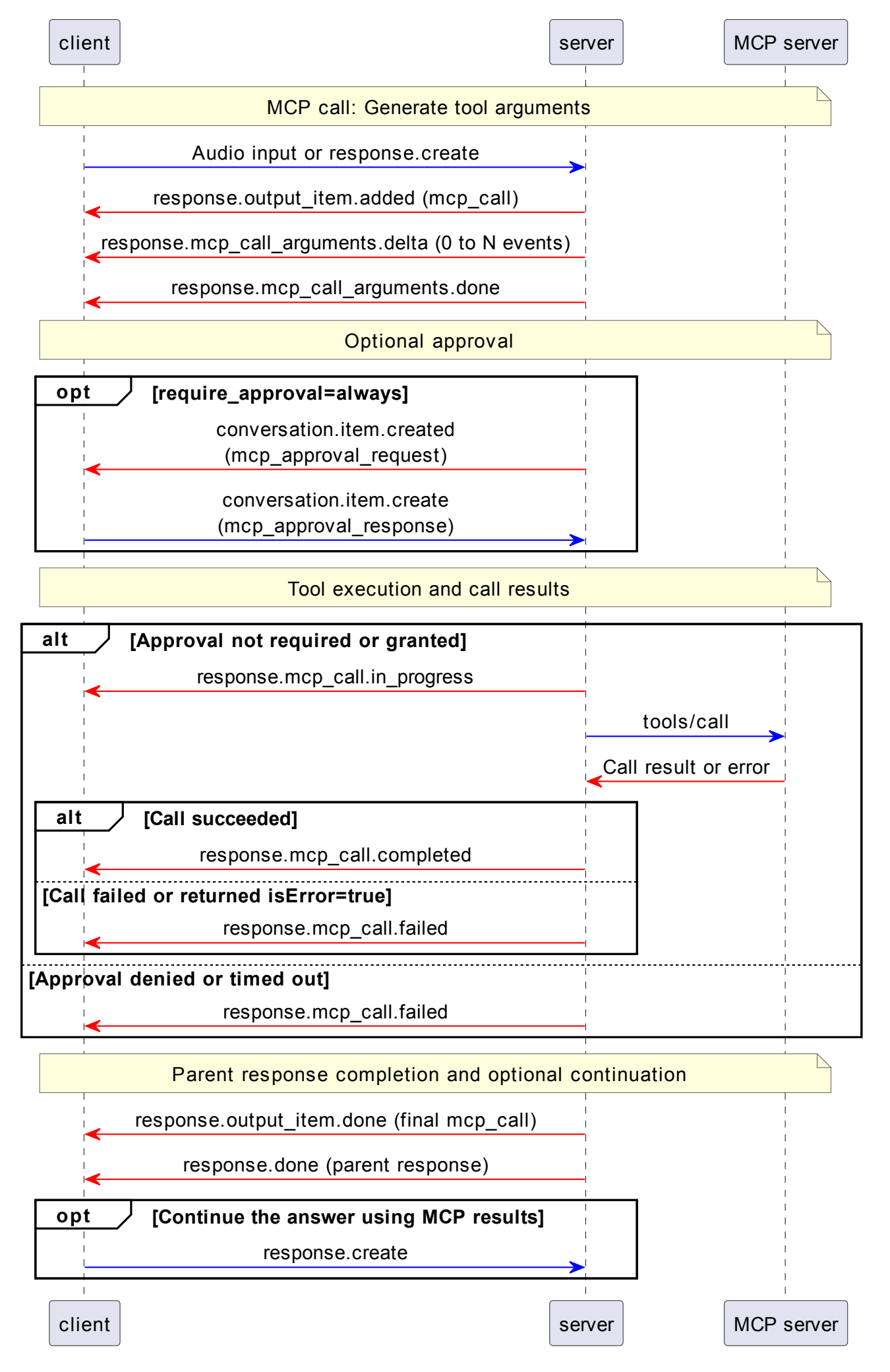
- The server creates an
mcp_callitem throughresponse.output_item.added. - Concatenate zero or more
response.mcp_call_arguments.deltafragments. Use the complete JSON string inresponse.mcp_call_arguments.doneas authoritative. - When approval is required, handle
conversation.item.createdwithitem.type="mcp_approval_request". Decide whether to allow the call and reply withconversation.item.create,item.type="mcp_approval_response", the exact approvalitem.id, and booleanapprove. Approval is required by default. - Approved calls, or calls configured to require no approval, emit
response.mcp_call.in_progress. The service executes the MCP call, then emitsresponse.mcp_call.completedorresponse.mcp_call.failed. Rejection or approval timeout emitsfailedwithout execution. - Consume
response.output_item.donefor the final call item. The parentresponse.donearrives after every MCP item in that Response reaches a terminal state. Itsresponse.outputincludes final snapshots: successful calls havecompletedandoutput; failed calls havefailedanderror. - To generate a model answer from the MCP results, send one
response.createafter the parentresponse.done. Do not attach MCP results: they are already in the conversation. Do not use the manualfunction_call_outputreturn flow for these server-executed MCP calls.
See client MCP configuration, approval replies, MCP server events, and MCP conversation items.
Usage limits
The following default MCP constraints apply to each session:
| Item | Default value |
|---|---|
| MCP servers | 8 |
| MCP tools | 128 |
| Tool discovery timeout | 30 seconds |
| Approval timeout | 60 seconds |
| Tool execution timeout | 30 seconds |
| Single upstream response size | 2 MB |
| Cumulative tool result size | 8 MB |
| Cumulative tool calls | 256 |