This topic uses the Qwen model as an example to walk you through the full lifecycle of model deployment on Alibaba Cloud Model Studio by using API (HTTP) calls, including deploying, querying, inference, deletion, and permission troubleshooting.
Prerequisites
- You have read the Model Deployment Overview and are familiar with the supported models and basic deployment steps.
- Obtain an API key and export the API key as an environment variable.
1. Deploy the model
The following command uses the fine-tuned custom model qwen3-8b-ft-202511132025-0260 to create a dedicated service named qwen3-8b-ft-202511132025-0260.
To obtain the custom model ID, go to the Model Studio console - model finetuning page. Click the Task Name of the model you want to deploy, click Outputs, and then click the blue model name. This opens the My Models page, where you can find the Model ID in the basic information section.
Use the Model IDas the input for the model_name parameter to deploy the model by using the API.
Provisioned Throughput (PTU)
NoteAfter you run the deployment command, billing starts as soon as the service is successfully deployed, even if you do not use it. Before proceeding, we recommend you review the service billing rules.
The provisioned throughput billing method charges based on usage duration. This method is suitable for scenarios that require stable throughput, high concurrency, low latency, and predictable traffic. In this mode, the platform provisions both throughput/concurrency and generation speed, which you cannot adjust.
curl "https://dashscope-intl.aliyuncs.com/api/v1/deployments" \
--header "Authorization: Bearer $DASHSCOPE_API_KEY" \
--header 'Content-Type: application/json' \
--data '{
    "name": "my_qwen_flash",
    "model_name": "qwen-flash-2025-07-28",
    "plan": "ptu",
    "ptu_capacity": {
        "input_tpm": 10000,
	"output_tpm": 1000
    }
}'
Model unit
Note
- After you run the deployment command, billing starts as soon as the service is successfully deployed, even if you do not use it. Before proceeding, we recommend you review the service billing rules.
- Computing resources for the post-paid model unit plan are allocated on a first-come, first-served basis. If the purchase is unsuccessful, a full refund will be issued.
The model unit billing method charges you based on usage duration. This billing method is ideal for large-scale inference tasks after model finetuning, offering dedicated resources with flexible performance and cost adjustments. You can customize both throughput/concurrency and generation speed.
curl "https://dashscope-intl.aliyuncs.com/api/v1/deployments" \
--header "Authorization: Bearer $DASHSCOPE_API_KEY" \
--header 'Content-Type: application/json' \
--data '{
    "name": "my_qwen_plus",
    "model_name": "qwen-plus-2025-12-01",
    "plan": "mu",
    "deploy_spec": "MU1",
    "enable_thinking": true,
    "capacity": 4,
    "max_context_length": 10000,
    "rpm_limit": 500,
    "tpm_limit": 1000
}'
The model unit deployment mode supports the following additional settings:
Configuration item | Configuration details |
Service name | Custom name for the deployment service. |
Select model | Select the model to deploy, including platform built-in models and fine-tuned models. |
Model unit type | Select the deployment specification. Different specifications correspond to different compute power and performance. |
Deployment replica count | Set the initial number of deployment replicas, which affects the concurrency capacity of the service. |
Deployment template | Select a deployment template (such as "single-node deployment"). Different templates correspond to different resource configuration schemes. Available only under the model unit billing mode. |
Configure model inference mode | For some models deployed in Model Unit mode, you can configure the inference mode, maximum context length, and more.
|
Maximum context length | The Model Unit deployment mode of some models supports this setting. The maximum context length depends on the model type. |
Service rate limiting | The Model Unit deployment mode of some models supports this setting. You can limit the RPM and TPM of model invocations. |
To learn how to configure these settings by using the API, see Create a model deployment task by using an API.
Token usage
With token usage billing, you are charged based on token usage. This method is suitable for cost-sensitive scenarios where concurrency and latency requirements are not critical. This mode offers the best price advantage; the platform provisions throughput/concurrency and generation speed, which you cannot adjust.
curl "https://dashscope-intl.aliyuncs.com/api/v1/deployments" \
--header "Authorization: Bearer $DASHSCOPE_API_KEY" \
--header 'Content-Type: application/json' \
--data '{
    "model_name": "qwen3-8b-ft-202511132025-0260",
    "plan": "lora",
    "capacity": 1,
    "name": "qwen3-8b-ft"
}'
The
capacityparameter is required but currently has no effect. To request scaling, go to the Dedicated Deployment console and submit a form.
dashscope CLI
Call via the dashscope command line.
export DASHSCOPE_API_KEY="your-api-key"
# Replace {WorkspaceId} with your workspace ID, ap-southeast-1 with your region (e.g., us-east-1, eu-central-1)
export DASHSCOPE_HTTP_BASE_URL="https://{WorkspaceId}.ap-southeast-1.maas.aliyuncs.com/api/v1"
# List deployed dedicated services
dashscope deployments list

# Create a dedicated service (--plan required)
# plan options: ptu (PTU reserved resources) / mu (model unit) / lora (LoRA deployment)
dashscope deployments create -m qwen2.5-7b-instruct -s tst -c 1 --plan ptu
-mspecifies the model name,-sspecifies the service suffix,-cspecifies the deployment capacity.
ImportantThe SDK Expert interactive assistant can accomplish the same development and troubleshooting via natural language, see
DashScope SDK Expert.For the complete region table, see Base URL overview.
On success, the command returns the following result (using a LoRA deployment as an example):
{
    "request_id": "83b173ab-2b2f-41aa-8c57-b173e8be934e",
    "output":
    {
        "deployed_model": "qwen3-8b-ft-202511132025-0260",
        "gmt_create": "2025-11-20T20:06:46.405",
        "gmt_modified": "2025-11-20T20:06:46.405",
        "status": "PENDING",
        "model_name": "qwen3-8b-ft-202511132025-0260",
        "base_model": "qwen3-8b",
        "workspace_id": "llm-8v*****",
        "charge_type": "post_paid",
        "creator": "16542*****",
        "modifier": "16542*****",
        "plan": "***"
    }
}
Where deployed_model is the unique ID of the dedicated service.
2. Query service status
Run the following command to query the details of a specific dedicated service:
curl "https://dashscope-intl.aliyuncs.com/api/v1/deployments/qwen3-8b-ft-202511132025-0260" \
    --header "Authorization: Bearer $DASHSCOPE_API_KEY" \
    --header 'Content-Type: application/json'
On success, the command returns the following result:
{
    "request_id": "ca36952d-9136-426e-ab08-68a97ad72719",
    "output":
    {
        "deployed_model": "qwen3-8b-ft-202511132025-0260",
        "gmt_create": "2025-11-20T20:32:08",
        "gmt_modified": "2025-11-20T20:42:25",
        "status": "RUNNING",
        "model_name": "qwen3-8b-ft-202511132025-0260",
        "base_model": "qwen3-8b",
        "base_capacity": 2,
        "capacity": 2,
        "ready_capacity": 2,
        "workspace_id": "llm-8v53etv3hwb8orx1",
        "charge_type": "post_paid",
        "creator": "1654290265984853",
        "modifier": "1654290265984853",
        "plan": "mu",
        "model_unit_spec": "MU1"
    }
}
When the service status is RUNNING, the service deployment is complete.
3. Make inference requests
NoteIf this is your first time using the DashScope SDK, see Install the SDK.
Ensure the API Key's workspace matches the model's deployment workspace.
When calling a deployed dedicated service, the model parameter should be set to the model code returned after successful deployment. Obtain it from the Dedicated Deployment console.
import os
import dashscope

messages = [
    {"role": "system", "content": "You are a helpful assistant."},
    {"role": "user", "content": "Who are you?"},
]
dashscope.base_http_api_url = 'https://dashscope-intl.aliyuncs.com/api/v1'
response = dashscope.Generation.call(
    # If you have not configured environment variables, replace the next line with your Bailian API Key: api_key="sk-xxx",
    api_key=os.getenv("DASHSCOPE_API_KEY"),
    model="qwen3-max-xxx-xxx",  # Please replace with the code returned after the model is successfully deployed
    messages=messages,
    result_format="message",
    enable_thinking=False,
)
print(response)
import os
from openai import OpenAI

client = OpenAI(
    # If you have not configured environment variables, replace the next line with your Bailian API Key: api_key="sk-xxx",
    api_key=os.getenv('DASHSCOPE_API_KEY'),
    base_url="https://dashscope-intl.aliyuncs.com/compatible-mode/v1",
)

completion = client.chat.completions.create(
    model="qwen3-max-xxx-xxx",  # Please replace with the code returned after the model is successfully deployed
    messages=[
        {"role": "system", "content": "You are a helpful assistant."},
        {"role": "user", "content": "Who are you?"},
    ],
    extra_body={"enable_thinking": False},
)
print(completion)
Inference parameter alignment
The default values of the Model Studio inference engine parameters may differ from those of your local inference framework. To align with vLLM defaults, refer to the table below when calling the API; if you use SGLang or other frameworks, refer to the corresponding documentation.
Parameter name | Recommended value (matches vLLM defaults) |
|---|---|
temperature | Range: [0, 2). Set to 1.0 to match vLLM's default. |
top_p | Range: (0, 1.0]. Set to 1.0 to match vLLM's default. |
top_k | Set to None or a value greater than 100 to disable top_k sampling (only top_p applies). Setting to 99 approximates vLLM's default value of 0 (full sampling). |
presence_penalty | Range: [-2.0, 2.0]. Set to 0 to match vLLM's default. |
repetition_penalty (DashScope protocol) | Increasing repetition_penalty reduces repetition in generated text. A value of 1.0 means no penalty. Range: greater than 0. Set to 1.0 to match vLLM's default. |
4. Delete the dedicated service
WarningRunning the delete command immediately takes the deployment service offline. This action is irreversible and has the following effects:
- You can no longer call the model.
- Billing for the service stops.
If you no longer need a dedicated service, you can delete it by using the following command:
curl --request DELETE 'https://dashscope-intl.aliyuncs.com/api/v1/deployments/qwen3-8b-ft-202511132025-0260' \
    --header "Authorization: Bearer $DASHSCOPE_API_KEY" \
    --header 'Content-Type: application/json'
On success, the command returns the following result:
{
    "request_id": "8f726017-6042-420e-a465-0d366a3aba59",
    "output":
    {
        "deployed_model": "qwen3-8b-ft-202511132025-0260",
        "gmt_create": "2025-11-20T20:32:08",
        "gmt_modified": "2025-11-27T16:35:31.591",
        "status": "DELETING",
        "model_name": "qwen3-8b-ft-202511132025-0260",
        "base_model": "qwen3-8b",
        "base_capacity": 2,
        "capacity": 2,
        "ready_capacity": 2,
        "workspace_id": "llm-8v53etv3hwb8orx1",
        "charge_type": "post_paid",
        "creator": "1654290265984853",
        "modifier": "1654290265984853",
        "plan": "mu",
        "model_unit_spec": "MU1"
    }
}
After deleting the service, you can no longer query its status using the method described in 2. Query service status.
Permission troubleshooting
If you encounter permission errors during model deployment, there are two troubleshooting paths depending on the deployment method:
Console deployment
-
If "Missing permission for this module" is displayed, ensure that your account has the Model Deployment - Operation permission on the permission management page of the business space.
If you cannot operate normally, contact your organization or IT administrator to add the relevant permissions or check the permission issues on your behalf.
-
If the error "xx business space does not have permission to deploy the xx model" is reported during deployment, go to the Business Space Management page of Model Studio to add the deployment permission of the corresponding model for the corresponding business space.
API call error:
Workspace xxx does not have deployment privilege for model xxxx.
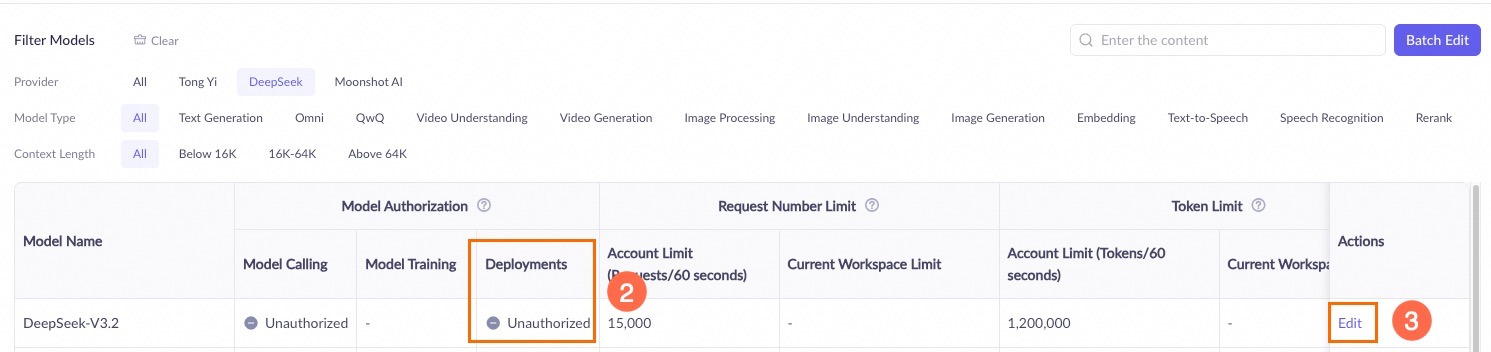
If insufficient permissions are prompted, contact your organization or IT administrator to add the relevant permissions or operate on your behalf.
API deployment
When deploying a model by using an API, ensure the following:
-
The API Key's Workspace must have permission to manage the model. Go to the Business Space Management page in Model Studio and check the model deployment permission settings for the corresponding workspace.
API call error:
Workspace xxx does not have deployment privilege for model xxxx.In the Actions column for the corresponding workspace, click Model Permission and Flow Control Settings.
In the Model List, find the target model and check the authorization status in the Model Deployment column. If it shows Not Authorized, click Edit in the Actions column to grant permission.
If you are prompted about insufficient permissions, contact your organization or IT administrator to add the relevant permissions or perform the operation on your behalf.
-
The Owner Account that owns the API Key has the required permissions in the Workspace. Go to the Model Studio console, click the workspace in the lower-left corner, switch to the correct workspace, and then click
 to check the model deployment permission settings.
API call error:
Workspace access denied.In the left-side navigation pane, click Permission Management and confirm that the user list includes the API Key's owner account (with type primary account).
If you are prompted about insufficient permissions, contact your organization or IT administrator to add the relevant permissions or perform the operation on your behalf.
API reference
For details on the API calls, see API details.