The Wan image-to-video model generates smooth videos from a first-frame image, a last-frame image, and an optional text prompt.
- Video specifications: Fixed 5-second duration and custom resolution (480P/720P/1080P).
- Additional capabilities: Prompt rewriting and watermarking.
Quick links: API reference | Prompt guide
Getting started
| Prompt | First frame | Last frame | Output video |
A cute blue monster with a slightly sad expression stands in the rain. The camera slowly zooms in and stops on the moment it looks up at the sky. |  |  |
Before calling the API: Get an API key, set it as an environment variable, and install the DashScope SDK.
Python SDK
ImportantRequires DashScope Python SDK ≥ 1.25.8 before running the code below. Older versions may show "url error, please check url!" errors. Install the SDK.
import os
from http import HTTPStatus
from dashscope import VideoSynthesis
import dashscope

# The following URL is for the Singapore region. When calling, replace {WorkspaceId} with your actual workspace ID. URLs vary by region. Get your URL: https://www.alibabacloud.com/help/model-studio/image-to-video-by-first-and-last-frame-api-reference
dashscope.base_http_api_url = 'https://{WorkspaceId}.ap-southeast-1.maas.aliyuncs.com/api/v1'
# API keys differ by region. Get your API key: https://www.alibabacloud.com/help/model-studio/get-api-key
api_key = os.getenv("DASHSCOPE_API_KEY", "YOUR_API_KEY")

print('please wait...')
rsp = VideoSynthesis.call(api_key=api_key,
                          model="wan2.2-kf2v-flash",
                          prompt="A cute blue monster with a slightly sad expression stands in the rain. The camera slowly zooms in and stops on the moment it looks up at the sky.",
                          first_frame_url="https://help-static-aliyun-doc.aliyuncs.com/file-manage-files/zh-CN/20260126/ixdxvt/wan-kf2v-blue-1.png",
                          last_frame_url="https://help-static-aliyun-doc.aliyuncs.com/file-manage-files/zh-CN/20260126/nhtdrc/wan-kf2v-blue-2.png",
                          duration=5,  # Fixed at 5 seconds. Do not change.
                          prompt_extend=True,
                          watermark=True)
print(rsp)
if rsp.status_code == HTTPStatus.OK:
    print("video_url:", rsp.output.video_url)
else:
    print('Failed, status_code: %s, code: %s, message: %s' % (rsp.status_code, rsp.code, rsp.message))
Java SDK
ImportantRequires DashScope Java SDK ≥ 2.22.6 before running the code below. Older versions may show "url error, please check url!" errors. Install the SDK.
import com.alibaba.dashscope.aigc.videosynthesis.VideoSynthesis;
import com.alibaba.dashscope.aigc.videosynthesis.VideoSynthesisParam;
import com.alibaba.dashscope.aigc.videosynthesis.VideoSynthesisResult;
import com.alibaba.dashscope.exception.ApiException;
import com.alibaba.dashscope.exception.InputRequiredException;
import com.alibaba.dashscope.exception.NoApiKeyException;
import com.alibaba.dashscope.utils.JsonUtils;
import com.alibaba.dashscope.utils.Constants;

public class Image2Video {

    static {
        // The following URL is for the Singapore region. When calling, replace {WorkspaceId} with your actual workspace ID. URLs vary by region. Get your URL: https://www.alibabacloud.com/help/model-studio/image-to-video-by-first-and-last-frame-api-reference
        Constants.baseHttpApiUrl = "https://{WorkspaceId}.ap-southeast-1.maas.aliyuncs.com/api/v1";
    }

    // If you have not set an environment variable, replace the line below with: apiKey="sk-xxx"
    // API keys differ by region. Get your API key: https://www.alibabacloud.com/help/model-studio/get-api-key
    static String apiKey = System.getenv("DASHSCOPE_API_KEY");

    public static void image2video() throws ApiException, NoApiKeyException, InputRequiredException {
        VideoSynthesis vs = new VideoSynthesis();
        VideoSynthesisParam param =
                VideoSynthesisParam.builder()
                        .apiKey(apiKey)
                        .model("wan2.2-kf2v-flash")
                        .prompt("A cute blue monster with a slightly sad expression stands in the rain. The camera slowly zooms in and stops on the moment it looks up at the sky.")
                        .firstFrameUrl("https://help-static-aliyun-doc.aliyuncs.com/file-manage-files/zh-CN/20260126/ixdxvt/wan-kf2v-blue-1.png")
                        .lastFrameUrl("https://help-static-aliyun-doc.aliyuncs.com/file-manage-files/zh-CN/20260126/nhtdrc/wan-kf2v-blue-2.png")
                        .resolution("720P")
                        .promptExtend(true)
                        .watermark(true)
                        .build();
        System.out.println("please wait...");
        VideoSynthesisResult result = vs.call(param);
        System.out.println(JsonUtils.toJson(result));
    }

    public static void main(String[] args) {
        try {
            image2video();
        } catch (ApiException | NoApiKeyException | InputRequiredException e) {
            System.out.println(e.getMessage());
        }
        System.exit(0);
    }
}
curl
Step 1: Create a task to get the task IDcurl --location 'https://{WorkspaceId}.ap-southeast-1.maas.aliyuncs.com/api/v1/services/aigc/image2video/video-synthesis' \
-H 'X-DashScope-Async: enable' \
-H "Authorization: Bearer $DASHSCOPE_API_KEY" \
-H 'Content-Type: application/json' \
-d '{
"model": "wan2.2-kf2v-flash",
"input": {
"first_frame_url": "https://help-static-aliyun-doc.aliyuncs.com/file-manage-files/zh-CN/20260126/ixdxvt/wan-kf2v-blue-1.png",
"last_frame_url": "https://help-static-aliyun-doc.aliyuncs.com/file-manage-files/zh-CN/20260126/nhtdrc/wan-kf2v-blue-2.png",
"prompt": "A cute blue monster with a slightly sad expression stands in the rain. The camera slowly zooms in and stops on the moment it looks up at the sky."
},
"parameters": {
"resolution": "720P",
"prompt_extend": true,
"watermark": true
}
}'
Replace {task_id} with the task_id value returned by the previous API call. The task_id is valid for queries for 24 hours, Replace {WorkspaceId} with your actual workspace ID.
curl -X GET https://{WorkspaceId}.ap-southeast-1.maas.aliyuncs.com/api/v1/tasks/{task_id} \
--header "Authorization: Bearer $DASHSCOPE_API_KEY"
video_urlexpires after 24 hours. Download the video promptly.
{
    "request_id": "c1209113-8437-424f-a386-xxxxxx",
    "output": {
        "task_id": "966cebcd-dedc-4962-af88-xxxxxx",
        "task_status": "SUCCEEDED",
        "video_url": "https://dashscope-result-sh.oss-accelerate.aliyuncs.com/xxx.mp4?Expires=xxx",
         ...
    },
    ...
}
Availability
- Supported models vary by region. Resources are isolated between regions. For supported models in each region, see the Model Studio console.
- When making a call, make sure your model, endpoint URL, and API key all belong to the same region. Cross-region calls fail.
NoteSample codes in this topic apply to the Singapore region.
Core capabilities
Generate video from first and last frames
Supported models: All models.
Generates smooth videos from first-frame and last-frame images.
Parameters:first_frame_url: Required. Provide the first-frame image.last_frame_url: Required. Provide the last-frame image.prompt: Optional (recommended). Controls how the video changes over time.
| Prompt | First frame | Last frame | Output video |
Realistic style. A curious black kitten looks up at the sky. The camera starts at eye level and gradually rises until it captures the kitten’s curious gaze from above. | 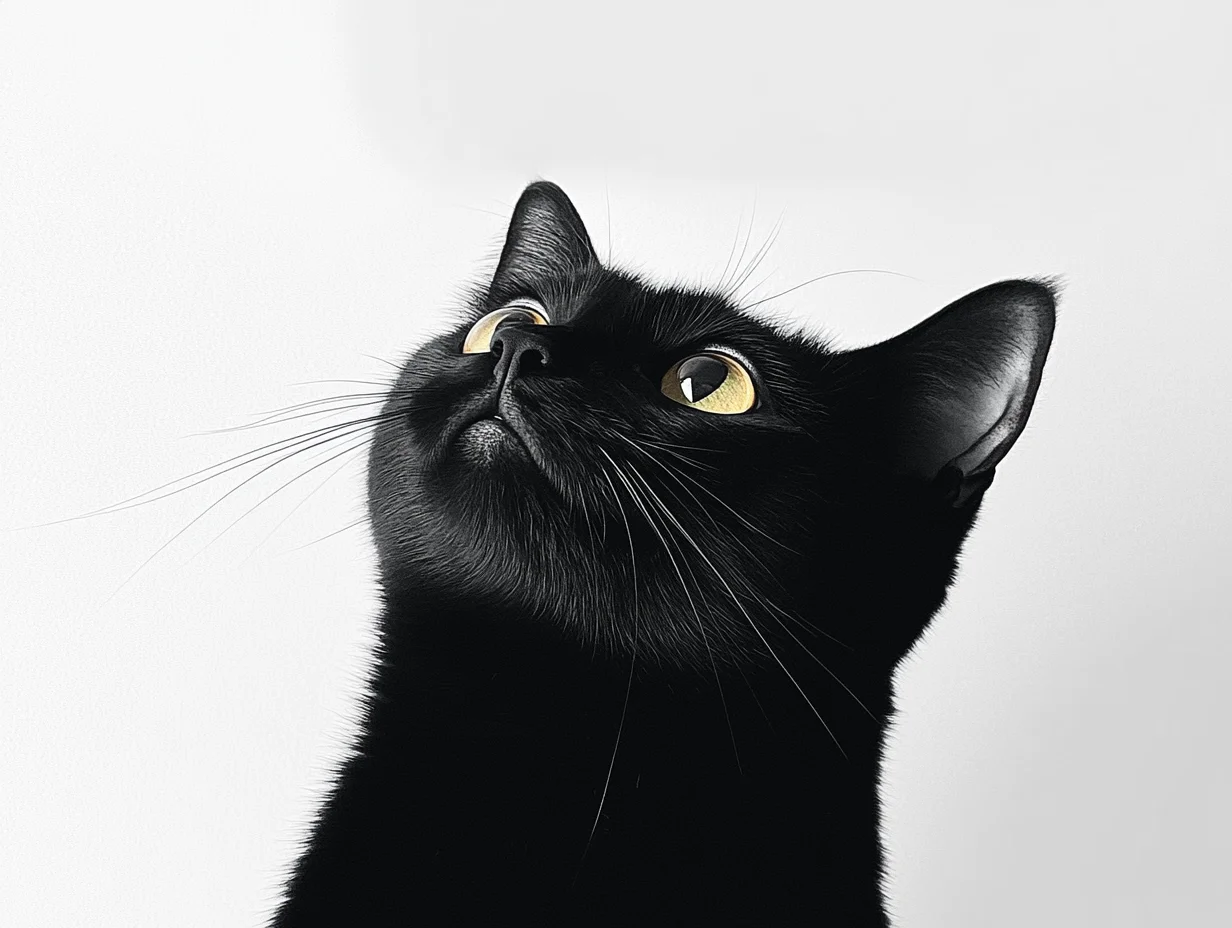 | 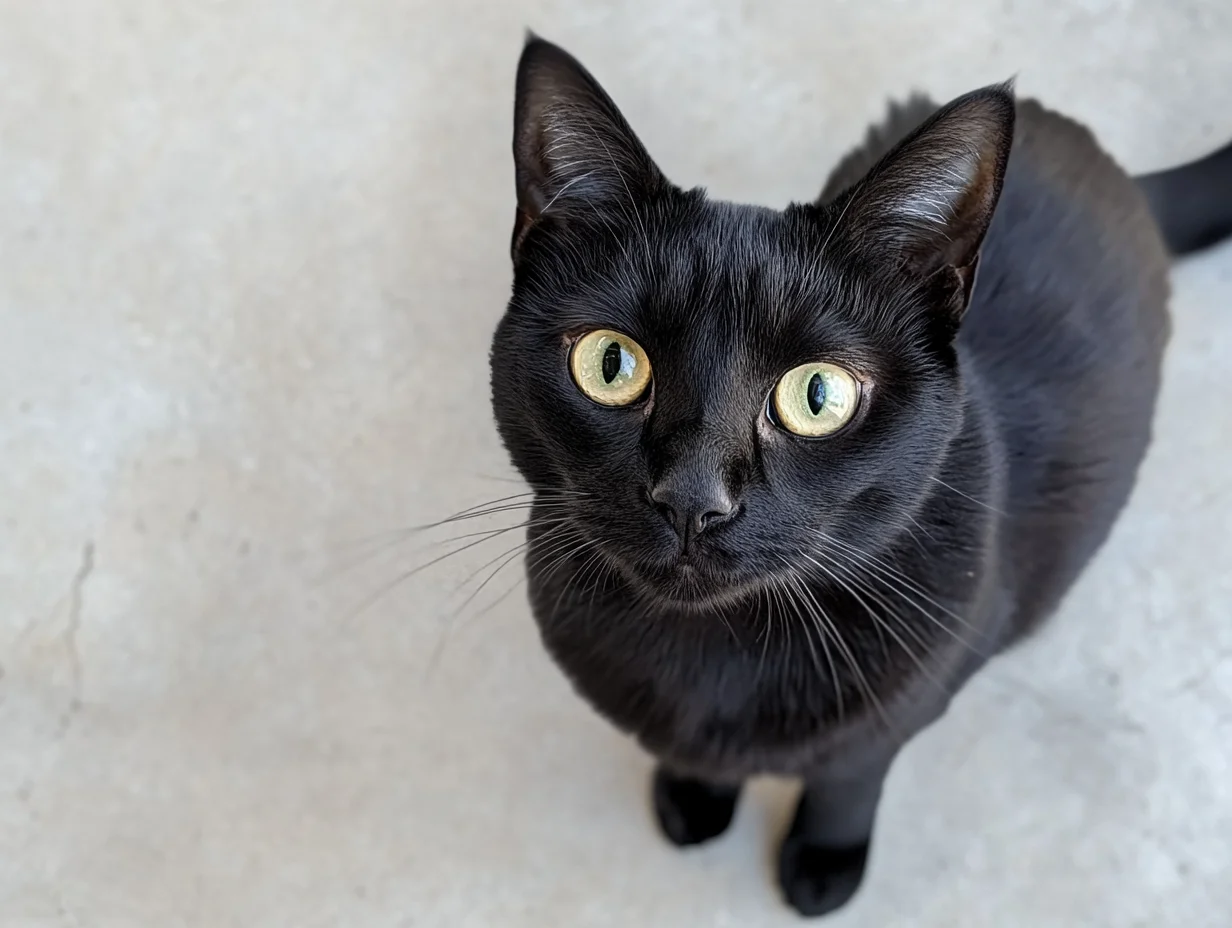 |
Python SDK
Requires DashScope Python SDK ≥
1.25.8. Upgrade if needed.
import os
from http import HTTPStatus
from dashscope import VideoSynthesis
import dashscope

# The following URL is for the Singapore region. When calling, replace {WorkspaceId} with your actual workspace ID. URLs vary by region. Get your URL: https://www.alibabacloud.com/help/model-studio/image-to-video-by-first-and-last-frame-api-reference
dashscope.base_http_api_url = 'https://{WorkspaceId}.ap-southeast-1.maas.aliyuncs.com/api/v1'
# API keys differ by region. Get your API key: https://www.alibabacloud.com/help/model-studio/get-api-key
api_key = os.getenv("DASHSCOPE_API_KEY", "YOUR_API_KEY")

def sample_async_call_kf2v():
    # Asynchronous call returns a task_id
    rsp = VideoSynthesis.async_call(api_key=api_key,
                                    model="wan2.2-kf2v-flash",
                                    prompt="Realistic style. A curious black kitten looks up at the sky. The camera starts at eye level and gradually rises until it captures the kitten’s curious gaze from above.",
                                    first_frame_url="https://wanx.alicdn.com/material/20250318/first_frame.png",
                                    last_frame_url="https://wanx.alicdn.com/material/20250318/last_frame.png",
                                    duration=5,  # Fixed at 5 seconds. Do not change.
                                    prompt_extend=True,
                                    watermark=True)
    print(rsp)
    if rsp.status_code == HTTPStatus.OK:
        print("task_id: %s" % rsp.output.task_id)
    else:
        print('Failed, status_code: %s, code: %s, message: %s' % (rsp.status_code, rsp.code, rsp.message))

    # Wait for asynchronous task to complete
    rsp = VideoSynthesis.wait(task=rsp, api_key=api_key)
    print(rsp)
    if rsp.status_code == HTTPStatus.OK:
        print(rsp.output.video_url)
    else:
        print('Failed, status_code: %s, code: %s, message: %s' % (rsp.status_code, rsp.code, rsp.message))

if __name__ == '__main__':
    sample_async_call_kf2v()
Java SDK
Requires DashScope Java SDK ≥
2.22.6. Upgrade if needed.
import com.alibaba.dashscope.aigc.videosynthesis.VideoSynthesis;
import com.alibaba.dashscope.aigc.videosynthesis.VideoSynthesisParam;
import com.alibaba.dashscope.aigc.videosynthesis.VideoSynthesisResult;
import com.alibaba.dashscope.exception.ApiException;
import com.alibaba.dashscope.exception.InputRequiredException;
import com.alibaba.dashscope.exception.NoApiKeyException;
import com.alibaba.dashscope.utils.JsonUtils;
import com.alibaba.dashscope.utils.Constants;

public class Image2Video {

    static {
        // The following URL is for the Singapore region. When calling, replace {WorkspaceId} with your actual workspace ID. URLs vary by region. Get your URL: https://www.alibabacloud.com/help/model-studio/image-to-video-by-first-and-last-frame-api-reference
        Constants.baseHttpApiUrl = "https://{WorkspaceId}.ap-southeast-1.maas.aliyuncs.com/api/v1";
    }

    // If you have not set an environment variable, replace the line below with: apiKey="sk-xxx"
    // API keys differ by region. Get your API key: https://www.alibabacloud.com/help/model-studio/get-api-key
    static String apiKey = System.getenv("DASHSCOPE_API_KEY");

    public static void image2video() throws ApiException, NoApiKeyException, InputRequiredException {
        VideoSynthesis vs = new VideoSynthesis();
        VideoSynthesisParam param =
                VideoSynthesisParam.builder()
                        .apiKey(apiKey)
                        .model("wan2.2-kf2v-flash")
                        .prompt("Realistic style. A curious black kitten looks up at the sky. The camera starts at eye level and gradually rises until it captures the kitten’s curious gaze from above.")
                        .firstFrameUrl("https://wanx.alicdn.com/material/20250318/first_frame.png")
                        .lastFrameUrl("https://wanx.alicdn.com/material/20250318/last_frame.png")
                        .resolution("720P")
                        .promptExtend(true)
                        .watermark(true)
                        .build();
        // Asynchronous call
        VideoSynthesisResult task = vs.asyncCall(param);
        System.out.println(JsonUtils.toJson(task));
        System.out.println("please wait...");

        // Get result
        VideoSynthesisResult result = vs.wait(task, apiKey);
        System.out.println(JsonUtils.toJson(result));
    }

    public static void main(String[] args) {
        try {
            image2video();
        } catch (ApiException | NoApiKeyException | InputRequiredException e) {
            System.out.println(e.getMessage());
        }
        System.exit(0);
    }
}
curl
Step 1: Create a task to get the task IDcurl --location 'https://{WorkspaceId}.ap-southeast-1.maas.aliyuncs.com/api/v1/services/aigc/image2video/video-synthesis' \
-H 'X-DashScope-Async: enable' \
-H "Authorization: Bearer $DASHSCOPE_API_KEY" \
-H 'Content-Type: application/json' \
-d '{
"model": "wan2.2-kf2v-flash",
"input": {
"first_frame_url": "https://wanx.alicdn.com/material/20250318/first_frame.png",
"last_frame_url": "https://wanx.alicdn.com/material/20250318/last_frame.png",
"prompt": "Realistic style. A curious black kitten looks up at the sky. The camera starts at eye level and gradually rises until it captures the kitten’s curious gaze from above."
},
"parameters": {
"resolution": "720P",
"prompt_extend": true,
"watermark": true
}
}'
Replace {task_id} with the task_id value returned by the previous API call. The task_id is valid for queries for 24 hours, Replace {WorkspaceId} with your actual workspace ID.
curl -X GET https://{WorkspaceId}.ap-southeast-1.maas.aliyuncs.com/api/v1/tasks/{task_id} \
--header "Authorization: Bearer $DASHSCOPE_API_KEY"
Input image
- Number of images: One first-frame image and one last-frame image.
- Input methods: Image URL, local file path.

Method 2: Local file path (SDK only)
Path requirements differ by language:
Python SDK: Supports absolute and relative paths.
Operating system | Input file path | Example (absolute path) | Example (relative path) |
|---|---|---|---|
Linux / macOS | file://{absolute or relative path} | file:///home/images/test.png | file://./images/test.png |
Windows | file://D:/images/test.png | file://./images/test.png |
Java SDK: Supports absolute paths only.
Operating system | Input file path | Example (absolute path) |
|---|---|---|
Linux / macOS | file://{absolute path} | file:///home/images/test.png |
Windows | file:///{absolute path} | file:///D:/images/test.png |
Sample code: Multiple image input methods
import os
from http import HTTPStatus
# DashScope SDK >= 1.23.4
from dashscope import VideoSynthesis
import dashscope

dashscope.base_http_api_url = 'https://{WorkspaceId}.ap-southeast-1.maas.aliyuncs.com/api/v1'

# Get the DashScope API key (which is your Model Studio API key) from an environment variable.
api_key = os.getenv("DASHSCOPE_API_KEY")

# ========== Image input method (choose one) ==========
# [Method 1] Use a public image URL
first_frame_url = "https://wanx.alicdn.com/material/20250318/first_frame.png"
last_frame_url = "https://wanx.alicdn.com/material/20250318/last_frame.png"

# [Method 2] Use a local file path (file:// + file path)
# Use an absolute path:
# first_frame_url = "file://" + "/path/to/your/first_frame.png"  # Linux/macOS
# last_frame_url = "file://" + "C:/path/to/your/last_frame.png"  # Windows
# Or use a relative path:
# first_frame_url = "file://" + "./first_frame.png"              # Use your actual path.
# last_frame_url = "file://" + "./last_frame.png"                # Use your actual path.

def sample_sync_call_kf2v():
    print('please wait...')
    rsp = VideoSynthesis.call(api_key=api_key,
                              model="wan2.2-kf2v-flash",
                              prompt="Realistic style, a small black cat looks up at the sky curiously, the camera gradually rises from eye level, and finally captures its curious gaze from a top-down view.",
                              first_frame_url=first_frame_url,
                              last_frame_url=last_frame_url,
                              resolution="720P",
                              prompt_extend=True)
    print(rsp)
    if rsp.status_code == HTTPStatus.OK:
        print(rsp.output.video_url)
    else:
        print('Failed, status_code: %s, code: %s, message: %s' %
              (rsp.status_code, rsp.code, rsp.message))

if __name__ == '__main__':
    sample_sync_call_kf2v()
// Copyright (c) Alibaba, Inc. and its affiliates.

// DashScope SDK >= 2.20.1
import com.alibaba.dashscope.aigc.videosynthesis.VideoSynthesis;
import com.alibaba.dashscope.aigc.videosynthesis.VideoSynthesisParam;
import com.alibaba.dashscope.aigc.videosynthesis.VideoSynthesisResult;
import com.alibaba.dashscope.exception.ApiException;
import com.alibaba.dashscope.exception.InputRequiredException;
import com.alibaba.dashscope.exception.NoApiKeyException;
import com.alibaba.dashscope.utils.Constants;
import com.alibaba.dashscope.utils.JsonUtils;

import java.util.HashMap;
import java.util.Map;

public class Kf2vSyncIntl {

    static {
        Constants.baseHttpApiUrl = "https://{WorkspaceId}.ap-southeast-1.maas.aliyuncs.com/api/v1";
    }

    // Get the DashScope API key (which is your Model Studio API key) from an environment variable.
    static String apiKey = System.getenv("DASHSCOPE_API_KEY");

    /**
     * Image input method (choose one):
     *
     * [Method 1] Public URL
     */
    static String firstFrameUrl = "https://wanx.alicdn.com/material/20250318/first_frame.png";
    static String lastFrameUrl = "https://wanx.alicdn.com/material/20250318/last_frame.png";

     /**
     * [Method 2] Local file path (file://+absolute path or file:///+absolute path)
     */
    // static String firstFrameUrl = "file://" + "/your/path/to/first_frame.png";  // Linux/macOS
    // static String lastFrameUrl = "file:///" + "C:/path/to/your/img.png";        // Windows

    public static void syncCall() {

        Map<String, Object> parameters = new HashMap<>();
        parameters.put("prompt_extend", true);
        parameters.put("resolution", "720P");

        VideoSynthesis videoSynthesis = new VideoSynthesis();
        VideoSynthesisParam param =
                VideoSynthesisParam.builder()
                        .apiKey(apiKey)
                        .model("wan2.2-kf2v-flash")
                        .prompt("Realistic style, a small black cat looks up at the sky curiously, the camera gradually rises from eye level, and finally captures its curious gaze from a top-down view.")
                        .firstFrameUrl(firstFrameUrl)
                        .lastFrameUrl(lastFrameUrl)
                        .parameters(parameters)
                        .build();
        VideoSynthesisResult result = null;
        try {
            // Making a synchronous call. This may take a moment.
            result = videoSynthesis.call(param);
        } catch (ApiException | NoApiKeyException e){
            throw new RuntimeException(e.getMessage());
        } catch (InputRequiredException e) {
            throw new RuntimeException(e);
        }
        System.out.println(JsonUtils.toJson(result));
    }

    public static void main(String[] args) {
        syncCall();
    }
}
Output video
-
Number of videos: One.
-
Specifications: Specifications vary by model. See Video specifications.
-
URL expiration: 24 hours.
-
Dimensions: Determined by the first-frame image and the
resolutionsetting.- The model preserves the first-frame's aspect ratio and scales total pixel count to the target. Output dimensions are adjusted automatically to be divisible by 16 (encoding requirement).
- Example: 750×1000 input (3:4) with resolution="720P" (target ≈920K pixels) may output 816×1104 (≈0.739 ratio, ≈900K pixels, both divisible by 16).
Billing and rate limiting
-
For free quota and pricing details, see Wanx-Image-to-Video-First-Last-Frame.
-
For model rate limiting, see Wanxiang series.
-
Billing details:
- Input is free. Output billing is based on successful video seconds generated.
- Failed calls incur no charges and don't consume free quota.
- Image-to-video also supports savings plans.
API reference
Image-to-video - first and last frames - API reference
FAQ
Q: How do I generate a video with a specific aspect ratio (such as 3:4)?
A: The API doesn't support direct aspect ratio control -- only resolution.
The resolution parameter controls pixel count, not aspect ratio. The model preserves the first-frame's aspect ratio (first_frame_url) with minor adjustments for encoding (dimensions must be multiples of 16). For 3:4 video, upload a 3:4 first-frame image.
Example: 750×1000 input (3:4) with resolution="720P" (target ≈920K pixels) may output 816×1104 (≈0.739 ratio, ≈900K pixels, both divisible by 16).
Q: Why do I get a “url error, please check url!” error when running the SDK code?
A: Ensure your SDK version meets the minimum requirement: DashScope Python SDK ≥ 1.25.8 or DashScope Java SDK ≥ 2.22.6. Older versions may show "url error, please check url!" errors. Upgrade the SDK.