Large language models (LLMs) cannot directly answer questions about private knowledge. Model Studio lets you connect your own documents to an agent application—no code required—so users get accurate, grounded answers instead of generic or fabricated responses.
Before and after
Without a knowledge base Without a dedicated knowledge base, the LLM cannot accurately answer questions about "Alibaba Cloud Model Studio phones". 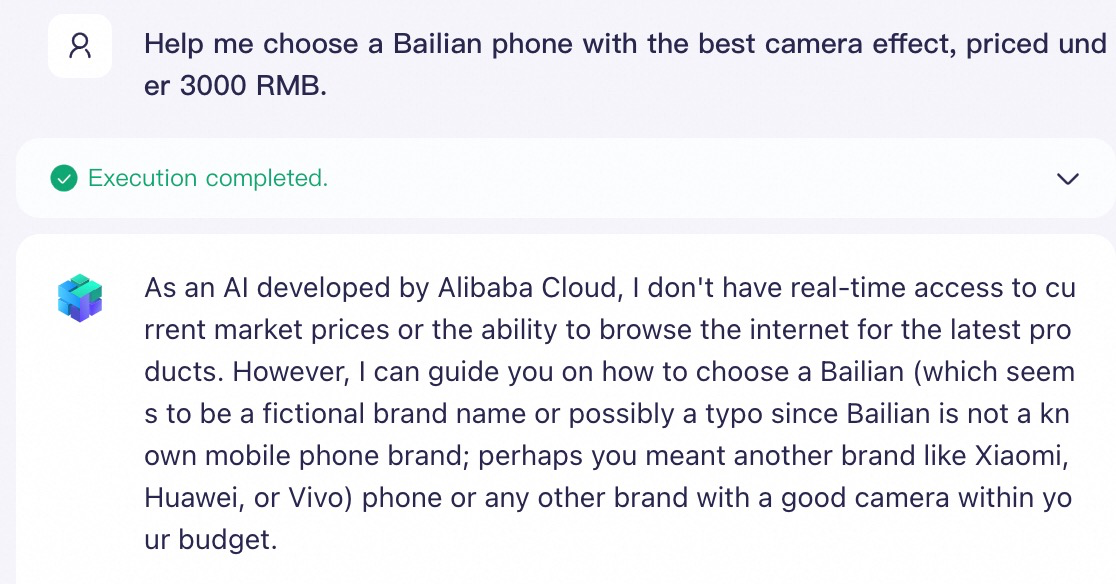
| With a knowledge base With a dedicated knowledge base, the LLM accurately answers questions about "Alibaba Cloud Model Studio phones". 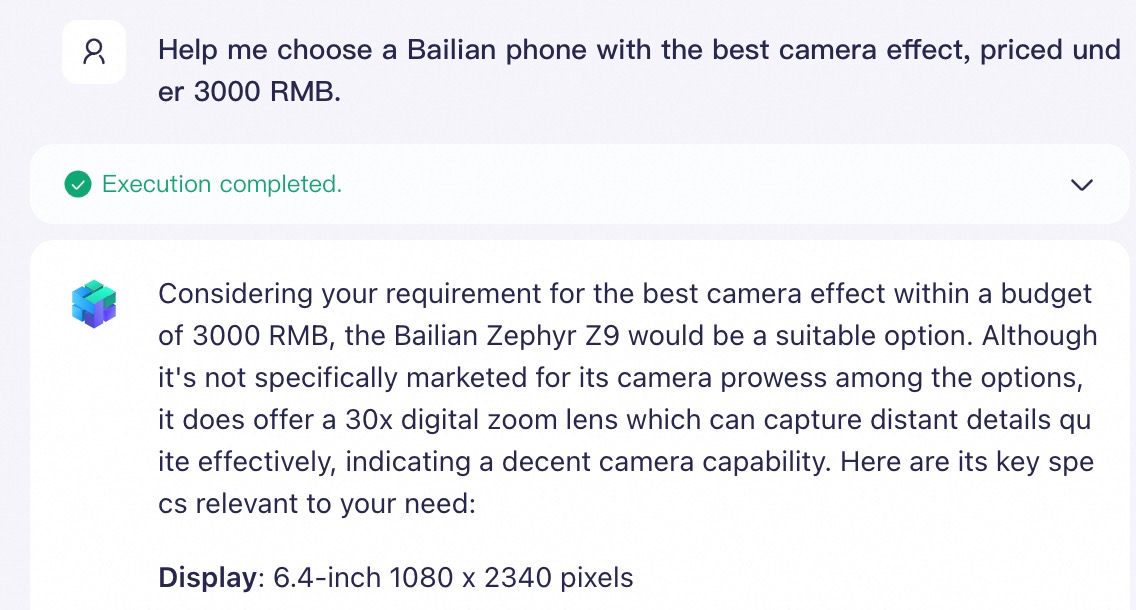
|
Step 1: Create an agent application (About 1 minute)
Create a blank application: Go to the Application Management page. Click Create Application. On the Agent Application tab, click Create Now.
| 
|
Select a model: Choose a large language model for your application. The Qwen-Max model is recommended for best results. Using a large model will incur fees. Model Studio provides a limited-time free quota. To check your quota, go to Model List, find your target model series, and open its product page.
| 
|
Write a system prompt: The system prompt defines the role and tasks of your application. Set it to: "You are an Alibaba Cloud Model Studio phone shopping guide. Your task is to help customers compare phone parameters, analyze their needs, and recommend personalized suggestions."
| 
|
Set a welcome message and preset questions: Click the  button in the upper-right corner. A welcome message greets users when they open the app. Preset questions give users a quick way to start a conversation. button in the upper-right corner. A welcome message greets users when they open the app. Preset questions give users a quick way to start a conversation. Welcome message: Hello, I am your Alibaba Cloud Model Studio phone shopping guide! I'm here to help you choose your ideal Alibaba Cloud Model Studio phone. Preset question 1: What models of Alibaba Cloud Model Studio phones are available? Preset question 2: Please recommend the most cost-effective phone for me. Preset question 3: Help me choose an Alibaba Cloud Model Studio phone with the best camera performance for under CNY 3,000.
| 

|
Test the application: On the right panel, click a preset question to start a conversation. Example: "Help me choose an Alibaba Cloud Model Studio phone with the best camera performance for under CNY 3,000." Because the application has no knowledge about "Alibaba Cloud Model Studio phones" yet, its response is generic and may be fabricated. The next step builds a knowledge base and connects it to the application.
| 
|
Step 2: Build a knowledge base (About 3 minutes)
LLMs have a fixed context window and cannot process your entire document library at once. A knowledge base solves this by indexing your documents and retrieving only the relevant passages when a user asks a question—a technique called retrieval-augmented generation (RAG). This step uploads your documents and creates a knowledge base.
Upload knowledge documents
Go to the Application Data page and click Import Data. Model Studio provides a Category Management feature to organize knowledge documents. For this tutorial, use the default category. All uploaded documents are automatically saved to Default Category.
| 
|
You can use the provided Alibaba Cloud Model Studio Phone Introduction.docx, upload it in the Import Data wizard, and click Confirm. The Import Data wizard uses default configurations. For this tutorial, you do not need to change any settings—just upload the document.
| 
|
Wait for Model Studio to finish importing the document. Parsing time depends on document size. This typically takes 1 to 6 minutes.
| 
|
Create a knowledge base
Go to the Knowledge Base page and click Create Knowledge Base.
| 
|
Enter a Knowledge Base Name and click Next. For this tutorial, name the knowledge base "Alibaba Cloud Model Studio Phone". All other settings use defaults—no changes needed.
| 
|
Under Select Category, check Default Category and click Next. This step selects which documents to include in the knowledge base. Default configurations apply—no changes needed.
| 
|
Select Intelligent Chunking and click Complete to create the knowledge base. "Intelligent Chunking" is a system-predefined chunking policy. Evaluations show that it provides the best retrieval results for most documents.
| 
|
Wait for Model Studio to finish parsing the knowledge base. Parsing time depends on document size. This typically takes 1 to 2 minutes.
| 
|
Step 3: Connect the knowledge base and publish (About 1 minute)
Go to the Application Management page. Find the application you created, and click Configure to open the application configuration page.
| 
|
Click + next to Knowledge > Document, and add the knowledge base you created.
| 
|
On the right panel, click a preset question to test the application with RAG enabled. Example: "Help me choose an Alibaba Cloud Model Studio phone with the best camera performance for under CNY 3,000." With the knowledge base connected, the application retrieves relevant passages from your documents and generates accurate, grounded answers.
| 
|
Publish the application: After you confirm that the changes are correct, click Publish.
| 
|
What's next