Some models supported by Token Plan (qwen3.8-max, qwen3.7-plus, etc.) natively support visual understanding and can process image inputs directly. For text-only models such as glm-5.2 and deepseek-v4-pro, you can add visual capabilities by configuring a local Skill.
NoteRunning the image understanding Skill consumes Token Plan Credits. No additional charges apply.
Prerequisites
- You have subscribed to Token Plan (Personal or Team).
- You have completed the integration configuration in an AI tool and can chat normally. For details, see Clients and Developer Tools.
Vision support
For whether each model supports visual understanding, see the supported model tables in Token Plan Personal Edition overview and Token Plan Team Edition overview.
Method 1: Use a vision model directly (recommended)
qwen3.7-plus and other models have visual understanding capabilities. If you frequently need to process images, switching to one of these models is the simplest and recommended approach.
Tool | How to switch models |
|---|---|
Claude Code |
|
OpenCode |
|
Qwen Code |
|
For more information about switching models in other coding tools, see Clients and Developer Tools. After switching, you can reference image paths directly in your conversation, or drag-and-drop/paste images.
Method 2: Add visual capabilities via Skill or Agent
If you need to use text-only models such as glm-5.2 or deepseek-v4-pro for image processing, you can configure a Skill or Agent to enable visual capabilities.
Claude Code
-
Add the Skill
Create an
.claudefolder in your project directory, then create anskills/image-analyzerdirectory inside it:
mkdir -p .claude/skills/image-analyzer
Create a SKILL.md file in that directory with the following content:
---
name: image-analyzer
description: Helps models without vision capabilities understand images. Use this skill when you need to analyze image content, extract information, text, or UI elements from images, or understand screenshots, charts, architecture diagrams, or any visual content. Simply pass in the image path to get a description.
model: qwen3.7-plus
---
qwen3.7-plus has visual understanding capabilities. Use qwen3.7-plus directly for image understanding.
The resulting directory structure is as follows:
.claude/
└── skills/
    └── image-analyzer/
        └── SKILL.md
-
Get started
-
Run
claudein your project directory to start Claude Code, then run/model deepseek-v4-proto switch to thedeepseek-v4-promodel. -
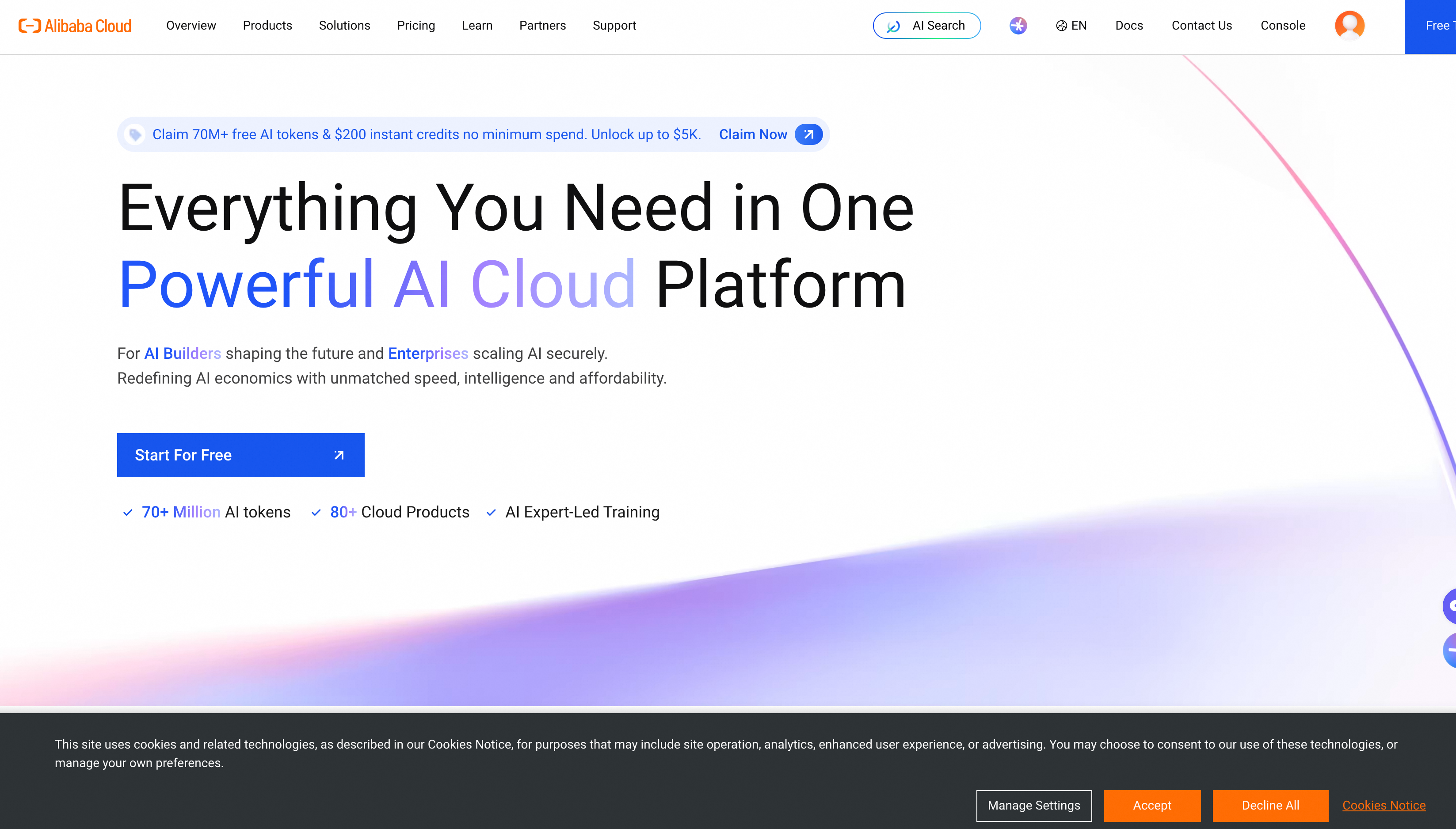
Download alibabacloud.png to your project directory, then ask:
Load image-analyzer skill and describe the information displayed at the alibabacloud.png banner location.You will receive a response similar to the following:The alibabacloud.png is a screenshot of the Alibaba Cloud homepage. The banner area title is Coding Plan now supports Qwen3.5, and the text introduces that Alibaba Cloud Model Studio supports models such as Qwen3.5, Kimi-k2.5, and GLM-4.7, with new customers getting the first month for only 7.9 yuan. The page provides Subscribe now and Online consultation entry points.
-
OpenCode
-
Add the Agent
Create an
.opencodefolder in your project directory, then create anagentsdirectory inside it:
mkdir -p .opencode/agents
Create an image-analyzer.md file in that directory with the following content:
NoteThe model field must use the provider and model name defined in the OpenCode configuration file. Refer to the configuration example in the OpenCode documentation. It should be bailian-token-plan/qwen3.7-plus.
---
description: Analyzes images using a vision-capable model. Use this agent when the user needs to understand image content, extract information from screenshots, diagrams, UI mockups, or any visual content. Invoke with @image-analyzer followed by the image path and your question.
mode: subagent
model: bailian-token-plan/qwen3.7-plus
tools:
  write: false
  edit: false
---
You have vision capabilities. Analyze the provided image and return a clear, structured description focused on what the user is asking about.
The resulting directory structure is as follows:
.opencode/
└── agents/
    └── image-analyzer.md
-
Get started
- Run
opencodein your project directory to start OpenCode, then switch to thedeepseek-v4-promodel. - Download alibabacloud.png to your project directory, invoke
@``image-analyzerand ask:@image-analyzer describe the information displayed at the alibabacloud.png banner location.You will receive a response similar to the following:
- Run
The banner area contains:
Left side:
- Hamburger menu icon
- Alibaba Cloud orange logo and text
- Navigation menu: Large Models, Products, Solutions, Benefits, Pricing, Marketplace, Partners, Services, About Alibaba Cloud
Right side:
- Search box (displaying "Large Models")
- Icons: blue circle, globe, headset
- Links: Documentation, ICP Filing, Console
Build · deepseek-v4-pro · 37.0s
FAQ
Why can't OpenCode + a vision model understand images?
Cause: OpenCode does not enable a model's vision capabilities by default. You must explicitly declare the modalities parameter in the configuration file.
Solution: Add a modalities field to the model definition in your OpenCode configuration file, and set input to ["text", "image"], as shown below:
Replace sk-sp-xxx with your Token Plan API Key.
{
  "$schema": "https://opencode.ai/config.json",
  "provider": {
    "bailian-token-plan": {
      "npm": "@ai-sdk/anthropic",
      "name": "Model Studio Token Plan",
      "options": {
        "baseURL": "https://token-plan.ap-southeast-1.maas.aliyuncs.com/compatible-mode/v1",
        "apiKey": "sk-sp-xxx"
      },
      "models": {
        "qwen3.6-plus": {
          "name": "Qwen3.6 Plus",
          "modalities": {
            "input": [
              "text",
              "image"
            ],
            "output": [
              "text"
            ]
          },
          "options": {
            "thinking": {
              "type": "enabled",
              "budgetTokens": 1024
            }
          }
        },
        "qwen3.8-flash": {
          "name": "Qwen3.8 Flash",
          "modalities": {
            "input": [
              "text",
              "image"
            ],
            "output": [
              "text"
            ]
          },
          "options": {
            "thinking": {
              "type": "enabled",
              "budgetTokens": 1024
            }
          }
        },
        "kimi-k2.5": {
          "name": "Kimi K2.5",
          "modalities": {
            "input": [
              "text",
              "image"
            ],
            "output": [
              "text"
            ]
          },
          "options": {
            "thinking": {
              "type": "enabled",
              "budgetTokens": 1024
            }
          }
        }
      }
    }
  }
}
Why can't OpenClaw + a vision model understand images?
Cause: OpenClaw requires the input field in the configuration file to determine whether a model supports vision capabilities.
Solution:
- In the
~/.openclaw/openclaw.jsonconfiguration file, ensure the model definition includes the"input": ["text", "image"]field.
{
  "models": {
    "mode": "merge",
    "providers": {
      "bailian": {
        "baseUrl": "https://token-plan.ap-southeast-1.maas.aliyuncs.com/compatible-mode/v1",
        "apiKey": "YOUR_API_KEY",
        "api": "openai-completions",
        "models": [
          {
            "id": "qwen3.6-plus",
            "name": "qwen3.6-plus",
            "reasoning": false,
            "input": ["text", "image"],
            "cost": { "input": 0, "output": 0, "cacheRead": 0, "cacheWrite": 0 },
            "contextWindow": 1000000,
            "maxTokens": 65536
          },
          {
            "id": "qwen3.8-flash",
            "name": "qwen3.8-flash",
            "reasoning": false,
            "input": ["text", "image"],
            "cost": { "input": 0, "output": 0, "cacheRead": 0, "cacheWrite": 0 },
            "contextWindow": 1000000,
            "maxTokens": 65536
          },
          {
            "id": "kimi-k2.5",
            "name": "kimi-k2.5",
            "reasoning": false,
            "input": ["text", "image"],
            "cost": { "input": 0, "output": 0, "cacheRead": 0, "cacheWrite": 0 },
            "contextWindow": 262144,
            "maxTokens": 32768
          }
        ]
      }
    }
  },
  "agents": {
    "defaults": {
      "model": {
        "primary": "bailian/qwen3.6-plus"
      },
      "models": {
        "bailian/qwen3.6-plus": {},
        "bailian/qwen3.8-flash": {},
        "bailian/kimi-k2.5": {}
      }
    }
  },
  "gateway": {
    "mode": "local"
  }
}
- After modifying the configuration, you must clear the OpenClaw model cache and restart. Otherwise, the old configuration will remain in effect.
rm ~/.openclaw/agents/main/agent/models.json
openclaw gateway restart