What should I do if a call fails?
For more information, see Troubleshoot gateway exceptions.
What do the API error codes mean?
For more information, see Gateway result codes.
What should I do if there is a conflict between okhttp, okio, and mPaaS?
To resolve this conflict, complete the following two steps.
Comment out the mPaaS wire component.
mpaascomponents{
   excludeDependencies=['com.alipay.android.phone.thirdparty:wire-build']
}
Use the wire component from the public network.
implementation 'com.squareup.wire:wire-lite-runtime:1.5.3.4@jar'
How do I put parameters in the POST body when sending a POST request to the backend through a JavaScript API call to an MGS RPC interface?
After you correctly configure the POST body and its data model in MGS, place the POST body content in the requestData parameter as the value for _requestBody when you send the request through a JavaScript API. See the following example.
window.onload = function() {
     ready(function() {
       window.AlipayJSBridge.call('rpc', {
         operationType: 'MYAPI',
         requestData: [
         {"_requestBody":"{\"key1\":\"value1\",\"key2\":\"value2\"}"}],
         headers:{},
         getResponse: true
       }, function(data) {
         alert(JSON.stringify(data));
       });
     });
   }
What is the signature verification flow for offline packages?
To ensure the security of offline packages, developers can enable the signature verification feature for them. This process ensures the integrity of the offline package content and the authenticity of its source.
First, configure the private and public keys. The private key is configured on the server-side to sign the offline package, and the public key is configured on the client to verify the signature.
Download the amr file from the real-time release page in the mPaaS console. If a private signature key is configured, the downloaded amr file contains signature information. This signature information is the ciphertext generated by encrypting the hash value of the offline package with the private key.
After the client receives and decompresses the amr package, it uses the public key preset in the project to verify the signature. The client decrypts the ciphertext from Step 2 to obtain a hash value. At the same time, it calculates the hash value of the offline package locally. It then compares the two hash values. If they are identical, the verification is successful.
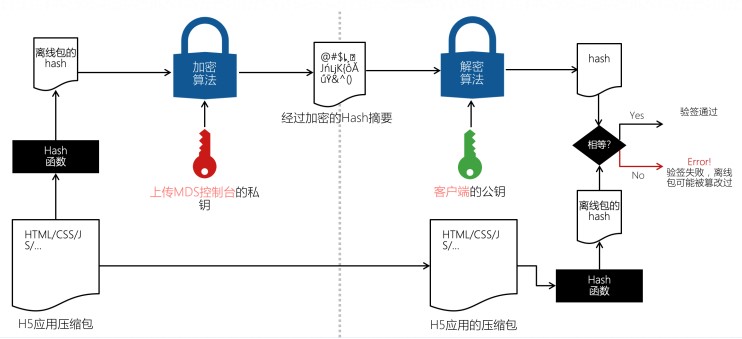
Although the signature verification process for offline packages can prevent them from being tampered with during transmission and loading, this mechanism cannot completely stop malicious cracking and tampering of H5 logic on the client. This is because users have full control of the client. Therefore, developers must be aware of various potential security risks on the frontend. For example, access control must be verified on the backend. Behaviors such as flash sales and panic buying require backend cooperation for timestamp verification.
What is Mobile Gateway Service and what does it do?
Mobile Gateway Service RPC is a component of Mobile PaaS (mPaaS) that connects mobile clients to servers. This component simplifies data and communication protocols between the client and the server, which significantly improves development and network communication efficiency. Mobile Gateway Service acts as a bridge between mobile clients and servers. Mobile clients access backend service interfaces through the gateway. For more information, see Introduction to Mobile Gateway Service.
Using Mobile Gateway Service, you can:
Encapsulate the communication between the client and the server using a dynamic agent.
If the server and the client define a consistent interface, the server can automatically generate and export code for the client to use.
Perform unified exception handling for RpcException, such as displaying dialog boxes or toast messages.
Mobile Gateway Service provides a server-side HTTP service signature verification feature to improve data security from the gateway to the server.
After you enable signature verification for an API group in the gateway console, Mobile Gateway Service creates signature information for each API request in that group. The public and private keys used for signing can be created in the gateway console.
After the server reads the signature string, it performs a local signing calculation on the received request. It then checks if the calculated signature matches the received signature to determine if the request is legitimate.
Verify the signature of requests from the client to Mobile Gateway Service to authenticate the caller's identity and ensure security. Gateway verification is enabled by default. To disable it, change the setting in the configuration file.
What is the gateway signature verification flow?
To prevent client requests from being tampered with or forged, RPC requests have a signature mechanism. The RPC module automatically adds signatures. The basic process for adding and verifying signatures is as follows:
Convert the content in the requestBody to a string.
Use the Security Guard module to add a signature to the converted string. The signature is added using the encryption key stored in the encrypted image (the Security Guard image).
Place the encrypted signature in the request and send it to the gateway.
The gateway signs the request in the same way and verifies that the two signatures are identical.
What are the similarities and differences between offline package signature verification and gateway signature verification?
Similarities:
The purpose of both offline package signature verification and gateway signature verification is to ensure client security and protect content from being tampered with.
Both offline package signature verification and gateway signature verification are forms of data validation.
Differences:
The validation outputs are different:
Offline signature verification checks if the offline package was modified after download and before decompression.
Gateway signature verification checks if the requestBody was modified.
The signing methods are different:
For offline package signature verification, signing is performed by configuring public and private keys in the backend.
For gateway signature verification, the signature is obtained through Security Guard.
The results of a failed verification are different:
A failed offline package signature verification does not invalidate the H5 page. The page data can still be loaded from the network, and normal use is not affected.
A failed gateway signature verification can cause backend validation of requested data to fail or decryption of data on the frontend to fail. In these cases, the app's page data cannot be displayed correctly, which affects normal use.
During gateway signature verification, the client initiates an RPC call through code but does not get the expected result. What do the error codes in the console mean?
Error code | Description | Cause |
7000 | No public key is set | The Security Guard of the mobile app does not have a key corresponding to the appId, or the gateway cannot obtain the signature key for the appId. |
7001 | Insufficient parameters for signature verification | Signature verification on the gateway server-side failed. |
7002 | Signature verification failed | Signature verification on the gateway server-side failed. |
7003 | Signature timeliness verification failed | The ts timestamp in the API request parameter has expired based on the system's time validity setting. Check if the client time is synchronized with the system time. |
7007 | Missing ts parameter for signature verification | The API request is missing the ts parameter for signature verification. |
7014 | Missing sign parameter for signature verification | The API request is missing the sign parameter for signature verification. This usually occurs when the client fails to sign the data, resulting in a missing sign parameter. Check if the client's Security Guard image is correct. |
For more information, see Troubleshoot Mobile Gateway Service call errors.
With an internet connection, my offline package application opens correctly, but without a connection, it fails to open. How can I troubleshoot this?
For more information, see Troubleshoot Mobile Gateway Service call errors.
My H5 application loads slowly during offline package signature verification. How can I troubleshoot this?
For more information, see Troubleshoot Mobile Gateway Service call errors.