The mPaaS component-based framework uses OSGi to split an Android app into independent Bundle projects and one Portal project that merges them into a runnable APK.
-
If you use baseline 10.2.3 or later, use the native AAR method.
-
The component-based connection type (Portal & Bundle) requires Android Studio Flamingo (2022.2.1) or an earlier version.
The component-based framework uses OSGi technology to divide an app into one or more business-independent Bundle projects and one Portal project. mPaaS manages the lifecycle and dependencies of each Bundle, and the Portal merges all Bundle packages into a runnable .apk package.
This framework suits team-based app development. It provides component initialization and instrumentation for easy mPaaS integration.
Bundle projects
A traditional native project has a main module and optional sub-modules. An mPaaS Bundle project typically has a main module named app and several sub-modules.
For example, in Alipay, a Bundle has a main module named app and three sub-modules:
-
api: Contains only interface definitions.
-
biz: Contains implementations of the interfaces.
-
ui: Contains activities, custom views, and other UI-related components.
A Bundle must have at least one sub-module named api. Without it, the Bundle cannot generate an interface package, and other Bundles cannot depend on it.
Bundle projects cover the following aspects:
Differences between Bundle and traditional projects
A Bundle is essentially a native project. The key difference is that the mPaaS Apply plugin is added to the build.gradle files of the project, main module, and sub-modules:
-
The
build.gradlefile in the project root directory -
The
build.gradlefile of the main module -
The
build.gradlefile of a sub-module
build.gradle in the project root directory
Add a dependency on the mPaaS plugin in the root build.gradle file:
The plugin version may change with new iterations.
classpath 'com.alipay.android:android-gradle-plugin:3.0.0.9.13'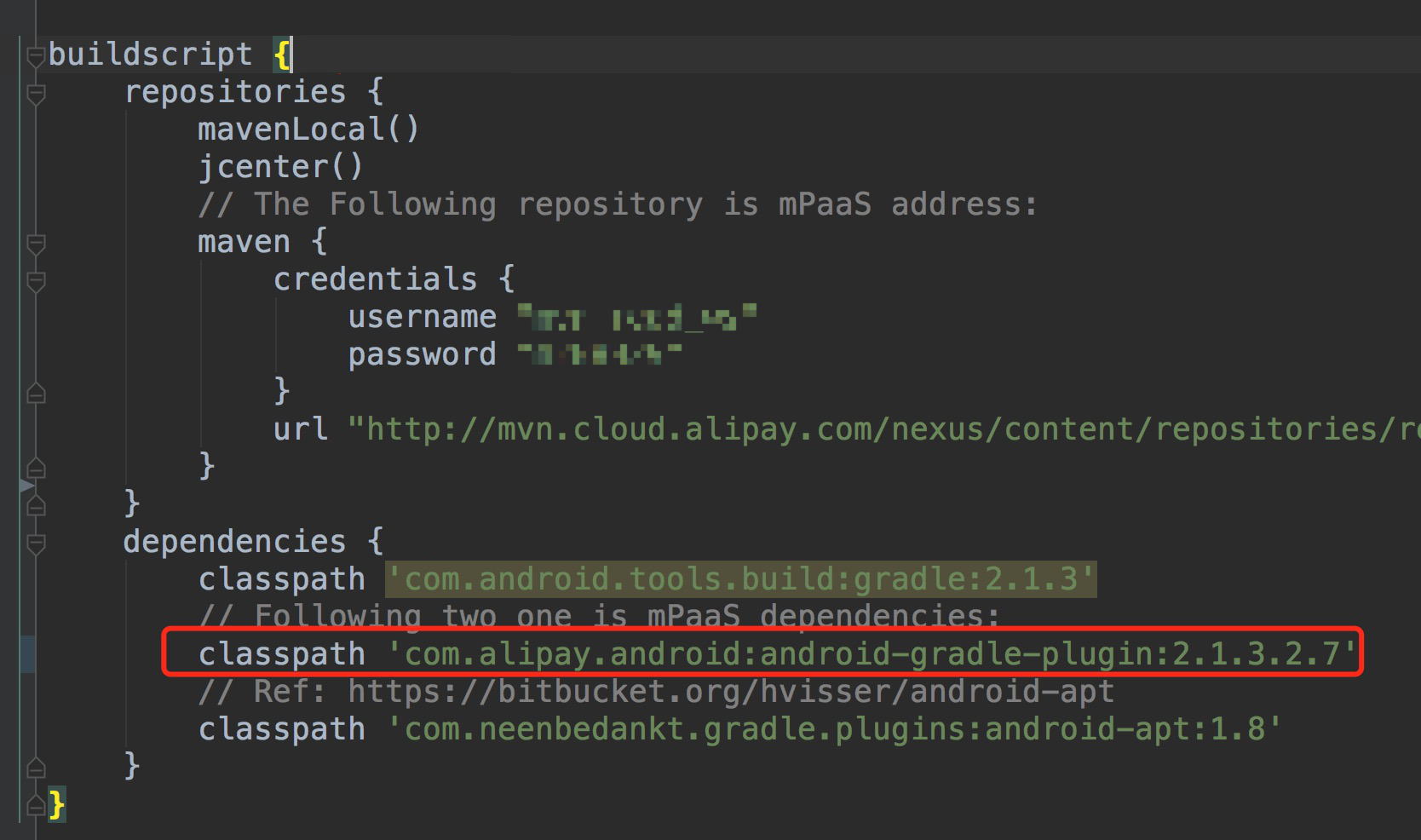
build.gradle of the main module
Declare the mPaaS Bundle Apply plugin in the main module's build.gradle file to mark the project as a Bundle:
apply plugin: 'com.alipay.bundle'The main module's build.gradle file also includes the following configuration: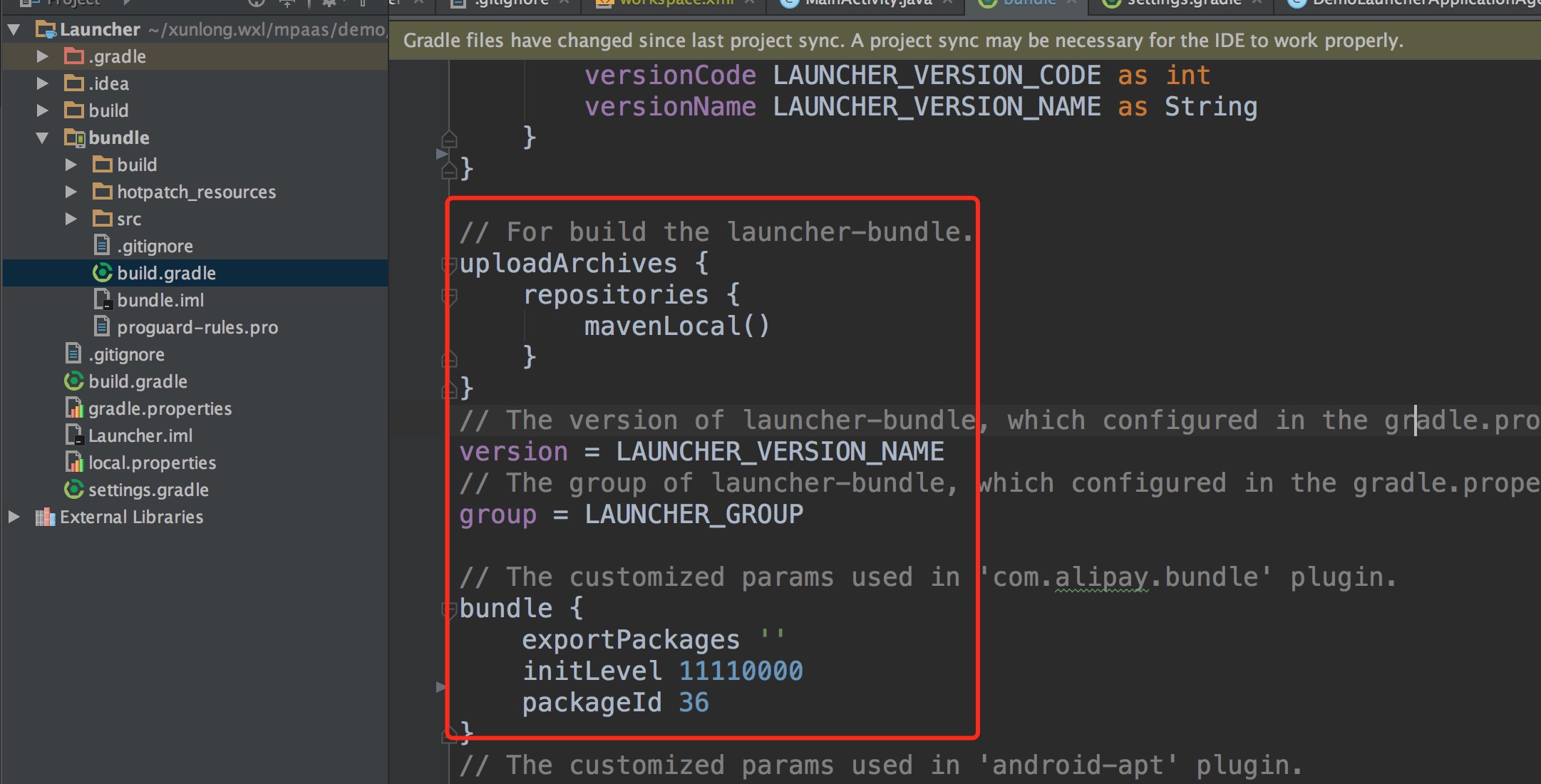
Parameters:
-
version: The Bundle version. -
group: The Bundle group ID. -
exportPackages: The package names containing all classes of this Bundle. You can specify a parent package name. For non-statically-linked Bundles,exportPackagesis required — otherwise, classes may fail to load. For example, if all code is undercom.alipay.demoandcom.alipay.bundle, specifycom.alipayinexportPackages, or specify bothcom.alipay.demoandcom.alipay.bundle. Avoid overly generic or overly specific package names. -
initLevel: The Bundle loading priority at startup. Range: 0–100 (lower = earlier). A value of11110000enables lazy loading (loaded on demand). -
packageId: The resource ID for aapt packaging. Must be unique per Bundle in a multi-Bundle architecture. The packageIds used by mPaaS are:
|
Bundle |
packageId |
|
com.alipay.android.phone.thirdparty:androidsupportrecyclerview-build |
28 |
|
com.alipay.android.phone.mobilesdk:framework-build |
30 |
|
com.alipay.android.phone.rome:pushservice-build |
35 |
|
com.alipay.android.phone.sync:syncservice-build |
38 |
|
com.alipay.android.phone.wallet:nebulabiz-build |
41 |
|
com.alipay.android.phone.mobilecommon:share-build |
42 |
|
com.alipay.android.phone.wallet:nebulacore-build |
66 |
|
com.alipay.android.mpaas:scan-build |
72 |
|
com.alipay.android.phone.wallet:nebula-build |
76 |
|
com.alipay.android.phone.securitycommon:aliupgrade-build |
77 |
The following mPaaS dependencies are added in dependencies:
dependencies {
    compile project(":api")
    apt 'com.alipay.android.tools:androidannotations:2.7.1@jar'
    //mPaaS dependencies
    provided 'com.alipay.android.phone.thirdparty:fastjson-api:1.1.73@jar'
    provided 'com.alipay.android.phone.thirdparty:androidsupport-api:13.23@jar'
}
build.gradle of a sub-module
Declare the mPaaS Apply plugin in the sub-module's build.gradle file to mark it as a Bundle sub-module. This creates the Bundle's interface package.
apply plugin: 'com.alipay.library'mPaaS dependencies in dependencies:
dependencies {
    apt 'com.alipay.android.tools:androidannotations:2.7.1@jar'
    //mPaaS dependencies
    provided "com.alipay.android.phone.thirdparty:utdid-api:1.0.3@jar"
    provided "com.alipay.android.phone.mobilesdk:framework-api:2.1.1@jar"
}
Bundle properties
Bundle properties in this framework are based on OSGi Bundles but simplified.
The following table lists the Bundle properties.
|
Property |
Description |
|
Bundle-Name |
Derived from the |
|
Bundle-Version |
From the |
|
Init-Level |
From the |
|
Package-Id |
From the properties in |
|
Contains-Dex |
Whether the Bundle contains a DEX file. Determined automatically by the compile plugin. |
|
Contains-Res |
Whether the Bundle contains resources. Determined automatically by the compile plugin. |
|
Native-Library |
The |
|
Component-Name |
From the |
|
exportPackages |
The package names containing all classes of this Bundle. Defined in the main module's |
Bundle interface packages
A Bundle can contain multiple sub-modules (biz, api, ui). When compiled, each sub-module generates an interface package in .jar format. Other Bundles can use the api interface package.
Compilation also generates a Bundle project package containing all sub-modules. The Portal uses this project package to build the final .apk.
-
A Bundle sub-module's interface package contains only Java or Kotlin interface classes — no other resources (such as res directory content). Only sub-modules named api generate these interface packages.
-
Bundles depend on each other through interface packages. Configure the dependency in the
dependencysection of the Bundle'sbuild.gradlefile. For example, if Bundle A depends on thebapisub-module in Bundle B, add thebapidependency in thedependencysection of the corresponding sub-module'sbuild.gradle:provided "com.alipay.android.phone:bundleB:1.0.1:bapi@jar" -
The
groupId:artifactid:version:classifierin the dependency corresponds to the group, name, version, and sub-module name declared in the Bundle. -
By default, the Bundle name is the main module's folder name. You can change it in
settings.gradle. In this example, app is the main module's project name:include ':api', ':xxxx-build' project(':xxxx-build').projectDir = new File('app')
Bundle project packages
-
The
.jarpackage from the entire Bundle project is actually an.apk-format file with a.jarextension (for example,framework-build.jar). -
To depend on a Bundle in a Portal, declare the dependency in the
dependencysection of the Portal's main modulebuild.gradle:dependencies { bundle "com.alipay.android.phone.mobilesdk:framework-build:version@jar" manifest "com.alipay.android.phone.mobilesdk:framework-build:version:AndroidManifest@xml" } -
Bundle packages come in debug and release types. To depend on a debug package, append
:rawto the dependency.-
When the Portal depends on the Bundle's debug package:
bundle "com.alipay.android.phone.mobilesdk:framework-build:version:raw@jar" -
When the Portal depends on the Bundle's release package:
bundle "com.alipay.android.phone.mobilesdk:framework-build:version@jar"
-
-
When packaging a Portal, determine:
-
Which Bundles to package into the main DEX. Statically linked Bundles containing a
ContentProvidermust be included. -
Which Bundles to load dynamically. For small apps, package all Bundles in the main DEX.
-
-
To package a Bundle's code into the main DEX, add it to the Portal's
slinksfile in the formatgroupId-artifactId. If the artifactId ends with-build, remove the suffix. For example, for groupIdcom.mpaas.groupand artifactIdtestBundle-build, addcom.mpaas.group-testBundletoslinks. -
Static linking packages the Bundle's code into the
APK'sclasses.dex,classes1.dex,classes2.dex, and other DEX files, enabling classes to load at startup.
Portal projects
A Portal project merges all Bundle packages into a runnable .apk.
Differences between Portal and traditional projects
A Portal differs from a traditional project in the build.gradle file:
-
build.gradlein the project root directory -
build.gradlein the main module directory
build.gradle in the project root directory
The com.alipay.android:android-gradle-plugin:2.1.3.2.7 plugin is added to the classpath:
The plugin version may change with new iterations.
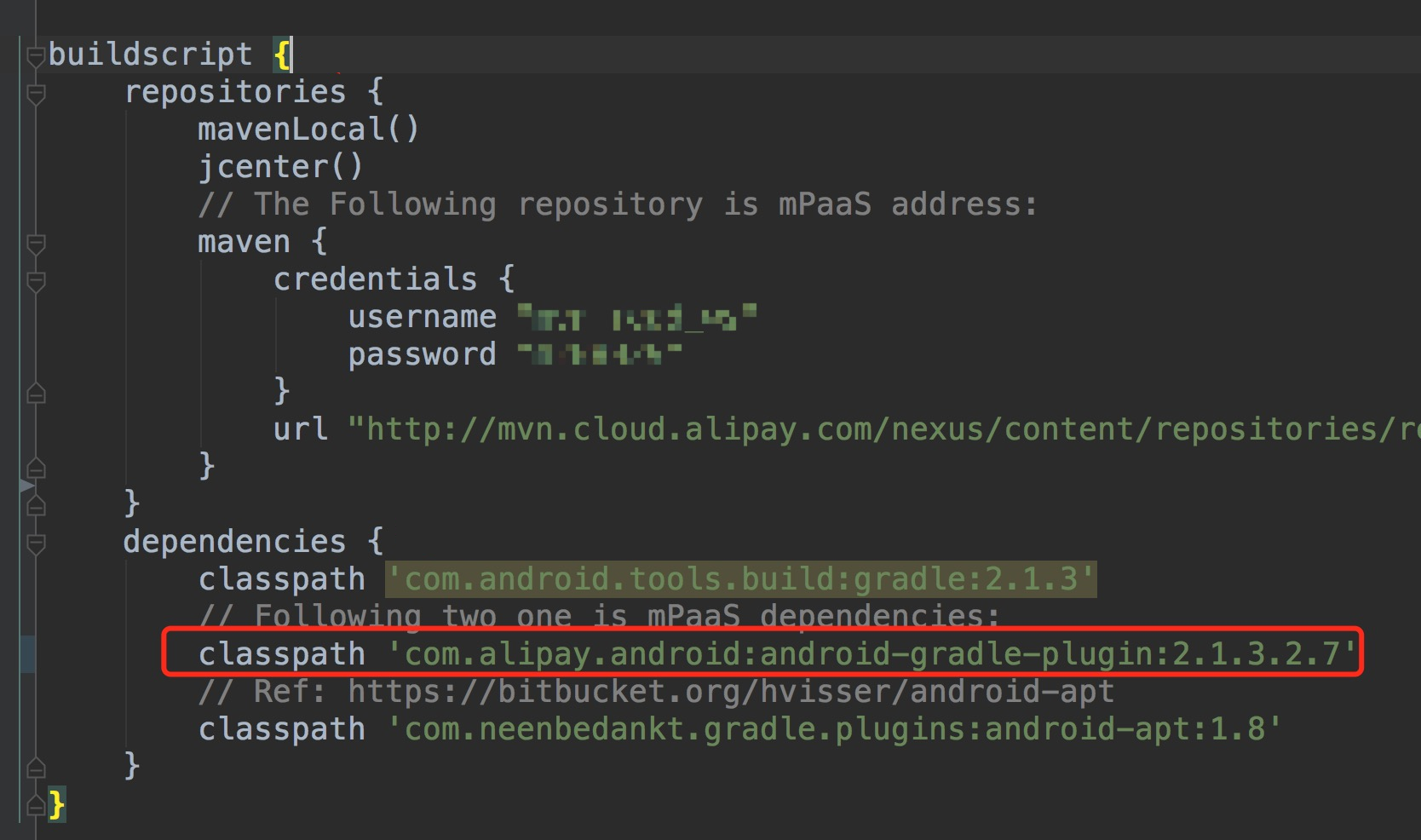
This plugin includes the Portal plugin, which merges Bundles during packaging.
-
Merged
.jarbundle -
Merging the bundle's
AndroidManifest
build.gradle in the main module directory
Declare the mPaaS Apply Portal plugin to mark the project as a Portal:
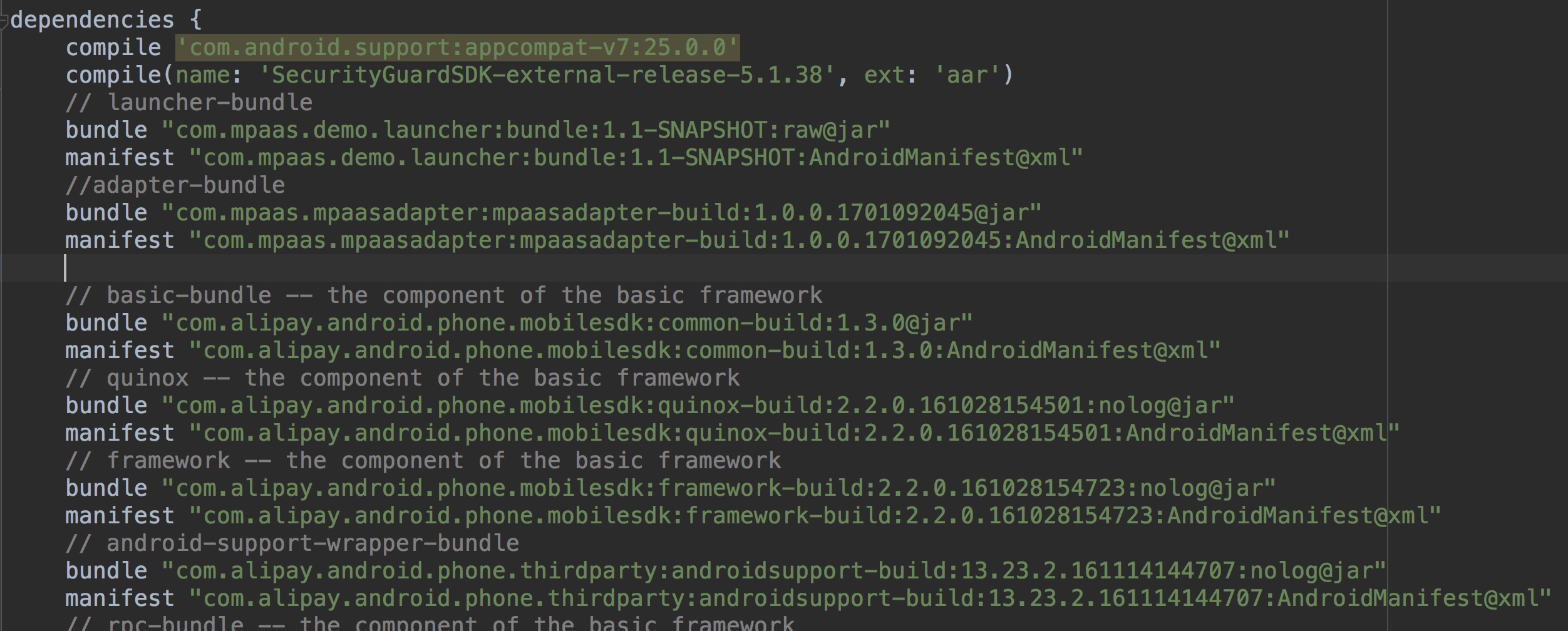
apply plugin: 'com.alipay.portal'Add the Bundle dependencies to the dependencies block. The statements in dependencies declare the bundles and manifests that the Portal depends on:
-
Typically, you do not write code in a Portal.
-
The following Bundle resources must be placed in the Portal. Otherwise, they cannot be found during compilation or at runtime:
-
Resources used in
AndroidManifest.xml. -
Resources passed to NotificationManager.
-
Resources used through the
getResources().getIdentifier()method. -
If a third-party
AARpackage contains any of these resource types, decompress theAARand copy the resources to the Portal.
-
Project dependencies
An mPaaS-based app includes one Portal and one or more Bundles. Each app can have only one Portal but multiple Bundles.
The mPaaS plugin merges all Bundle packages in the Portal into a runnable .apk. After merging, the plugin deploys the Bundle to a repository. The repository address is defined in the Bundle's main module build.gradle:
uploadArchives {
    repositories {
        mavenLocal()
    }
}
By default, this uploads to the local ~/.m2 repository. You can add a custom repository address:
mavenDeployer {
    mavenLocal()
    repository(url: "${repository_url}") {
        authentication(userName: 'userName', password: 'userName_pwd')
    }
    snapshotRepository(url: "${repository_url}") {
        authentication(userName: 'userName', password: 'userName_pwd')
    }
}
After uploading, the Bundle is available in the format groupid:artifactid:version:classifier@type. Declare dependencies in the dependency section of the Portal's main module build.gradle:
dependencies {
    bundle 'com.alipay.android.phone.mobilesdk:quinox-build:2.2.1.161221190158:nolog@jar'
    manifest 'com.alipay.android.phone.mobilesdk:quinox-build:2.2.1.161221190158:AndroidManifest@xml'
}
For dependencies between Bundles, declare the repository address in the dependent Bundle's root build.gradle.
The username and password below are not your console logon credentials. To obtain these values, join the DingTalk group 145930007362.
-
mavenLocal(): The local repository for dependencies. -
maven{}: The remote repository for dependencies.
allprojects {
    repositories {
        mavenLocal()
        mavenCentral()
        maven {
            credentials {
                username "{username}"
                password "{password}"
            }
            url "http://mvn.cloud.alipay.com/nexus/content/repositories/releases/"
        }
    }
}
Bundle compilation and packaging results
Compiling and packaging a Bundle with the mPaaS plugin generates a project package (.jar). For more information, see Bundle project packages and Bundle interface packages.
The project package is published to the repository in groupid:artifactid:version:classifier@type format. The repository address is defined in the Bundle's main module build.gradle:
uploadArchives {
    repositories {
        mavenLocal()
    }
}
This uses the local Maven repository (mavenLocal, default: ~/.m2). To change the address or add a repository, see Configure a publishing repository.
Add Bundle dependencies
You can add a Bundle dependency from within a Portal or from another Bundle:
-
Declare the dependency repository in the root
build.gradleof the Portal or Bundle. The dependency repository must match the Bundle's publishing repository. Configure a dependency repository. -
Declare
dependenciesin the main module'sbuild.gradle. The following example adds a dependency on thequinoxBundle:
dependencies {
    bundle 'com.alipay.android.phone.mobilesdk:quinox-build:2.2.1.161221190158:nolog@jar'
    manifest 'com.alipay.android.phone.mobilesdk:quinox-build:2.2.1.161221190158:AndroidManifest@xml'
}